
The Oracle Forms client, whether in a browser, Java Web Start, or the Forms Standalone Launcher, is a Java program that draws the items the server describes. Each kind of item is a Java class: a text item is oracle.forms.ui.VTextField, and a button is VButton. That means you can add Java classes of your own.
This guide covers the three ways to extend the Oracle Forms 14.1.2 client with Java: a Java bean in a bean area, a pluggable Java component that changes a standard item, and the FBEAN package for ordinary JavaBeans. It ends with how to build and deploy the JAR files.
Sample Form for This Guide
The examples and screenshots use the sample forms CH31_BEAN, CH31_PJC, and CH31_FBEAN from the Oracle Forms code repository on GitHub. Download them, open them in Forms Builder, and connect as CAREWELL to follow along.
| Form | File | What it shows |
|---|---|---|
| CH31_BEAN | forms/ch31/ch31_bean.fmb | A Java bean bar chart whose bars query a doctor's appointments |
| CH31_PJC | forms/ch31/ch31_pjc.fmb | A phone item with a pluggable Java component |
| CH31_FBEAN | forms/ch31/ch31_fbean.fmb | A Swing progress bar hosted with FBEAN |
The forms run against the CareWell Clinic sample schema, which you install first.
Three Ways to Use Java at a Glance
| Approach | What it is | Use it for |
|---|---|---|
| Java bean | A class extending VBean, shown in a bean area item. | Things Forms does not draw: a chart, a signature pad, a calendar. |
| Pluggable Java component (PJC) | A subclass of a standard item class, named in the item's Implementation Class. | Changing how a standard item behaves in the client. |
| FBEAN | A built-in package that hosts any JavaBean and calls its methods by name. | JavaBeans written for any Java program, with no Forms-specific code. |
Java code runs on the user's computer, like WebUtil's, and PL/SQL reaches it through properties and events. See how to use WebUtil in Oracle Forms for the other client-side toolkit. To connect a form to a web page in the user's browser instead, see how to connect a form to a web page using JavaScript.
Build a Java Bean
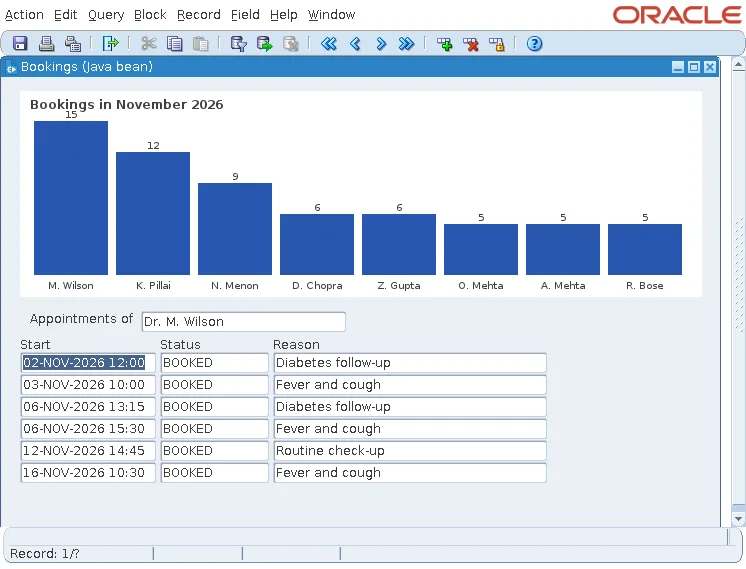
The sample bean form shows the bookings of the busiest doctors in November as a bar chart, and clicking a bar lists that doctor's appointments. The chart item of older releases is gone from Forms 14.1.2, as explained in how to create charts in Oracle Forms 14.1.2, but a bean area can hold any chart component written in Java.
The Java Class
A bean for Forms extends oracle.forms.ui.VBean, from frmall.jar, the client's own classes.
Java class cw/BarChart.java, in carewell_beans.jar:
package cw;

import java.awt.*;
import java.awt.event.MouseAdapter;
import java.awt.event.MouseEvent;
import oracle.forms.handler.IHandler;
import oracle.forms.properties.ID;
import oracle.forms.ui.CustomEvent;
import oracle.forms.ui.VBean;

/**
 * A bar chart for a bean area of Oracle Forms.
 *   set_custom_property(item, 1, 'TITLE', 'Bookings in November');
 *   set_custom_property(item, 1, 'DATA',  'Wilson=15;Pillai=12;Menon=9');
 * A click on a bar raises the event BAR_CLICKED, with the parameter BAR_LABEL.
 */
public class BarChart extends VBean {
  private static final ID TITLE       = ID.registerProperty("TITLE");
  private static final ID DATA        = ID.registerProperty("DATA");
  private static final ID BAR_CLICKED = ID.registerProperty("BAR_CLICKED");
  private static final ID BAR_LABEL   = ID.registerProperty("BAR_LABEL");
  private static final Color BAR = new Color(0x28, 0x56, 0xb0);

  private IHandler handler;
  private String title = "";
  private String[] labels = new String[0];
  private double[] values = new double[0];
  private Rectangle[] bars = new Rectangle[0];

  public BarChart() {
    addMouseListener(new MouseAdapter() {
      public void mouseClicked(MouseEvent e) {
        for (int i = 0; i < bars.length; i++) {
          if (bars[i] != null && bars[i].contains(e.getPoint())) {
            try {
              handler.setProperty(BAR_LABEL, labels[i]);   // the event's parameter
            } catch (Exception ignored) { }
            dispatchCustomEvent(new CustomEvent(handler, BAR_CLICKED));
          }
        }
      }
    });
  }

  public void init(IHandler h) {
    super.init(h);
    handler = h;
  }

  public boolean setProperty(ID id, Object value) {
    if (id == TITLE) {
      title = String.valueOf(value);
      repaint();
      return true;
    }
    if (id == DATA) {                                      // label=value;label=value
      String[] pairs = String.valueOf(value).split(";");
      labels = new String[pairs.length];
      values = new double[pairs.length];
      for (int i = 0; i < pairs.length; i++) {
        String[] lv = pairs[i].split("=");
        labels[i] = lv[0];
        values[i] = lv.length > 1 ? Double.parseDouble(lv[1]) : 0;
      }
      repaint();
      return true;
    }
    return super.setProperty(id, value);
  }

  public void paint(Graphics g0) {
    Graphics2D g = (Graphics2D) g0;
    g.setRenderingHint(RenderingHints.KEY_ANTIALIASING, RenderingHints.VALUE_ANTIALIAS_ON);
    int w = getWidth(), h = getHeight();
    g.setColor(Color.white);
    g.fillRect(0, 0, w, h);
    g.setColor(Color.darkGray);
    g.setFont(new Font("Dialog", Font.BOLD, 12));
    g.drawString(title, 10, 18);
    double max = 1;
    for (double v : values) max = Math.max(max, v);
    int n = values.length, left = 10, top = 30, bottom = h - 22;
    bars = new Rectangle[n];
    if (n == 0) return;
    int slot = (w - 2 * left) / n;
    g.setFont(new Font("Dialog", Font.PLAIN, 10));
    for (int i = 0; i < n; i++) {
      int bh = (int) ((bottom - top) * values[i] / max);
      bars[i] = new Rectangle(left + i * slot + 4, bottom - bh, slot - 8, bh);
      g.setColor(BAR);
      g.fill(bars[i]);
      g.setColor(Color.darkGray);
      FontMetrics fm = g.getFontMetrics();
      String v = String.valueOf((long) values[i]);
      g.drawString(v, bars[i].x + (bars[i].width - fm.stringWidth(v)) / 2, bars[i].y - 3);
      int lx = bars[i].x + (bars[i].width - fm.stringWidth(labels[i])) / 2;
      g.drawString(labels[i], lx, h - 8);
    }
  }
}
Three things connect it to Forms:
- Properties: ID.registerProperty("DATA") declares a property PL/SQL can set by that name. Forms calls setProperty with the ID and the value; the bean handles its own properties and passes the others to VBean.
- The handler: init receives the IHandler, the bean's link to the Forms client.
- Events: dispatchCustomEvent sends an event to the server, where it fires the item's WHEN-CUSTOM-ITEM-EVENT trigger. A value set with handler.setProperty just before becomes a parameter of the event.
The Bean Area
A bean area is an item type of its own, with no data. Its Implementation Class property names the Java class, here cw.BarChart. When the form starts, the client creates an instance of the class in the item's rectangle, as it creates a VTextField for a text item.
Send Data to the Bean with SET_CUSTOM_PROPERTY
Syntax:
set_custom_property(item varchar2 | item_id item, row_number number, property varchar2,
                    value varchar2 | number | boolean)
get_custom_property(item varchar2 | item_id item, row_number number, property varchar2) return varchar2
The chart's data is a string of label=value pairs, built from a query when the form starts.
Example (WHEN-NEW-FORM-INSTANCE trigger, bean form):
declare
  v_data varchar2(2000);
begin
  for d in (select * from (select substr(d.first_name, 1, 1) || '. ' || d.last_name name,
                                   count(a.appt_id) n
                              from doctors d, appointments a
                             where a.doctor_id = d.doctor_id
                               and a.status = 'BOOKED'
                               and a.appt_start >= date '2026-11-01'
                               and a.appt_start < date '2026-12-01'
                             group by d.doctor_id, d.first_name, d.last_name
                             order by n desc)
             where rownum <= 8) loop                 -- no FETCH FIRST in Forms PL/SQL
    v_data := v_data || d.name || '=' || d.n || ';';           -- 'M. Wilson=15;...'
  end loop;
  set_custom_property('CTL.CHART', 1, 'TITLE', 'Bookings in November 2026');
  set_custom_property('CTL.CHART', 1, 'DATA', rtrim(v_data, ';'));
end;
row_number is the record of the bean in a multi-record block, 1 in a control block. A property name the bean does not know is passed to VBean and ignored. The labels combine the doctor's first initial and last name: grouped by last name alone, the chart first gave Wilson 19, the sum of the clinic's two Dr. Wilsons.
Receive Events with WHEN-CUSTOM-ITEM-EVENT
:SYSTEM.CUSTOM_ITEM_EVENT names the event, and :SYSTEM.CUSTOM_ITEM_EVENT_PARAMETERS names a parameter list with the values the bean set.
Example (WHEN-CUSTOM-ITEM-EVENT trigger on CTL.CHART):
declare
  v_params paramlist := get_parameter_list(:system.custom_item_event_parameters);
  v_type   number;
  v_label  varchar2(100);
begin
  if :system.custom_item_event = 'BAR_CLICKED' then
    get_parameter_attr(v_params, 'BAR_LABEL', v_type, v_label);
    :ctl.chosen := 'Dr. ' || v_label;                   -- 'M. Wilson'
    go_block('APPOINTMENTS');
    set_block_property('APPOINTMENTS', default_where,
      'doctor_id = (select doctor_id from doctors'
      || ' where substr(first_name, 1, 1) || ''. '' || last_name = '''
      || replace(v_label, '''', '''''') || ''') and status = ''BOOKED'''
      || ' and appt_start >= date ''2026-11-01'' and appt_start < date ''2026-12-01''');
    execute_query;
  end if;
end;
Clicking the bar of M. Wilson listed her booked appointments of November. Parameter lists are covered in how to pass values between forms.
Change a Standard Item with a Pluggable Java Component
A PJC is a subclass of one of the standard item classes, such as VTextField, VButton, VCheckbox, VComboBox, VRadioButton, or VTextArea, named in the item's Implementation Class. The item stays a normal item of its block, with its data and triggers; only its behavior in the client changes.
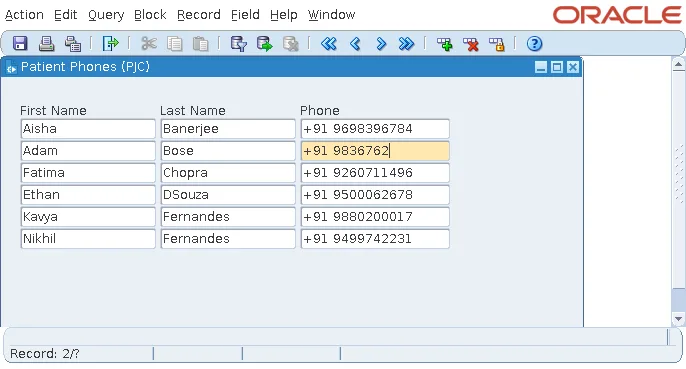
PhoneField refuses anything but digits, +, and spaces as they are typed, and colors the item until the number is complete.
Java class cw/PhoneField.java, in carewell_beans.jar:
package cw;

import java.awt.Color;
import java.awt.event.KeyAdapter;
import java.awt.event.KeyEvent;
import oracle.forms.ui.VTextField;

/**
 * A pluggable Java component for phone numbers: the text item accepts only digits,
 * '+' and spaces as the user types, and turns amber until the number has ten digits.
 */
public class PhoneField extends VTextField {
  private static final Color INCOMPLETE = new Color(0xff, 0xe8, 0xb0);

  public PhoneField() {
    super();
    addKeyListener(new KeyAdapter() {
      public void keyTyped(KeyEvent e) {
        char c = e.getKeyChar();
        if (!Character.isDigit(c) && c != '+' && c != ' ' && !Character.isISOControl(c)) {
          e.consume();                                   // never reaches the server
        }
      }
      public void keyReleased(KeyEvent e) {
        String digits = getText().replaceAll("[^0-9]", "");
        if (digits.startsWith("91")) digits = digits.substring(2);
        setBackground(digits.length() == 10 ? Color.white : INCOMPLETE);
      }
    });
  }
}
In the sample PJC form, the item PHONE of a patient block has the implementation class cw.PhoneField. Typing abc in a phone number changed nothing, and the item stayed amber while digits were missing.
A Convenience, Not Validation
The keystrokes the PJC consumes never reach the server: no trigger fires, and no round trip is made. That is the strength of a PJC, immediate feedback without network traffic, and its limit: it helps the user but does not validate. WHEN-VALIDATE-ITEM and the database's constraints must still check the value, as described in how to validate data in Oracle Forms.
Host Any JavaBean with FBEAN
A JavaBean written for any Java program, such as a Swing component, has no setProperty(ID, ...) for Forms to call. The built-in package FBEAN hosts it anyway: registered in a bean area with no implementation class, its public methods are called by name from PL/SQL.
Syntax:
fbean.register_bean(item, instance number, bean_class varchar2)
fbean.invoke(item, instance, method varchar2, args varchar2 | number := null)
fbean.invoke_char(item, instance, method, args) return varchar2      -- invoke_num, invoke_bool
fbean.set_property(item, instance, property varchar2, value varchar2)
fbean.get_property(item, instance, property varchar2) return varchar2
fbean.enable_event(item, instance, listener_name varchar2, subscription boolean)
The sample FBEAN form shows the progress of a long task with javax.swing.JProgressBar, from the Java runtime itself.
Example (WHEN-NEW-FORM-INSTANCE trigger, FBEAN form):
begin
  fbean.register_bean('CTL.PROGRESS', 1, 'javax.swing.JProgressBar');  -- any JavaBean
  fbean.invoke('CTL.PROGRESS', 1, 'setMaximum', 100);
  fbean.set_property('CTL.PROGRESS', 1, 'StringPainted', 'true');     -- setStringPainted
end;
Example (WHEN-BUTTON-PRESSED trigger on CTL.STEP):
:ctl.done := least(nvl(:ctl.done, 0) + 25, 100);
fbean.invoke('CTL.PROGRESS', 1, 'setValue', :ctl.done);
:ctl.info := 'getValue returned ' || fbean.invoke_num('CTL.PROGRESS', 1, 'getValue');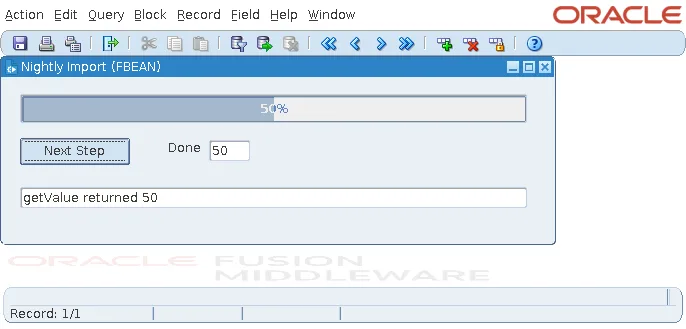
INVOKE passes the value to setValue, and INVOKE_NUM returns what getValue returns. Arguments are text or numbers: a BOOLEAN argument did not compile (PLS-00306), and SET_PROPERTY with 'true' called setStringPainted(true). ENABLE_EVENT subscribes to the bean's events, by the listener interface's name, such as ActionListener, and they then fire WHEN-CUSTOM-ITEM-EVENT.
Build and Deploy the JAR
Compile the Java classes against frmall.jar, in the forms/java directory of the Forms installation, and package them in a JAR.
Compile and package:
javac --release 11 -cp $ORACLE_HOME/forms/java/frmall.jar -d classes cw/*.java
jar cf carewell_beans.jar -C classes cw
--release sets the oldest Java version that can load the classes, so choose that of the oldest Java runtime your users' clients run; 11 was used here, with a client running Java 21. Copy the JAR to forms/java and add it to the archive parameter of the configuration section, as with button icons.
The formsweb.cfg section:
[book]
archive=frmall.jar,carewell_icons.jar,carewell_beans.jar
The Forms Standalone Launcher downloads the JAR into its cache on the first run, and again whenever it changes; its log showed Downloading archive file carewell_beans.jar after the PJC was added. The test JAR was not signed, and the launcher loaded it. Oracle's JARs are signed, and for the browser and Java Web Start, Oracle's documentation requires your JARs to be signed with a code-signing certificate too, so sign them for every client and users never see a security question. Icon JARs are described in how to create push buttons in Oracle Forms.
Conclusion
The Oracle Forms client is Java, so bean areas can host your own components and PJCs can replace the classes of standard items. A bean extends VBean, registers the properties PL/SQL sets with SET_CUSTOM_PROPERTY, and raises events that fire WHEN-CUSTOM-ITEM-EVENT, with parameters in :SYSTEM.CUSTOM_ITEM_EVENT_PARAMETERS. A PJC gives immediate feedback without round trips but does not replace validation, FBEAN hosts any JavaBean and calls its methods by name, and every class ships in a JAR compiled against frmall.jar, listed in the archive, and signed.
