
When one form starts another, they usually need to exchange values: the patient whose appointments to show, the appointment the user chose, a context many forms need. Oracle Forms offers three ways to do it, each with its own strengths and limits.
This guide covers passing values between forms in Oracle Forms 14.1.2: parameter lists for values going into a form, global variables for values coming back, and shared library data for richer context, with a patient list that calls an appointments form and gets back the appointment the user chooses.
Sample Form for This Guide
The examples and screenshots use the sample forms CH24_PATIENTS and CH24_APPOINTMENTS from the Oracle Forms code repository on GitHub. Download them, open them in Forms Builder, and connect as CAREWELL to follow along.
| Form | File | What it shows |
|---|---|---|
| CH24_PATIENTS | forms/ch24/ch24_patients.fmb | The patients of Pune, with buttons that call, open, and replace other forms |
| CH24_APPOINTMENTS | forms/ch24/ch24_appointments.fmb | One patient's appointments, called from the patient list |
The forms run against the CareWell Clinic sample schema, which you install first.
Three Ways to Pass Values
| Method | Direction | Types | Scope |
|---|---|---|---|
| Parameter list | Into the started form | Text, converted to each parameter's type | One call |
| Global variable | Any direction | Text, up to 4,000 characters | Every form of the session |
| Shared library data | Any direction | Any PL/SQL type | Forms started with SHARE_LIBRARY_DATA |
The built-ins that start forms, CALL_FORM, OPEN_FORM, and NEW_FORM, are covered in how to open another form in Oracle Forms.
Pass Values In with a Parameter List
A parameter list is a named set of values that becomes the started form's parameters: each value is assigned to the parameter of the same name as the form starts. The form's own parameters are described in how to pass parameters to a form.
The sample patients form's Appointments button builds a list with the patient's key and calls the appointments form.
Example (WHEN-BUTTON-PRESSED trigger on CTL.APPTS, patients form):
declare
  v_list paramlist := get_parameter_list('CW_PATIENT');
  v_mode number := case :ctl.query_only when 'Y' then query_only else no_query_only end;
begin
  if not id_null(v_list) then
    destroy_parameter_list(v_list);                    -- left over from an earlier call
  end if;
  v_list := create_parameter_list('CW_PATIENT');
  add_parameter(v_list, 'P_PATIENT_ID', text_parameter, to_char(:patients.patient_id));
  cw_ctx.patient_id := :patients.patient_id;           -- library data (CW_LIB)
  :global.cw_appt_id := null;
  call_form('ch24_appointments', no_hide, no_replace, v_mode, share_library_data, v_list);
  -- runs when CH24_APPOINTMENTS has exited
  destroy_parameter_list(v_list);
  :ctl.chosen := :global.cw_appt_id;
end;
The list is built in three steps:
- GET_PARAMETER_LIST looks for a list of that name, left from an earlier press of the button, and DESTROY_PARAMETER_LIST removes it, because list names must be unique.
- CREATE_PARAMETER_LIST creates the list and returns its ID.
- ADD_PARAMETER adds each value, as text.
Parameter List Built-ins
Syntax:
create_parameter_list(name varchar2) return paramlist
get_parameter_list(name varchar2) return paramlist
add_parameter(list paramlist | varchar2, key varchar2, paramtype number, value varchar2)
delete_parameter(list paramlist | varchar2, key varchar2)
get_parameter_attr(list paramlist | varchar2, key varchar2, paramtype out number, value out varchar2)
set_parameter_attr(list paramlist | varchar2, key varchar2, paramtype number, value varchar2)
destroy_parameter_list(list paramlist | varchar2)
paramtype is TEXT_PARAMETER for a value. DATA_PARAMETER, whose value is the name of a record group, passes data to Oracle Reports and cannot be used with forms. Forms converts the text to the parameter's data type, a number here.
Every Parameter Must Exist
Every parameter in the list must exist in the called form. A list with a P_DOCTOR_ID that the appointments form does not have stops the call before the form starts.
Output:
FRM-47023: No such parameter named P_DOCTOR_ID exists in form CH24_APPOINTMENTS.
A parameter the list does not mention keeps its Parameter Initial Value. The appointments form gives P_PATIENT_ID an initial value, so it also runs on its own from Forms Builder.
Return Values with Global Variables
A global variable is a variable of the Forms session, shared by every form that runs in it. Globals need no declaration: the first assignment creates one.
Example:
:global.cw_appt_id := :appointments.appt_id;
Limits of Globals
Globals are always text, and hold up to 4,000 characters; assigning 4,001 characters in a test failed with ORA-06502. Reading a global that no one has assigned fails too.
Output:
FRM-40815: Variable GLOBAL.CW_NOTHING does not exist.
Two built-ins avoid that error and clean up afterward:
- DEFAULT_VALUE(value, 'GLOBAL.name') assigns the value only if the global does not exist yet, the usual way to initialize a global that another form may already have set.
- ERASE('GLOBAL.name') removes the global and frees its memory.
In library code, which cannot use bind variables, use NAME_IN('GLOBAL.name') and COPY, as shown in how to create a PL/SQL library.
Example: Return the Chosen Appointment
Globals are how a called form most often returns a value. The calling trigger above sets :GLOBAL.CW_APPT_ID to null before the call, and the Choose button of the appointments form sets it and exits.
Example (WHEN-BUTTON-PRESSED trigger on CTL.CHOOSE, appointments form):
:global.cw_appt_id := :appointments.appt_id;
exit_form;
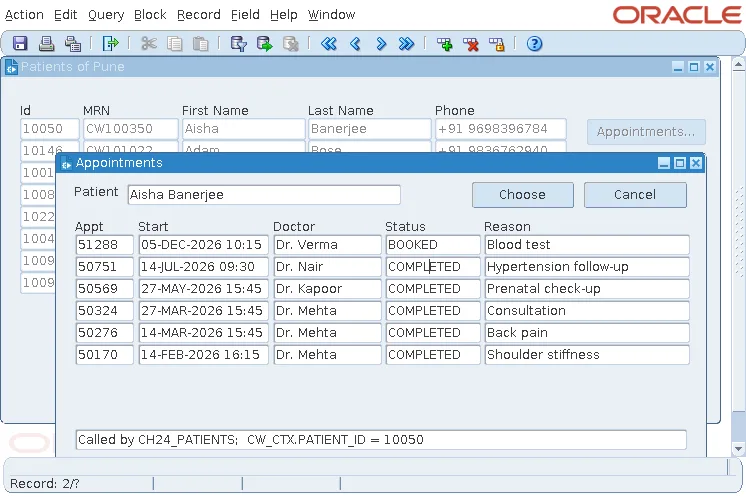
Back in the calling trigger, the statement after CALL_FORM copies the global into Chosen appointment. Choosing the second appointment of Aisha Banerjee shows 50751 there, and Cancel leaves it empty.
Name globals with a prefix of the application, such as CW_, because every form of the session shares the same names. For more, see global variables in Oracle Forms.
Share Library Data
A package in a PL/SQL library keeps its variables while the form runs. The sample library CW_LIB has a package with nothing but a variable.
Library CW_LIB, package CW_CTX (specification):
package cw_ctx is
  -- context that forms opened with SHARE_LIBRARY_DATA see too
  patient_id number;
end cw_ctx;
The calling trigger sets CW_CTX.PATIENT_ID before CALL_FORM. Whether the called form sees that value depends on the data_mode argument:
- With SHARE_LIBRARY_DATA, the forms share one copy of the library's packages, and the last line of the appointments form shows CW_CTX.PATIENT_ID = 10050.
- With NO_SHARE_LIBRARY_DATA, the default, the called form gets its own copy and shows CW_CTX.PATIENT_ID = null.
Shared library data carries any PL/SQL type, including numbers, dates, records, and collections, without the conversions and the 4,000-character limit of globals, and only among forms that choose to share. It suits a context that many forms need, such as the current patient or the user's roles. For older examples of passing values, see how to pass values across Oracle Forms.
Conclusion
Parameter lists pass values into a started form's parameters, built with CREATE_PARAMETER_LIST and ADD_PARAMETER, and every parameter in the list must exist in the called form. Global variables are text of up to 4,000 characters, created by assignment and shared by every form of the session, so initialize them with DEFAULT_VALUE, remove them with ERASE, and prefix their names. For richer context, share a library's package variables among forms started with SHARE_LIBRARY_DATA.
