The hospital management system your whole hospital can work in
Rounds HMS is one complete system for hospitals and clinics. OPD and IPD, billing, the laboratory, pharmacy, beds and HMIS reports all share one patient record, and HRMS looks after the staff, from the duty roster to payroll. Run it as a cloud-based hospital management system or on your own server. Your staff only need a web browser.
- OPD & IPD
- Appointments
- Billing & GST
- Laboratory
- Pharmacy
- Bed board
- HMIS reports
- HRMS & payroll
Hospitals that have used Rounds HMS
- Fatima Hospital
- St. Joseph Hospital
- Mayo Hospital
- and more
From Oracle Forms to Oracle APEX: how Rounds HMS was built
Rounds HMS was first written in 2000 and has been developed ever since. It was never rewritten from scratch: each time Oracle moved forward, the same system moved with it, keeping the patient numbers, bill series and way of working that staff already knew.
- 2000 · The beginning
Oracle8 + Forms 4.5
The first version: patient registration, billing and wards, on the Oracle8 database.
- Upgrade
Oracle Forms 5.0
More modules and more departments, still on the same database schema.
- Upgrade
Oracle Forms 6i
The long-running workhorse: OPD, IPD, cash counters, pathology, pharmacy and reports.
- Upgrade
Oracle Forms 10g
The move to the application server, with forms opened across the hospital network.
- Upgrade
Oracle Forms 11g
Fusion Middleware and WebLogic, with more reports and modules along the way.
- 2026 · Today
Oracle APEX 26.1
A complete web-based hospital management system on Oracle AI Database 26ai. No Java applets, no client install, and it works on a phone.
See the hospital at a glance
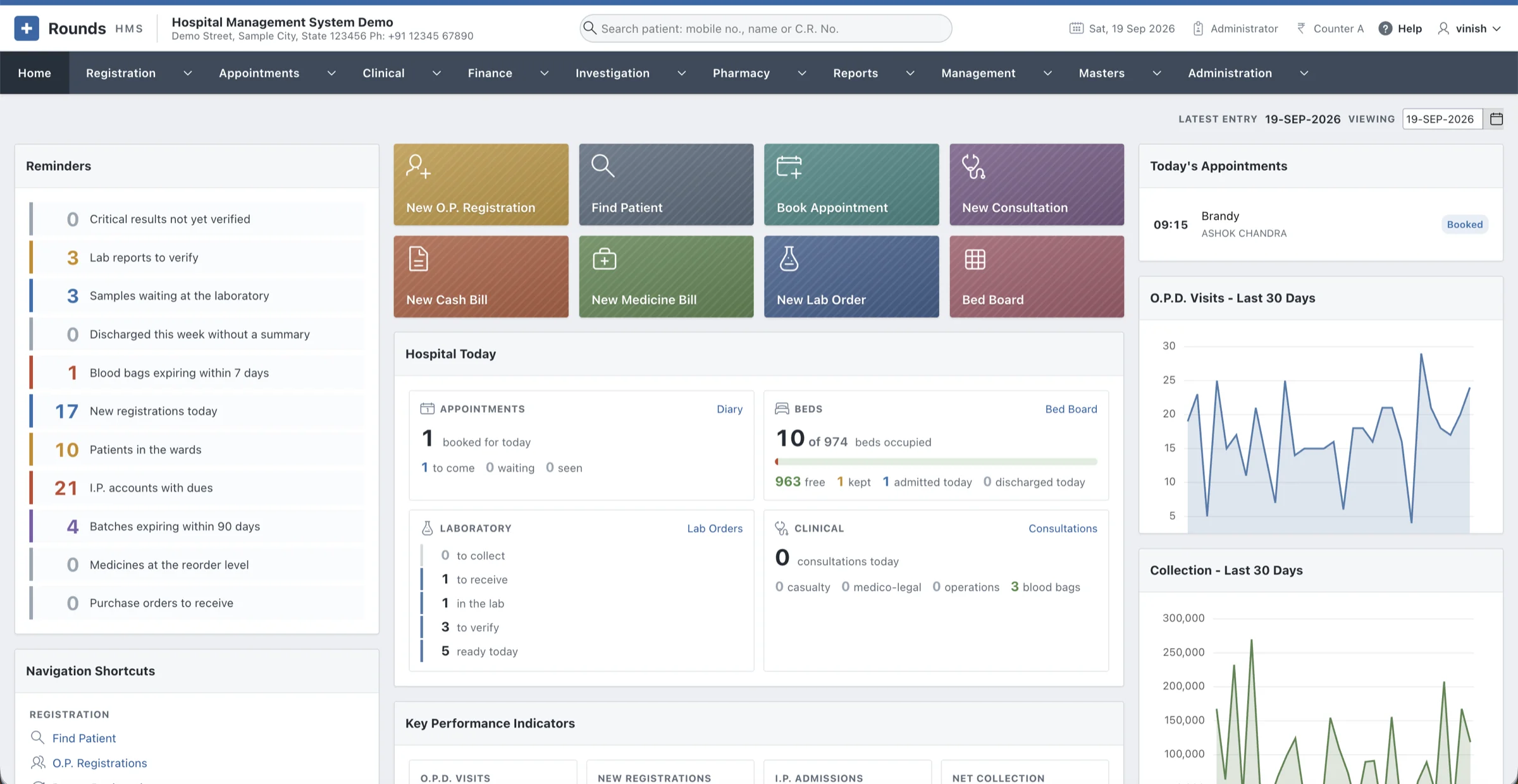
Reminders, quick actions, today's appointments, the beds and the laboratory, as each role opens the day.
Everything a hospital runs on, in one HMS
Thirteen modules, from the front desk to the director's office: twelve share one patient record, and HRMS looks after the people who work there. Pick one to see what it actually does.
Registration & patients
The front desk starts with the patient's mobile number. From then on every visit, admission, bill and report stays with one patient record and one C.R. No.
Mobile number first
O.P. Registration asks for the mobile number first. Type it on any patient screen and press Tab: one match fills the patient in, several open a list to choose from.
Families by mobile number
Patients registered with the same number are one family. Registration lists the family as the number is typed, Use this address copies a member's address, and Patient History shows the other members.
Find any patient from the header
Search by mobile number, name, C.R. No. or I.P. No. Each result shows the family size and whether the patient is in the wards, with links to admit, renew, open the history or start a bill.
Quick registration for walk-ins
Name, age, sex and mobile number are enough. The patient gets a C.R. No. from the same series as a full registration, with no fee, straight from Find Patient or a new bill.
One click to the next step
The Actions column opens a prescription, cash bill, medicine bill, admission or history with the patient filled in, and the patient's registered doctor comes in by itself.
Appointments
Clinic hours, slots and token queues for every doctor, with a day diary the front desk runs without the page ever reloading.
Schedules and leave
One row per weekday with the hours, the minutes an appointment takes and the patients per slot. Put the whole clinic in one slot and it becomes a plain token queue. Doctor Leave blocks the days a doctor is away.
Book in seconds
Find the patient by mobile number, C.R. No. or name (or register them on the spot) and choose from the doctor's free times, such as "10:30 (1 of 1 free)". The slip prints with the day, doctor and token.
The diary of the day
Token, time, patient, mobile and reason, with Arrived, Seen, Prescription, Reschedule, No-show and Cancel on every row. Yesterday and tomorrow are one click away.
Waiting-time reports
The Appointments Register shows each patient's wait, and Doctor Utilisation counts appointments, no-shows, cancellations and the average wait per doctor and day. Reminders go out on WhatsApp.
Clinical record
What was asked, found and prescribed is written down, coded and kept, so the next doctor sees the whole story on one page.
Consultations with vitals
B.P., pulse, temperature, respiration, SpO2, weight, height with B.M.I. and blood sugar, then complaints, history, examination, advice and the follow-up day. Allergies and long-standing problems stand at the top.
ICD-10 diagnoses
As many diagnoses as the visit needs, each coded or in the doctor's own words, and marked main, secondary or provisional. About 190 everyday codes come ready, and Masters adds more.
Prescriptions like your own pad
Medicines with dose, frequency, timing and duration, with the quantity worked out. Tests come from the tariff, an earlier prescription can be copied, and a bill can pick up its tests or medicines.
Discharge summary and ward chart
The summary can be filled from the notes of the stay and lists the medicines to continue at home. The ward chart records a day's vitals, intake and output with the running balance, and the medicines given.
Consents in English and Hindi
Admission, operation, anaesthesia, high-risk, blood transfusion, LAMA/DAMA and more, filled in with the patient's details. Every form is kept exactly as printed.
Theatre, casualty & M.L.C.
The operation theatre, the casualty book and the medico-legal register every hospital in India must keep.
Operations booked and recorded
Theatre, time, surgeon, assistant, anaesthetist and anaesthesia, the operation with its ICD-10 code, and the full operation note, from the findings to the blood loss and complications.
Theatre items charged once
Implants and consumables are picked from pharmacy batches as they are used. Charge to the Bill puts them on the patient's bill, takes them out of stock, and refuses to charge the same operation twice.
Casualty with triage
Arrival to the minute, who brought the patient, red, yellow or green triage, the treatment, and where the patient went. A walk-in does not need to be registered first.
The M.L.C. register
Mark a case medico-legal and it takes the next M.L.C. number of the year, with the police station informed, F.I.R. number, injuries and identification marks. It prints as a Medico-Legal Case Report.
Mother & child care
The mother's antenatal card, the child's vaccination card, and the birth and death registers a hospital has to keep.
Antenatal (A.N.C.) cards
Blood group, last period with the expected date of delivery worked out, G P A L and any high-risk reasons. Each visit adds weight, B.P., fundal height, foetal heart, Hb and urine, with the weeks of pregnancy calculated.
Immunisation cards
Enter the child's date of birth and the card lists every vaccine with its due date: not due, due, late or given. The schedule comes with 27 doses, from B.C.G. to Td at sixteen, and a report lists the children to call.
Birth and death registers
Running numbers for the year, the details a hospital must record, and the ICD-10 cause of death. Both print as the hospital's Record of Birth and Record of Death for the municipal registrar.
Blood bank
Donors, every bag in stock, and a cross-match screen that only ever offers compatible blood.
Donors
Each donor's group and last donation, with whether they can give again after ninety days.
Every bag tracked
Bag number, group, component, source, collection date and expiry, which follows the component: whole blood 35 days, packed cells 42, platelets 5, plasma a year. Expired bags leave the stock by themselves.
Safe cross-match and issue
Choose the patient's group and only compatible bags are offered, so O negative is offered to everyone and A positive never to an O negative patient. Only a compatible bag can be issued, and every step prints a slip.
Blood Bank Register
A period's activity with today's stock by group and component. The home page warns about bags expiring within seven days.
Laboratory
Every test is ordered, collected, received, resulted and verified, and every step is recorded.
Orders with priority
New Lab Order takes the patient, doctor and priority (routine, urgent or STAT), and can pull the tests from a prescription or a cash bill. Tests not yet billed are shown, with Bill the Tests one click away.
Barcoded samples
One tube per specimen type with its own sample number, such as L26-00012, and a barcode label. At the lab counter, scan and press Enter to receive. A tube can be rejected with the reason.
Flags by age and sex
Each result is checked against the patient's own normal range, so a child gets the child's range: L or H outside the range, LL or HH at a critical value. Critical results wait on the home page until verified.
Results straight from analysers
Analysers send results over HL7 (ORU^R01) or ASTM, and they land on the right tube, flagged, with no typing. Results Over Time shows a patient's values side by side, date by date.
Radiology
X-ray and ultrasound reports that the machine, the PACS and the patient can all find again.
Accession numbers
Every X-ray and ultrasound report gets an accession number, such as X26-00001 or U26-00001. The machine and the PACS know the study by the same number, and it is printed on the report.
Report templates
Start from a Template fills in the heading, findings and impression. Thirteen come ready, including a normal chest, consolidation, renal calculus and early pregnancy, and you can write your own.
Open the images
Once your PACS viewer address is set, View the Images opens the study straight from the report.
Print, PDF or WhatsApp
Reports print on your letterhead, share as a PDF, or go to the patient on WhatsApp from the print window.
Billing, GST & insurance
Cash, credit and I.P. bills, every way of paying, GST returns ready to file, and insurance claims tracked to settlement.
Every way of paying
Cash, UPI with a QR code for the exact amount, card, wallet, payment link, bank transfer, cheque or demand draft, each with a transaction ID. A bill can also be split across two modes.
GST done properly
Taxes print line by line on a tax invoice. GST Returns builds GSTR-3B and GSTR-1 with a JSON download for the portal, and e-invoices can be recorded when your turnover needs them.
Insurance and TPA claims
Pre-authorisation, queries, approval, enhancement and settlement with UTR, TDS and disallowed amounts, each step on a timeline. Packages and schemes such as PM-JAY, CGHS and ECHS are charged correctly on the I.P. bill.
Control at the counter
Discount limits by role, with larger discounts sent for approval. Day-end closing counts the cash note by note, and Receivables Ageing shows what is owed in 30, 60, 90 and 180-day bands.
Accounts without retyping
Every document becomes a balanced voucher. The Day Book and Ledger show them, and Accounting Export downloads them for Tally (XML), Zoho Books or as CSV.
Pharmacy & stock
A pharmacy that knows every batch, refuses what it should, and can explain where every strip went.
A catalogue of 2,53,973 medicines
Pick the brand, composition, manufacturer, form, pack and M.R.P. from the A to Z medicines dataset of India instead of typing them.
Priced per unit
Stock and bills work per tablet, or per bottle for packs sold whole. The M.R.P. per unit is worked out from the pack, so a strip of 15 at 34.27 sells at 2.28 a tablet.
Safe medicine bills
Pick a batch from stock with its expiry. An expired batch, or more than the stock, is refused. A prescription fills the bill with the batches that expire first.
Stock that adds up
Saving a purchase entry receives the goods into their batches. Stock Adjustments handles breakage, expiry, returns and stock counts, Stock Alerts lists near-expiry and reorder items, and Stock Movements is the ledger.
Beds & wards
Every ward and every bed on one screen, and room charges that follow the patient from bed to bed.
The bed board
Green is free, red is occupied (with the patient, I.P. No. and day of stay), and amber is kept for a patient on the way. Click a free bed to admit a patient straight into it.
Keep a bed
Hold a bed for a patient on the way until a set day. After that day it frees itself.
Transfers that bill correctly
A move records the time, and an occupied or reserved bed is refused. Room Charges So Far shows each stay at its own ward's rate, exactly as the final bill will charge it.
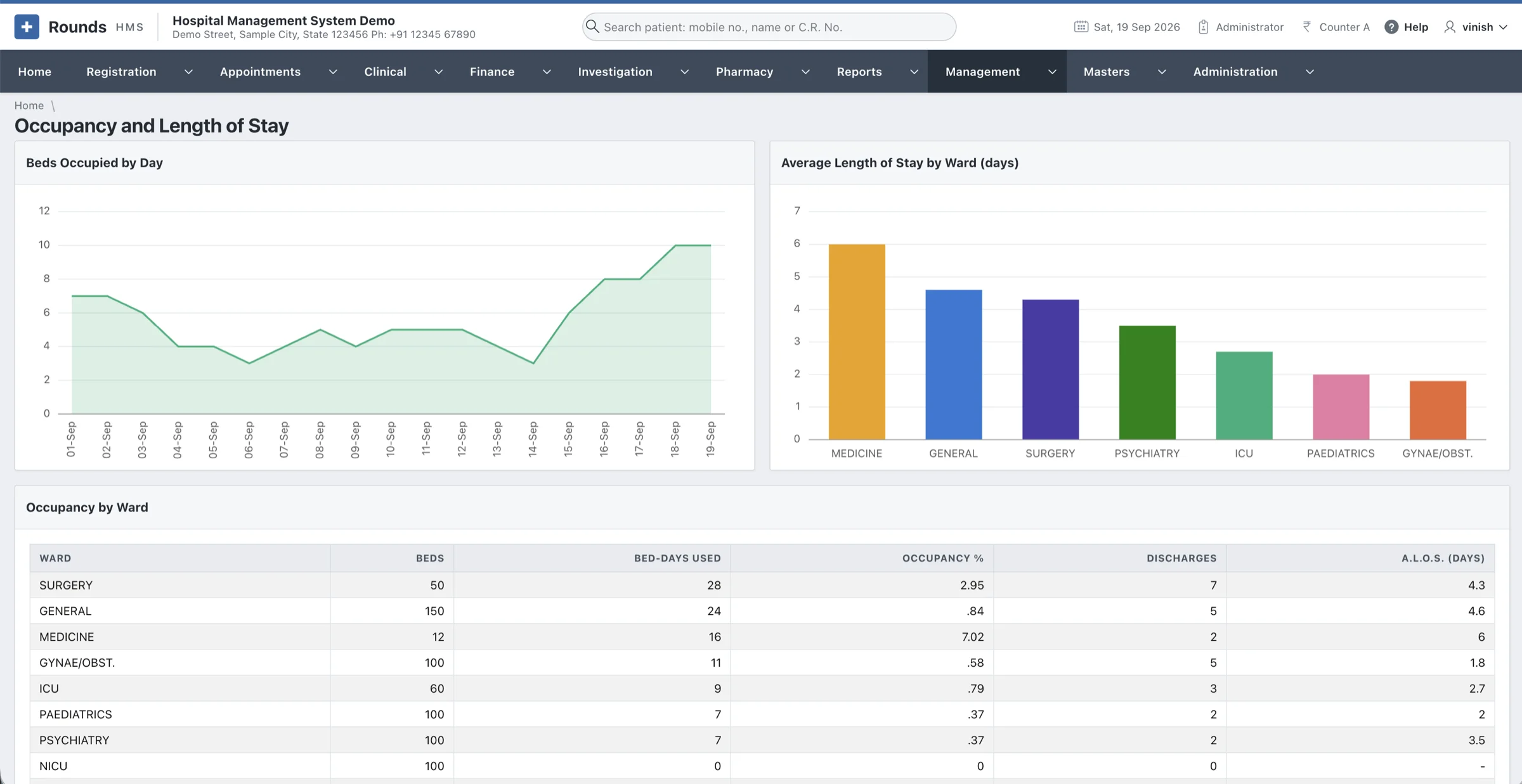
Occupancy and length of stay
Bed-days, occupancy, admissions, discharges and the average length of stay (A.L.O.S.), ward by ward and for the whole hospital.
HMIS reports & management
For the director: the figures that matter, compared with the last period and mailed on a schedule.
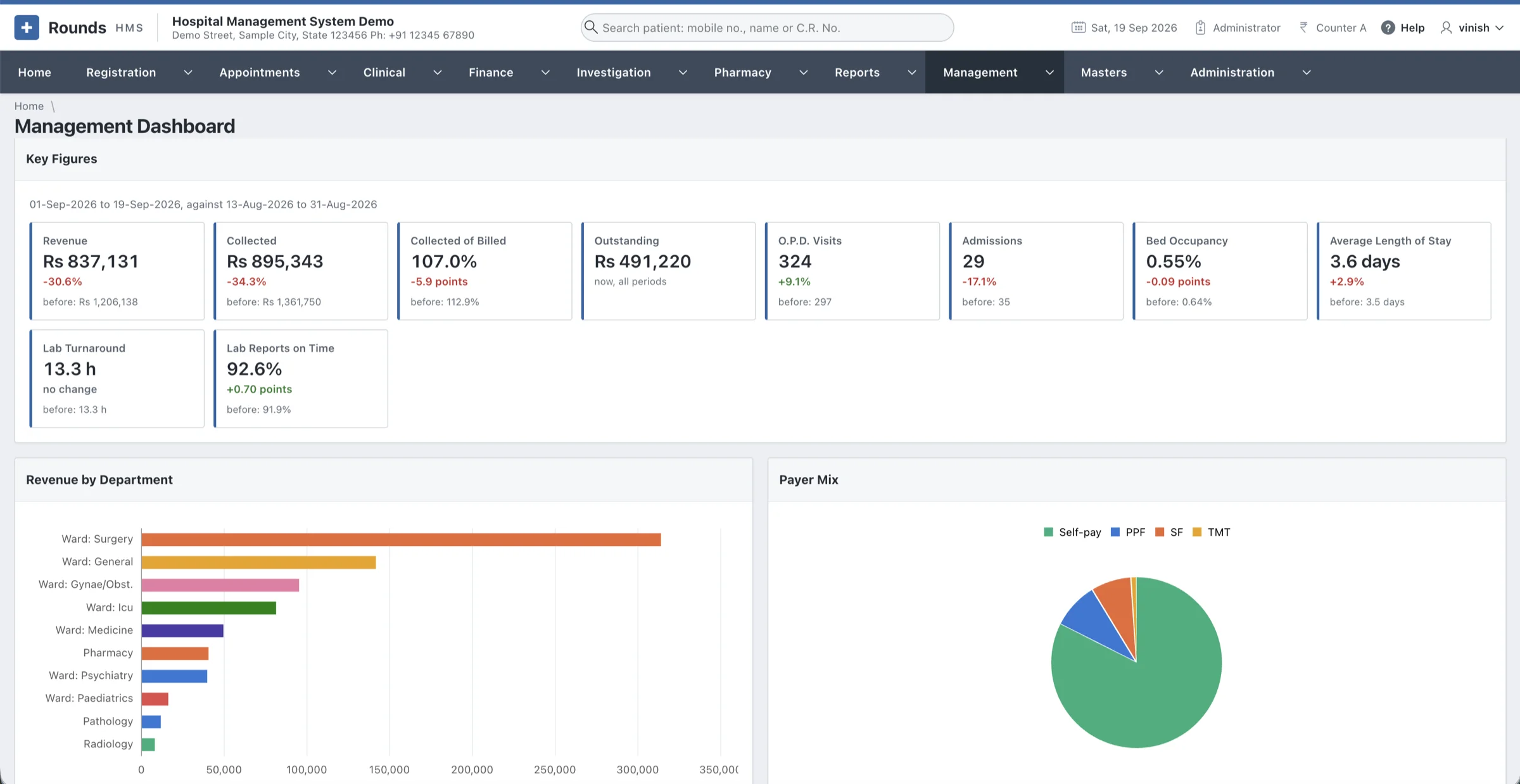
Management dashboard
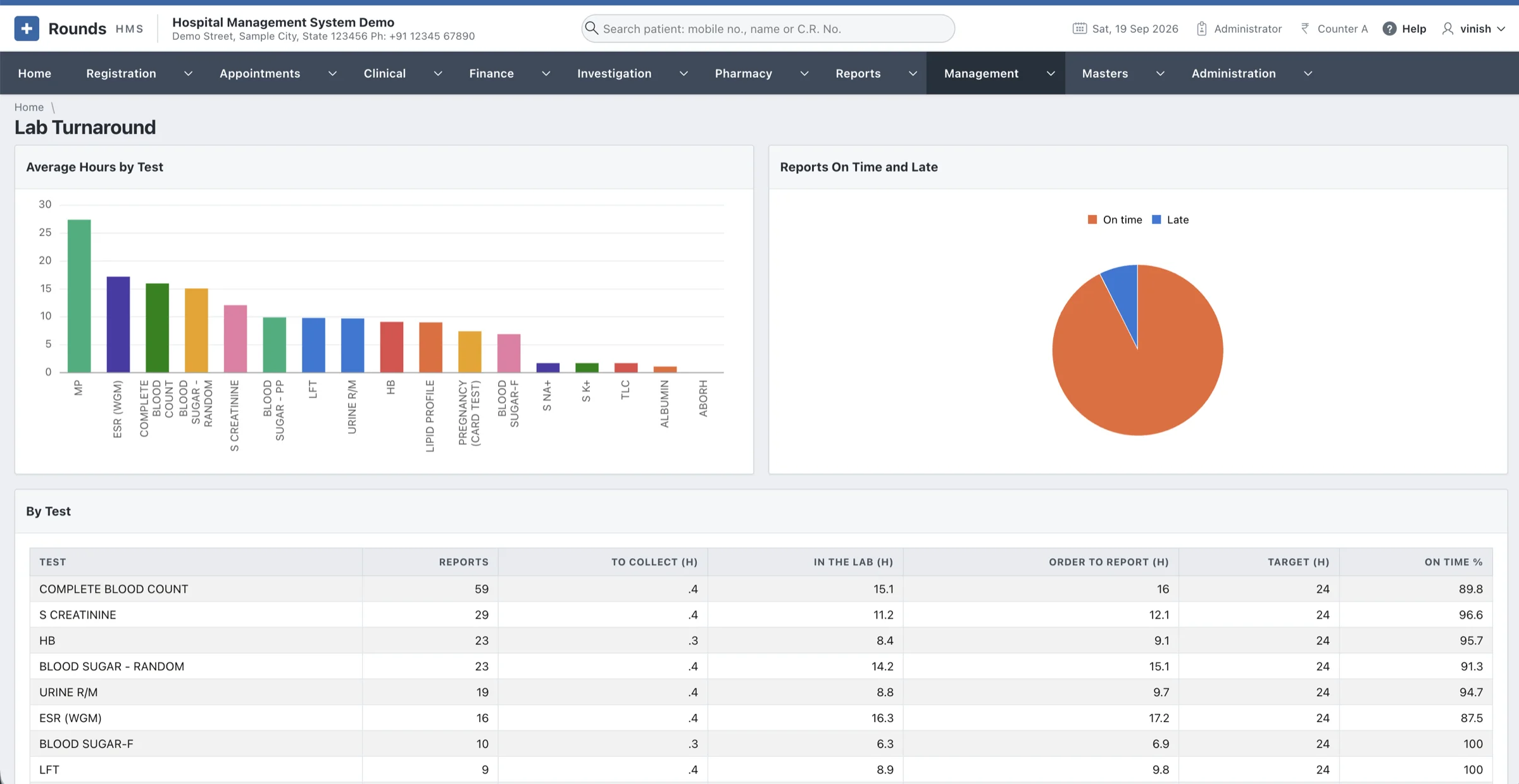
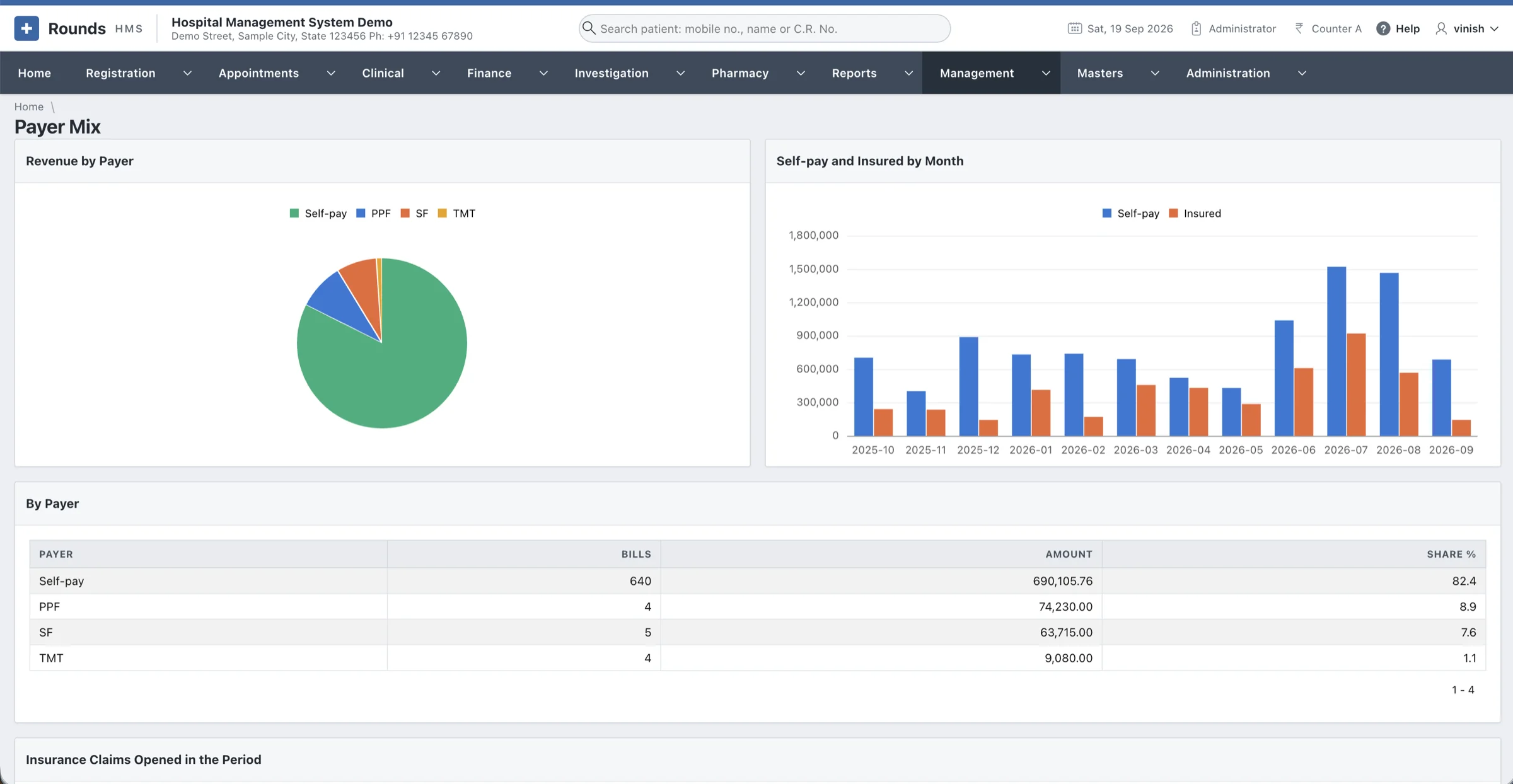
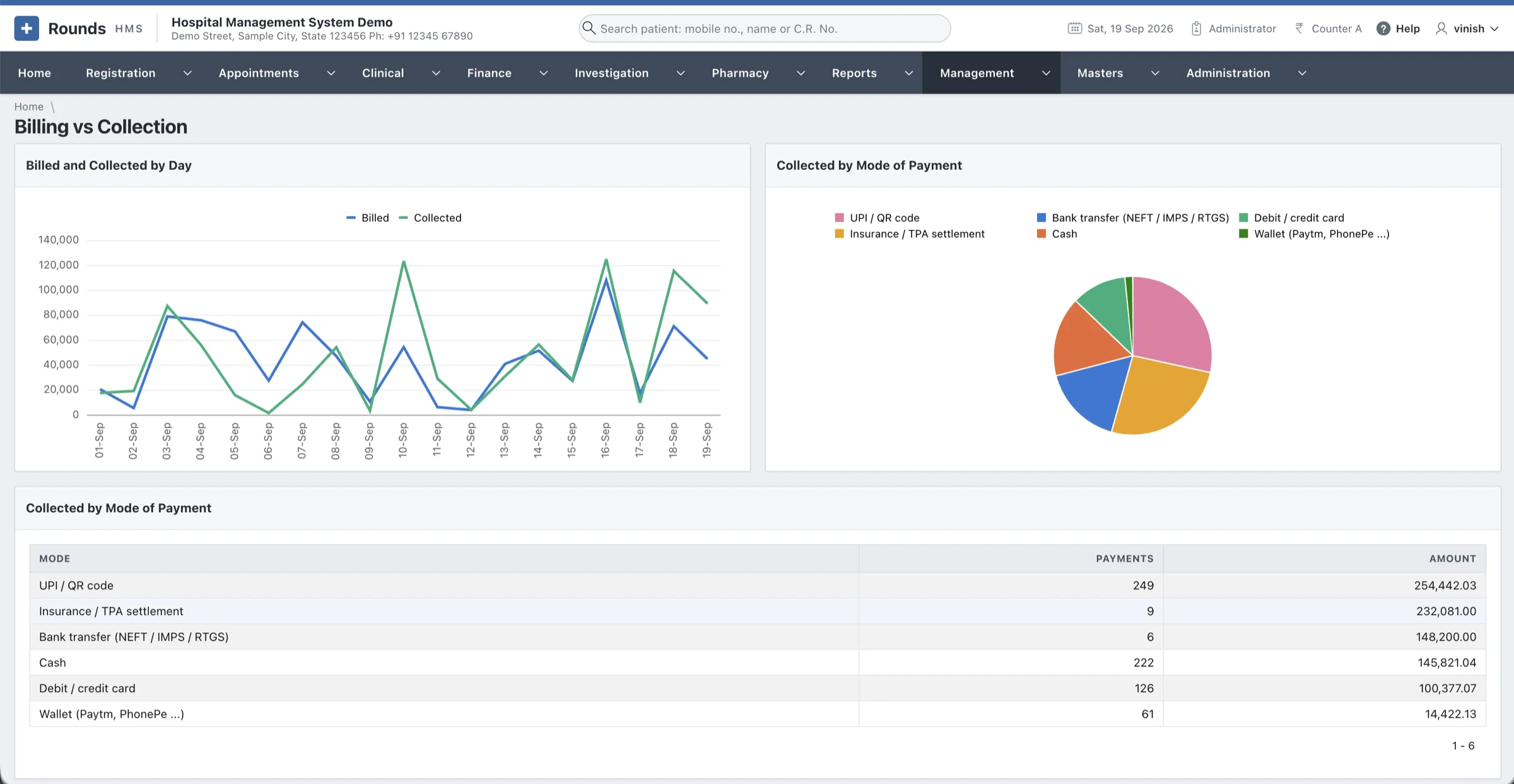
Revenue, collection, outstanding dues, O.P.D. visits, admissions, bed occupancy, A.L.O.S. and lab turnaround, each against the previous period, with six charts and a link to the screen behind every figure.
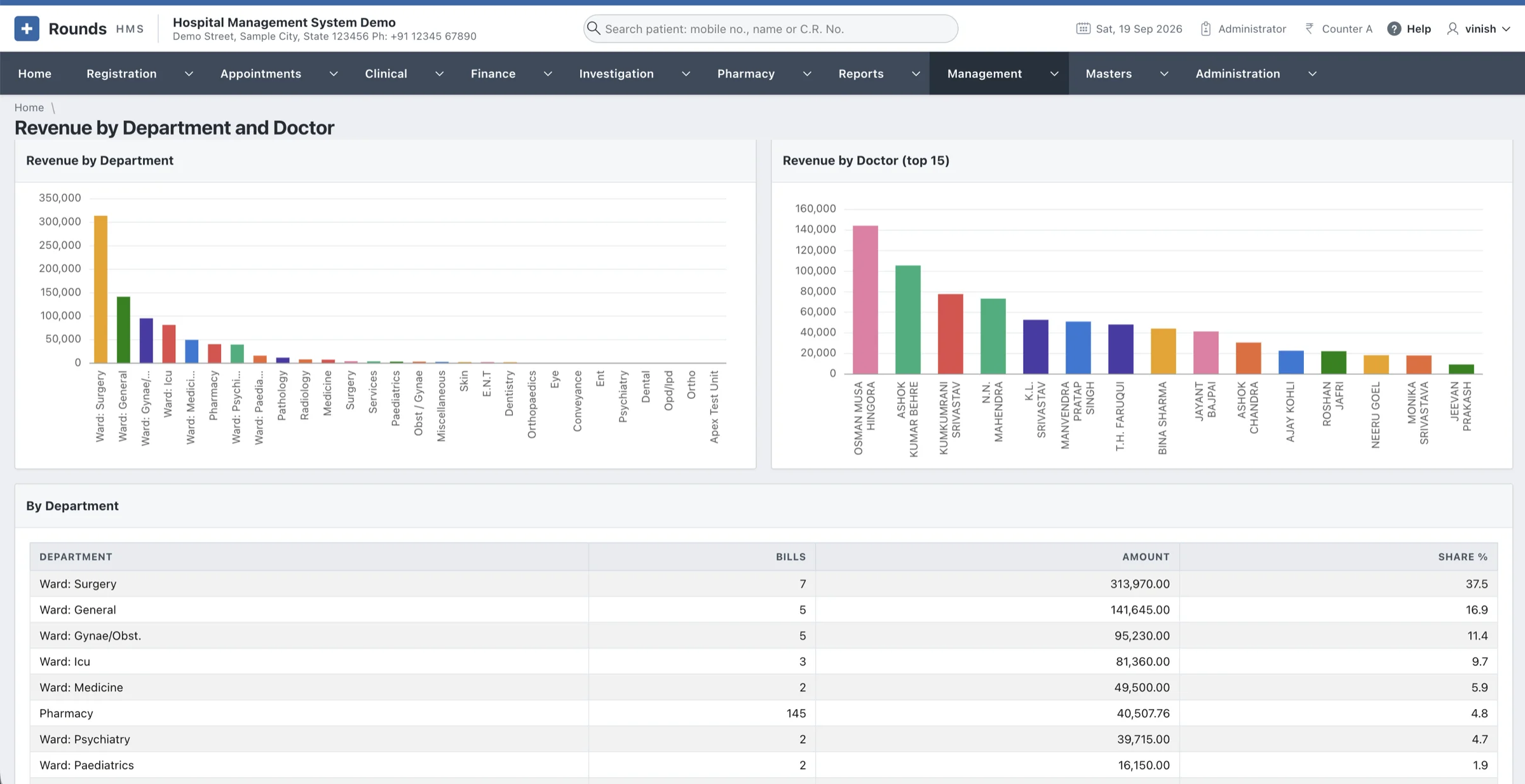
Five analyses
Revenue by department and doctor, occupancy and length of stay, lab turnaround, payer mix, and billed against collected.
Scheduled MIS e-mail
The day's summary, the MIS, collections or outstanding dues, mailed every day, week or month to a list of addresses.
Print or export any report
Every report prints with your filters, period and hospital name, and exports to CSV, Excel or PDF.
HRMS: staff, roster & payroll
A menu of its own for the people who work in the hospital. A role can be given HRMS and nothing else, and only administrators can change a salary or run the payroll.
Employees and their history
Each employee's job, grade, pay, bank details and the numbers statutory returns ask for. A transfer or promotion writes a posting of its own, so the record keeps its full history.
The duty roster
A month at a glance, with the staff down the side and the days across. Fill from the Usual Week writes the whole month and marks holidays and weekly offs, Copy Last Month carries the last one over, and any single day can be changed.
Attendance, three ways
Marked on screen, loaded from the file the attendance machine at the door writes, or taken from the roster alone, set for the hospital or per department. Late arrivals and overtime are worked out from the times.
Leave that adds up
Leave types with their days, how they build up, and whether they carry forward. An application counts only the days it really costs, stops at the balance, and allowing it updates the roster and attendance.
Payroll with P.F. and E.S.I.
Salaries are built from heads: a fixed amount, a percentage of another head, a rate per day worked, or a slab. The month is worked out from salaries and attendance, checked, then locked, with payslips. P.F. and E.S.I. follow your rates; professional tax follows your state's slab.
Straight into the accounts
A locked month becomes a salary journal in Finance, and Salaries Paid records the payment from bank or cash, ready for the Day Book, Ledger, Trial Balance and Tally or Zoho exports. Ten HRMS reports run from staff strength to the bank statement.
A cloud-based HMS on the Oracle stack
Rounds HMS lives inside the Oracle database, next to your data. Host it on Oracle Cloud for a cloud-based setup, or keep it on a server in your hospital. The business logic is PL/SQL, the screens are Oracle APEX, and a browser is all a user needs.
Deploy your way
On a server in your hospital, on Oracle Cloud (OCI), or in an APEX workspace.
No client software
No Forms runtime, no Java applet and no JInitiator. Update the server once and every desk has the new version.
Unicode throughout
AL32UTF8 text columns, so names, addresses and consent forms can be in Hindi as well as English.
Open standards
HL7 and ASTM for analysers, UPI QR codes for payments, and PDF, CSV and Excel for reports.
Patient data is kept private and every entry is checked
A hospital system holds some of the most personal data there is. Rounds HMS makes sure each person sees only their own work, and it refuses entries that would corrupt the books or the stock.
Secure by default
Passwords are never stored
Only salted SHA-512 hashes are kept. A password needs at least 8 characters with both letters and numbers.
Lock-out after five tries
Five wrong passwords lock the account until an administrator unlocks it.
Forced password change
A password set by an administrator has to be changed at the next sign-in.
Menus by role
A lab user sees the laboratory and a receptionist sees registration. Only administrators see Administration.
Tamper-proof pages
APEX session state protection rejects URLs that have been edited by hand.
Rules enforced in the database
Expired batches, overselling stock and broken bill numbering are refused by PL/SQL, whichever screen the entry comes from.
Discounts are approved
A discount waits for approval, and each one records who allowed it.
A full audit trail
Every change to money, patients, masters, users and the clinical record is logged: who, when, from which page, and the old value beside the new. Entries can never be edited.
Designed around a busy front desk
Every screen was reworked with the people who use it, so the common jobs take fewer clicks and fewer mistakes.
Mobile number first
Type the patient's mobile number and press Tab. Their details fill in, and their family appears alongside.
No page reloads while billing
Adding a line to a bill or prescription updates the totals straight away, and nothing you typed is lost.
Cursor already in place
Every form opens with the cursor in the first field you need, and dates default to today.
Messages in plain words
"Only 80 in stock in batch DL2601." instead of an ORA error code.
Print anything, share on WhatsApp
Bills, prescriptions, reports and appointment slips print on your letterhead, or go to the patient on WhatsApp.
A few numbers behind the move to APEX
Moving from Oracle Forms to APEX did not mean starting again. Bill series, C.R. and I.P. numbers carry on where they left off, and everything was checked before release.
- 97
Legacy tables recovered
Including 23 empty tables that the 2013 export had skipped, rebuilt from an older dump.
- 83,496
Records migrated
Moved into the new schema and counted table by table against the old export.
- 752
Queries compile cleanly
Every SQL query and PL/SQL block of the application compiles against the database.
- 312
Page requests tested
A crawler opened every page, form and printable document before release, with no errors.
- 2,53,973
Medicines in the catalogue
The A to Z medicines dataset of India, ready to pick from instead of typing.
A user guide for every menu
Step-by-step chapters with annotated screenshots of each screen, written for the people at the counter, in the lab and on the wards. Hand it to new staff on their first day.
Frequently asked
Can't find your answer? Ask in the form below and we'll reply personally.
We still run Oracle Forms. Can you migrate our data?
Yes, this is exactly how Rounds HMS itself got here. Legacy tables, records and numbering series are moved into the new schema and counted table by table against the old export, so nothing goes missing.
Does it suit a small clinic, or only a large hospital?
Both. Modules are switched on by role, so a clinic can start with registration, billing and pharmacy and add the laboratory, wards or appointments later. The same HMS grows with you into a multi-speciality hospital.
What is the difference between an HMS and an HMIS?
The two terms overlap. A hospital management system (HMS) usually means the software that runs daily work: registration, billing, the laboratory and the pharmacy. A hospital management information system (HMIS) puts the weight on information: complete patient records, statistics and reports for management. Rounds HMS does both, because every report is built from the same records the counters and wards enter.
Is Rounds HMS a cloud-based hospital management system?
It can be. Rounds HMS runs on Oracle APEX, so it can be hosted on Oracle Cloud or another APEX service and opened securely from anywhere. If you prefer to keep patient data inside the hospital, it runs just as well on your own server.
Where does our data live?
In your own Oracle database, either in Oracle Cloud or on a server at the hospital. The data belongs to you, and you can back it up with standard Oracle tools.
Do the computers need anything installed?
No. Rounds HMS runs in a web browser, so any PC, tablet or phone on your network can open it. There is no Forms runtime or Java to maintain.
Does it handle GST and Indian payment methods?
Yes. Taxes are configured per clinic and printed on the invoice line by line. Payments can be cash, UPI with a QR code, card, wallet, bank transfer, cheque, or split across two methods.
Does Rounds HMS include HR and payroll?
Yes. The HRMS keeps employees, the duty roster, attendance (on screen or from the machine at the door), leave with balances, and a monthly payroll with P.F., E.S.I. and payslips. A locked month goes straight into the accounts as a salary journal, and only administrators can change salaries or run the payroll.
How do we train our staff?
The user guide covers every menu with screenshots, and we walk your team through the system during setup.
Ready when your hospital is. One system, one patient record, every department.
- Setup and data migration
- Staff trained with the user guide
- In the cloud or on your own server
Let's set up Rounds HMS for your hospital
Tell us a little about your hospital or clinic. We read every request ourselves and reply personally.
- A short callWe learn how your departments work today and which software you use now.
- A live demoYou see Rounds HMS working with your own kinds of patients, bills and tests.
- Setup & migrationWe install Rounds HMS, move your existing data and train your staff.
Request Rounds HMS
Fields marked * are required.
Thank you, we've got it
Your request is on its way. We'll get back to you soon.