
Every example in this Oracle Forms 14.1.2 series runs against one sample application: the system of CareWell Clinic, a mid-sized outpatient clinic with eight departments. Receptionists register patients and book appointments, doctors record visits and write prescriptions, the pharmacy tracks its stock, and the billing office issues invoices and records payments.
This is exactly the kind of work Oracle Forms was made for: many users entering and looking up related records all day, with rules the data must follow. This guide explains the CareWell schema, its tables, keys, and sample data, and shows you how to install it and connect Forms Builder to it.
Why One Sample Application
Using one application instead of unrelated snippets has a purpose. Later forms reuse the objects of earlier ones, such as the patients block, the list of doctors, and a library of common code, the same way real Forms applications do.
Each feature also appears where it naturally belongs: a patient's photo in an image item, the tree of medicine categories in a hierarchical tree, and the lines of an invoice in a detail block with a running total.
The CareWell Data Model
The application's data lives in the schema CAREWELL: fourteen tables, one view, nine sequences, and a package of stored program units called CW_API. In the diagram, an arrow points from a foreign key column to the key it refers to.
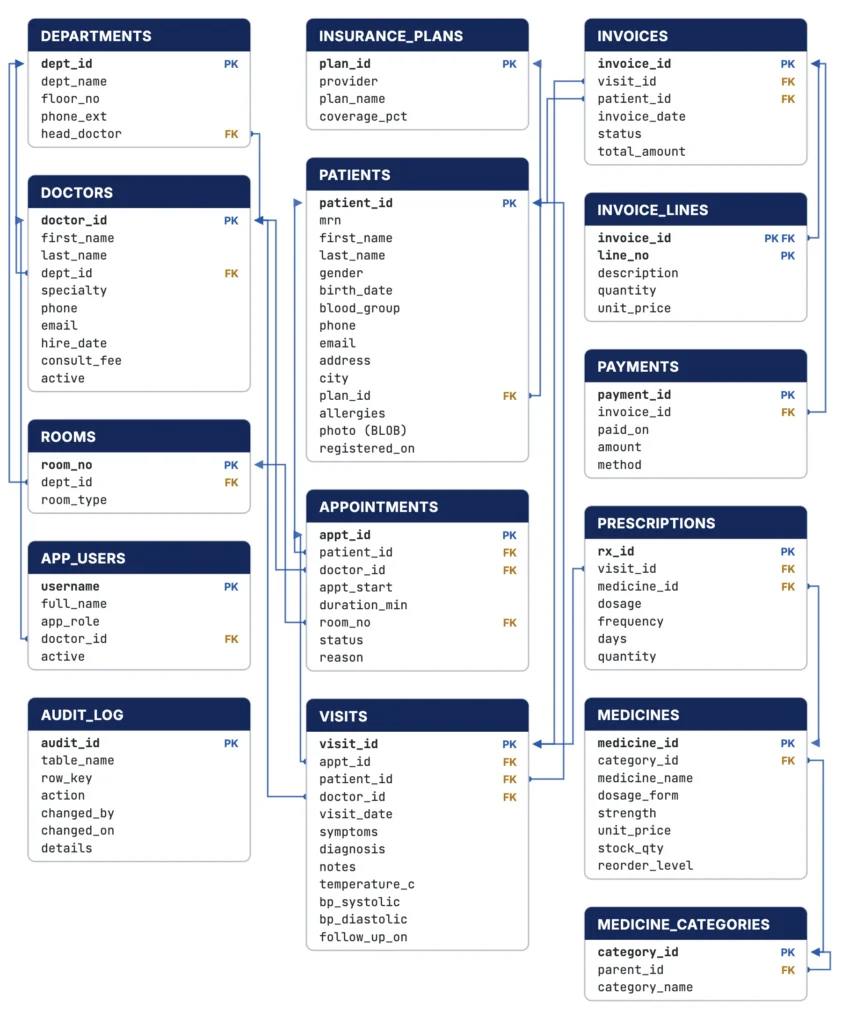
The tables fall into four groups, plus an audit log.
The Clinic and Its Staff
| Table | What it holds |
|---|---|
| DEPARTMENTS | The eight departments, from General Medicine to Diagnostics, with each one's floor and phone extension. Each has a head, HEAD_DOCTOR, who is one of the doctors. |
| DOCTORS | The 24 doctors, each with a department (DEPT_ID), specialty, hire date, consultation fee, and active flag. |
| ROOMS | The 24 consultation rooms, procedure rooms, laboratories, and wards, each in a department. |
| APP_USERS | The application's users and their roles: administrator, doctor, receptionist, billing, and pharmacy. A user with the role DOCTOR is linked to a row of DOCTORS. |
Because a department has a head doctor and each doctor belongs to a department, DEPARTMENTS and DOCTORS refer to each other. A master-detail form of departments and their doctors has to handle that.
Patients and Appointments
PATIENTS is the widest table, with the kinds of columns most item types need:
- A unique medical record number, MRN.
- Names and a birth date.
- GENDER and BLOOD_GROUP, restricted by check constraints to a few values, which make good radio groups and list items.
- Contact details and a free-text list of allergies.
- A PHOTO stored as a BLOB, for an image item.
- The patient's insurance plan, from INSURANCE_PLANS: the six plans the clinic accepts, with the percentage of a bill each one covers.
APPOINTMENTS records every booking: which patient sees which doctor, when, for how many minutes, in which room, and why. Its STATUS moves from BOOKED to CHECKED_IN and COMPLETED, or ends as CANCELLED or NO_SHOW.
The appointments form is where most of the validation and transaction logic lives. A doctor cannot be booked twice at the same time, and a completed appointment cannot be moved.
Visits and the Pharmacy
A completed appointment becomes a VISIT, the record of what the doctor found: symptoms, diagnosis, notes of up to 2,000 characters, the patient's temperature and blood pressure, and a follow-up date if needed. A visit can also be recorded for a walk-in patient without an appointment, so APPT_ID is optional.
PRESCRIPTIONS lists the medicines prescribed at a visit, with dosage, frequency, number of days, and quantity. Each refers to one of 40 MEDICINES, with its form (tablet, syrup, injection, and others), strength, price, stock, and reorder level.
Medicines belong to MEDICINE_CATEGORIES, which form a hierarchy. PARENT_ID refers to the category above, from Medicines at the top down to categories such as Antibiotics and Antihypertensives.
Billing
Each visit is billed with an INVOICE, which has one or more INVOICE_LINES (the consultation fee, medicines, and tests) and receives PAYMENTS in cash, by card, through insurance, or by UPI. An invoice's STATUS is OPEN until it is paid, PARTIAL when part of it is paid, PAID, or VOID.
The view INVOICE_TOTALS adds up the lines and payments of each invoice. The primary key of INVOICE_LINES has two columns, the invoice and the line number, and it is the only composite key in the schema.
The Audit Log
The fourteenth table, AUDIT_LOG, refers to no other table. It records who changed what, and when. Its key is an identity column, which the database fills itself, so a form must not try to insert a value into it.
Keys and Sequences
Every table except INVOICE_LINES, ROOMS, APP_USERS, and AUDIT_LOG takes its key from a sequence, as most Forms applications do. The sequences start at different values, so the keys of different tables are easy to tell apart.
| Table | Rows | Keys | Sequence |
|---|---|---|---|
| DEPARTMENTS | 8 | 100 to 107 | DEPARTMENTS_SEQ |
| DOCTORS | 24 | 1000 to 1023 | DOCTORS_SEQ |
| PATIENTS | 240 | 10000 to 10239 | PATIENTS_SEQ |
| APPOINTMENTS | 1,341 | 50000 to 51340 | APPOINTMENTS_SEQ |
| VISITS | 862 | 70000 to 70861 | VISITS_SEQ |
| PRESCRIPTIONS | 1,220 | 90000 to 91219 | PRESCRIPTIONS_SEQ |
| INVOICES | 862 | 3000 to 3861 | INVOICES_SEQ |
| PAYMENTS | 733 | 6000 to 6732 | PAYMENTS_SEQ |
| MEDICINES | 40 | 500 to 539 | MEDICINES_SEQ |
The installation restarts each sequence after the last key of the sample data, so the first new doctor you save gets 1024.
The Sample Data
The data was generated by a program with a fixed starting point, so every installation has exactly the same rows, and your forms show the same results as the examples in this series.
- The dates are in 2026. Appointments run from January 5 to December 18.
- Visits end on September 26, the "today" of the sample data, so appointments after it are still BOOKED.
- Of the 1,341 appointments, 862 are completed, each with a visit and an invoice; 111 were cancelled and 87 were missed.
The rows of APP_USERS are ADMIN, RECEPTION1, RECEPTION2, BILLING1, PHARMACY1, and five doctors: DR_PILLAI, DR_WILSON, DR_REDDY, DR_NAIR, and DR_BOSE. They are rows of a table, not database users, which a form can use to decide what each user may do.
The clinic is set in India, and its patients live in eight Indian cities. Their names, phone numbers, email addresses, and street addresses are invented. No photos are loaded; a form loads them later.
Install the CareWell Schema
The scripts are in the setup/carewell folder of the Oracle Forms code repository on GitHub:
| Script | Run as | What it does |
|---|---|---|
| create-user.sql | A DBA | Creates the user CAREWELL and grants it the privileges to create tables, views, sequences, and program units. It asks for the password. |
| install.sql | CAREWELL | Runs schema.sql (the tables), data.sql (the data), and code.sql (the CW_API package), then gathers statistics. |
| uninstall.sql | CAREWELL | Drops every object of the schema, so you can install it again. |
Install the schema in a pluggable database of your own. The examples use one named FORMSPDB on Oracle AI Database 26ai Free, but any Oracle Database 19c or later works. Run these commands from the setup/carewell folder.
Create the user and install the schema:
sqlplus system@formspdb @create-user.sql
sqlplus carewell@formspdb @install.sql
The installation takes less than a minute and ends with a line that counts the rows.
Output:
CareWell installed: 240 patients, 1341 appointments
To get the original data back after you have changed it, run uninstall.sql and then install.sql, both as CAREWELL.
Connect Oracle Forms to the Schema
Forms Builder and the Forms server connect to the database through Oracle Net. They need a net service name in the tnsnames.ora file of the Forms instance's TNS_ADMIN directory, or an Easy Connect string.
Here is an entry for a database running in a container on the same computer; adjust the host and port for yours.
A tnsnames.ora entry for FORMSPDB:
FORMSPDB =
  (DESCRIPTION =
    (ADDRESS = (PROTOCOL = TCP)(HOST = host.docker.internal)(PORT = 1523))
    (CONNECT_DATA = (SERVICE_NAME = formspdb)))
With it, choose File, Connect in Forms Builder and sign in as carewell, with its password, to the database formspdb. The same service name goes into the userid parameter of the Forms configuration section that runs your forms.
If Forms is not installed yet, start with how to install Oracle Forms 14.1.2. Once you are connected, create your first form with the Data Block Wizard on the DOCTORS table.
Conclusion
The CareWell Clinic schema gives every Oracle Forms example a realistic home: fourteen tables for the clinic's staff, patients and appointments, visits and pharmacy, and billing, plus an audit log, the INVOICE_TOTALS view, nine sequences with distinct key ranges, and fixed sample data. Install it with create-user.sql as a DBA and install.sql as CAREWELL, add a tnsnames.ora entry, and connect Forms Builder as carewell to start building forms.
