
Validation keeps bad data out of the database: a start time outside clinic hours, a doctor booked twice at once, a status that skips a step. Oracle Forms validates at well-defined moments, checks some things by itself, and lets you add your own rules in triggers.
This guide covers validation in Oracle Forms 14.1.2 with an appointments form in which every booking rule is checked as the user types. It explains validation status, the checks Forms makes on its own, WHEN-VALIDATE-ITEM and WHEN-VALIDATE-RECORD, database constraints, and the built-ins that force or skip validation.
Sample Form for This Guide
The examples and screenshots use the sample form CH19_APPOINTMENT from the Oracle Forms code repository on GitHub. Download it, open it in Forms Builder, and connect as CAREWELL to follow along.
| Form | File | What it shows |
|---|---|---|
| CH19_APPOINTMENT | forms/ch19/ch19_appointment.fmb | One doctor's appointments with the clinic's booking rules |
The forms run against the CareWell Clinic sample schema, which you install first.
Validation at a Glance
| Where the rule lives | Use it for | Example |
|---|---|---|
| Item properties | Type, format, length, required, range, and list checks | Duration between 5 and 240 minutes |
| WHEN-VALIDATE-ITEM | A rule about one value | No appointments on Sundays |
| WHEN-VALIDATE-RECORD | A rule across several items or other rows | No double bookings |
| Database constraints | The last line of defense | The patient must exist |
When Oracle Forms Validates
Every item and every record has a validation status:
- New: created and not changed since, like a new record's items before the user types in them.
- Changed: changed since it was last validated, by the user or by code.
- Valid: validated, or fetched from the database. A queried record starts Valid.
Forms validates an item when the cursor leaves it with the status New or Changed, whether by Tab, a click elsewhere, or a key that moves to another record. It validates a record when the cursor leaves the record or when the form is saved. Leaving a Valid item validates nothing, which you can see in the traced firing order of triggers.
The Validation Unit
The form property Validation Unit sets how much the user can change before validation. With Item, the default, each item is validated as it is left. With Record, Block, or Form, Forms waits until the cursor leaves the record, block, or form.
Larger units let the user fill several items in any order. The checks then run together, later, and the cursor is sent back to the first invalid item. The property is described in SET_FORM_PROPERTY in Oracle Forms.
What Forms Checks by Itself
Before any trigger runs, Forms validates an item against its own properties, in this order:
- The value must match the item's Data Type and Format Mask. Letters in a number item fail with FRM-50016, and a malformed date with FRM-50026.
- It must not exceed Maximum Length.
- A Required item must have a value (FRM-40202).
- The value must lie between Lowest Allowed Value and Highest Allowed Value (FRM-40207).
- With Validate from List, it must be in the item's LOV.
Only then does Forms fire WHEN-VALIDATE-ITEM. In the sample form, the duration has a range of 5 to 240 minutes, and every column the table requires is Required, all done with properties rather than code. These properties are covered in how to use text items in Oracle Forms.
Validate One Value with WHEN-VALIDATE-ITEM
WHEN-VALIDATE-ITEM checks the value of one item. When the value is wrong, the trigger displays a message and raises FORM_TRIGGER_FAILURE. The validation fails, the item stays Changed, and the cursor stays in the item until the user corrects it.
The start of an appointment must be on a working day, during clinic hours.
Example (WHEN-VALIDATE-ITEM trigger on APPOINTMENTS.APPT_START):
declare
  v_hour number := to_number(to_char(:appointments.appt_start, 'HH24.MI'));
begin
  if to_char(:appointments.appt_start, 'DY', 'nls_date_language=english') = 'SUN' then
    message('The clinic is closed on Sundays.');
    raise form_trigger_failure;
  elsif v_hour < 9 or v_hour >= 17 then
    message('Appointments start between 09:00 and 16:59.');
    raise form_trigger_failure;
  end if;
end;
A Sunday is refused, and so is an evening.
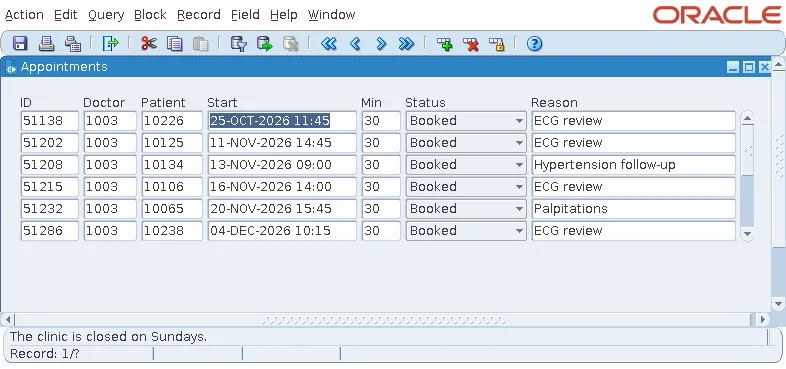
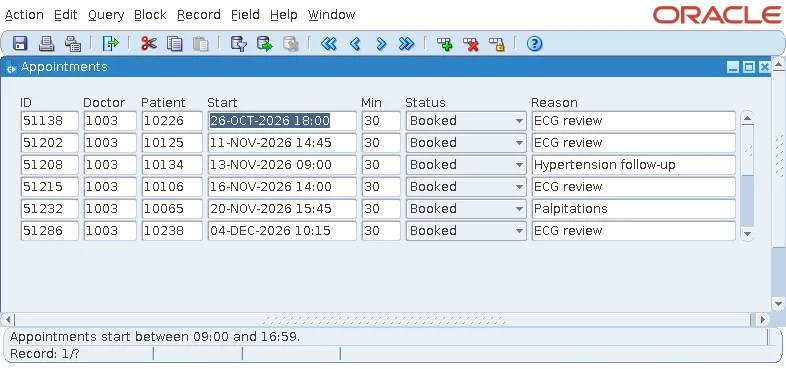
TO_CHAR with 'DY' returns the day's abbreviation in the session's language, so the trigger fixes the language to English. Comparing with TO_CHAR(..., 'D') instead would depend on which day the territory treats as the first of the week.
Write Messages That Help
A good validation message says what is wrong and what is right. Compare "Appointments start between 09:00 and 16:59" with the generic "WHEN-VALIDATE-ITEM trigger failed on field - APPOINTMENTS.APPT_START" that the Data Block Wizard's generated triggers produce. For more on custom messages, see how to create custom error messages in Oracle Forms.
Compare with the Database Value
Some rules depend on the value the record had before the user changed it. An appointment's status follows a path (booked, checked in, completed), and a finished appointment keeps its status. GET_ITEM_PROPERTY with DATABASE_VALUE returns the value fetched from the database.
Example (WHEN-VALIDATE-ITEM trigger on APPOINTMENTS.STATUS):
declare
  v_old varchar2(10) := get_item_property('APPOINTMENTS.STATUS', database_value);
begin
  if :appointments.status = v_old then
    return;                                            -- changed back: nothing to check
  elsif v_old in ('COMPLETED', 'CANCELLED', 'NO_SHOW') then
    message('A ' || lower(v_old) || ' appointment can''t change its status.');
    raise form_trigger_failure;
  elsif v_old = 'BOOKED' and :appointments.status = 'COMPLETED' then
    message('Check the patient in before completing the appointment.');
    raise form_trigger_failure;
  end if;
end;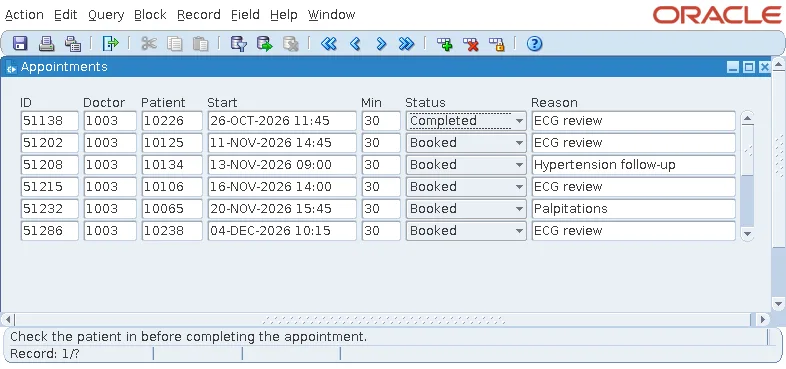
The trigger returns early when the user sets the old value again. Changing an item and changing it back still leaves it Changed, so the trigger fires.
What Validation Triggers Can and Cannot Do
- They cannot navigate: GO_ITEM and the other restricted built-ins fail in them, as explained in how to use triggers in Oracle Forms.
- They can change other items, which are then validated when the cursor leaves them.
- A WHEN-VALIDATE-ITEM that changes its own item marks it Valid, so the new value is not validated again.
Validate a Whole Record with WHEN-VALIDATE-RECORD
A rule that involves several items of a record, such as a start and an end, or a quantity and a stock, belongs in WHEN-VALIDATE-RECORD. It fires when the cursor leaves a changed record or the form is saved, by which time the user has filled every item, in whatever order.
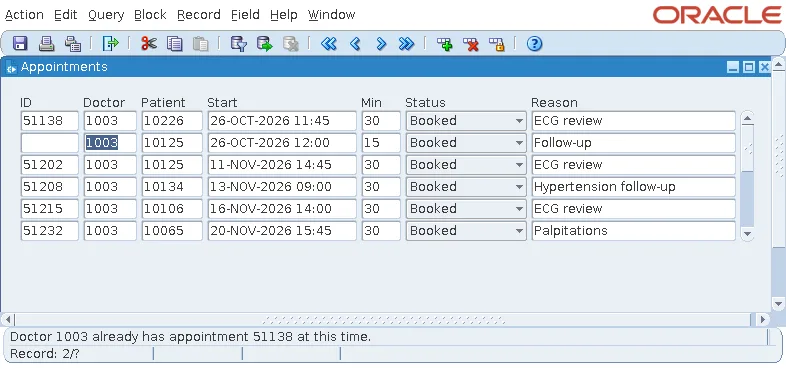
A doctor cannot be booked twice at once. The rule involves the doctor, the start, and the duration of the new appointment, and the other appointments in the database.
Example (WHEN-VALIDATE-RECORD trigger on APPOINTMENTS):
declare
  v_clash appointments.appt_id%type;
begin
  select min(appt_id)
  into   v_clash
  from   appointments
  where  doctor_id = :appointments.doctor_id
  and    appt_id  != nvl(:appointments.appt_id, -1)
  and    status in ('BOOKED', 'CHECKED_IN')
  and    appt_start < :appointments.appt_start + :appointments.duration_min / 1440
  and    appt_start + duration_min / 1440 > :appointments.appt_start;

  if v_clash is not null then
    message('Doctor ' || :appointments.doctor_id || ' already has appointment ' || v_clash ||
            ' at this time.');
    raise form_trigger_failure;
  end if;
end;
Two intervals overlap when each starts before the other ends, and duration_min / 1440 converts minutes to a fraction of a day. The condition on APPT_ID excludes the record itself when an existing appointment is being changed.
A new appointment at 12:00 on 26 October clashes with appointment 51138, which runs from 11:45 for thirty minutes. Saving it fails, and nothing is written.
The Limit of Form Validation
The query sees the committed rows of other users, not their changes in progress. Two users booking the same slot at the same moment would both pass the check. Only a rule in the database, such as a unique constraint, or a lock taken before the check, closes that window. Validation in the form is for the user; the database is the last line of defense.
Database Constraints and FRM-40508
Every database constraint still applies when a form saves a row. A form that does not check them itself lets the user type a whole record, then fails on save with a message that says little. An appointment for patient 99999, who does not exist, passes every check of the form and fails at the insert.
Output:
FRM-40508: ORACLE error: unable to INSERT record.
Help, Display Error (Shift+Ctrl+E) shows the statement and the database's error.
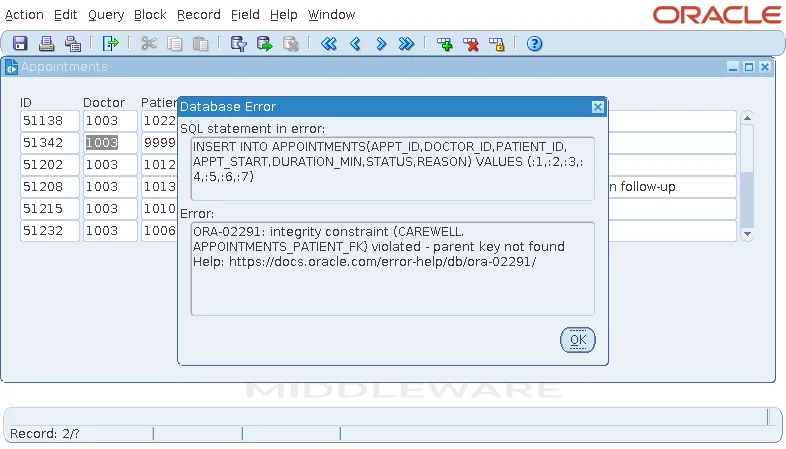
The user would have no idea what to do. The cure is to check such values in the form: a WHEN-VALIDATE-ITEM on PATIENT_ID that looks up the patient, or better, an LOV with Validate from List, as shown in how to create an LOV using the LOV Wizard. The Data Block Wizard's Enforce data integrity option writes this kind of check for every constraint of the table; it is a good start, to be rewritten with clear messages.
Control Validation from Code
VALIDATE
VALIDATE validates now, at a scope of your choice, as if the cursor were leaving it. Call it from a Check button, or from code that must be sure a record is valid before acting on it, and test FORM_SUCCESS for the result.
Syntax:
validate(validation_scope number)
The scope is ITEM_SCOPE, RECORD_SCOPE, BLOCK_SCOPE, FORM_SCOPE, or DEFAULT_SCOPE. When validation fails, the cursor does not move to the invalid item.
ITEM_IS_VALID
SET_ITEM_PROPERTY, or SET_ITEM_INSTANCE_PROPERTY, with ITEM_IS_VALID marks an item Valid, so Forms skips its validation. Use it for a value that code has just set and knows to be right, or, with PROPERTY_FALSE, to mark an item for validation again.
Example:
:appointments.duration_min := 30;
set_item_property('APPOINTMENTS.DURATION_MIN', item_is_valid, property_true);
Two more switches exist, both to be used sparingly: SET_FORM_PROPERTY with VALIDATION set to PROPERTY_FALSE turns validation off for the whole form, and SET_FORM_PROPERTY with VALIDATION_UNIT changes the unit at run time.
The Status of Records and Forms
| Variable or built-in | Values |
|---|---|
| :SYSTEM.RECORD_STATUS | The current record: NEW, INSERT (new and changed), QUERY (fetched, unchanged), or CHANGED. |
| :SYSTEM.BLOCK_STATUS, :SYSTEM.FORM_STATUS | NEW, QUERY, or CHANGED for the current block or the whole form. |
| GET_RECORD_PROPERTY(record, block, STATUS) | The status of any record. |
A form's status becomes CHANGED only after a changed record has been validated. Code that asks whether to save before closing should call VALIDATE(FORM_SCOPE) first. To stop a save when validation fails, see also how to prevent a commit if validation fails.
Conclusion
Oracle Forms validates Changed items when the cursor leaves them and Changed records when the cursor leaves the record or the form is saved, after first checking data type, format, length, Required, range, and Validate from List. Use WHEN-VALIDATE-ITEM for rules about one value and WHEN-VALIDATE-RECORD for rules across items and other rows, raising FORM_TRIGGER_FAILURE with a clear message. Check foreign keys in the form so users never see FRM-40508, keep the database as the last line of defense, and use VALIDATE, ITEM_IS_VALID, and the status variables to control validation from code.
