
If you open an old form with a chart in Forms Builder 14.1.2, it will not compile. The chart item called Oracle Graphics to draw a chart of a block's data, and Oracle Graphics is long gone, so the chart item went with it.
This guide explains what happens to chart items in Oracle Forms 14.1.2, the three ways to show a chart today, and a complete bar chart built from ordinary display items that works everywhere.
Sample Form for This Guide
The examples and screenshots use the sample forms CH11_CHART and CH11_TCHART from the Oracle Forms code repository on GitHub. Download them, open them in Forms Builder, and connect as CAREWELL to follow along.
| Form | File | What it shows |
|---|---|---|
| CH11_CHART | forms/ch11/ch11_chart.fmb | A bar chart of appointments per department, made of display items |
| CH11_TCHART | forms/ch11/ch11_tchart.fmb | An old-style chart item that the 14.1.2 compiler rejects |
The forms run against the CareWell Clinic sample schema, which you install first.
The Chart Item Is No Longer Supported
Forms Builder 14.1.2 still has the chart item type and its properties, so old forms can be opened. The compiler, however, refuses it.
Output:
FRM-30454: Unsupported item type.
Item: CHART
Block: CTL
Form: CH11_TCHART
Any form that still contains a chart item must be changed before it can be compiled for 14.1.2.
Three Ways to Show a Chart in Oracle Forms 14.1.2
| Approach | How it works | Best for |
|---|---|---|
| Draw it with items | A multi-record block whose display items hold bars of characters. | Simple bar charts that must work in every client. |
| A Java bean or JavaScript | A bean area hosts a Java chart component, or the JavaScript integration of Forms 14.1.2 passes data to a chart library in the page that holds the form. | Interactive or complex charts. |
| Oracle Reports | Reports draw charts in documents the form runs. | Printed or exported charts. |
For the Reports route, see how to call Oracle Reports from Oracle Forms.
Build a Bar Chart from Display Items
The sample chart form shows the number of appointments for each department as a bar.
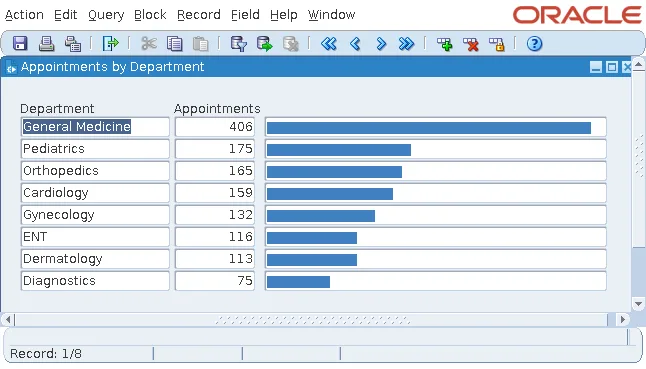
The Block Behind the Chart
The chart is a control block called BARS, with eight records and three display items:
- DEPT_NAME, the department.
- APPTS, the number of appointments.
- BAR, a string of the Unicode block character U+2588, whose length is proportional to the count.
The bar item's color is r25g50b75, a color of the Forms palette.
The Trigger That Fills It
When the form starts, a trigger finds the largest count, then creates one record per department with a bar up to 36 characters long.
Example (WHEN-NEW-FORM-INSTANCE trigger on the form):
declare
  v_max number;
begin
  select max(count(*)) into v_max
  from   appointments a, doctors d
  where  d.doctor_id = a.doctor_id
  group  by d.dept_id;

  go_block('BARS');
  for r in (select dp.dept_name, count(*) as appts
            from   appointments a, doctors d, departments dp
            where  d.doctor_id = a.doctor_id
            and    dp.dept_id = d.dept_id
            group  by dp.dept_name
            order  by appts desc) loop
    if :bars.dept_name is not null then
      create_record;
    end if;
    :bars.dept_name := r.dept_name;
    :bars.appts     := r.appts;
    for i in 1 .. round(r.appts / v_max * 36) loop     -- one block character per step
      :bars.bar := :bars.bar || unistr('\2588');
    end loop;
  end loop;
  first_record;
end;
Two PL/SQL Limits the Trigger Works Around
The trigger shows two things to know about PL/SQL inside Oracle Forms:
- The queries join tables in the WHERE clause, because the PL/SQL compiler of Forms does not accept the JOIN syntax of SQL, nor analytic functions such as MAX(...) OVER (), in the SQL statements of triggers and program units. That is also why the largest count comes from a separate query with MAX(COUNT(*)).
- The bar is built one character at a time, because RPAD in the form counts bytes, and the block character takes three bytes in UTF-8. RPAD would produce bars that are too short.
When you need SQL features the Forms compiler does not support, move the query into a database view or a stored function and call that from the form.
Conclusion
The chart item is not supported in Oracle Forms 14.1.2, and the compiler rejects it with FRM-30454. For simple charts, fill a multi-record control block of display items with bars of the U+2588 character from a WHEN-NEW-FORM-INSTANCE trigger, keeping to the SQL the Forms compiler accepts. For richer charts, use a Java bean, the JavaScript integration, or Oracle Reports.
