
Some things are easier in a web page than in Java: a chart library, a map, or a dashboard the organization already has. Oracle Forms 14.1.2 can connect a running form to a page open in the user's browser, so the form runs JavaScript in the page and the page raises events in the form.
This guide builds that connection with WebSocket JavaScript integration (WJSI): a form sends a doctor's bookings to a page that draws them with Chart.js, and a click on a bar lists that doctor's appointments back in the form. It also covers the two network problems that kept the page from finding the form in testing.
Sample Form for This Guide
The examples and screenshots use the sample form CH31_JS from the Oracle Forms code repository on GitHub. Download it, open it in Forms Builder, and connect as CAREWELL to follow along.
| Form | File | What it shows |
|---|---|---|
| CH31_JS | forms/ch31/ch31_js.fmb | A form that sends bookings to a web page and receives its click events |
The forms run against the CareWell Clinic sample schema, which you install first.
How WJSI Works
The Forms client, on the user's computer, starts a small WebSocket server. The page connects to it, and from then on the form can run JavaScript in the page, and the page can raise events in the form.
| Direction | Form side | Page side |
|---|---|---|
| Form to page | SET_CUSTOM_PROPERTY with WSJSI_JS_EVAL_EXPR | The expression is evaluated in the page. |
| Page to form | WHEN-CUSTOM-JAVASCRIPT-EVENT, with :SYSTEM.JAVASCRIPT_EVENT_NAME and :SYSTEM.JAVASCRIPT_EVENT_VALUE | frmwebsocketjsi.raiseEvent(name, value) |
What WJSI Needs
WJSI is itself a Java bean, with its parts in the forms/java directory of the Forms installation:
- frmwebsocketjsi.jar, the bean, whose class is oracle.forms.websocketjsi.WebSocketJSI, and frmwebsocketjsi.js, the library the page loads.
- Jetty 9.4, the WebSocket server the bean runs. It is not installed with Forms: download the single-JAR distribution, jetty-all-9.4.x-uber.jar, from Maven Central, and copy it to forms/java. The test used jetty-all-9.4.54.v20240208-uber.jar.
The configuration section adds both JARs to the archive and turns on events from JavaScript.
A formsweb.cfg section for WJSI:
[cwjs]
archive=frmall.jar,carewell_icons.jar,carewell_beans.jar,frmwebsocketjsi.jar,jetty-all-9.4.54.v20240208-uber.jar
enableJavascriptEvent=true
websocketJSILogging=true
websocketJSILogging writes the bean's messages to the client's log, which is how the problems described below were found. In the form, a bean area, CTL.WJSI, has the implementation class oracle.forms.websocketjsi.WebSocketJSI. It draws nothing, so it can be tiny. Bean areas and custom properties are explained in how to add Java beans to Oracle Forms.
Start the Server and a Session
The form drives the bean with custom properties. Two steps connect it:
- WSJSI_START_SERVER, with a port, starts the WebSocket server in the Forms client. It listens on localhost only, so pages on other computers cannot reach it.
- WSJSI_BEGIN_SESSION, with the same port, connects the bean itself to the server, under the session ID set before with WSJSI_SET_SESSION_ID. The page joins the form by that ID.
Take the Steps in Order with a Timer
The server starts in a background thread, so WSJSI_IS_SERVER_UP may still say FALSE just after START_SERVER, and a session begun too early fails. The form lets a repeating timer take the steps in order. WHEN-NEW-FORM-INSTANCE creates it.
Example (WHEN-NEW-FORM-INSTANCE trigger on the form):
declare
  v_timer timer;
begin
  v_timer := create_timer('WJSI_JOIN', 1000, repeat);   -- see WHEN-TIMER-EXPIRED
end;
Each second, WHEN-TIMER-EXPIRED does the next step, until the session exists.
Example (WHEN-TIMER-EXPIRED trigger on the form):
-- The WJSI server starts in a background thread of the client: check, act, and try again
if get_application_property(timer_name) = 'WJSI_JOIN' then
  if get_custom_property('CTL.WJSI', 1, 'WSJSI_IS_SERVER_UP') = 'FALSE' then
    set_custom_property('CTL.WJSI', 1, 'WSJSI_START_SERVER', '9002');    -- on localhost
  elsif get_custom_property('CTL.WJSI', 1, 'WSJSI_IS_SESSION') = 'FALSE' then
    set_custom_property('CTL.WJSI', 1, 'WSJSI_SET_SESSION_ID', 'cw-board');
    set_custom_property('CTL.WJSI', 1, 'WSJSI_BEGIN_SESSION', '9002');   -- the form joins
  else
    :ctl.session := get_custom_property('CTL.WJSI', 1, 'WSJSI_GET_SESSION_ID');
    delete_timer('WJSI_JOIN');
  end if;
end if;
Timers are covered in how to use timers in Oracle Forms. Other properties answer questions, such as WSJSI_IS_SESSION, WSJSI_GET_SESSION_ID, and WSJSI_IS_PORT_AVAIL, or change and end things: WSJSI_SET_PORT, WSJSI_END_SESSION, and WSJSI_STOP_SERVER.
The Web Page
The page loads frmwebsocketjsi.js. Here the page and the library are served from forms/java, at /forms/java/ of the Forms server. The page uses three functions of the frmwebsocketjsi object: connectToServer(port), beginSession(sessionId), and raiseEvent(name, value).
Below are the parts of the page cw-board.html that talk to the form, with the session ID fixed for brevity; the real page reads it from a field.
The page's script:
<script src="/forms/java/frmwebsocketjsi.js"></script>
<script>
  function connect() {
    frmwebsocketjsi.connectToServer(9001);
    setTimeout(function () { frmwebsocketjsi.beginSession('cw-board'); }, 1000);
  }
  function showBookings(rows) {                    // called by the form
    ...
    chart = new Chart(document.getElementById('chart'), { type: 'bar', data: ...,
      options: { onClick: function (e, bars) {      // a click on a bar goes to the form
        if (bars.length) frmwebsocketjsi.raiseEvent('doctor', labels[bars[0].index]);
      } } });
  }
</script>
What the Page's Console Tells You
| Console message | Meaning |
|---|---|
| Connected with given session id. | The session is established. |
| Could not find peer. | The session ID is unknown. |
| Peer is already engaged | A second page asked for the same session; the server pairs one page with one form. |
Send Data from the Form to the Page
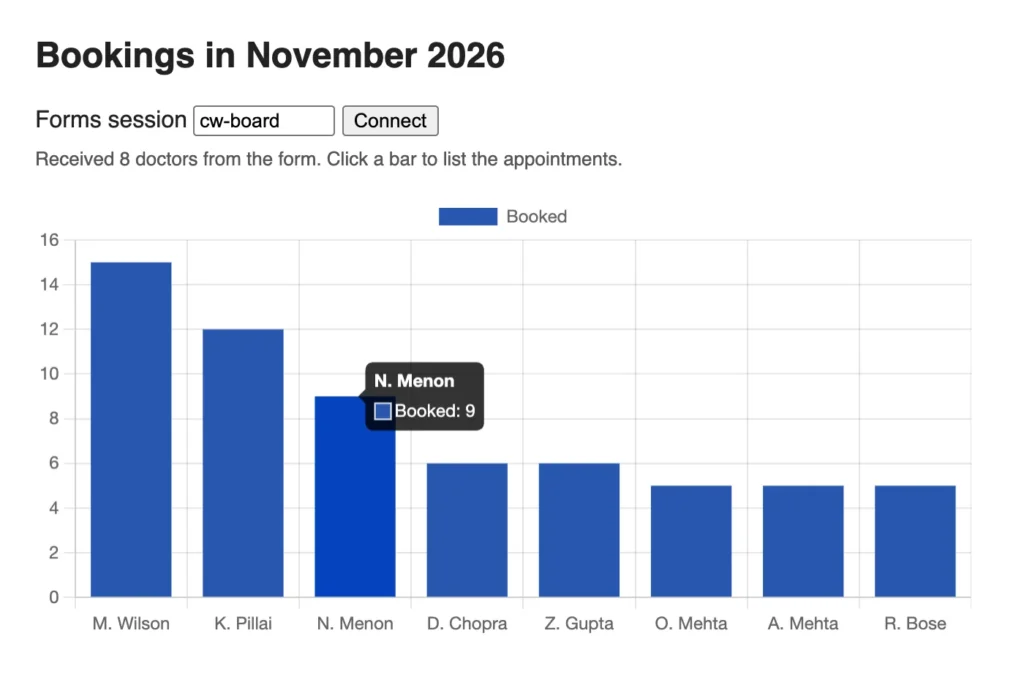
WSJSI_JS_EVAL_EXPR sends a JavaScript expression to the page, which evaluates it. The Send to Page button queries the eight busiest doctors, builds a JSON array, and calls the page's showBookings.
Example (WHEN-BUTTON-PRESSED trigger on CTL.SEND):
declare
  v_js varchar2(4000);
begin
  for d in (select * from (select substr(d.first_name, 1, 1) || '. ' || d.last_name name,
                                   count(a.appt_id) n
                              from doctors d, appointments a
                             where a.doctor_id = d.doctor_id and a.status = 'BOOKED'
                               and a.appt_start >= date '2026-11-01'
                               and a.appt_start < date '2026-12-01'
                             group by d.doctor_id, d.first_name, d.last_name
                             order by n desc)
             where rownum <= 8) loop
    v_js := v_js || '{"doctor":"' || d.name || '","booked":' || d.n || '},';
  end loop;
  set_custom_property('CTL.WJSI', 1, 'WSJSI_JS_EVAL_EXPR',
                      'showBookings([' || rtrim(v_js, ',') || '])');   -- runs in the page
end;
The page then drew the chart shown above. WSJSI_JS_EVAL_FUNCTION sends a function call the same way, and WSJSI_GET_JS_EVAL_VALUE returns the value of the last evaluation.
Treat the Text as Code
The text is code run by the browser. Build it from values the form controls, and escape text that comes from users or data, because a quote in a name would end the string.
Raise Events from the Page: WHEN-CUSTOM-JAVASCRIPT-EVENT
raiseEvent fires the form-level trigger WHEN-CUSTOM-JAVASCRIPT-EVENT. In the trigger, the event's name is in :SYSTEM.JAVASCRIPT_EVENT_NAME, and its value, which is always a string, in :SYSTEM.JAVASCRIPT_EVENT_VALUE.
Example (WHEN-CUSTOM-JAVASCRIPT-EVENT trigger on the form):
if :system.javascript_event_name = 'doctor' then
  :ctl.chosen := 'Dr. ' || :system.javascript_event_value;    -- sent by raiseEvent
  go_block('APPOINTMENTS');
  set_block_property('APPOINTMENTS', default_where,
    'doctor_id = (select doctor_id from doctors'
    || ' where substr(first_name, 1, 1) || ''. '' || last_name = '''
    || replace(:system.javascript_event_value, '''', '''''') || ''')'
    || ' and status = ''BOOKED'' and appt_start >= date ''2026-11-01'''
    || ' and appt_start < date ''2026-12-01''');
  execute_query;
end if;
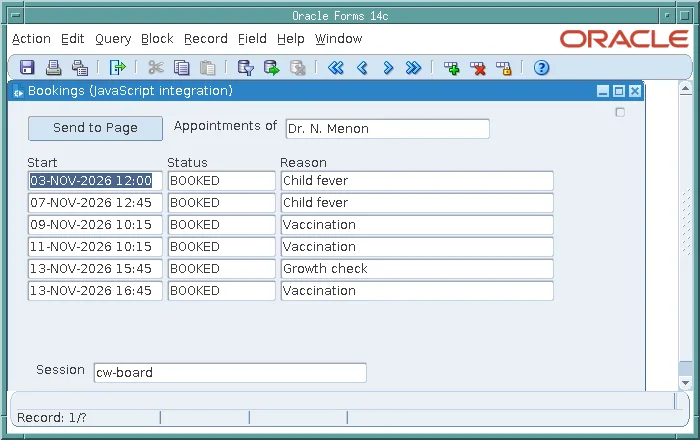
A click on the bar of N. Menon queried the doctor's appointments in the form.
The value comes from a page, which a user can change. The trigger doubles its quotes before putting it in the WHERE clause, and a production form would bind it instead. Changing a block's WHERE clause is covered in SET_BLOCK_PROPERTY in Oracle Forms.
Two Network Problems to Know
In testing, two problems, both with addresses, kept the page from finding the form. The second is worth knowing on any computer.
Where the Browser Runs
The page and the Forms client must be on the same computer, because the server listens on localhost. In the test, the Forms client ran in a container, so the page, in a browser on the host, connected to port 9001, which the container published and forwarded to the form's port, 9002. On a user's computer, the page connects to the form's port directly.
IPv4 and IPv6
The server started on localhost, which it bound to the IPv4 address 127.0.0.1. But the bean, looking for a loopback address to begin its session, took the IPv6 one, [::1], where nothing listened. WSJSI_IS_SESSION stayed FALSE, and the page reported Could not find peer.
Starting the client's Java runtime with -Djava.net.preferIPv4Stack=true made the bean use 127.0.0.1, and the session began at once. For the Forms Standalone Launcher, that is an option of the java command that starts it; for Java Web Start and the browser, it is a Java runtime setting on the users' computers.
Conclusion
WebSocket JavaScript integration connects an Oracle Forms 14.1.2 form to a web page on the user's computer. A WJSI bean area starts a WebSocket server and a session, driven step by step by a timer; WSJSI_JS_EVAL_EXPR runs JavaScript in the page; and the page's raiseEvent fires WHEN-CUSTOM-JAVASCRIPT-EVENT in the form. It needs the Jetty 9.4 JAR in the archive, enableJavascriptEvent in the configuration section, the page and client on the same computer, and, where IPv6 is on, IPv4 preferred by the client's Java runtime.
