
A push button is the simplest way to let users run code in a form: they click it, and your WHEN-BUTTON-PRESSED trigger does the work. Buttons can show a label, an icon, or both, and a few properties decide whether clicking one moves the cursor away from the record the user is working on.
This guide covers push buttons in Oracle Forms 14.1.2: their properties, why toolbar buttons should not take the cursor, and how to deploy icons so the Forms client can find them.
Sample Form for This Guide
The examples and screenshots use the sample form CH11_PHOTO from the Oracle Forms code repository on GitHub. Download it, open it in Forms Builder, and connect as CAREWELL to follow along.
| Form | File | What it shows |
|---|---|---|
| CH11_PHOTO | forms/ch11/ch11_photo.fmb | Three iconic buttons in a TOOLS control block |
The forms run against the CareWell Clinic sample schema, which you install first.
Push Button Properties at a Glance
| Property | What it does |
|---|---|
| Label | The text on the button. |
| Access Key | A letter the user presses with Alt to click the button from the keyboard. |
| Iconic, Icon Filename | Show an icon on the button. |
| Label on Iconic Button | None shows only the icon; Start, End, Top, or Bottom puts the label on that side of it. |
| Default Button | Makes the button the one the Select key (Enter) presses in its window, as in a dialog. |
| Rollover Color Swap, Rounded Corner End | Change the colors when the pointer is over the button, and round one or both ends. |
| Tooltip (Help group) | Especially useful for buttons with only an icon. |
| Mouse Navigate, Keyboard Navigable | Whether a click or Tab moves the cursor to the button. |
Create a Push Button
A push button is an item of type Push Button. It holds no value; its purpose is its WHEN-BUTTON-PRESSED trigger, which Forms fires when the user clicks the button or presses it from the keyboard.
The sample photo form has three buttons with icons that find patients, load a photo from a file, and save.
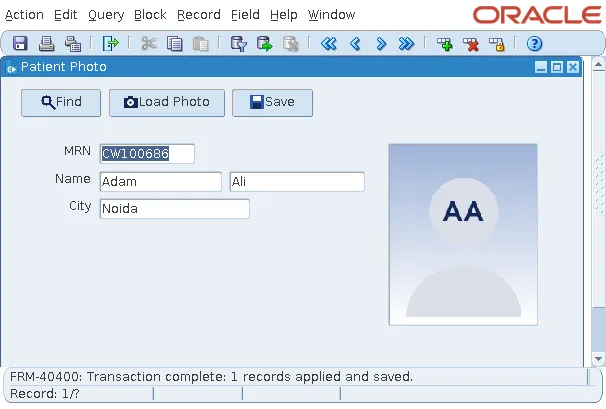
Each button runs one statement or a short block.
The Find button's WHEN-BUTTON-PRESSED trigger:
go_block('PATIENTS'); execute_query;The Save button's WHEN-BUTTON-PRESSED trigger:
commit_form;
The Load Photo button reads a picture from a file, as shown in how to display images in Oracle Forms using READ_IMAGE_FILE. For more trigger examples, see the WHEN-BUTTON-PRESSED trigger in Oracle Forms.
Put Buttons in Their Own Control Block
Buttons usually belong to a control block of their own, here TOOLS, rather than to the data block they act on. A button in a data block is repeated in every record of a multi-record block.
Set the Label and Icon
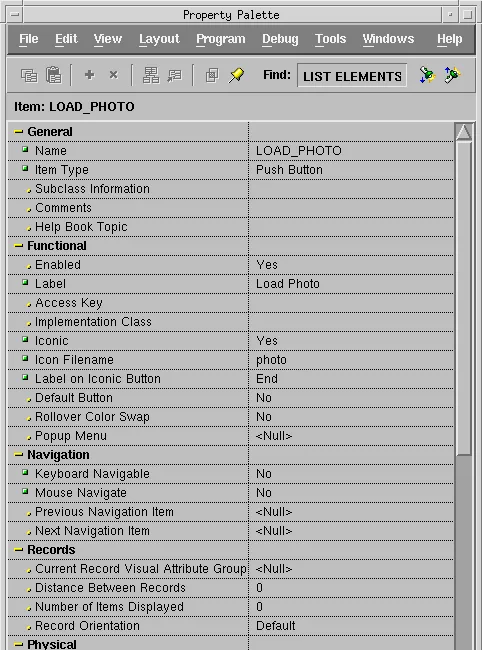
Set the button's Functional properties in the Property Palette. The buttons of the photo form show their labels at the end of their icons.
Buttons That Do Not Take the Cursor
When the user clicks a button, Forms normally moves the cursor to it first. That means leaving the item the cursor was in, validating it, and perhaps leaving the record and the block. For a button that acts on the current record, such as loading a photo for this patient, that is exactly wrong.
Two settings fix it:
- Mouse Navigate set to No: the click fires WHEN-BUTTON-PRESSED while the cursor stays where it was.
- Keyboard Navigable set to No: Tab passes over the button.
Every button of a toolbar should have both set to No, as the buttons of the photo form do.
Inside the trigger, :SYSTEM.TRIGGER_ITEM names the button that was clicked, and :SYSTEM.CURSOR_ITEM the item the cursor is in. With Mouse Navigate set to No, that is still the item of the data block.
Deploy Icons for Push Buttons
An icon is a GIF, PNG, or JPEG file that the Forms client downloads from the server. The Icon Filename property names it without its extension (photo). Forms takes the extension from the setting default.icons.iconextension in the file Registry.dat, gif by default. You can give a file name with another extension, or a URL, in full.
Package the Icons in a JAR
The usual way to deploy icons is a JAR file with the images at its root, listed in the archive parameter of the configuration section that runs the form, with imageBase set to codebase, the default of formsweb.cfg. The photo form's icons are three 16-by-16 GIF files.
Create the JAR:
jar cf carewell_icons.jar find.gif photo.gif save.gif
Copy the JAR to the directory of the Forms client's JARs, $ORACLE_HOME/forms/java, and add it to the section of formsweb.cfg that runs your forms.
The formsweb.cfg section:
[book]
archive=frmall.jar,carewell_icons.jar
The Forms client, in a browser or the Standalone Launcher, downloads the JAR once and caches it.
Or Serve Icons as Separate Files
Icons can also be served as separate files from a directory of the web server, named by default.icons.iconpath in Registry.dat. A JAR is faster, because it is one download instead of one per icon.
Conclusion
A push button's work is its WHEN-BUTTON-PRESSED trigger, while its label, icon, access key, and default status are properties. Put buttons in a control block of their own, and set Mouse Navigate and Keyboard Navigable to No for buttons that act on the current record, so clicking them does not move the cursor or trigger validation. Deploy icons as GIF, PNG, or JPEG files in a JAR listed in the archive parameter of formsweb.cfg, with imageBase set to codebase.
