
Query by example lets users describe the rows they want, but a real form often needs more: a criterion the block has no item for, a rule that refuses a query without criteria, display values computed for each row. That is the job of the query triggers and built-ins.
This guide covers the developer side of queries in Oracle Forms 14.1.2: PRE-QUERY and POST-QUERY, the EXECUTE_QUERY, ENTER_QUERY, COUNT_QUERY, and ABORT_QUERY built-ins, the system variables of queries, and how Forms fetches rows.
Sample Form for This Guide
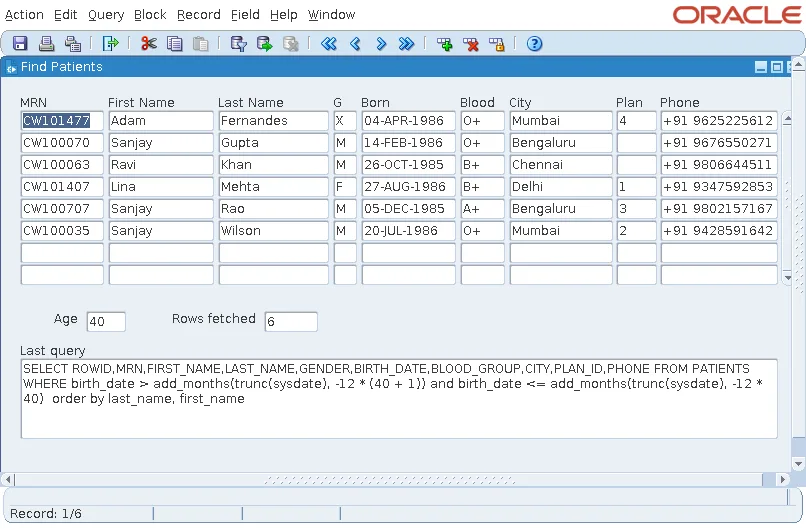
The examples and screenshots use the sample form CH20_SEARCH from the Oracle Forms code repository on GitHub. Download it, open it in Forms Builder, and connect as CAREWELL to follow along.
| Form | File | What it shows |
|---|---|---|
| CH20_SEARCH | forms/ch20/ch20_search.fmb | A patient search form that shows the rows fetched and the last SELECT |
The forms run against the CareWell Clinic sample schema, which you install first.
Query Triggers at a Glance
| Trigger | Fires | Use it to |
|---|---|---|
| PRE-QUERY | Once, after the criteria are known and before Forms builds the SELECT | Check, change, or extend the criteria, or refuse the query |
| POST-QUERY | Once for each record fetched | Fill display items that are not columns |
Where these fire among all the other triggers is shown in how to trace the firing order of triggers.
PRE-QUERY: Add Criteria from Elsewhere
In PRE-QUERY, the example record is still in the block. The trigger can:
- Read the criteria the user typed.
- Change them: assign a value to an item, and it becomes a criterion.
- Refuse the query by raising FORM_TRIGGER_FAILURE, for example when a large table would be queried without any criterion.
- Add conditions the example record cannot express.
Example: Search by Age When the Table Stores Birth Dates
The sample search form has an Age item in a control block, but the table stores birth dates, not ages. PRE-QUERY turns the age into a condition on BIRTH_DATE.
Example (PRE-QUERY trigger on PATIENTS):
declare
  v_age varchar2(10) := :ctl.age;           -- a criterion the table has no column for
begin
  if v_age is not null then
    set_block_property('PATIENTS', onetime_where,
      'birth_date >  add_months(trunc(sysdate), -12 * (' || to_number(v_age) || ' + 1)) ' ||
      'and birth_date <= add_months(trunc(sysdate), -12 * ' || to_number(v_age) || ')');
  end if;
end;
ONETIME_WHERE adds the condition to this query only, as explained in SET_BLOCK_PROPERTY in Oracle Forms. With 40 in Age, Execute Query returns the six patients who are forty today, a result that depends on the day the form runs.
Never Paste User Input into SQL Unchecked
TO_NUMBER does more than convert here: a value that is not a number fails at that point, instead of being pasted into the SQL. Never build SQL text from what a user typed without making sure it can only be what you expect.
POST-QUERY: Fill Each Record
POST-QUERY fires for every record fetched, with that record current. It is where display items that are not columns get their values, such as a patient's name looked up from another table, or an age computed from a birth date.
- Its code runs once per row, so keep it light. One stored function that returns everything a record needs is better than several queries.
- Raising FORM_TRIGGER_FAILURE in POST-QUERY drops the record from the block.
- Setting an item in POST-QUERY marks the record Changed only if the item is a database item. Non-database display items can be set freely.
Examples of POST-QUERY at work are in how to highlight records using visual attributes and the POST-QUERY trigger in Oracle Forms.
Built-ins for Queries
EXECUTE_QUERY and ENTER_QUERY
Syntax:
execute_query [(keyword_one varchar2 [, keyword_two varchar2 [, locking varchar2]])]
enter_query [(keyword_one varchar2 [, keyword_two varchar2 [, locking varchar2]])]
Both act on the current block, and both are restricted built-ins, so they cannot run in navigation, validation, or query triggers.
- EXECUTE_QUERY clears the block, asking the user whether to save changes first, and queries.
- ENTER_QUERY puts the block in Enter Query mode, as F11 does.
- ALL_RECORDS fetches every row at once, instead of as the user scrolls.
- FOR_UPDATE locks the rows as they are fetched, with NO_WAIT or WAIT as the locking option.
COUNT_QUERY and ABORT_QUERY
Syntax:
count_query
abort_query
COUNT_QUERY counts the rows the criteria would return, and GET_BLOCK_PROPERTY with QUERY_HITS returns the number afterward. ABORT_QUERY closes the block's open query, so no more rows are fetched.
System Variables of Queries
| Variable | Value |
|---|---|
| :SYSTEM.MODE | NORMAL, ENTER-QUERY while the user types criteria, or QUERY while Forms is fetching. Triggers that must behave differently during a query test it. |
| :SYSTEM.LAST_QUERY | The last SELECT of the form. |
| :SYSTEM.RECORD_STATUS | QUERY for a fetched, unchanged record. |
How Oracle Forms Fetches Rows
A query does not fetch every row at once. Forms fetches Query Array Size rows in each round trip, by default as many as the block displays, and fetches more as the user scrolls down. The status line shows Record: 1/? while more rows may remain, and the total once the last row is fetched.
| Setting | Effect |
|---|---|
| Query All Records, or EXECUTE_QUERY(ALL_RECORDS) | Fetches everything first, as summary items need. |
| Maximum Records Fetched, Maximum Query Time | Stop a query that would fetch too much. |
| Number of Records Buffered | How many fetched records Forms keeps in memory before writing the rest to a temporary file on the server. |
A block that users scroll through thousands of rows at a time needs a larger buffer, or better, criteria that return fewer rows. The block properties are described in how to create data blocks in Oracle Forms, and the user side of searching in how to search records using query by example.
Conclusion
PRE-QUERY runs once before Forms builds the SELECT, so use it to check, change, or extend the criteria, for example with ONETIME_WHERE, and to refuse unbounded queries. POST-QUERY runs once per fetched record, so keep it light and use it to fill non-database display items. EXECUTE_QUERY, ENTER_QUERY, COUNT_QUERY, and ABORT_QUERY control queries from code, :SYSTEM.MODE tells triggers what the form is doing, and Query Array Size, Query All Records, and the fetch limits decide how rows arrive.
