
Searching is the feature users rely on most in any form. In Oracle Forms, they do it with query by example: they type what they are looking for into the block's own items, and Forms builds the SQL for them.
This guide covers query by example in Oracle Forms 14.1.2: Enter Query mode, every operator users can type, the SQL Forms builds from it, case-insensitive queries, Count Query, and the Query/Where window with the security setting that disables it by default.
Sample Form for This Guide
The examples and screenshots use the sample form CH20_SEARCH from the Oracle Forms code repository on GitHub. Download it, open it in Forms Builder, and connect as CAREWELL to follow along.
| Form | File | What it shows |
|---|---|---|
| CH20_SEARCH | forms/ch20/ch20_search.fmb | A patient search form that shows the rows fetched and the last SELECT |
The forms run against the CareWell Clinic sample schema, which you install first.
Query by Example at a Glance
| Action | Key | What it does |
|---|---|---|
| Enter Query | F11 | Clears the block and shows one empty example record for the criteria. |
| Execute Query | Ctrl+F11 | Runs the query with the criteria, or with none in normal mode. |
| Cancel Query | F4 in Enter Query mode | Leaves the mode without querying. |
| Count Query | F12 in Enter Query mode | Says how many rows the criteria would return, without fetching them. |
Enter Query Mode
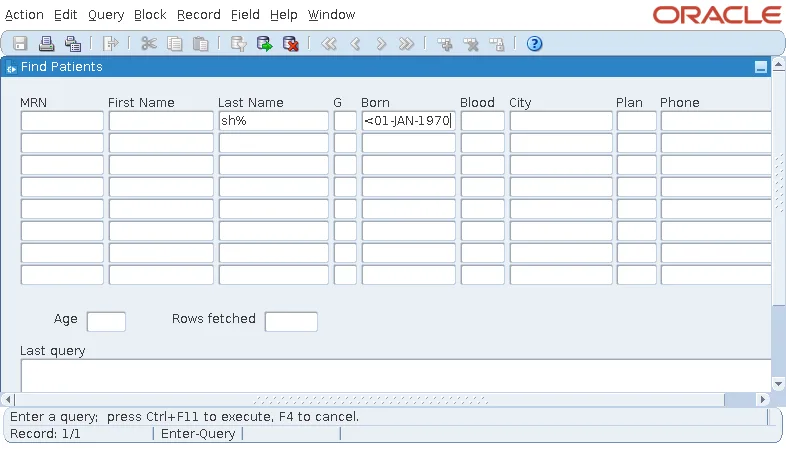
Enter Query (F11) clears the block and puts it in Enter Query mode. The status line says so, and the block shows one empty record, the example record. Every value typed in it is a criterion.
Here the user is looking for patients whose last name starts with sh and who were born before 1970: they typed sh% in Last Name and <01-JAN-1970 in Born.
Execute Query returns the five matching patients. The sample search form also shows the number of rows fetched and the SELECT Forms ran, below the block.
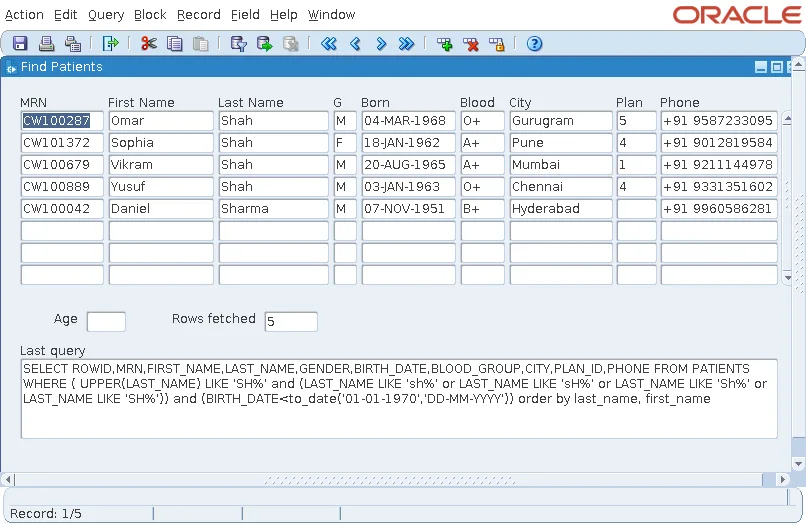
How the Sample Form Shows the SQL
A KEY-EXEQRY trigger fires for the Execute Query key, the menu item, and the toolbar button, and replaces their action. It runs the query itself, then copies the last query and the number of rows into the control block.
Example (KEY-EXEQRY trigger on PATIENTS):
begin
  execute_query;
  :ctl.last_query := get_block_property('PATIENTS', last_query);
  :ctl.hits       := get_block_property('PATIENTS', query_hits);
end;
LAST_QUERY and QUERY_HITS are covered in SET_BLOCK_PROPERTY in Oracle Forms.
Query by Example Operators
| Criterion | Meaning | Example |
|---|---|---|
| A value | Equal to it | Pune |
| % and _ | Any text, and any one character (LIKE) | sh%, CW1000_7 |
| >, <, >=, <= | Greater, less, and so on | <01-JAN-1970 |
| != | Not equal | !=O+ |
| # followed by SQL | The rest of the text goes into the WHERE clause as typed | #is null, #between '01-JAN-1990' and '31-DEC-1990' |
| :name alone | Opens the Query/Where window | :b |
Values must match the item's data type and format mask, as when entering data, and several criteria are combined with AND.
The SQL Forms Builds
Behind each criterion, Forms writes a condition on the item's column. The SQL of the search above is this.
Output:
SELECT ROWID,MRN,FIRST_NAME,LAST_NAME,GENDER,BIRTH_DATE,BLOOD_GROUP,CITY,PLAN_ID,PHONE FROM PATIENTS
WHERE ( UPPER(LAST_NAME) LIKE 'SH%' and (LAST_NAME LIKE 'sh%' or LAST_NAME LIKE 'sH%' or LAST_NAME
LIKE 'Sh%' or LAST_NAME LIKE 'SH%')) and (BIRTH_DATE<to_date('01-01-1970','DD-MM-YYYY'))
order by last_name, first_name
Three details are worth noticing:
- The date criterion becomes a TO_DATE with an explicit format, so it does not depend on the session's settings.
- The block's ORDER BY Clause is added at the end, as its WHERE Clause would be.
- LAST_NAME has the item property Case Insensitive Query, so sh% matches Shah and Sharma. Forms compares UPPER(LAST_NAME) and adds the four combinations of the first two letters' cases, which lets the database still use an index on LAST_NAME to narrow the rows before it applies UPPER.
The # Operator
A criterion that starts with # is copied into the SQL as typed, after the column name, so it must be valid SQL. #between 01-jan-1990 and 31-dec-1990 fails with FRM-40505: ORACLE error: unable to perform query, because the dates are not quoted. #between '01-JAN-1990' and '31-DEC-1990' works, relying on the session's date format.
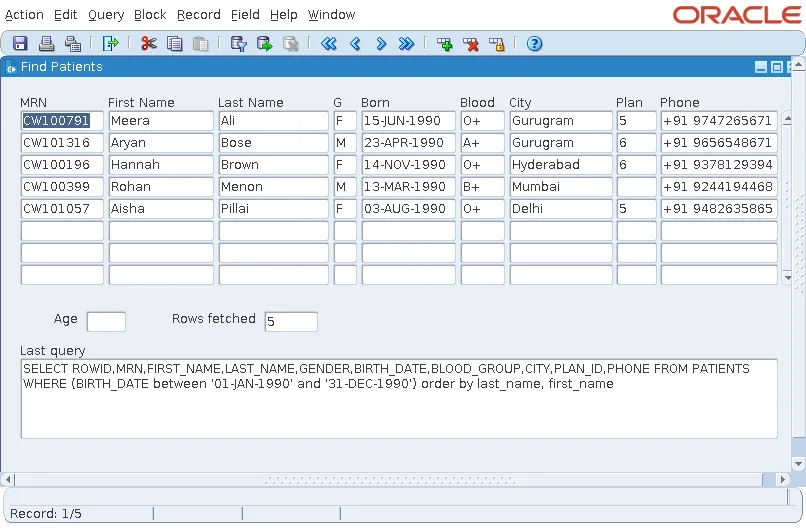
#is null finds empty values. The patients of Pune without an insurance plan whose blood group is not O+ are four.
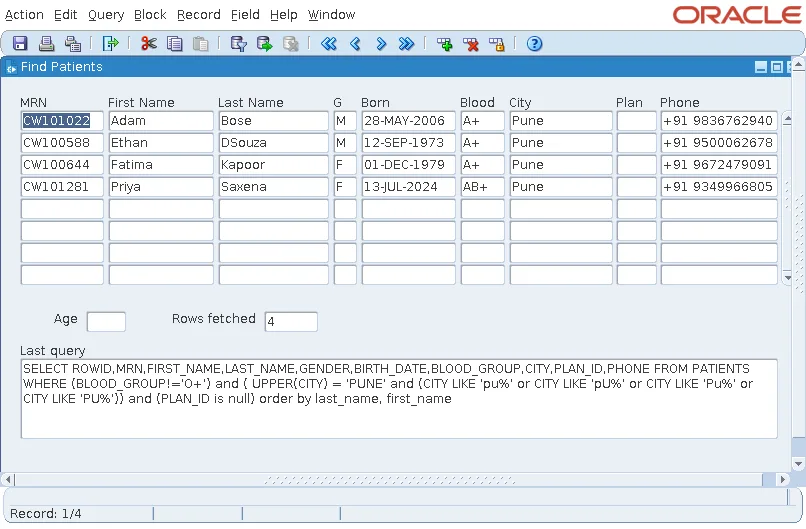
Count Records Before You Fetch Them
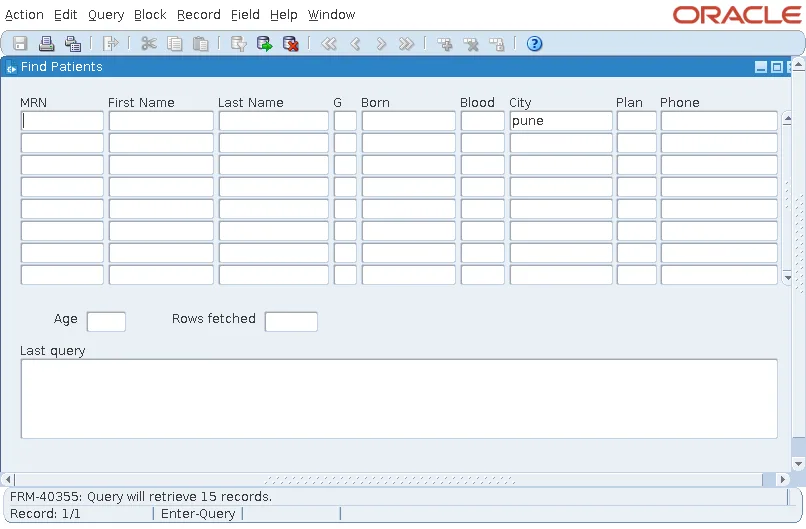
Count Query runs SELECT COUNT(*) with the criteria and reports the result on the message line, which is useful before a query that might return thousands of rows.
Output:
FRM-40355: Query will retrieve 15 records.
The COUNT_QUERY built-in does the same from code.
The Query/Where Window and FORMS_RESTRICT_ENTER_QUERY
Typing a colon and a name, such as :b, in an item of the example record and executing the query opens the Query/Where window. There the user types any condition for the WHERE clause, using :b for the item's column.
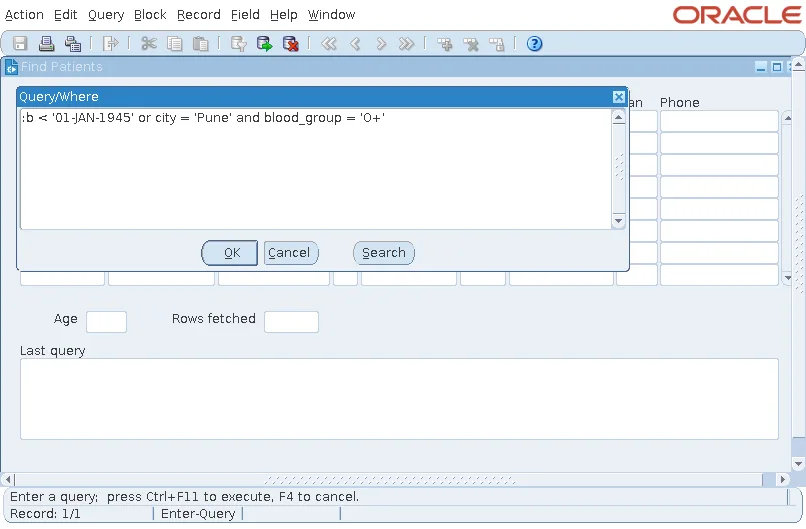
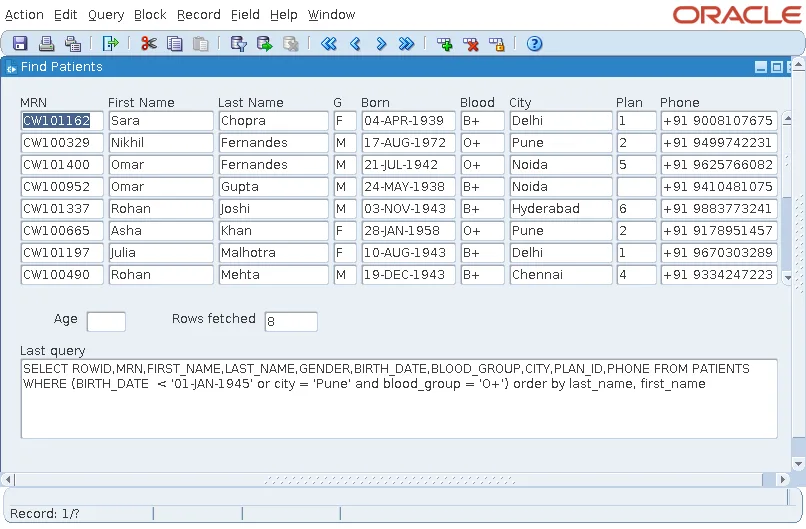
Forms replaces :b with the column name and adds the condition to the query.
Output:
SELECT ROWID,MRN,FIRST_NAME,LAST_NAME,GENDER,BIRTH_DATE,BLOOD_GROUP,CITY,PLAN_ID,PHONE FROM PATIENTS
WHERE (BIRTH_DATE  < '01-JAN-1945' or city = 'Pune' and blood_group = 'O+') order by last_name,
first_name
Why It Is Disabled by Default
This is powerful, and dangerous: the user can write any SQL, including subqueries on tables the form was never meant to show. For that reason, the default.env file of Forms 14.1.2 sets the environment variable FORMS_RESTRICT_ENTER_QUERY to TRUE. That disables the Query/Where window, and also conjunctions (AND, OR) and SQL functions in criteria. With the default configuration, :b gives this error.
Output:
FRM-40367: Invalid criteria in field BIRTH_DATE in example record.
The screenshots of the window were taken with a configuration whose environment file sets the variable to FALSE. Leave it TRUE in production unless your users are trusted to write SQL, and even then consider giving them a reporting tool instead.
For queries run from code, see also ENTER_QUERY in Oracle Forms and EXECUTE_QUERY in Oracle Forms.
Conclusion
Query by example in Oracle Forms turns the block into a search form: press F11, type criteria into the example record (values, % and _, comparison operators, !=, and # followed by SQL), and press Ctrl+F11. Forms combines the criteria with AND, adds the block's WHERE and ORDER BY clauses, and handles case-insensitive items in an index-friendly way. Use Count Query (F12) before large queries, and keep FORMS_RESTRICT_ENTER_QUERY set to TRUE so users cannot type arbitrary SQL into the Query/Where window.
