
Color should carry meaning in a form: the record the user is on, a cancelled appointment, an overdue invoice. Setting colors object by object does not scale, because an application has hundreds of items and a change of style would mean changing them all.
Named visual attributes solve that. This guide shows how to create them in Oracle Forms 14.1.2, highlight the current record, style individual records at run time with SET_ITEM_INSTANCE_PROPERTY, and add row banding.
Sample Form for This Guide
The examples and screenshots use the sample form CH14_SCHEDULE from the Oracle Forms code repository on GitHub. Download it, open it in Forms Builder, and connect as CAREWELL to follow along.
| Form | File | What it shows |
|---|---|---|
| CH14_SCHEDULE | forms/ch14/ch14_schedule.fmb | One doctor's appointments with a banner, styled records, and a property class |
The forms run against the CareWell Clinic sample schema, which you install first.
What You Build
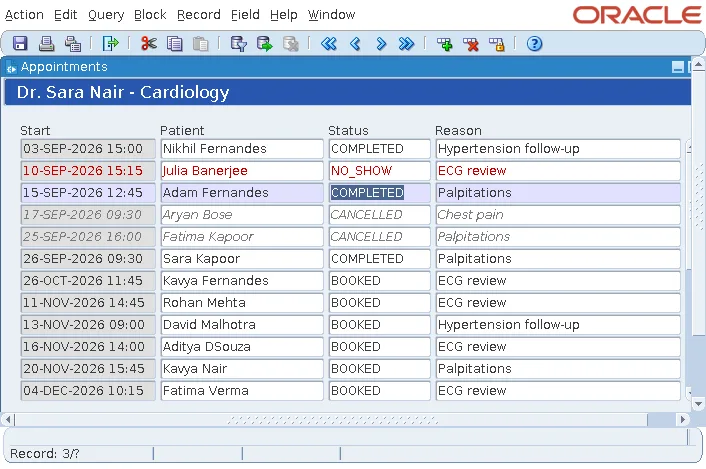
The sample schedule form shows one doctor's appointments. Cancelled appointments appear in gray italics, missed ones in dark red, and the current record is highlighted in pale blue as the cursor moves.
Create a Named Visual Attribute
A named visual attribute is an object of the form, under Visual Attributes in the Object Navigator, that holds a set of colors and fonts. An object whose Visual Attribute Group property names it takes its settings. Change the visual attribute, and every object that uses it changes.
Its Visual Attribute Type says what it styles:
| Type | Styles | Applied with |
|---|---|---|
| Common | Items and other objects | Visual Attribute Group |
| Prompt | The prompts of items | The item property Prompt Visual Attribute Group |
| Title | The titles of frames | The frame's title properties |
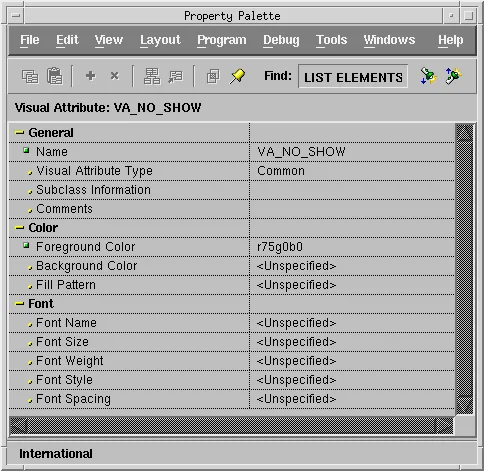
Any setting left <Unspecified> does not change the object. VA_NO_SHOW sets only the foreground color, so the items it is applied to keep their background and font.
The Three Visual Attributes of the Sample
| Visual attribute | Settings | Used for |
|---|---|---|
| VA_CURRENT | Background r88g88b100, a pale blue | The current record |
| VA_CANCELLED | Foreground gray52, italic font | Cancelled appointments |
| VA_NO_SHOW | Foreground r75g0b0, a dark red | Missed appointments |
The color names come from the Forms color palette, explained in how to use the Layout Editor in Oracle Forms.
Highlight the Current Record
A block's Current Record Visual Attribute Group names the visual attribute of the record that holds the cursor. For the APPOINTMENTS block it is VA_CURRENT, the pale blue row that follows the cursor from record to record, with no code at all.
The same property exists at the form level, for every block, and on items, for one item of the current record. For another take on this technique, see how to highlight the current record in a multi-record block.
Style One Record at Run Time
The other two visual attributes are applied by code, record by record:
- SET_ITEM_PROPERTY changes an item in every record of the block.
- SET_ITEM_INSTANCE_PROPERTY changes it in one record, an item instance.
The POST-QUERY trigger of APPOINTMENTS, which Forms fires for each record fetched, looks up the patient's name and gives the four items of the record the visual attribute of its status.
Example (POST-QUERY trigger on APPOINTMENTS):
declare
  type t_names is table of varchar2(30);
  items t_names := t_names('APPT_START', 'PATIENT_NAME', 'STATUS', 'REASON');
  va    varchar2(30);
  rec   number := to_number(:system.trigger_record);
begin
  select first_name || ' ' || last_name
  into   :appointments.patient_name
  from   patients
  where  patient_id = :appointments.patient_id;

  va := case :appointments.status when 'CANCELLED' then 'VA_CANCELLED'
                                  when 'NO_SHOW'   then 'VA_NO_SHOW' end;
  if va is not null then
    for i in 1 .. items.count loop
      set_item_instance_property('APPOINTMENTS.' || items(i), rec, visual_attribute, va);
    end loop;
  end if;
end;
Why the Trigger Uses TO_NUMBER
The record number of the record being fetched is :SYSTEM.TRIGGER_RECORD. It is a character value, and SET_ITEM_INSTANCE_PROPERTY has several overloads with a number or a character in that position. Passing it directly fails to compile with PLS-00307: too many declarations of 'SET_ITEM_INSTANCE_PROPERTY' match this call. Converting it with TO_NUMBER makes the choice clear.
SET_ITEM_INSTANCE_PROPERTY
Syntax:
set_item_instance_property(item_name varchar2 | item_id item, record_number number,
                           property number, value {varchar2 | number})
An item instance has only a few properties:
- VISUAL_ATTRIBUTE and BORDER_BEVEL, for its look.
- INSERT_ALLOWED, UPDATE_ALLOWED, NAVIGABLE, and REQUIRED, for its behavior.
- ITEM_IS_VALID.
- DATA_VALUE, which sets the item's value in that record without going to it.
They last until the record is cleared or queried again, which is why POST-QUERY is the right place to set them. The older DISPLAY_ITEM built-in does the same for the visual attribute and is kept for old forms. More examples are in SET_ITEM_INSTANCE_PROPERTY in Oracle Forms.
Add Row Banding
A block's or item's Row Banding Frequency gives every nth row another background color, 2 for alternate rows, so long rows are easier to follow. The banding follows the rows of the display, not the records, so it stays in place as the records scroll.
The form properties PINSTRIPE1_COLOR and PINSTRIPE2_COLOR choose the two colors; set them with SET_FORM_PROPERTY, as described in SET_FORM_PROPERTY in Oracle Forms. An item with a background color of its own is not banded.
Conclusion
Named visual attributes in Oracle Forms hold sets of colors and fonts for items, prompts, and frame titles, so a change of style is made once. Use a block's Current Record Visual Attribute Group to highlight the record under the cursor without code, and SET_ITEM_INSTANCE_PROPERTY in POST-QUERY to style individual records by their data, converting :SYSTEM.TRIGGER_RECORD with TO_NUMBER. Add Row Banding Frequency for alternate row colors, chosen with PINSTRIPE1_COLOR and PINSTRIPE2_COLOR.
