
A block is a group of items that belong together, such as the items that show the columns of a table, or the fields of a search panel. It sits at the center of every form: Forms navigates from block to block, validates and queries block by block, and commits the changes of all blocks as one transaction.
This guide explains the two kinds of blocks in Oracle Forms 14.1.2, how to create them with the Data Block Wizard or by hand, what the most important block properties do, and which SQL Forms runs for a data block.
Sample Form for This Guide
The examples and screenshots use the sample form CH07_PATIENTS from the Oracle Forms code repository on GitHub. Download it, open it in Forms Builder, and connect as CAREWELL to follow along.
| Form | File | What it shows |
|---|---|---|
| CH07_PATIENTS | forms/ch07/ch07_patients.fmb | A FILTER control block above a PATIENTS data block |
The forms run against the CareWell Clinic sample schema, which you install first.
Data Blocks vs. Control Blocks
| Data block | Control block | |
|---|---|---|
| Database Data Block property | Yes | No |
| Source of rows | A table, a view, or another source | None |
| Queried and saved by Forms | Yes, without any code | Never |
| Typical items | The columns of the table | Search criteria, totals, buttons, status messages |
In a data block, each item with Database Item set to Yes shows the column named in its Column Name property. Items with Database Item set to No, such as a calculated age or a button, belong to the block but not to the table.
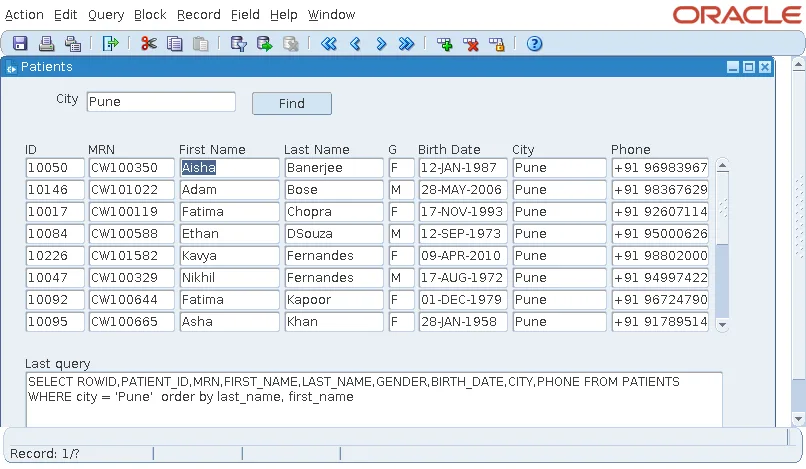
A control block's records exist only while the form runs. The sample form CH07_PATIENTS has one of each: the control block FILTER at the top, with a city to search for, a Find button, and an item that shows the last query, and the data block PATIENTS, which lists patients eight at a time.
Create a Block
The Data Block Wizard is the quickest way to create a data block. It creates the block, an item for each column you choose, and, with Enforce data integrity, the triggers that check the table's constraints. The steps are shown in how to create your first form using the Data Block Wizard.
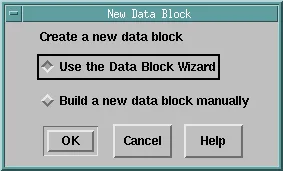
When you select the Data Blocks node in the Object Navigator and click Create, Forms Builder asks whether to use the wizard or build the block manually.
Build a Block Manually
A block built manually starts as a data block with no source and no items.
- For a control block, set Database Data Block to No.
- For a data block, set Query Data Source Name to the table, add items in the navigator or with the Layout Editor's tools, and set each item's Column Name.
Building by hand makes sense for control blocks, and for data blocks whose items you want to lay out yourself from the start.
Change a Block with the Wizard Later
The wizard is reentrant. Select an existing block and choose Tools, Data Block Wizard, and it opens with the block's settings so you can add or remove columns. The Layout Wizard does the same for the block's frame.
Oracle Forms Block Properties
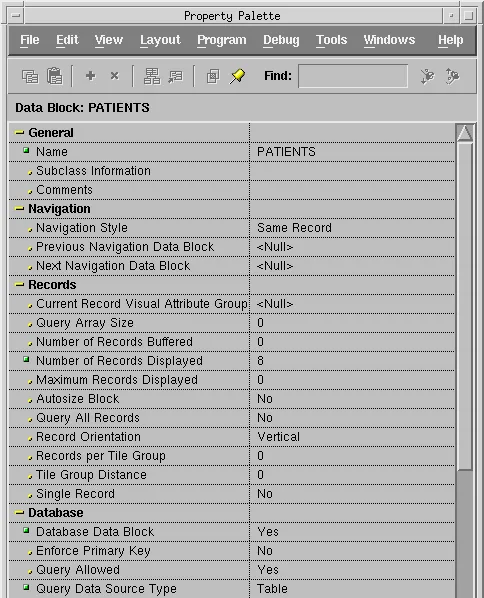
Select a block and press F4 to see its properties. Here are the first ones of the PATIENTS block.
Navigation
Navigation Style says where Tab goes from the last item of a record: back to the first item of the Same Record (the default), to the first item of the next record (Change Record), or to the next block (Change Data Block).
Previous Navigation Data Block and Next Navigation Data Block change the order in which Forms moves between blocks, which is otherwise the order of the navigator.
Records
| Property | What it does |
|---|---|
| Number of Records Displayed | How many records the block shows at once: 1 for a form layout, more for a tabular one. |
| Autosize Block | The number of rows shown follows the number of records, up to Maximum Records Displayed. |
| Query Array Size | How many rows Forms fetches in one round trip to the database. |
| Number of Records Buffered | How many records Forms keeps in memory before writing the others to a temporary file. With 0, the default for this and Query Array Size, Forms bases the values on the number of records displayed. |
| Query All Records | Fetches every row at once instead of as the user scrolls, which blocks with summary items need. |
| Single Record | For control blocks that must always hold exactly one record, such as a block of totals. |
| Record Orientation | Horizontal lays records out side by side instead of one under another. |
Database
These properties tie the block to its source:
| Property | What it does |
|---|---|
| Query Data Source Type, Name | Usually Table and a table or view name. Other types include procedures, FROM clause queries, and transactional triggers. |
| WHERE Clause, ORDER BY Clause | Added to every query of the block. The WHERE clause can refer to items and parameters as bind variables, for example city = :filter.city. |
| Optimizer Hint | A hint Forms adds to the SELECT, such as /*+ first_rows */, entered without the comment marks. |
| Query, Insert, Update, Delete Allowed | Which operations the block permits. A lookup block sets the last three to No. |
| Enforce Primary Key | Forms checks before saving that a new or changed key does not already exist. Mark the key items with the item property Primary Key. |
| Locking Mode | Automatic (the default, the same as Immediate on Oracle) locks a row as soon as the user changes its record. Delayed locks it only on save, and then fails if another user changed the row in the meantime. |
| Key Mode | How Forms identifies a record's row: by ROWID (Automatic, the default), or by its primary key, for views and sources without ROWIDs. |
Advanced Database
- Update Changed Columns Only makes an UPDATE list only the columns the user changed.
- Enforce Column Security makes items read-only for users without UPDATE privilege on their columns.
- Maximum Query Time and Maximum Records Fetched override the form's properties of the same names.
- DML Data Target Type and Name send inserts, updates, and deletes to a different table or view than the one queried, or to procedures.
- DML Array Size writes several records in one round trip.
- DML Returning Value set to Yes brings back into the form the values database triggers set when a row is inserted or updated.
- Precompute Summaries is for summary items.
The SQL Forms Runs for a Data Block
For a data block on a table, Forms builds every statement itself:
- To query, it selects the ROWID and the column of each database item from the table. The WHERE clause combines the block's WHERE Clause with the criteria the user typed in Enter Query mode, followed by the block's ORDER BY Clause.
- To save, it inserts the new records, updates the changed ones, and deletes the removed ones, identifying rows by their ROWID.
After the user searched for Pune in CH07_PATIENTS, the last SELECT Forms ran for the PATIENTS block was this one.
Output:
SELECT ROWID,PATIENT_ID,MRN,FIRST_NAME,LAST_NAME,GENDER,BIRTH_DATE,CITY,PHONE FROM PATIENTS
WHERE city = 'Pune'  order by last_name, first_name
You can read this statement at run time with GET_BLOCK_PROPERTY and the property LAST_QUERY. Seeing the real SQL is the quickest way to check what a block's WHERE and ORDER BY clauses do. For queries in code, see EXECUTE_QUERY in Oracle Forms.
Conclusion
A data block queries and changes a table or another source of rows, while a control block holds the form's own values such as search criteria and buttons. Create data blocks with the reentrant Data Block Wizard, or build control blocks by hand with Database Data Block set to No. Block properties set navigation between records and blocks, how many records are shown, fetched, and buffered, the data source, the WHERE and ORDER BY clauses, the operations allowed, locking, and how rows are identified, and from them Forms builds every SELECT, INSERT, UPDATE, and DELETE itself.
