
A block's design-time properties are only a starting point. While the form runs, you can change its WHERE and ORDER BY clauses, switch inserts or deletes on and off, read its state, and see the exact SELECT Forms ran.
This guide covers the Oracle Forms 14.1.2 built-ins for working with blocks at run time: SET_BLOCK_PROPERTY, GET_BLOCK_PROPERTY, FIND_BLOCK, and GO_BLOCK, plus the system variables that describe the current block. A working search button ties them together.
Sample Form for This Guide
The examples and screenshots use the sample form CH07_PATIENTS from the Oracle Forms code repository on GitHub. Download it, open it in Forms Builder, and connect as CAREWELL to follow along.
| Form | File | What it shows |
|---|---|---|
| CH07_PATIENTS | forms/ch07/ch07_patients.fmb | The Find button that changes the block's WHERE clause |
The forms run against the CareWell Clinic sample schema, which you install first.
Quick Reference
| Built-in or variable | Purpose |
|---|---|
| SET_BLOCK_PROPERTY | Changes a block property for the rest of the session. |
| GET_BLOCK_PROPERTY | Returns a block property, or the block's run-time state, as text. |
| FIND_BLOCK | Returns a block's internal ID. |
| GO_BLOCK | Moves the cursor to a block's first navigable item. |
| :SYSTEM.CURSOR_BLOCK, TRIGGER_BLOCK, BLOCK_STATUS, LAST_QUERY | The state of the blocks, read like items. |
SET_BLOCK_PROPERTY
SET_BLOCK_PROPERTY changes a property of a block for the rest of the session. The block is named by its name or by the ID FIND_BLOCK returns.
Syntax:
set_block_property(block_name varchar2 | block_id block, property number,
                   value {varchar2 | number})
set_block_property(block_name varchar2 | block_id block, property number, x number [, y number])
The properties used most are the query's clauses:
| Property | Effect |
|---|---|
| DEFAULT_WHERE | Replaces the block's WHERE clause for every later query. |
| ORDER_BY | Replaces the block's ORDER BY clause. |
| ONETIME_WHERE | Adds a condition to the next query only. The query after it uses the default again. |
Other properties switch operations on and off with PROPERTY_TRUE or PROPERTY_FALSE (INSERT_ALLOWED, UPDATE_ALLOWED, DELETE_ALLOWED, QUERY_ALLOWED). You can also set the navigation (NAVIGATION_STYLE, NEXT_NAVIGATION_BLOCK), the query limits, the data source and target names, the locking and key modes, and the colors of the current row. The form of the call with two coordinates moves the block's scroll bar.
GET_BLOCK_PROPERTY
GET_BLOCK_PROPERTY returns a property of a block, as text.
Syntax:
get_block_property(block_name varchar2 | block_id block, property number) return varchar2
Besides the design-time properties, such as DEFAULT_WHERE, ORDER_BY, QUERY_DATA_SOURCE_NAME, INSERT_ALLOWED, and LOCKING_MODE, it returns the state of the running block:
- STATUS: NEW, QUERY, or CHANGED.
- CURRENT_RECORD and TOP_RECORD, as record numbers, and RECORDS_DISPLAYED.
- QUERY_HITS: the number of records COUNT_QUERY found, or, while a query is fetching, the number fetched so far.
- LAST_QUERY: the last SELECT Forms ran for the block.
- FIRST_ITEM and LAST_ITEM.
Example: A Search Button That Changes the WHERE Clause
The sample form CH07_PATIENTS has a control block FILTER with a city item, a Find button, and an item that shows the last query, above a data block PATIENTS. The Find button sets the block's WHERE clause from the city the user typed, runs the query, and shows the statement Forms ran.
Example (WHEN-BUTTON-PRESSED trigger on FILTER.FIND):
if :filter.city is null then
  set_block_property('PATIENTS', default_where, '');
else
  set_block_property('PATIENTS', default_where, 'city = :filter.city');
end if;
go_block('PATIENTS');
execute_query;
:filter.last_query := get_block_property('PATIENTS', last_query);
With Pune as the city, the LAST_QUERY item shows this statement.
Output:
SELECT ROWID,PATIENT_ID,MRN,FIRST_NAME,LAST_NAME,GENDER,BIRTH_DATE,CITY,PHONE FROM PATIENTS
WHERE city = 'Pune'  order by last_name, first_name
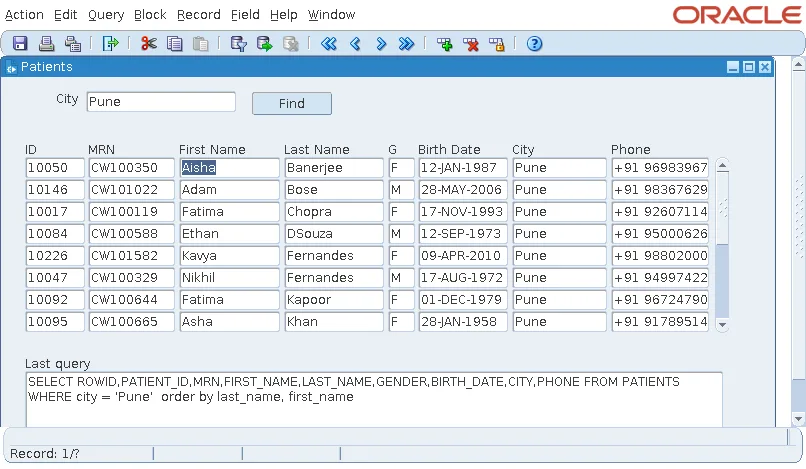
A few things to notice:
- The WHERE clause refers to :filter.city as a bind variable. LAST_QUERY shows the item's value in its place.
- When the city is empty, the trigger clears DEFAULT_WHERE, so Find shows every patient.
- Because DEFAULT_WHERE stays in effect, later queries from the toolbar also use the city. Use ONETIME_WHERE when the condition should apply to one query only.
- The same text is in :SYSTEM.LAST_QUERY, for the block that ran the last query in the form.
FIND_BLOCK and GO_BLOCK
FIND_BLOCK returns a block's ID, of type BLOCK. GO_BLOCK moves the cursor to the first navigable item of a block, validating the block the cursor leaves.
Syntax:
find_block(block_name varchar2) return block
go_block(block_name varchar2)
GO_BLOCK fails with FRM-40106: No navigable items in destination block when the block has no item the cursor can enter.
Code that works with a block's records, such as EXECUTE_QUERY, CREATE_RECORD, and FIRST_RECORD, acts on the current block, the block of the cursor. That is why it usually follows a GO_BLOCK, as in the example above. For more on queries from code, see EXECUTE_QUERY in Oracle Forms.
System Variables of Blocks
Forms keeps the state of the form in system variables, which code reads like items:
| Variable | Value |
|---|---|
| :SYSTEM.CURSOR_BLOCK | The block of the cursor. |
| :SYSTEM.TRIGGER_BLOCK | The block of the item or record that fired the running trigger. |
| :SYSTEM.BLOCK_STATUS | NEW when the current block has only new records, QUERY when its records are unchanged since the query, CHANGED when a record has changes to save. |
| :SYSTEM.LAST_QUERY | The last SELECT of the form. |
For the full picture of system variables, see system variables in Oracle Forms. Block properties at design time are covered in how to create data blocks in Oracle Forms, and the form-level equivalents in SET_FORM_PROPERTY in Oracle Forms.
Conclusion
SET_BLOCK_PROPERTY changes a block for the rest of the session, most often its DEFAULT_WHERE, ONETIME_WHERE, and ORDER_BY clauses or the operations it allows. GET_BLOCK_PROPERTY reads the same properties plus the block's run-time state, including LAST_QUERY, the exact SELECT Forms ran. Combine them with FIND_BLOCK, GO_BLOCK, EXECUTE_QUERY, and the :SYSTEM block variables to build search panels and other forms that adapt to what the user asks for.
