
Knowing which trigger fires when is the key to putting code in the right place in Oracle Forms. Descriptions of the firing order are easy to misremember, so the most reliable way to learn it is to watch it.
This guide builds a trace form in Oracle Forms 14.1.2 whose triggers only write their names to a file, runs it through seven everyday steps, and shows the exact order in which the triggers fired, with the lessons that follow.
Sample Form for This Guide
The examples and screenshots use the sample form CH18_TRACE from the Oracle Forms code repository on GitHub. Download it, open it in Forms Builder, and connect as CAREWELL to follow along.
| Form | File | What it shows |
|---|---|---|
| CH18_TRACE | forms/ch18/ch18_trace.fmb | A doctors form whose triggers write their names to a trace file |
The forms run against the CareWell Clinic sample schema, which you install first.
The Trace Form
The sample trace form shows three doctors in a block called DOCTORS. Every trigger is defined at the form level and records its own name; KEY-COMMIT also calls COMMIT_FORM, so saving still works.
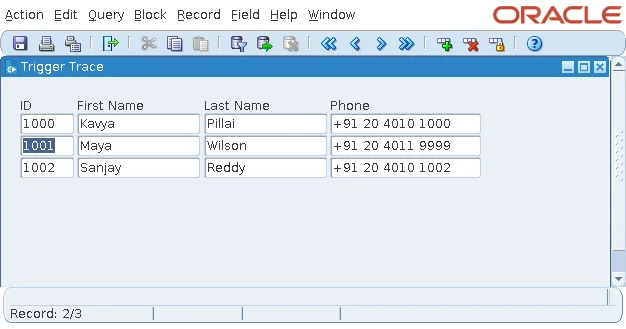
Each trigger calls a procedure of the form's package TRACE, which writes a numbered line to a file on the Forms server with the built-in package TEXT_IO.
Program unit TRACE (package specification):
package trace is
  procedure log(p_trigger varchar2);
end trace;
Program unit TRACE (package body):
package body trace is
  g_count pls_integer := 0;

  procedure log(p_trigger varchar2) is
    f      text_io.file_type;
    v_what varchar2(80);
  begin
    g_count := g_count + 1;
    v_what  := nvl(:system.trigger_item, :system.trigger_block);
    if :system.trigger_record is not null and :system.trigger_block is not null then
      v_what := v_what || ' (record ' || :system.trigger_record || ')';
    end if;
    -- the first line of the session creates the file, the others are appended
    f := text_io.fopen('/tmp/ch18_trace.txt',
                       case when g_count = 1 then 'w' else 'a' end);
    text_io.put_line(f, lpad(g_count, 3) || '  ' || rpad(p_trigger, 26) || v_what);
    text_io.fclose(f);
  end log;
end trace;
Each trigger passes its own name to TRACE.LOG. The item LAST_NAME also has a second WHEN-NEW-ITEM-INSTANCE trigger of its own with Execution Hierarchy set to After, marked with an asterisk in the trace. Execution Hierarchy is explained in how to use triggers in Oracle Forms.
The form was run, seven steps were performed, and a marker line was written after each. Here is the file, step by step.
Step 1: The Form Starts
Forms fires the PRE- triggers of navigation from the outside in (form, block, record, item) as it moves the cursor to the first item of the first block. Then it fires the WHEN-NEW-...-INSTANCE triggers in the same order, once the cursor has arrived.
Output:
  1  PRE-FORM
  2  PRE-BLOCK                 DOCTORS (record 1)
  3  PRE-RECORD                DOCTORS (record 1)
  4  PRE-TEXT-ITEM             DOCTORS.DOCTOR_ID (record 1)
  5  WHEN-NEW-FORM-INSTANCE    DOCTORS.DOCTOR_ID (record 1)
  6  WHEN-NEW-BLOCK-INSTANCE   DOCTORS.DOCTOR_ID (record 1)
  7  WHEN-NEW-RECORD-INSTANCE  DOCTORS.DOCTOR_ID (record 1)
  8  WHEN-NEW-ITEM-INSTANCE    DOCTORS.DOCTOR_ID (record 1)
PRE- triggers run while Forms is still navigating, so the cursor is not yet in the item and they cannot move it elsewhere. The WHEN-NEW-...-INSTANCE triggers run when the cursor is in place, which is why WHEN-NEW-FORM-INSTANCE, not PRE-FORM, is where a form runs its first query. See also the WHEN-NEW-FORM-INSTANCE trigger and the PRE-FORM trigger.
Step 2: Execute Query
To query, Forms leaves the item and the record (the POST- triggers), fires PRE-QUERY once and POST-QUERY for each record fetched, and then enters the first record again.
Output:
  9  POST-TEXT-ITEM            DOCTORS.DOCTOR_ID (record 1)
 10  POST-RECORD               DOCTORS (record 1)
 11  PRE-QUERY                 DOCTORS (record 1)
 12  POST-QUERY                DOCTORS (record 1)
 13  POST-QUERY                DOCTORS (record 2)
 14  POST-QUERY                DOCTORS (record 3)
 15  PRE-RECORD                DOCTORS (record 1)
 16  PRE-TEXT-ITEM             DOCTORS.DOCTOR_ID (record 1)
 17  WHEN-NEW-RECORD-INSTANCE  DOCTORS.DOCTOR_ID (record 1)
 18  WHEN-NEW-ITEM-INSTANCE    DOCTORS.DOCTOR_ID (record 1)
Step 3: Down to the Next Record
Moving to another record fires the POST- triggers of the item and record being left, then the PRE- and WHEN-NEW- triggers of the record and item being entered. The block is not left, so no block triggers fire.
Output:
 19  POST-TEXT-ITEM            DOCTORS.DOCTOR_ID (record 1)
 20  POST-RECORD               DOCTORS (record 1)
 21  PRE-RECORD                DOCTORS (record 2)
 22  PRE-TEXT-ITEM             DOCTORS.DOCTOR_ID (record 2)
 23  WHEN-NEW-RECORD-INSTANCE  DOCTORS.DOCTOR_ID (record 2)
 24  WHEN-NEW-ITEM-INSTANCE    DOCTORS.DOCTOR_ID (record 2)
Step 4: Tab, Tab
Moving from item to item fires only item triggers. Nothing was changed, so nothing is validated. The asterisk marks the item-level trigger that fires after the form's, because its Execution Hierarchy is After; with Override, only the item's would fire.
Output:
 25  POST-TEXT-ITEM            DOCTORS.DOCTOR_ID (record 2)
 26  PRE-TEXT-ITEM             DOCTORS.FIRST_NAME (record 2)
 27  WHEN-NEW-ITEM-INSTANCE    DOCTORS.FIRST_NAME (record 2)
 28  POST-TEXT-ITEM            DOCTORS.FIRST_NAME (record 2)
 29  PRE-TEXT-ITEM             DOCTORS.LAST_NAME (record 2)
 30  WHEN-NEW-ITEM-INSTANCE    DOCTORS.LAST_NAME (record 2)
 31  WHEN-NEW-ITEM-INSTANCE*   DOCTORS.LAST_NAME (record 2)
Step 5: Change a Value and Tab
The user tabs to PHONE, types a new number, and presses Tab. Leaving a changed item validates it first, so WHEN-VALIDATE-ITEM fires before POST-TEXT-ITEM. PHONE is the last item of the record, and the block's Navigation Style is Same Record, so Tab goes back to the record's first item.
Output:
 32  POST-TEXT-ITEM            DOCTORS.LAST_NAME (record 2)
 33  PRE-TEXT-ITEM             DOCTORS.PHONE (record 2)
 34  WHEN-NEW-ITEM-INSTANCE    DOCTORS.PHONE (record 2)
 35  WHEN-VALIDATE-ITEM        DOCTORS.PHONE (record 2)
 36  POST-TEXT-ITEM            DOCTORS.PHONE (record 2)
 37  PRE-TEXT-ITEM             DOCTORS.DOCTOR_ID (record 2)
 38  WHEN-NEW-ITEM-INSTANCE    DOCTORS.DOCTOR_ID (record 2)
Step 6: Save
Ctrl+S fires KEY-COMMIT, whose code calls COMMIT_FORM. Saving validates the changed record (WHEN-VALIDATE-RECORD) and navigates out of the block to the form level. Then it fires the commit triggers: PRE-COMMIT, then PRE-UPDATE and POST-UPDATE around the UPDATE of each changed row, then POST-FORMS-COMMIT before the database commit and POST-DATABASE-COMMIT after it. Finally it navigates back to where the cursor was.
Output:
 39  KEY-COMMIT                DOCTORS.DOCTOR_ID (record 2)
 40  POST-TEXT-ITEM            DOCTORS.DOCTOR_ID (record 2)
 41  WHEN-VALIDATE-RECORD      DOCTORS (record 2)
 42  POST-RECORD               DOCTORS (record 2)
 43  POST-BLOCK                DOCTORS (record 0)
 44  PRE-COMMIT
 45  PRE-UPDATE                DOCTORS (record 2)
 46  POST-UPDATE               DOCTORS (record 2)
 47  POST-FORMS-COMMIT
 48  POST-DATABASE-COMMIT
 49  PRE-BLOCK                 DOCTORS (record 0)
 50  PRE-RECORD                DOCTORS (record 2)
 51  PRE-TEXT-ITEM             DOCTORS.DOCTOR_ID (record 2)
 52  WHEN-NEW-ITEM-INSTANCE    DOCTORS.DOCTOR_ID (record 2)
Notice that the return trip fires PRE- triggers and WHEN-NEW-ITEM-INSTANCE, but not WHEN-NEW-BLOCK-INSTANCE or WHEN-NEW-RECORD-INSTANCE. Code that must run after a commit belongs in POST-FORMS-COMMIT or POST-DATABASE-COMMIT, not in the navigation triggers.
Step 7: Exit
Leaving the form fires the POST- triggers from the inside out.
Output:
 53  POST-TEXT-ITEM            DOCTORS.DOCTOR_ID (record 2)
 54  POST-RECORD               DOCTORS (record 2)
 55  POST-BLOCK                DOCTORS (record 0)
 56  POST-FORM
Two Lessons from the Trace
- Navigation triggers fire far more often than most developers expect, twice around every query and every commit, so they must be fast and free of side effects.
- The right trigger for a job is the one tied to the event, not to the navigation that happens to go with it: WHEN-VALIDATE-ITEM to check a value, POST-QUERY to compute a fetched record's display items, and PRE-INSERT to set a key.
For PRE-INSERT in practice, see how to populate primary keys from a sequence, and for POST-QUERY, the POST-QUERY trigger in Oracle Forms.
Conclusion
Tracing a real session shows the firing order of Oracle Forms triggers exactly: navigation fires PRE- triggers from the outside in, WHEN-NEW-...-INSTANCE triggers once the cursor arrives, and POST- triggers from the inside out, while queries and commits navigate out of the block and back. Validation fires before POST-TEXT-ITEM, commits fire PRE-COMMIT, PRE- and POST-UPDATE, POST-FORMS-COMMIT, and POST-DATABASE-COMMIT, and the return trip skips the block and record instance triggers. Put code in the trigger tied to its event, and keep navigation triggers light.
