
An application is rarely one form. A patient list opens a patient's appointments, a booking form opens a search of doctors and takes back the doctor chosen, and a menu starts the billing forms. Oracle Forms has three built-ins that start another form, and each treats the form that started it differently.
This guide covers CALL_FORM, OPEN_FORM, and NEW_FORM in Oracle Forms 14.1.2: when to use each, their options, what they do to changes and commits across forms, and how users and code move between the forms that are open.
Sample Form for This Guide
The examples and screenshots use the sample forms CH24_PATIENTS and CH24_APPOINTMENTS from the Oracle Forms code repository on GitHub. Download them, open them in Forms Builder, and connect as CAREWELL to follow along.
| Form | File | What it shows |
|---|---|---|
| CH24_PATIENTS | forms/ch24/ch24_patients.fmb | The patients of Pune, with buttons that call, open, and replace other forms |
| CH24_APPOINTMENTS | forms/ch24/ch24_appointments.fmb | One patient's appointments, called from the patient list |
The forms run against the CareWell Clinic sample schema, which you install first.
Three Ways to Start a Form
| Built-in | What it does | Use it for |
|---|---|---|
| CALL_FORM | Starts a form on top of the current one, which waits. When the called form exits, the calling form continues at the statement after CALL_FORM. | Dialogs that return something: a search, a choice, a detail to edit. |
| OPEN_FORM | Starts a form next to the current one. Both stay open, and the user moves between them freely. | Work in parallel, such as a patient's visits beside the patient list. |
| NEW_FORM | Replaces the current form, which exits. | Moving to another part of the application, with no need to come back. |
All three take the form's name, the name of its .fmx file without the extension, found in FORMS_PATH, so use lowercase on Linux. All three take an optional parameter list. They are restricted built-ins, so call them from triggers such as WHEN-BUTTON-PRESSED, not from WHEN-VALIDATE-ITEM or POST-QUERY; see how to use triggers in Oracle Forms.
CALL_FORM
Syntax:
call_form(formmodule_name varchar2 [, display number [, switch_menu number
[, query_mode number [, data_mode number [, paramlist paramlist | varchar2]]]]])| Argument | Values |
|---|---|
| display | HIDE, the default, hides the calling form while the called form runs. NO_HIDE leaves it visible behind the called form, inactive. |
| switch_menu | NO_REPLACE keeps the calling form's menu; DO_REPLACE shows the called form's own. |
| query_mode | NO_QUERY_ONLY, or QUERY_ONLY, which lets the user query but not change anything in the called form. |
| data_mode | NO_SHARE_LIBRARY_DATA, or SHARE_LIBRARY_DATA, which lets the forms share their libraries' package variables. |
Example: Call the Appointments Form
The Appointments button of the sample patients form builds a parameter list with the patient's key and calls the appointments form.
Example (WHEN-BUTTON-PRESSED trigger on CTL.APPTS, patients form):
declare
  v_list paramlist := get_parameter_list('CW_PATIENT');
  v_mode number := case :ctl.query_only when 'Y' then query_only else no_query_only end;
begin
  if not id_null(v_list) then
    destroy_parameter_list(v_list);                    -- left over from an earlier call
  end if;
  v_list := create_parameter_list('CW_PATIENT');
  add_parameter(v_list, 'P_PATIENT_ID', text_parameter, to_char(:patients.patient_id));
  cw_ctx.patient_id := :patients.patient_id;           -- library data (CW_LIB)
  :global.cw_appt_id := null;
  call_form('ch24_appointments', no_hide, no_replace, v_mode, share_library_data, v_list);
  -- runs when CH24_APPOINTMENTS has exited
  destroy_parameter_list(v_list);
  :ctl.chosen := :global.cw_appt_id;
end;
The appointments form appears over the patient list. Its WHEN-NEW-FORM-INSTANCE trigger reads the parameter, queries the appointments, and writes on its last line which form called it.
Example (WHEN-NEW-FORM-INSTANCE trigger, appointments form):
begin
  select first_name || ' ' || last_name into :ctl.patient
    from patients where patient_id = :parameter.p_patient_id;
  :ctl.info := 'Called by ' || nvl(get_application_property(calling_form), 'no form')
            || ';  CW_CTX.PATIENT_ID = ' || nvl(to_char(cw_ctx.patient_id), 'null');
  go_block('APPOINTMENTS');
  execute_query;
end;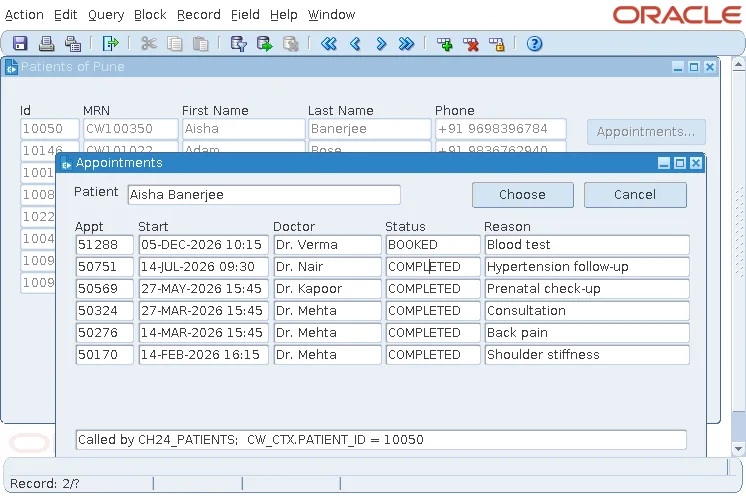
GET_APPLICATION_PROPERTY(CALLING_FORM) returns the name of the form that called the current one, or null for a form that was not called. Forms can call forms that call forms, and each EXIT_FORM returns one level. How the called form returns the chosen appointment is shown in how to pass values between forms.
Query-Only Mode
The patient list's Query only check box calls the form with QUERY_ONLY. Typing in any item of the called form then gives this message.
Output:
FRM-40208: Form running in query-only mode. Cannot change database fields.
OPEN_FORM
Syntax:
open_form(form_name varchar2 [, activate_mode number [, session_mode number
[, data_mode number [, paramlist paramlist | varchar2]]]])- activate_mode: ACTIVATE, the default, moves the user into the new form; NO_ACTIVATE opens it and leaves the user where they are.
- session_mode: NO_SESSION, the default, runs the new form in the same database session and transaction; SESSION gives it a session of its own. In a test, the number of CAREWELL sessions went from two to three when a form opened another with SESSION, and stayed at two with NO_SESSION.
- data_mode: as for CALL_FORM.
The Visits button opens the visits form from how to pass parameters to a form, whose parameter P_PATIENT_ID has the same name.
Example (WHEN-BUTTON-PRESSED trigger on CTL.VISITS, patients form):
declare
  v_list paramlist := get_parameter_list('CW_VISITS');
begin
  if not id_null(v_list) then
    destroy_parameter_list(v_list);
  end if;
  v_list := create_parameter_list('CW_VISITS');
  add_parameter(v_list, 'P_PATIENT_ID', text_parameter, to_char(:patients.patient_id));
  open_form('ch16_visits', activate, no_session, v_list);
  message('OPEN_FORM returned');
end;
Nothing Runs After an Activating OPEN_FORM
With ACTIVATE, the statements after OPEN_FORM in the trigger never run: in the test, the MESSAGE never appeared, and an assignment to an item placed there left the item empty. With NO_ACTIVATE they run, and the calling form keeps the focus. Put nothing after an OPEN_FORM that activates the new form.
Use SESSION Sparingly
A form opened with SESSION has its own transaction: saving in it does not save the other forms' changes, and its locks can block theirs. Use it only for forms that must commit on their own, such as a log of the user's activity. Locking is covered in how to handle record locking.
NEW_FORM
Syntax:
new_form(formmodule_name varchar2 [, rollback_mode number [, query_mode number
         [, data_mode number [, paramlist paramlist | varchar2]]]])
The sample Doctors' Fees button replaces the patient list with the fees form. When the patient list has unsaved changes, Forms first asks Do you want to save the changes you have made?; after the answer, the patient list exits, and the fees form is the only form left. A MESSAGE after NEW_FORM in the trigger does not run.
rollback_mode sets what happens to the exiting form's changes that were posted but not committed:
- TO_SAVEPOINT, the default, rolls back to the savepoint set when that form started.
- NO_ROLLBACK keeps them in the transaction.
- FULL_ROLLBACK rolls back everything.
Changes and Commits Across Forms
Forms started with CALL_FORM, or with OPEN_FORM and NO_SESSION, share one database transaction. That has two consequences.
A Called Form Cannot Save While Its Caller Has Unsaved Changes
The user changed Aisha Banerjee's phone, did not save, and opened her appointments. Saving a change there fails.
Output:
FRM-40403: A calling form has unapplied changes. Save not allowed.
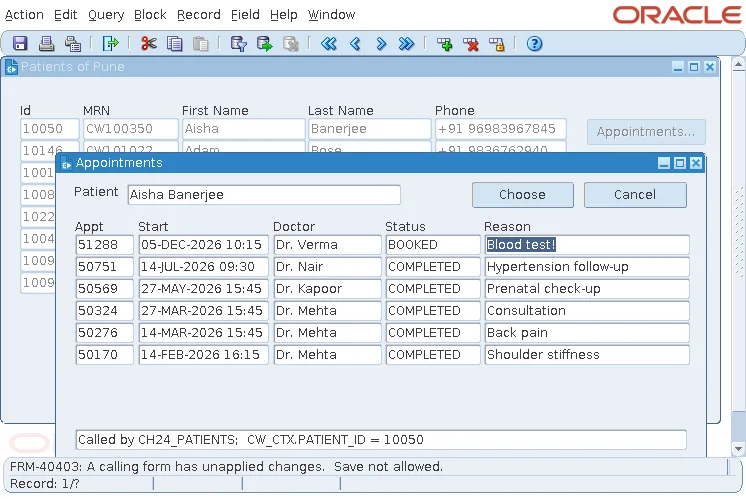
A commit in the called form would commit the caller's changes too, changes the caller has not even validated, so Forms refuses it.
POST Before CALL_FORM Lets the Called Form Save Both
POST writes the caller's changes to the database without committing them. With POST before CALL_FORM, the same save in the called form succeeded.
Output:
FRM-40406: Transaction complete: 1 records applied; all records saved.
The database then held both changes, the appointment's and the phone number posted by the caller. The called form sees the caller's rows, and one save commits the work of both, but the user must know that a save in the called form saves everything.
POST shows its own message, FRM-40404: Database apply complete, as an alert just before the called form appears. Setting :SYSTEM.MESSAGE_LEVEL to '5' around it hides the message.
Hide the POST message:
:system.message_level := '5';
post;
:system.message_level := '0';
If the called form exits without saving, its caller's posted changes are still in the transaction, to be saved or rolled back from the caller. POST is explained in how to save changes using commit processing.
Move Between Open Forms
Forms opened with OPEN_FORM are all listed in the Window menu of the default menu, each under the title of its window. The user switches by choosing one, or by clicking a window, and Cascade, Tile Horizontally, and Tile Vertically arrange them.
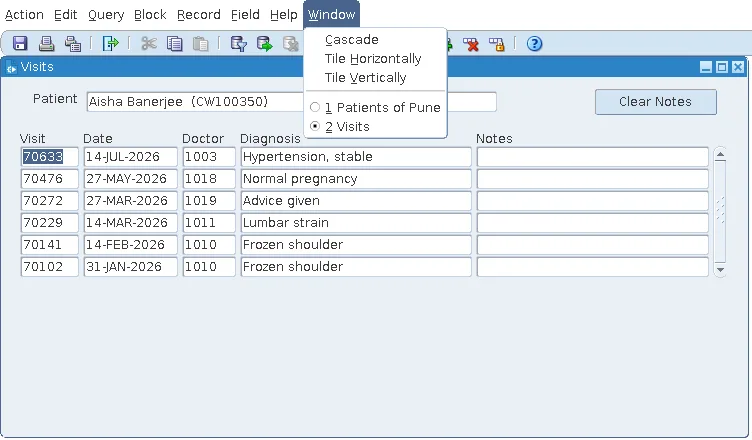
Code moves between forms with these built-ins.
Syntax:
go_form(form_name varchar2 | form_id formmodule)
next_form
previous_form
close_form(form_name varchar2 | form_id formmodule)
- CLOSE_FORM closes another open form, as EXIT_FORM closes the current one.
- FIND_FORM returns a form's ID, or a null ID if it is not open, the test to make before opening a form a second time.
- :SYSTEM.CURRENT_FORM is the name of the form the user is in.
- When the user moves between forms, Forms fires WHEN-FORM-NAVIGATE, and WHEN-WINDOW-ACTIVATED for the window entered: the places to refresh a form whose data another form may have changed.
For more on these built-ins, see CALL_FORM and OPEN_FORM in Oracle Forms, FIND_FORM and GO_FORM, and EXIT_FORM, CLOSE_FORM, and NEW_FORM.
Conclusion
CALL_FORM starts a form on top of the current one, which resumes after the call; OPEN_FORM starts one beside it; and NEW_FORM replaces it. With OPEN_FORM and ACTIVATE, the statements after the call never run, and with SESSION the opened form gets its own database session and transaction. A called form cannot save while its caller has unapplied changes, so POST before the call when it must, and use the Window menu, GO_FORM, NEXT_FORM, and CLOSE_FORM to move between open forms.
