
A form often needs to know something before it starts: which patient to show, which department to open, which mode to run in. Form parameters carry those values. They are set when the form starts, from the URL that launches it or from the form that calls it.
This guide covers form parameters in Oracle Forms 14.1.2: declaring them, referring to them in code and block properties, and passing them in the URL, either directly or through a formsweb.cfg variable.
Sample Form for This Guide
The examples and screenshots use the sample form CH16_VISITS from the Oracle Forms code repository on GitHub. Download it, open it in Forms Builder, and connect as CAREWELL to follow along.
| Form | File | What it shows |
|---|---|---|
| CH16_VISITS | forms/ch16/ch16_visits.fmb | The parameter P_PATIENT_ID that chooses the patient |
The forms run against the CareWell Clinic sample schema, which you install first.
Form Parameters at a Glance
| Task | How |
|---|---|
| Declare a parameter | Create it under Parameters in the Object Navigator. |
| Refer to it | :PARAMETER.name, like an item. |
| Pass it in a URL | The servlet parameter otherparams, with name=value pairs. |
| Pass it through formsweb.cfg | A variable in the configuration section's otherparams. |
| Pass it from another form | A parameter list given to CALL_FORM, OPEN_FORM, or NEW_FORM. |
Declare a Form Parameter
A form parameter is a variable of the form that is set when the form starts. Parameters are objects under Parameters in the Object Navigator, with three properties:
- Parameter Data Type: Char, Number, or Date.
- Maximum Length.
- Parameter Initial Value: the value the parameter has when no one passes another.
The sample visits form has a parameter P_PATIENT_ID, a number with the initial value 10012.
Use the Parameter in the Form
Code refers to a parameter as :PARAMETER.name, just like an item. The block VISITS uses P_PATIENT_ID in its WHERE clause, patient_id = :parameter.p_patient_id, so it queries only that patient's visits.
The form's startup trigger shows the patient's name and runs the query.
Example (WHEN-NEW-FORM-INSTANCE trigger on the form):
begin
  select first_name || ' ' || last_name || '  (' || mrn || ')'
  into   :ctl.patient
  from   patients
  where  patient_id = :parameter.p_patient_id;

  go_block('VISITS');
  execute_query;
exception
  when no_data_found then
    message('There is no patient ' || :parameter.p_patient_id || '.');
end;
The NO_DATA_FOUND handler covers a parameter that names a patient who does not exist, so the user gets a clear message instead of an error. Block WHERE clauses are covered in how to create data blocks in Oracle Forms.
Pass a Parameter in the URL
A form started from a web page or the Forms Standalone Launcher receives its parameters in the URL, through the servlet parameter otherparams. Its value is a list of name=value pairs separated by spaces, written as + or %20 in a URL.
Start the visits form for patient 10125:
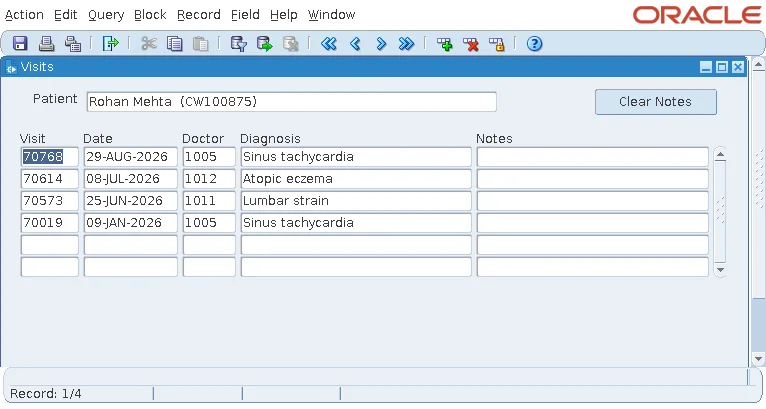
http://localhost:7001/forms/frmservlet?config=book&form=ch16_visits.fmx&otherparams=P_PATIENT_ID=10125
The form then shows the visits of patient 10125, Rohan Mehta, instead of the initial value's patient.
Pass a Parameter Through formsweb.cfg
A value of otherparams in the URL replaces the one in formsweb.cfg, which by default passes some runtime settings of its own. To keep those settings, add the parameter to the configuration section instead, with a variable the URL fills.
A formsweb.cfg section:
[visits]
form=ch16_visits.fmx
otherparams=obr=%obr% record=%record% p_patient_id=%patient%
patient=10012
With this section, frmservlet?config=visits&patient=10125 starts the form for patient 10125, and patient=10012 is the default when the URL leaves it out. The URL also gets shorter and hides the form's internal parameter name.
Pass Parameters Between Forms
Parameters are also how forms pass values to each other. CALL_FORM, OPEN_FORM, and NEW_FORM take a parameter list whose values become the called form's parameters. Global variables, which all the forms of a session share, are the other option.
For both techniques, see parameters and global variables in Oracle Forms and CALL_FORM and OPEN_FORM in Oracle Forms.
Conclusion
Form parameters in Oracle Forms are typed variables, declared under Parameters with a data type, length, and initial value, and set when the form starts. Refer to them as :PARAMETER.name in code and in block properties such as a WHERE clause. Pass them in the URL with otherparams, or better through a formsweb.cfg variable that keeps the default runtime settings, and between forms with parameter lists.
