
An Oracle Forms application is driven by events: the form starts, the cursor enters an item, the user changes a value, a record is fetched, a key is pressed, a row is about to be inserted. For most events Forms has a default behavior, and for each one it offers a trigger, a block of PL/SQL that runs when the event happens.
Writing a form means choosing which events to answer, and at which level. This guide covers triggers in Oracle Forms 14.1.2: the five families, levels and Execution Hierarchy, restricted built-ins, key triggers, trigger properties, and what happens when a trigger fails.
Sample Form for This Guide
The examples and screenshots use the sample form CH18_TRACE from the Oracle Forms code repository on GitHub. Download it, open it in Forms Builder, and connect as CAREWELL to follow along.
| Form | File | What it shows |
|---|---|---|
| CH18_TRACE | forms/ch18/ch18_trace.fmb | A doctors form whose triggers write their names to a trace file |
The forms run against the CareWell Clinic sample schema, which you install first.
The Five Families of Triggers
A trigger's name says what event fires it, and its prefix says what kind of trigger it is. Forms 14.1.2 has about a hundred triggers, in five families:
| Family | Fires | Examples |
|---|---|---|
| WHEN- | After an event, to add behavior to Forms' own | WHEN-BUTTON-PRESSED, WHEN-VALIDATE-ITEM, WHEN-NEW-RECORD-INSTANCE |
| PRE- and POST- | Before and after Forms does something: navigation, a query, a commit | PRE-TEXT-ITEM, POST-QUERY, PRE-INSERT, POST-FORMS-COMMIT |
| ON- | Instead of Forms' own processing | ON-LOCK, ON-INSERT, ON-ERROR, ON-POPULATE-DETAILS |
| KEY- | When the user presses a key, instead of the key's action | KEY-COMMIT, KEY-DELREC, KEY-NEXT-ITEM, KEY-OTHERS |
| User-named | Only when code calls them with EXECUTE_TRIGGER | Any name |
The key difference to remember: a WHEN- trigger adds to what Forms does, a PRE- or POST- trigger runs before or after it, and an ON- trigger replaces it. With an ON-UPDATE trigger, Forms no longer updates the row, so the trigger must. The ON-POPULATE-DETAILS trigger that coordinates a master-detail form is an example, as shown in how to create a master-detail form.
User-named triggers are a relic of old versions; program units do the same job better.
Trigger Levels and Execution Hierarchy
A trigger is defined at one of three levels: the form, a block, or an item. It fires for events of its own object and of the objects below it:
- A WHEN-VALIDATE-ITEM trigger on the form fires for every item of every block.
- One on a block fires for the items of that block.
- One on an item fires for that item only.
Not every trigger exists at every level. WHEN-NEW-FORM-INSTANCE is a form trigger, WHEN-BUTTON-PRESSED is usually defined on its button, and Forms Builder offers only the triggers that make sense for the selected object.
When the Same Trigger Exists at Several Levels
By default, the lowest level wins: an item's WHEN-VALIDATE-ITEM fires instead of the block's and the form's. The trigger's Execution Hierarchy property changes that:
| Execution Hierarchy | Effect |
|---|---|
| Override (default) | Fires the trigger instead of the one at the next higher level. |
| Before | Fires this trigger first, then the higher one. |
| After | Fires the higher one first, then this one. |
:SYSTEM.TRIGGER_ITEM, :SYSTEM.TRIGGER_BLOCK, and :SYSTEM.TRIGGER_RECORD tell a trigger defined at a high level which item, block, and record the event concerns. To see Execution Hierarchy and the rest of the firing order in a real session, see how to trace the firing order of triggers.
Restricted Built-ins
Some built-ins move the cursor or change the form's state, such as GO_ITEM, GO_BLOCK, NEXT_RECORD, EXECUTE_QUERY, COMMIT_FORM, and CLEAR_FORM. These restricted built-ins cannot be called while Forms is navigating.
| Where | Restricted built-ins allowed? |
|---|---|
| PRE- and POST- navigation triggers | No |
| Validation and query triggers, such as WHEN-VALIDATE-ITEM and POST-QUERY | No |
| WHEN-NEW-...-INSTANCE triggers | Yes |
| Key triggers | Yes |
| WHEN- triggers of interface items, such as WHEN-BUTTON-PRESSED | Yes |
A form whose POST-TEXT-ITEM calls GO_ITEM compiles, but fails when it runs.
Output:
FRM-40737: Illegal restricted procedure GO_ITEM in POST-TEXT-ITEM trigger.
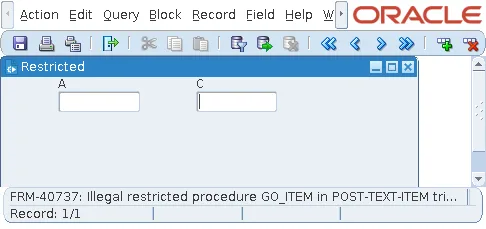
The description of each built-in in the Forms online help says whether it is restricted.
Key Triggers
A key trigger replaces what a key does. Key triggers take the names of Forms' logical keys, such as KEY-NEXT-ITEM (Tab), KEY-COMMIT (Save), KEY-DELREC (Remove Record), KEY-EXIT, KEY-ENTQRY, and dozens more, whatever physical key the user's keyboard map assigns to them. Menu items and toolbar buttons that do the same actions fire the same key triggers.
Because a key trigger replaces the key's action, a KEY-COMMIT trigger must call COMMIT_FORM itself, or Ctrl+S would do nothing else.
- DO_KEY('COMMIT_FORM') runs a key's own action, including any key trigger defined for it, from code, which is the way to reuse the key's behavior.
- KEY-OTHERS fires for every key that has no trigger of its own. A KEY-OTHERS containing only NULL; disables all the keys that are not explicitly handled, which some applications use to lock down a form.
- KEY-F0 to KEY-F9 answer extra function keys that the keyboard map defines.
- A key trigger's Display in 'Keyboard Help' and 'Keyboard Help' Text properties list it, with a description, in the Show Keys window (Ctrl+K).
Trigger Properties and Creating Triggers
| Property | What it does |
|---|---|
| Trigger Style | PL/SQL for every trigger written since Forms 4. V2 triggers, made of steps, survive only in very old forms. |
| Fire in Enter-Query Mode | Whether the trigger fires while the form is in Enter Query mode. It applies to key, ON-ERROR, ON-MESSAGE, and most WHEN- triggers. :SYSTEM.MODE tells the trigger the mode: NORMAL, ENTER-QUERY, or QUERY. |
| Execution Hierarchy | Override, Before, or After. |
To create a trigger, select the Triggers node of the object and click Create. A list of every trigger possible at that level appears, with a Find field that narrows it.
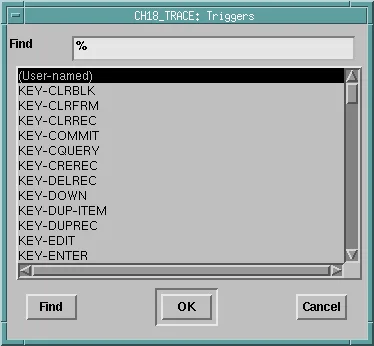
Program, SmartTriggers, or a right-click on an object, lists only the triggers commonly used for its type.
When a Trigger Fails
A trigger fails when it raises FORM_TRIGGER_FAILURE, or any exception it does not handle. What happens then depends on the trigger:
| Failing trigger | Result |
|---|---|
| Validation (WHEN-VALIDATE-ITEM, WHEN-VALIDATE-RECORD) | The value or record is invalid, and the cursor stays where it is. |
| PRE- navigation | The navigation stops, and the cursor goes back where it came from. |
| PRE-QUERY | The query is cancelled. |
| POST-QUERY | The record just fetched is rejected and does not appear in the block. |
| Commit (PRE-INSERT, ON-UPDATE, PRE-COMMIT, and others) | Forms rolls back to the savepoint it set at the start of the commit, and nothing is saved. |
| WHEN- trigger of an interface item, such as WHEN-BUTTON-PRESSED | The trigger just ends. |
Each trigger's description in the online help has an On Failure section. An unhandled exception other than FORM_TRIGGER_FAILURE also shows a message, such as FRM-40735: WHEN-BUTTON-PRESSED trigger raised unhandled exception ORA-44003. For handling errors deliberately, see how to handle errors in Oracle Forms.
Conclusion
Triggers answer the events of Oracle Forms: WHEN- triggers add behavior, PRE- and POST- triggers run around Forms' processing, ON- triggers replace it, and KEY- triggers replace keys. A trigger fires for its object and the objects below it, and the lowest level wins unless Execution Hierarchy is Before or After. Keep restricted built-ins out of navigation, validation, and query triggers to avoid FRM-40737, use DO_KEY and KEY-OTHERS to control keys, and remember that a failing trigger's effect depends on its kind.
