
In a multi-user application, two people will sooner or later change the same row at the same time. Oracle Forms keeps them from overwriting each other with row locks, but how well that works depends on the locking mode you choose and on a few checks you add yourself.
This guide covers record locking in Oracle Forms 14.1.2: when Forms locks a row, what users see when another session holds the lock or has changed the row, how lost updates happen and how to prevent them, and how to lock a master row to serialize its details.
Sample Form for This Guide
The examples and screenshots use the sample forms CH21_FEES and CH21_INVOICES from the Oracle Forms code repository on GitHub. Download them, open them in Forms Builder, and connect as CAREWELL to follow along.
| Form | File | What it shows |
|---|---|---|
| CH21_FEES | forms/ch21/ch21_fees.fmb | Cardiology fees, used for the locking tests |
| CH21_INVOICES | forms/ch21/ch21_invoices.fmb | Invoice lines numbered under a lock on the invoice |
The forms run against the CareWell Clinic sample schema, which you install first.
Locking Modes at a Glance
Forms locks rows with SELECT ... FOR UPDATE NOWAIT. When it does so depends on the block's Locking Mode:
| Locking Mode | When the row is locked | Conflicts show up |
|---|---|---|
| Automatic (default), Immediate | As soon as the user types the first character into a queried record, until the save or a rollback ends the transaction | Before the user saves |
| Delayed | Only during the save | During the save, or not at all |
The Locking Mode is a block property, described in how to create data blocks in Oracle Forms.
When Another Session Holds the Lock
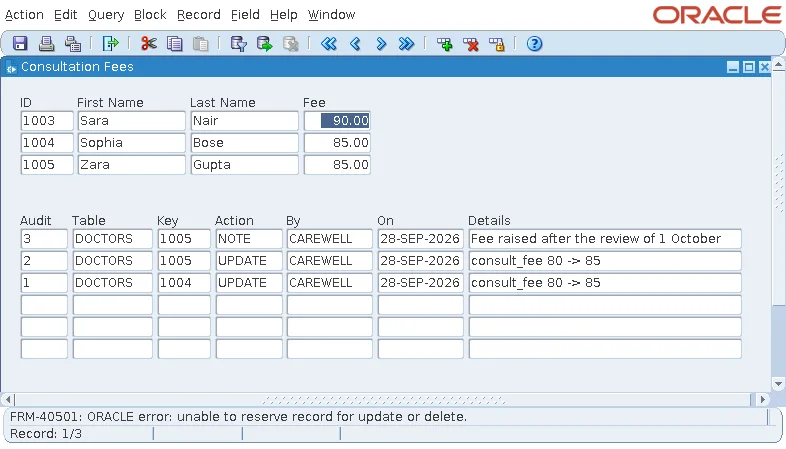
In a test, a second session updated Dr. Sara Nair's row and kept its transaction open. When the user typed a new fee into her record, Forms failed to lock the row, retried, and asked the user what to do.
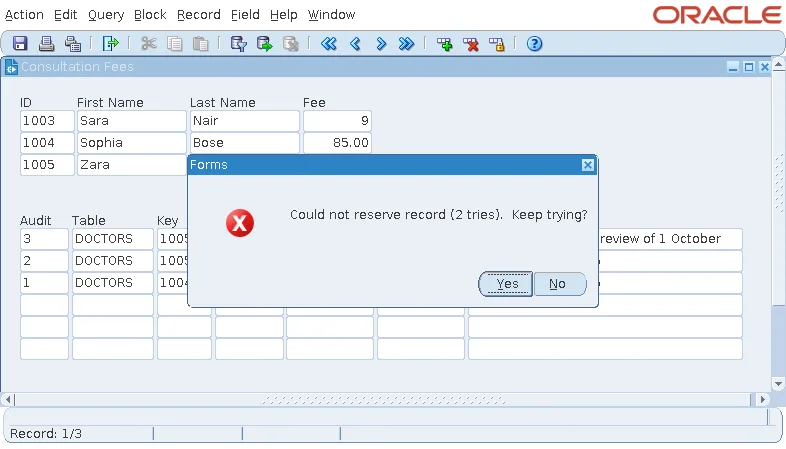
Yes keeps trying. No gives up, and Forms restores the value the user typed over.
Output:
FRM-40501: ORACLE error: unable to reserve record for update or delete.
Keep Transactions Short
Immediate locking is why a user who leaves a record half-edited at lunch blocks everyone else who needs that row. Keep transactions short: save often, and do not hold changes open while waiting for the user.
When Another Session Changed the Row
A different case is a row that another session changed and committed after the form queried it. Forms compares the row with what it fetched when it locks it. With Forms 14.1.2 and the default configuration, tests showed this behavior:
| Locking Mode | What happened |
|---|---|
| Immediate | When the user started to change the record, Forms locked the row, found it changed, and refreshed the record with the current values before applying the keystroke. The other session had set the fee to 100; the user's keystroke, meant for 90, was applied to 100. The user sees the new values before saving, and nothing is lost, but the value typed may not be what they meant. |
| Delayed | The refresh happened during the save, and the user's changes were applied on top of it. A change the other session made to another column survived; a change to the same column, the fee, was overwritten by the user's value without any message. That is a lost update. |
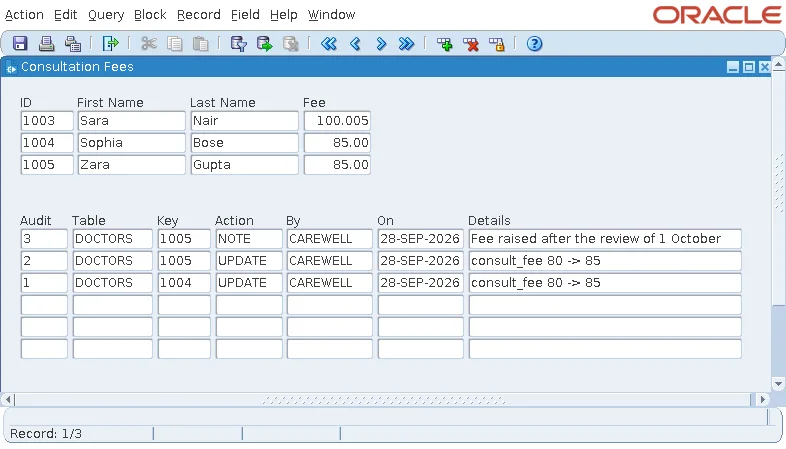
The message older releases gave in this situation, FRM-40654: Record has been updated by another user. Re-query to see change., did not appear in these tests.
Prevent Lost Updates
Two defenses follow from the tests:
- Prefer Immediate locking, the default, for tables that several users change, so conflicts show up before the user saves.
- For Delayed locking, or whenever a lost update matters, add your own check: a version column that every update increments, compared in PRE-UPDATE with the value the form fetched.
For a table with a VERSION column shown in a Query Only item, the check looks like this.
A version check in PRE-UPDATE:
select version into v_version from doctors where doctor_id = :doctors.doctor_id for update;
if v_version != get_item_property('DOCTORS.VERSION', database_value) then
  message('Another user changed this doctor. Query the record again.');
  raise form_trigger_failure;
end if;
:doctors.version := v_version + 1;
DATABASE_VALUE, the value fetched from the database, is explained in how to validate data in Oracle Forms.
Lock a Master Row to Serialize Its Details
Numbering invoice lines with MAX(LINE_NO) + 1 has a gap: two users adding lines to one invoice at the same moment can both compute the same number. Locking the invoice first makes the second user wait until the first has committed, and then see the first user's line.
Example (PRE-INSERT trigger on INVOICE_LINES):
declare
  v_id invoices.invoice_id%type;
begin
  -- lock the invoice: a second user adding lines to it waits here until this commit
  select invoice_id into v_id
  from   invoices
  where  invoice_id = :invoice_lines.invoice_id
  for update;

  select nvl(max(line_no), 0) + 1
  into   :invoice_lines.line_no
  from   invoice_lines
  where  invoice_id = :invoice_lines.invoice_id;
end;
The same pattern closes the gap in a double-booking check: lock the doctor's row in PRE-INSERT before checking the schedule, and two bookings can no longer pass the check at once. The unlocked version of this trigger is in how to create a master-detail form in Oracle Forms.
LOCK_RECORD
Syntax:
lock_record
LOCK_RECORD locks the row of the current record now, as a keystroke would, for example in a button that starts an edit. For older examples of locking in forms, see how to lock and unlock records in Oracle Forms, and for what happens during the save itself, how to save changes using commit processing.
Conclusion
Oracle Forms locks rows with SELECT ... FOR UPDATE NOWAIT, at the first keystroke with Immediate locking or only during the save with Delayed locking. A lock held by another session gives a retry prompt, then FRM-40501, so keep transactions short. A row changed by another user is refreshed when Forms locks it, but with Delayed locking a change to the same column can be silently lost, so prefer Immediate locking and add a version column check where it matters. Lock a master row in PRE-INSERT to serialize its details, and use LOCK_RECORD to lock the current row on demand.
