
A form collects changes, new, changed, and deleted records in any of its blocks, and saves them together as one database transaction when the user presses Save. Either everything is saved or nothing is.
This guide follows that save step by step in Oracle Forms 14.1.2. It covers the commit triggers and what each is for, writing an audit trail in the same transaction, saving rows whose key the database generates, and the POST, savepoint, and CLEAR_FORM tools for controlling a transaction from code.
Sample Form for This Guide
The examples and screenshots use the sample form CH21_FEES from the Oracle Forms code repository on GitHub. Download it, open it in Forms Builder, and connect as CAREWELL to follow along.
| Form | File | What it shows |
|---|---|---|
| CH21_FEES | forms/ch21/ch21_fees.fmb | Cardiology fees with an audit trail written in the same transaction |
The forms run against the CareWell Clinic sample schema, which you install first.
The Steps of Commit Processing
COMMIT_FORM, called by the Save key's default action or by your code, saves the form's changes in six steps:
- Validate the form: every changed item and record, at every level, as if the cursor were leaving them (WHEN-VALIDATE-ITEM, WHEN-VALIDATE-RECORD).
- Fire PRE-COMMIT, once, before any row is written.
- Post the changes, block by block: for each deleted record, PRE-DELETE, the DELETE, and POST-DELETE; for each new record, PRE-INSERT, the INSERT, and POST-INSERT; for each changed record, PRE-UPDATE, the UPDATE, and POST-UPDATE.
- Fire POST-FORMS-COMMIT, when every row is written but not yet committed.
- Commit the database transaction.
- Fire POST-DATABASE-COMMIT.
Before step 3, Forms sets a savepoint. If any trigger of steps 2 to 4 fails, or the database rejects a row, Forms rolls back to that savepoint. Nothing of this save is kept, the records stay changed in the form, and the user can correct them and save again. You can watch these steps in a real session in how to trace the firing order of triggers.
What Each Commit Trigger Is For
| Trigger | Use it for |
|---|---|
| PRE-COMMIT | Checks that span blocks, or work that must happen once before the save. |
| PRE-INSERT, PRE-UPDATE, PRE-DELETE | Per-row work before the statement: keys from sequences, audit columns, and checks against the database that must run inside the transaction. |
| POST-INSERT, POST-UPDATE, POST-DELETE | Per-row work after the statement, such as writing related rows. |
| POST-FORMS-COMMIT | Work after all rows are written and before the commit, such as a check on the result of the whole save. |
| POST-DATABASE-COMMIT | Work after the commit, which can no longer be undone with the save, such as a message or a notification. |
The ON- versions (ON-INSERT, ON-UPDATE, ON-DELETE, ON-LOCK, and ON-COMMIT) replace Forms' own statements. They are meant for blocks based on procedures or other data sources. PRE-INSERT for keys is shown in how to populate primary keys from a sequence.
Write an Audit Trail in the Same Transaction
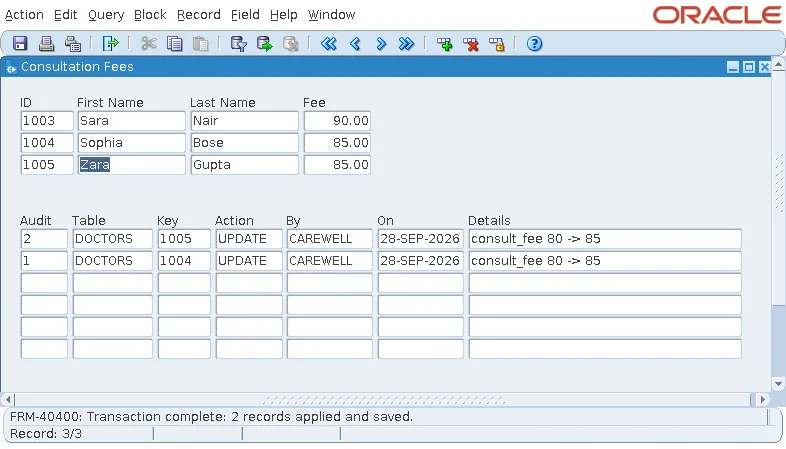
The statements of triggers run in the same transaction as the form's own. The sample fees form changes the consultation fees of the Cardiology doctors, and its PRE-UPDATE on DOCTORS writes a row to AUDIT_LOG for every fee that changes, with the old value from DATABASE_VALUE.
Example (PRE-UPDATE trigger on DOCTORS):
declare
  v_old varchar2(20) := get_item_property('DOCTORS.CONSULT_FEE', database_value);
begin
  if v_old != :doctors.consult_fee then
    insert into audit_log (table_name, row_key, action, details)
    values ('DOCTORS', :doctors.doctor_id, 'UPDATE',
            'consult_fee ' || v_old || ' -> ' || :doctors.consult_fee);
  end if;
end;
If the save fails, the audit rows are rolled back with it; if it succeeds, they are committed with it. The form's KEY-COMMIT saves and, when everything was saved, queries the audit block again so it shows the new rows.
Example (KEY-COMMIT trigger on the form):
begin
  commit_form;
  if :system.form_status = 'QUERY' then        -- everything was saved
    go_block('AUDIT_LOG');
    execute_query;                             -- show the new audit rows
    go_block('DOCTORS');
  end if;
end;
:SYSTEM.FORM_STATUS is QUERY after a successful save, because no changes remain. Here, two fees changed from 80 to 85 and were saved, with their audit rows. CHANGED_BY and CHANGED_ON were filled by the columns' defaults, USER and SYSDATE.
Save Rows Whose Key the Database Generates
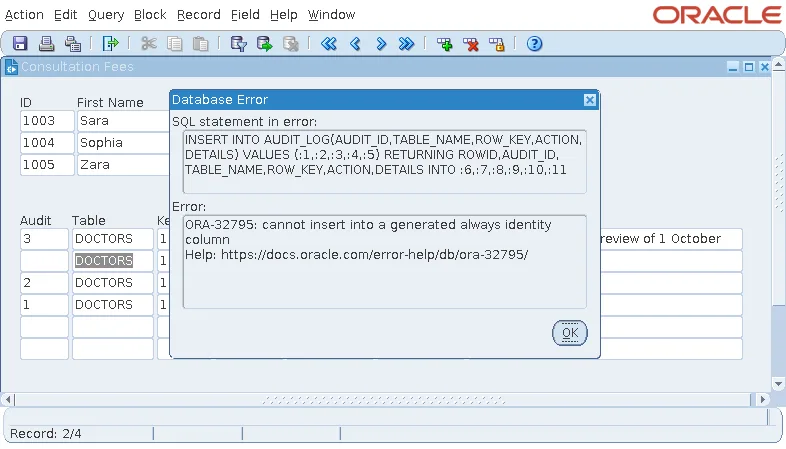
AUDIT_LOG.AUDIT_ID is an identity column, GENERATED ALWAYS. The database assigns it and refuses any value, even null, in an INSERT. A block on the table must therefore leave the column out of its inserts, but an ordinary database item does not: Forms lists every database item in its INSERT, and the save fails.
Output:
ORA-32795: cannot insert into a generated always identity column
Query Only and DML Returning Value
Two properties solve it:
- The item's Query Only is Yes: Forms queries the column but never inserts or updates it.
- The block's DML Returning Value is Yes: Forms adds a RETURNING clause to its statements and puts back into the items the values the database set, such as the new identity and the columns' defaults.
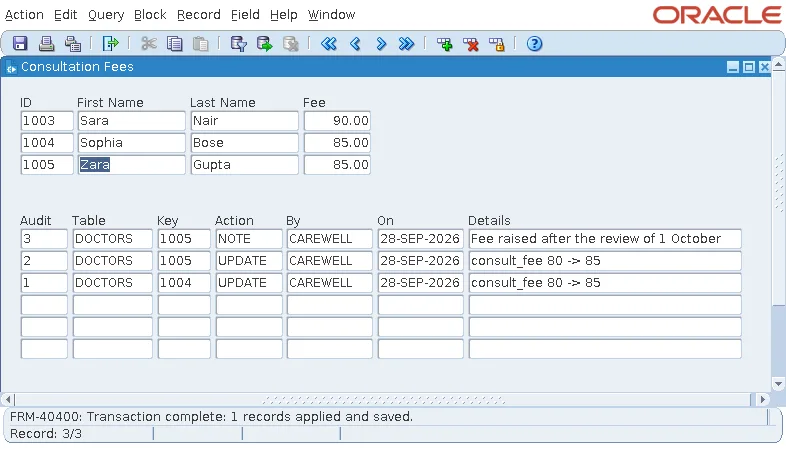
With both, a note typed in the audit block is saved, and its new AUDIT_ID appears in the item.
Check the audit rows:
select audit_id, table_name, row_key, action, details from audit_log order by audit_id;
Output:
  AUDIT_ID TABLE_NAME ROW_KEY ACTION DETAILS
---------- ---------- ------- ------ ------------------------------------------
         1 DOCTORS    1004    UPDATE consult_fee 80 -> 85
         2 DOCTORS    1005    UPDATE consult_fee 80 -> 85
         3 DOCTORS    1005    NOTE   Fee raised after the review of 1 October
The same approach works for keys set by database triggers, and for columns with defaults the form should show after the save.
POST, Savepoints, and Rollback
POST
Syntax:
post
POST writes the form's changes, steps 1 to 4 of commit processing, without the commit. The rows are in the database, visible to the form's own session and locked, but not committed. Use it before calling another form that must see the changes, or before code that queries the rows just written.
Savepoints and CLEAR_FORM
The form's Savepoint Mode property (SAVEPOINT_MODE for SET_FORM_PROPERTY) lets Forms set savepoints at the start of each save and when a form calls another, so a failure rolls back only the work since then.
In form code, a ROLLBACK statement is treated as CLEAR_FORM with no arguments, and a COMMIT statement as COMMIT_FORM. To undo the user's unsaved changes, call CLEAR_FORM directly.
Syntax:
clear_form [(commit_mode number [, rollback_mode number])]
- CLEAR_FORM(NO_VALIDATE, FULL_ROLLBACK) discards every change and rolls back the database transaction, without asking.
- ASK_COMMIT, the default, asks whether to save first.
- CLEAR_BLOCK and CLEAR_RECORD do the same for one block or record.
- ISSUE_ROLLBACK and ISSUE_SAVEPOINT exist for ON-ROLLBACK and ON-SAVEPOINT triggers.
For CLEAR_BLOCK in practice, see CLEAR_BLOCK in Oracle Forms. What happens when two users change the same rows is covered in how to handle record locking in Oracle Forms.
Conclusion
COMMIT_FORM validates the form, fires PRE-COMMIT, posts deletes, inserts, and updates with their PRE- and POST- triggers, fires POST-FORMS-COMMIT, commits, and fires POST-DATABASE-COMMIT, rolling back to a savepoint if anything fails. Because trigger statements run in the form's transaction, audit rows and other related rows are saved, or not, together with the form's changes. Give identity and trigger-set columns Query Only items and turn on DML Returning Value, use POST to write without committing, and CLEAR_FORM to discard changes.
