
Between the user's computer and the Forms server, it is not the application code that causes round trips: it is the user's actions and the form's design. Each request crosses the network, so a form that makes fewer of them feels faster, especially for users far from the server.
This guide counts what user actions send to the Forms server in Oracle Forms 14.1.2, explains event bundling, shows why a one-second clock is expensive, and covers the settings that make forms start faster and let one server serve more users.
Sample Form for This Guide
The examples and screenshots use the sample form CH34_TRIPS from the Oracle Forms code repository on GitHub. Download it, open it in Forms Builder, and connect as CAREWELL to follow along.
| Form | File | What it shows |
|---|---|---|
| CH34_TRIPS | forms/ch34/ch34_trips.fmb | Eight items and a clock, for counting requests to the Forms server |
The forms run against the CareWell Clinic sample schema, which you install first.
What User Actions Cost at a Glance
| Action | Requests to the Forms server |
|---|---|
| Typing 20 characters in an item | 0 |
| Tab seven times, from item 1 to item 8 | 7 |
| One click from item 1 on item 8 | 1 |
| A one-second clock timer, for 36 seconds | 68 |
Measure Requests to the Forms Server
The Forms client sends each request to the Forms listener servlet, at /forms/lservlet. WebLogic's access log of the Forms server, servers/WLS_FORMS/logs/access.log, has a line for every request.
A line of the access log:
2026-09-28 09:41:40 POST 4df082c6-...-000001d2 0 /forms/lservlet 200 14
Counting these lines between two moments counts the requests of an action. WebLogic writes the log in blocks, so the last requests appear some time later. Fusion Middleware Control shows the average response time of the Forms server.
The Sample Form and Its Results
The sample trips form has eight text items and a clock that a one-second timer updates. The access log counted the requests of four actions, shown in the table above.
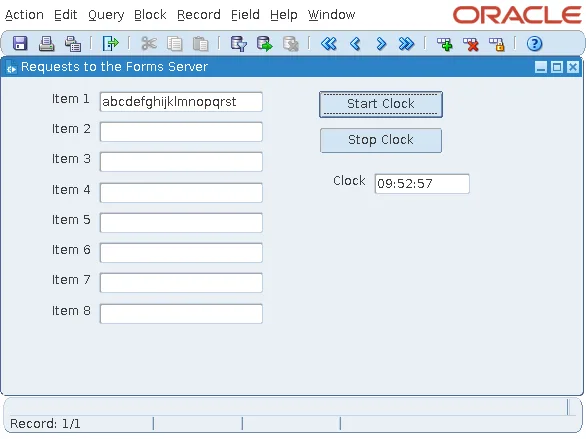
The clock's timer starts from a button.
Example (WHEN-BUTTON-PRESSED trigger on CTL.START):
declare
  v_timer timer;
begin
  v_timer := create_timer('CLOCK', 1000, repeat);   -- every second
end;
Typing and Navigation
Typing stays in the client: the characters travel when the user leaves the item. Each Tab is a navigation, and a request, because the Forms server runs navigation and its triggers.
Event Bundling
A click on a distant item is a single navigation, however many items it passes. Forms sends all the events it causes, leaving item 1, validating it, and entering item 8, in one request. Oracle calls this event bundling.
Timers
The clock made two requests a second: every expiry of a timer is a request of its own, with nothing to bundle. A clock in every open form of a hundred users is some 700,000 requests an hour for nothing. Show time with a Java bean that runs in the client, and keep timers for work only the server can do; see how to use timers in Oracle Forms and how to add Java beans to Oracle Forms.
Design Forms That Send Less
- Validation happens on the server, when the user leaves an item. Checking each keystroke needs a pluggable Java component, which answers without a request.
- Navigation: forms whose users can skip what they do not need, such as defaults they accept and items they never change, send fewer requests.
- What is sent: Forms sends each object's properties once, and then only what changes. Objects that share their properties through SmartClasses and property classes cost less than objects that each differ a little; prompts cost less than boilerplate text; and rectangles and lines cost less than other drawn objects.
- Menus: changes to menu items are buffered and sent with the whole menu. SET_APPLICATION_PROPERTY(MENU_BUFFERING, 'FALSE') sends each change alone, which is better for a form that changes a single item now and then.
Shared properties are covered in how to reuse objects with object libraries.
Start Forms Faster
A form's start is paid by every user, every time:
- The client's JAR files are downloaded once and cached; the Standalone Launcher reported Using cached archive file frmall.jar on later starts. Keep the archive list to what the application uses.
- The first window must be drawn before the user can work. Put rarely used items on canvases that are not visible at the start (Visible No, Raise on Entry Yes), and prefer stacked canvases shown on demand to large tab canvases, because a tab canvas loads the items of all its pages, including those hidden behind the first one. See how to use canvases in Oracle Forms.
- Runtime processes can be started before users arrive. The configuration section's prestartRuntimes=true, with prestartInit, prestartMin, prestartIncrement, and prestartTimeout, keeps a pool of Forms runtime processes ready, for applications many users open at the same time, such as the start of a shift. Fusion Middleware Control can schedule the prestart.
Serve More Users
On the Forms server, each user has a runtime process, and its memory is what limits the number of users:
- The code and drawn objects of an .fmx file are shared by all the processes that run it; each process has its own data, such as records, variables, and record groups. Memory grows with what a form fetches and keeps, more than with the number of forms.
- OPEN_FORM with SESSION adds a database session per form.
- The Forms server belongs next to the database, because every query, trigger, and commit travels between them. Users can be far away, since they send only the few requests measured above.
Round trips on the database side are covered in how to reduce database round trips in Oracle Forms.
Conclusion
Count a form's requests to the Forms server in the access log of /forms/lservlet. Typing costs nothing, each navigation is a request, event bundling makes one click on a distant item a single request, and each timer expiry is a request, so a one-second clock made two requests a second. Share properties, keep the first canvas light and the archive small, prestart runtimes for busy mornings, and place the Forms server next to the database, not next to the users.
