
Most form code runs because the user did something: typed, clicked, or pressed a key. Some forms must act on their own, such as a waiting-room screen with a clock. Oracle Forms timers make that possible, and a special one-shot timer solves a very different problem: running restricted built-ins right after a trigger that is not allowed to call them.
This guide covers timers in Oracle Forms 14.1.2: creating, changing, and deleting them, handling them in WHEN-TIMER-EXPIRED, what they cost, and the one-shot timer technique.
Sample Form for This Guide
The examples and screenshots use the sample form CH29_WAITING_ROOM from the Oracle Forms code repository on GitHub. Download it, open it in Forms Builder, and connect as CAREWELL to follow along.
| Form | File | What it shows |
|---|---|---|
| CH29_WAITING_ROOM | forms/ch29/ch29_waiting_room.fmb | A waiting-room screen with a clock, a patient finder, and database events |
The forms run against the CareWell Clinic sample schema, which you install first.
Timer Built-ins at a Glance
| Built-in | What it does |
|---|---|
| CREATE_TIMER | Creates a timer that runs out after a number of milliseconds, once or repeatedly. |
| SET_TIMER | Changes the interval or mode of an existing timer; NO_CHANGE keeps either. |
| DELETE_TIMER | Removes a timer. |
| FIND_TIMER | Returns a timer's ID; with ID_NULL, tells whether it exists before creating it again. |
| GET_APPLICATION_PROPERTY(TIMER_NAME) | In WHEN-TIMER-EXPIRED, the name of the timer that expired. |
Create a Timer
A timer is created by code, runs out after a number of milliseconds, and fires the form-level trigger WHEN-TIMER-EXPIRED. A form can have many timers, and the trigger asks which one expired.
Syntax:
create_timer(timer_name varchar2, milliseconds number, iterate number) return timer
set_timer(timer_id timer | timer_name varchar2, milliseconds number, iterate number)
delete_timer(timer_id timer | timer_name varchar2)
find_timer(timer_name varchar2) return timer
iterate is REPEAT, to run out again and again, or NO_REPEAT, to run out once.
Example: a Clock
The sample waiting-room form starts a clock when it opens. The same trigger also sets the idle time for a client-idle event.
Example (WHEN-NEW-FORM-INSTANCE trigger on the form):
declare
  v_clock timer;
begin
  set_application_property(client_idle_time, 20);  -- seconds without input: event IDLE
  go_block('APPOINTMENTS');
  execute_query;
  v_clock := create_timer('CLOCK', 1000, repeat);   -- every second, until deleted
end;
The form-level WHEN-TIMER-EXPIRED trigger handles both of the form's timers, CLOCK and FIND.
Example (WHEN-TIMER-EXPIRED trigger on the form):
declare
  v_timer varchar2(30) := get_application_property(timer_name);
begin
  if v_timer = 'CLOCK' then
    :ctl.now := to_char(sysdate, 'HH24:MI:SS');
  elsif v_timer = 'FIND' then                        -- one-shot: see WHEN-VALIDATE-ITEM
    go_block('APPOINTMENTS');
    first_record;
    loop
      exit when upper(:appointments.patient) like upper(:ctl.find) || '%'
             or :system.last_record = 'TRUE';
      next_record;
    end loop;
  end if;
end;
The Server time item changes every second. It shows SYSDATE, the time of the Forms server, not the time of the user's computer. GET_APPLICATION_PROPERTY is covered in GET_APPLICATION_PROPERTY in Oracle Forms.
What Timers Cost
A timer does not interrupt anything: it expires when the form is waiting for the user, not in the middle of a trigger. But each expiry is a round trip between the Forms client and the server, plus a trigger execution on the server.
A one-second clock in every form of a hundred users is a hundred requests a second for nothing. Use repeating timers only where they earn their cost, with the longest interval that works, and delete them when they are no longer needed.
The One-Shot Timer Technique
A timer of 1 millisecond with NO_REPEAT has a use that has nothing to do with time. Restricted built-ins such as GO_BLOCK, NEXT_RECORD, and EXECUTE_QUERY cannot run in WHEN-VALIDATE-ITEM and similar triggers, as explained in how to use triggers in Oracle Forms.
A trigger that needs them can create a one-shot timer instead. The timer expires as soon as the trigger and the navigation around it are finished, and WHEN-TIMER-EXPIRED, which may navigate, does the work.
Example: Find a Patient
The waiting room's Find patient item uses this technique. Its WHEN-VALIDATE-ITEM cannot move to the record it is looking for, so it only starts the timer FIND.
Example (WHEN-VALIDATE-ITEM trigger on CTL.FIND):
declare
  v_find timer := find_timer('FIND');
begin
  -- GO_BLOCK and NEXT_RECORD are restricted here: a timer runs them just after
  if id_null(v_find) then
    v_find := create_timer('FIND', 1, no_repeat);
  else
    set_timer(v_find, 1, no_repeat);
  end if;
end;
The FIND branch of WHEN-TIMER-EXPIRED above then goes to the first appointment whose patient starts with the text typed. Typing Rah and pressing Tab moved the cursor to Rahul Bose, at 16:30.
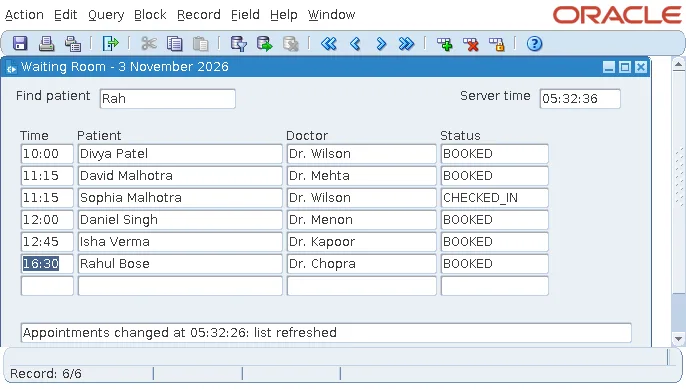
The trigger reuses the timer if it already exists, checking with FIND_TIMER and ID_NULL, and restarts it with SET_TIMER.
Conclusion
CREATE_TIMER starts a timer in Oracle Forms that runs out once or repeatedly, WHEN-TIMER-EXPIRED handles it, and GET_APPLICATION_PROPERTY(TIMER_NAME) says which one expired. Timers expire only while the form waits for the user, and every expiry is a round trip, so keep repeating timers few and slow. A 1-millisecond, NO_REPEAT timer is the standard way to run restricted built-ins just after a trigger that cannot call them.
