
A PL/SQL library shares code across forms, but it cannot hold alerts, visual attributes, or items. Property classes hold properties, but they belong to one form. To give every form of an application the same objects, and keep them the same, Oracle Forms has object libraries.
This guide builds an object library in Oracle Forms 14.1.2 and uses it in a form. It covers copying versus subclassing, what happens when the library changes, SmartClasses, object groups and the problems they showed in testing, and template forms that every new form starts from.
Sample Form for This Guide
The examples and screenshots use the sample form CH28_PATIENT, the object library CW_OBJECTS, and the template form CW_TEMPLATE from the Oracle Forms code repository on GitHub. Download them, open them in Forms Builder, and connect as CAREWELL to follow along.
| Form | File | What it shows |
|---|---|---|
| CH28_PATIENT | forms/ch28/ch28_patient.fmb | A patient form with alerts and items subclassed from the library |
| CW_OBJECTS | forms/ch28/cw_objects.olb | The object library of the sample application |
| CW_TEMPLATE | forms/ch28/cw_template.fmb | The template form new forms start from |
The forms run against the CareWell Clinic sample schema, which you install first.
Object Libraries at a Glance
| Feature | What it gives you |
|---|---|
| Object library (.olb) | Objects of almost any kind, organized on tabs, for all the forms of an application. Design time only. |
| Copy | An independent copy in the form. Later library changes do not reach it. |
| Subclass | An object that inherits every property from the library and follows its changes when the form is recompiled. |
| SmartClasses | Library objects offered on an object's right-click menu, to subclass in one click. |
| Template form | A form every new form is copied from, with the application's window, menu, libraries, triggers, and subclassed objects. |
Create an Object Library
File, New, Object Library creates a library, and Tools, Object Library opens its window. A library is organized in tabs, like the pages of a catalog.
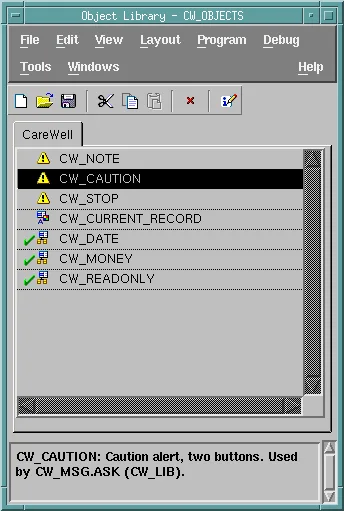
The sample library CW_OBJECTS has one tab, CareWell, holding:
- The alerts CW_NOTE, CW_CAUTION, and CW_STOP, used by the message package described in how to create a PL/SQL library.
- The visual attribute CW_CURRENT_RECORD, to highlight a block's current record.
- The property classes CW_DATE, CW_MONEY, and CW_READONLY.
- The text items CW_DATE_ITEM and CW_MONEY_ITEM, marked as SmartClasses with a check mark.
To add an object, drag it from a form in the Object Navigator onto the tab. Selecting an object shows its description at the bottom of the window, a text kept with the object and the first thing another developer reads.
An object library is a design-time module: it has no runtime file and never runs. Keep it in the directory of the forms' sources, and save it in lowercase, because forms find it by its file name.
Copy or Subclass
Drag an object from the library window onto a form in the Object Navigator, such as the Alerts node of the sample patient form, and Forms Builder asks how to take it.
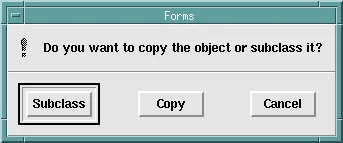
- Copy puts an independent copy in the form. Later changes to the library do not reach it.
- Subclass puts an object in the form that inherits every property from the library's object. Its Subclass Information names the source object and its module, and inherited properties carry an arrow in the Property Palette.
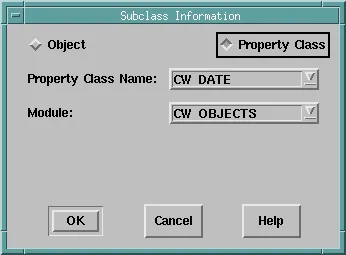
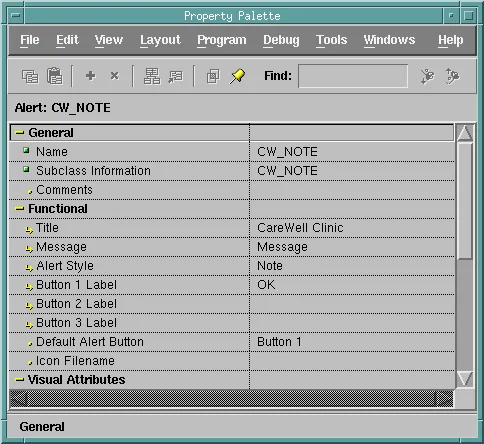
In Forms Builder, drag and drop uses the mouse button the desktop uses for it: the middle button on a Linux desktop, and the left button on Windows.
The Sample Form
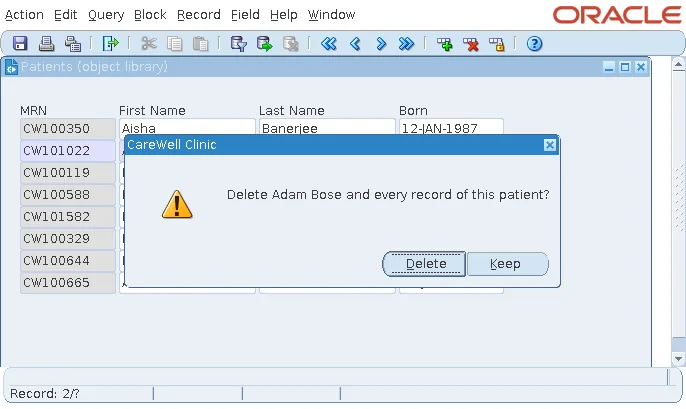
The sample patient form subclasses the three alerts and the visual attribute, and bases two of its items on the library's property classes: MRN on CW_READONLY, gray and closed to typing, and Born on CW_DATE. The form attaches the code library CW_LIB, and its delete confirmation uses the library's alerts, so the same alerts serve the message package in every form that subclasses them.
Overrides
As with property classes, a property you change in a subclassed object overrides the library for that property only. A red cross joins its arrow, and the palette's Inherit button restores it.
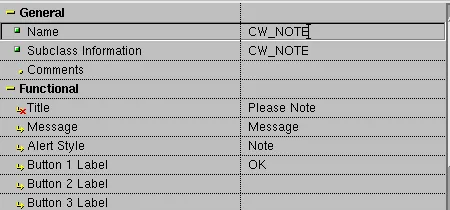
Override sparingly: every override is a place where the form no longer follows the application's standard. Property classes and inheritance are explained in how to use property classes in Oracle Forms.
When the Library Changes
Subclassing pays off when the library changes. In a test, the title of CW_CAUTION was changed in the library to CareWell Clinic: Please Confirm, and ch28_patient.fmb was compiled again with frmcmp_batch, without opening it in Forms Builder. The alert of the running form had the new title: the compiler reads the library, and every subclassed property follows it.
When the Library Is Missing
A form keeps its own copy of the inherited values, from the last time it was saved or compiled. When the compiler cannot find the library, because it was renamed or is not where the form expects it, it reports the objects it could not load and compiles the form with the values it has.
Output:
FRM-18108: Failed to load the following objects.

Source Module: cw_objects.olb
  Source Object: CW_NOTE
Source Module: cw_objects.olb
  Source Object: CW_CAUTION
...
The form still works, but no longer follows the library. Two rules follow: after changing a library, recompile every form that subclasses from it, and treat FRM-18108 in a compilation log as an error, not a warning. Compiling from scripts is covered in how to compile Oracle Forms modules.
SmartClasses
A SmartClass is a library object marked for everyday use, the check mark in the library window. With the library open, right-clicking an object in the Object Navigator offers, under SmartClasses, the SmartClasses whose type matches the object. For a text item, that is CW_DATE_ITEM and CW_MONEY_ITEM, and choosing one subclasses the item from it in one click.
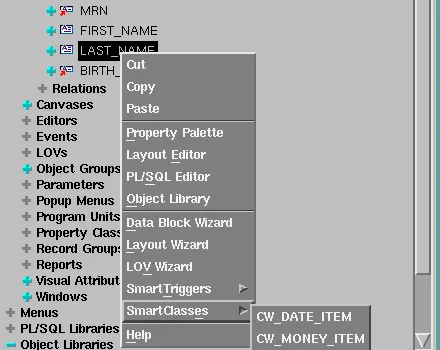
The object type must match. Marked as SmartClasses, the property classes CW_DATE and CW_MONEY left the menu disabled for items; the text items CW_DATE_ITEM and CW_MONEY_ITEM, two items with the right format masks kept in a scratch block, were needed.
Object Groups, and Why to Be Careful
An object group is a named list of a form's objects, under Object Groups in the navigator, meant to be copied or subclassed as one. The sample patient form has the group CW_STANDARD, whose Object Group Children are the three alerts and the visual attribute.
In tests with Forms 14.1.2, object groups misbehaved twice:
- Dragging CW_STANDARD to another form, as a subclass, added the group and its list of children to that form, but not the alerts themselves. The form, when run, failed to show CW_NOTE with FRM-41039: Invalid Alert ID 0.
- A library that contained an object group could not be opened again: Forms Builder closed, without a message, as it loaded the library. The same happened to every library a group was added to, whatever the group held. Oracle's own webutil.olb, which holds two object groups made with an earlier release, opens and works.
So check what a group really brings before relying on it. A template form does the group's job without these risks.
Template Forms
File, New, Form Using Template creates a new form as a copy of an existing one. A template form gives every form of an application the same start. The sample cw_template.fmb has:
- The window and canvas of a CareWell form.
- The menu CW_MENU, described in how to create a menu in Oracle Forms.
- The code library CW_LIB attached.
- The parameter P_USER, and a WHEN-NEW-FORM-INSTANCE trigger that signs the user in and adjusts the menu.
- The group CW_STANDARD, whose objects are subclassed from CW_OBJECTS.
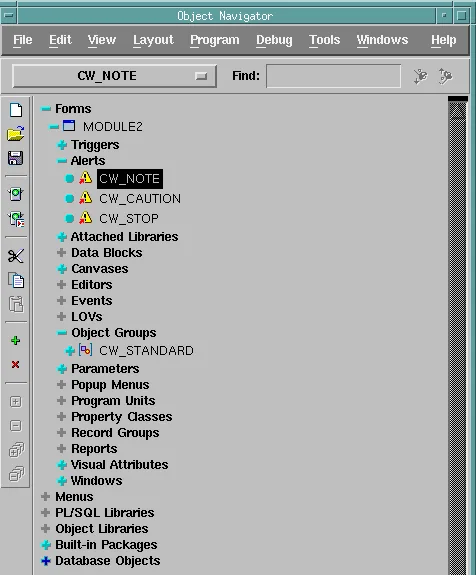
The new form, MODULE2, came with all of it, and its alerts were still subclasses of the library's: the template passes on the links to the library, not copies. A template is only a starting point, and later changes to it do not reach the forms made from it. So put in the template what every form needs, and in the library what must stay the same in all of them.
Conclusion
An object library (.olb) holds alerts, visual attributes, property classes, items, and other objects on tabs, for all the forms of an application, at design time only. Subclass rather than copy, so recompiling a form picks up the library's changes, keep overrides rare, and treat FRM-18108 as an error. SmartClasses make subclassing a one-click job, object groups deserve caution in 14.1.2, and a template form gives every new form the application's window, menu, libraries, triggers, and subclassed objects from the start.
