
Most screens in a business application show one record together with the records that belong to it: a department and its doctors, an invoice and its lines, a patient and their appointments. In Oracle Forms, that screen is a master-detail form: two data blocks joined by a relation.
Whenever the master block moves to another record, the detail block shows that record's details. Forms does this on its own, a process called coordination, using code Forms Builder writes when you create the relation. This guide builds two master-detail forms in Oracle Forms 14.1.2 and explains the relation's properties, its generated code, and the built-ins that change it at run time.
Sample Form for This Guide
The examples and screenshots use the sample forms CH08_DEPARTMENTS and CH08_INVOICES from the Oracle Forms code repository on GitHub. Download them, open them in Forms Builder, and connect as CAREWELL to follow along.
| Form | File | What it shows |
|---|---|---|
| CH08_DEPARTMENTS | forms/ch08/ch08_departments.fmb | Departments with their doctors |
| CH08_INVOICES | forms/ch08/ch08_invoices.fmb | Invoices with their lines and payments |
The forms run against the CareWell Clinic sample schema, which you install first.
Master-Detail at a Glance
| Piece | What it does |
|---|---|
| Relation | An object of the master block that names the detail block and the join condition. |
| Join condition | Added to the detail's query, with the master's current value. |
| Copy Value from Item | Gives new detail records the master's key. |
| Delete Record Behavior | Decides what happens to the details when a master is deleted. |
| Generated triggers | ON-POPULATE-DETAILS, ON-CHECK-DELETE-MASTER or PRE-DELETE, and ON-CLEAR-DETAILS. |
Step 1: Create the Master Block
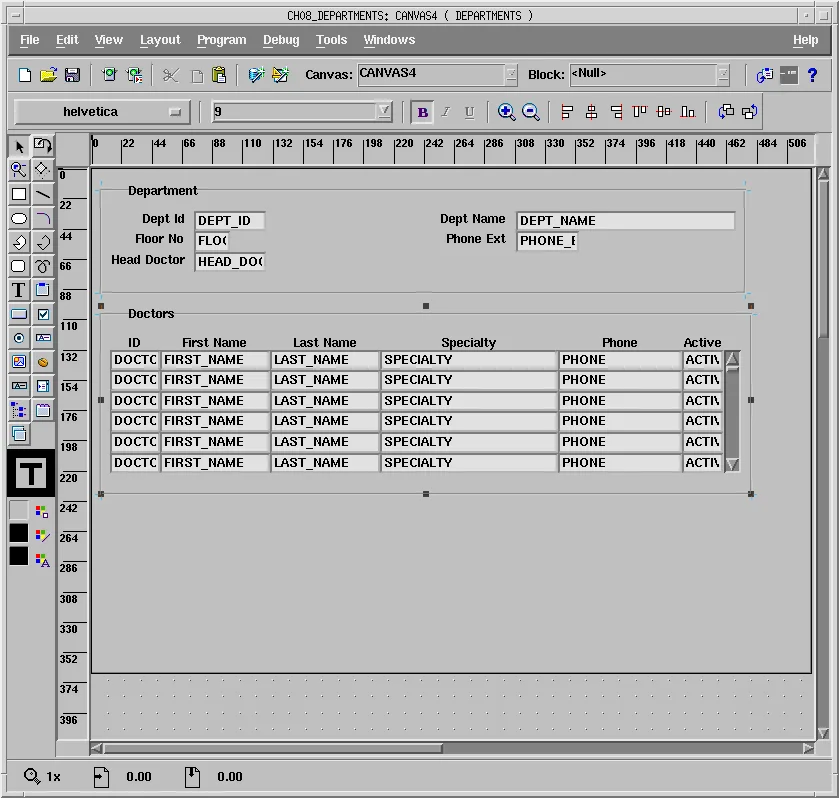
The sample form CH08_DEPARTMENTS shows the clinic's departments with their doctors. Create the master block first, as in how to create your first form using the Data Block Wizard: a new form, the Data Block Wizard on DEPARTMENTS with all its columns, and the Layout Wizard in Form style, one record in a frame titled Department.
Step 2: Create the Detail Block and the Relation
Select the Data Blocks node and run the Data Block Wizard again for the detail block, on DOCTORS, with the columns DOCTOR_ID, FIRST_NAME, LAST_NAME, DEPT_ID, SPECIALTY, PHONE, and ACTIVE.
Because the form now has another block, the wizard shows a page for master-detail relations. Keep Auto-join data blocks selected and click Create Relationship. The wizard lists the blocks the new block can be a detail of, with the foreign key that joins them, here DEPARTMENTS through DOCTORS_DEPT_FK.
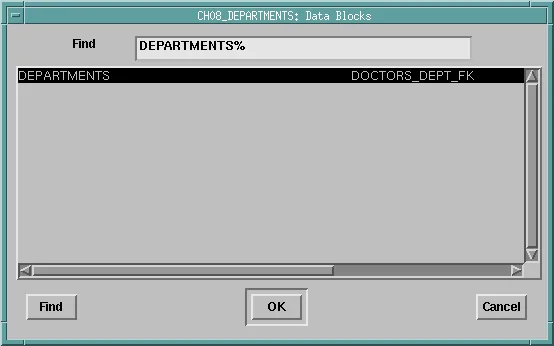
Select it and click OK, and the wizard writes the join condition from the foreign key.
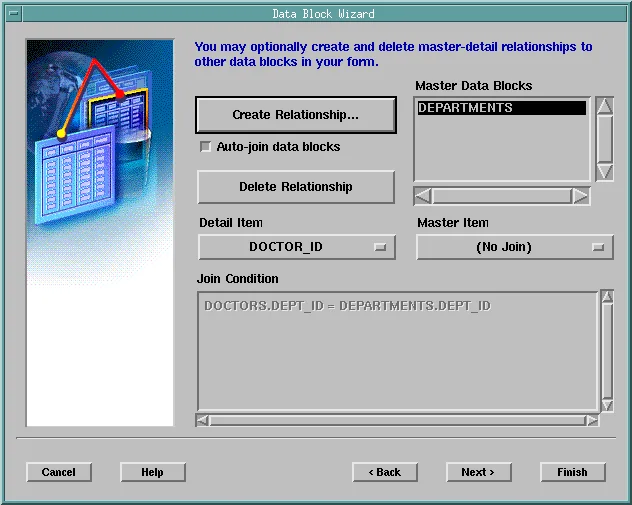
Without Auto-join data blocks, the wizard lists all blocks, and you choose the Detail Item and Master Item that join them, or type the join condition yourself. Do that for tables without a foreign key, or for views.
Lay Out the Detail Block
The detail block needs the foreign key column, DEPT_ID, for the join, but the user does not need to see it, because every doctor in the block belongs to the department above. In the Layout Wizard, leave DEPT_ID out of the displayed items; the item stays in the block, on no canvas.
Lay out the other items in Tabular style, six records with a scroll bar, in a frame titled Doctors, on the same canvas as the master.
How Coordination Works
Run the form and execute a query. The master block shows the first department, and the detail block shows its doctors. Move to the next department with the Down arrow, which goes to the next record in a single-record block, and the detail block clears and shows that department's doctors.
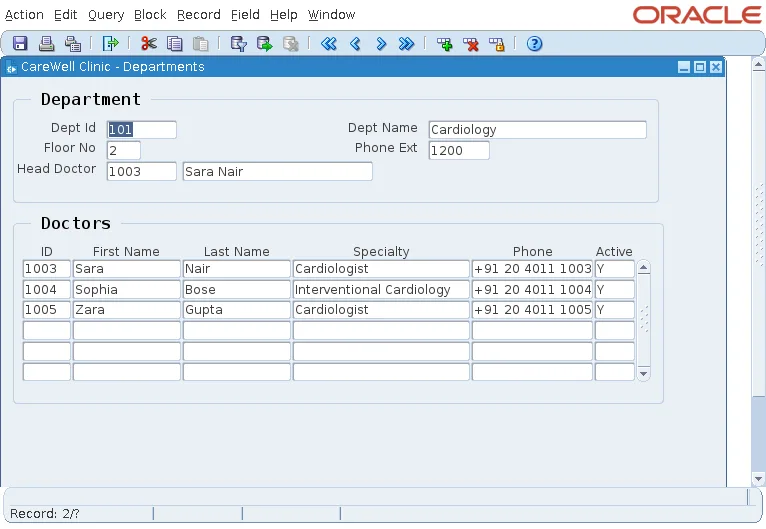
The relation joins the blocks in two directions:
- Querying: each time the master changes records, Forms clears the detail block and queries it again, adding the join condition DOCTORS.DEPT_ID = DEPARTMENTS.DEPT_ID, with the master's current value, to the detail's WHERE clause.
- Inserting: the detail item DEPT_ID has its Copy Value from Item property set to DEPARTMENTS.DEPT_ID, so a new doctor takes the current department's key without the user typing it.
If the detail block has unsaved changes, moving to another master record would lose them, so Forms first asks the user whether to save them.
The Properties of a Relation
A relation is an object of the master block, under its Relations node. The wizard named this one DEPARTMENTS_DOCTORS, after the two blocks.
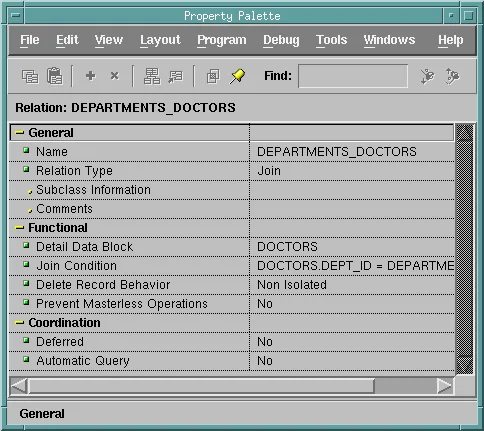
| Property | What it does |
|---|---|
| Relation Type | Join for blocks joined by a condition, the usual case, or REF for blocks based on object tables joined by a REF column. |
| Detail Data Block, Join Condition | Which block is the detail and how its records match the master's. The condition uses block and item names, not tables and columns, and can join several items with AND. |
| Delete Record Behavior | What happens to the details when the user deletes a master record (see below). |
| Prevent Masterless Operations | Yes stops the user from querying or inserting details when the master block has no current record. |
| Deferred, Automatic Query | When the details are queried (see below). |
Delete Record Behavior
- Non Isolated, the default, refuses to delete a master that has details.
- Cascading deletes the details together with the master.
- Isolated deletes the master and leaves the details alone, which the database then refuses if a foreign key protects them.
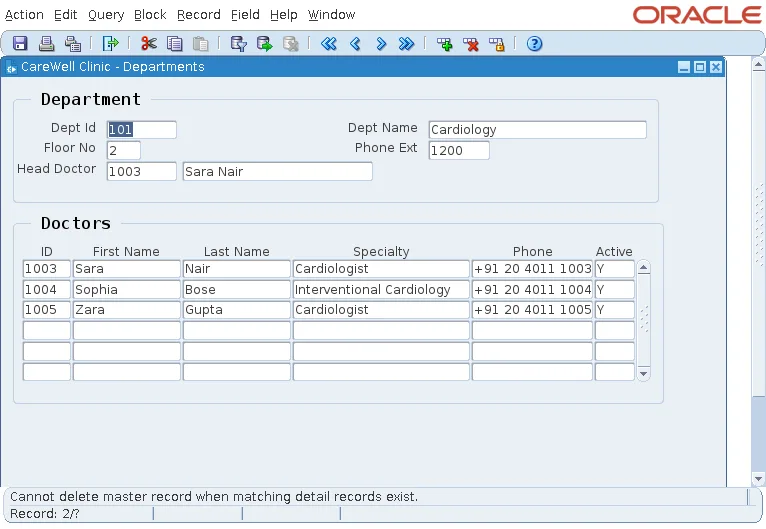
Try to delete the department Cardiology, which has doctors, and the Non Isolated behavior refuses.
Output:
Cannot delete master record when matching detail records exist.
Deferred and Automatic Query
| Deferred | Automatic Query | When the details are queried |
|---|---|---|
| No (default) | Any | As soon as the master changes record. |
| Yes | Yes | When the cursor enters the detail block. |
| Yes | No | When the user queries the detail block themselves. |
Deferred coordination saves queries in forms whose details sit on other tab pages or windows the user may never open.
The Code Forms Builder Generates
Forms Builder writes the coordination code when you create a relation, and rewrites it when you change the relation's properties.
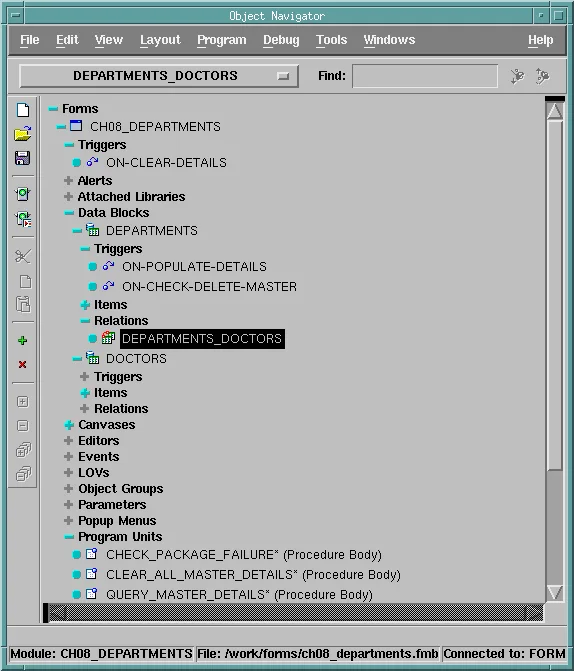
| Code | Where | What it does |
|---|---|---|
| ON-POPULATE-DETAILS | Master block | Queries the details by calling QUERY_MASTER_DETAILS for each detail block, unless the master record is new. |
| ON-CHECK-DELETE-MASTER | Master block | Implements Non Isolated: looks for detail rows and fails with the message above if it finds one. |
| PRE-DELETE | Master block | With Cascading, deletes the detail rows just before Forms deletes the master row. |
| ON-CLEAR-DETAILS | Form | Clears the details of a master that changed record, by calling CLEAR_ALL_MASTER_DETAILS, which clears the whole hierarchy below it. |
| QUERY_MASTER_DETAILS, CLEAR_ALL_MASTER_DETAILS, CHECK_PACKAGE_FAILURE | Program units | Do the work. They are the same in every form. |
Here is the generated ON-POPULATE-DETAILS trigger of DEPARTMENTS, in lowercase and without its comments.
Generated ON-POPULATE-DETAILS trigger on DEPARTMENTS:
declare
  recstat  varchar2(20)      := :system.record_status;
  startitm varchar2(61 char) := :system.cursor_item;
  rel_id   relation;
begin
  if (recstat = 'NEW' or recstat = 'INSERT') then
    return;
  end if;
  if ((:departments.dept_id is not null)) then
    rel_id := find_relation('DEPARTMENTS.DEPARTMENTS_DOCTORS');
    query_master_details(rel_id, 'DOCTORS');
  end if;
  if (:system.cursor_item <> startitm) then
    go_item(startitm);
    check_package_failure;
  end if;
end;
You rarely change this code, but it helps to know it is there. It is ordinary PL/SQL in ordinary triggers, and a trigger of your own on the same event, such as another ON-POPULATE-DETAILS on the block, would replace it.
ON-CLEAR-DETAILS uses two system variables: :SYSTEM.MASTER_BLOCK, the master that changed, and :SYSTEM.COORDINATION_OPERATION, what it did (NEXT_RECORD, CLEAR_RECORD, EXECUTE_QUERY, and others). The code is written by Forms Builder, not by the Forms runtime, so a relation created some other way, such as through the Forms Java API, has none, and its blocks are not coordinated until you add it.
Handle a Reference Back to the Detail: the Head Doctor
DEPARTMENTS and DOCTORS refer to each other: each doctor belongs to a department, and each department's HEAD_DOCTOR is a doctor. The relation handles the first reference, and the form handles the second.
CH08_DEPARTMENTS shows the head's name beside the key, in a display item HEAD_NAME that is not a database item, filled when a department is queried.
Example (POST-QUERY trigger on DEPARTMENTS):
select first_name || ' ' || last_name
into   :departments.head_name
from   doctors
where  doctor_id = :departments.head_doctor;
When the user changes the head, a WHEN-VALIDATE-ITEM trigger checks that the doctor exists and works in the department, then shows the new name.
Example (WHEN-VALIDATE-ITEM trigger on DEPARTMENTS.HEAD_DOCTOR):
declare
  v_name varchar2(61);
  v_dept doctors.dept_id%type;
begin
  select first_name || ' ' || last_name, dept_id
  into   v_name, v_dept
  from   doctors
  where  doctor_id = :departments.head_doctor;

  if v_dept <> :departments.dept_id then
    message('Doctor ' || :departments.head_doctor || ' works in another department.');
    raise form_trigger_failure;
  end if;
  :departments.head_name := v_name;
exception
  when no_data_found then
    message('There is no doctor ' || :departments.head_doctor || '.');
    raise form_trigger_failure;
end;
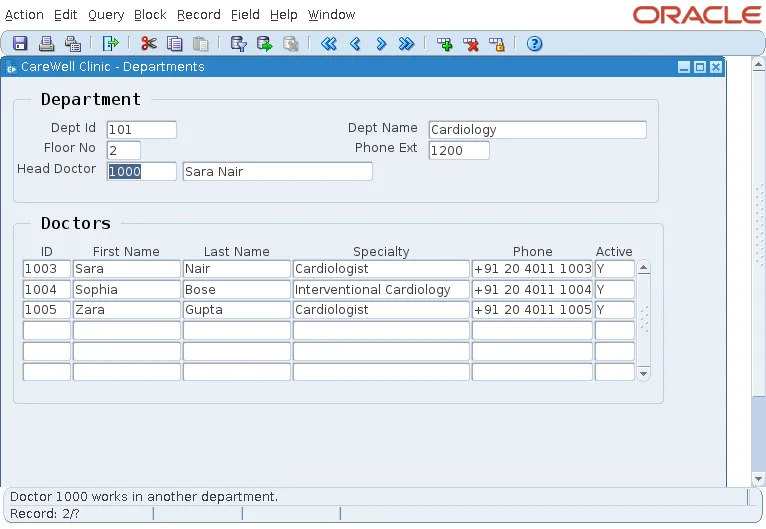
Make doctor 1000, who works in General Medicine, the head of Cardiology, and the form refuses, keeping the current head's name.
Output:
Doctor 1000 works in another department.
A Master with Several Details
A block can be the master of several details, and a detail can itself be the master of others. The sample form CH08_INVOICES shows an invoice with two details: its lines, through the relation INVOICES_LINES, and its payments, through INVOICES_PAYMENTS. Moving to another invoice queries both.
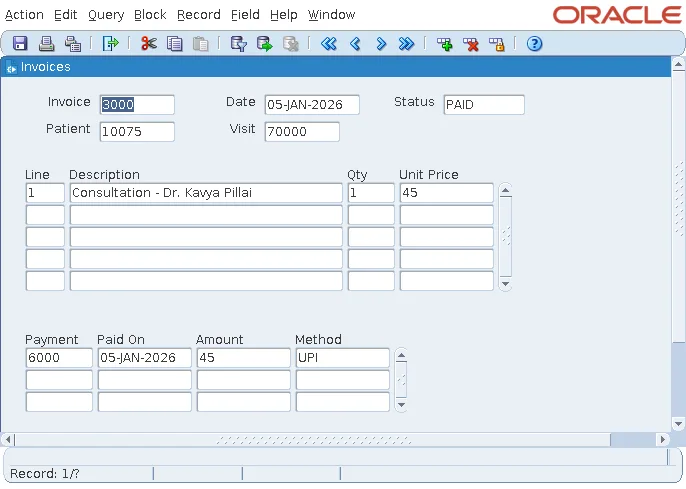
The two relations behave differently when an invoice is deleted:
- Lines have no meaning without their invoice, so INVOICES_LINES is Cascading: deleting an invoice deletes its lines.
- Payments are money received, which the clinic must keep, so INVOICES_PAYMENTS is Non Isolated: an invoice with payments cannot be deleted at all.
Number Detail Records Automatically
The key of INVOICE_LINES is the invoice plus a line number, which the user should not have to type. The line number item cannot be entered, and a PRE-INSERT trigger gives each new line the next number of its invoice.
Example (PRE-INSERT trigger on INVOICE_LINES):
select nvl(max(line_no), 0) + 1
into   :invoice_lines.line_no
from   invoice_lines
where  invoice_id = :invoice_lines.invoice_id;
Forms fires PRE-INSERT for each new record just before inserting it, in the same transaction. When the user adds several lines and saves them together, each trigger sees the lines inserted before it and takes the next number.
For invoice 3019, which had two lines, a new line Blood test - CBC is saved as line 3.
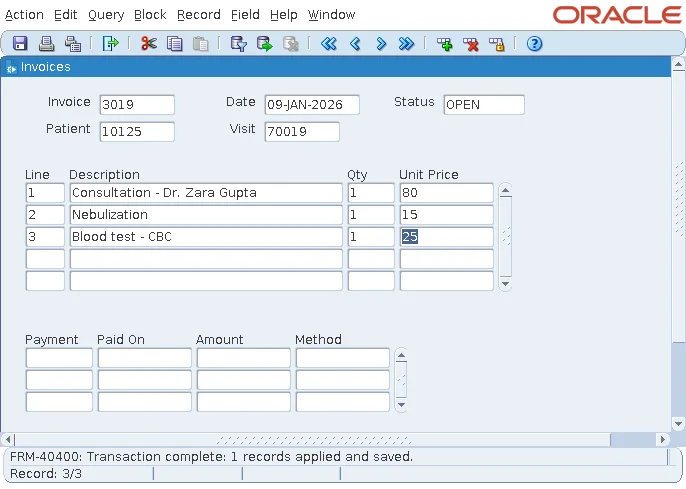
Check the lines in SQL*Plus:
select invoice_id, line_no, description, quantity, unit_price
from   invoice_lines
where  invoice_id = 3019
order  by line_no;
Output:
INVOICE_ID    LINE_NO DESCRIPTION                      QUANTITY UNIT_PRICE
---------- ---------- ------------------------------ ---------- ----------
      3019          1 Consultation - Dr. Zara Gupta           1         80
      3019          2 Nebulization                            1         15
      3019          3 Blood test - CBC                        1         25
When two users add lines to the same invoice at the same time, both can compute the same number, and the primary key then rejects the second insert. Locking the master record before computing the number prevents that. The same PRE-INSERT technique for sequence keys is shown in how to populate primary keys from a sequence.
Change a Relation at Run Time
SET_RELATION_PROPERTY and GET_RELATION_PROPERTY change or read a relation's properties while the form runs. The relation is named MASTER_BLOCK.RELATION, or given by its ID from FIND_RELATION.
Syntax:
set_relation_property(relation_name varchar2 | relation_id relation,
                      property number, value number)
get_relation_property(relation_name varchar2 | relation_id relation,
                      property number) return varchar2
find_relation(relation_name varchar2) return relation- SET_RELATION_PROPERTY sets DEFERRED_COORDINATION and AUTOQUERY (PROPERTY_TRUE or PROPERTY_FALSE), MASTER_DELETES (NON_ISOLATED, ISOLATED, or CASCADING), and PREVENT_MASTERLESS_OPERATION.
- GET_RELATION_PROPERTY also returns DETAIL_NAME, MASTER_NAME, NEXT_MASTER_RELATION, and NEXT_DETAIL_RELATION, which the generated program units use to walk the relations of a form.
- FIND_RELATION returns a relation's ID, which the generated code passes to QUERY_MASTER_DETAILS.
Whether a detail block is coordinated with its master is a property of the block, COORDINATION_STATUS (COORDINATED or NON_COORDINATED), which GET_BLOCK_PROPERTY returns, as covered in SET_BLOCK_PROPERTY in Oracle Forms.
Conclusion
To create a master-detail form in Oracle Forms, build the master block, then run the Data Block Wizard for the detail block and let it create the relation from the foreign key, with a join condition and a detail key that copies its value from the master. Coordination then clears and requeries the details whenever the master changes record. Choose Delete Record Behavior per relation (Non Isolated, Cascading, or Isolated), use Deferred and Automatic Query to skip unneeded queries, and handle extra rules, such as a head doctor or line numbers, with POST-QUERY, WHEN-VALIDATE-ITEM, and PRE-INSERT triggers.
