
Everything a form does beyond its defaults, such as checks, calculations, navigation, database calls, and messages, is written in PL/SQL, the same language as the database's stored procedures. But PL/SQL in Oracle Forms has its own rules: where the code lives, how it refers to the form, and where it runs, which decides what it can do.
This guide covers those rules for Oracle Forms 14.1.2: triggers and program units, bind variables and indirect references, the SQL features the Forms PL/SQL engine rejects, the ways around them, and the built-in packages Forms provides.
Sample Form for This Guide
The examples and screenshots use the sample form CH17_SUMMARY from the Oracle Forms code repository on GitHub. Download it, open it in Forms Builder, and connect as CAREWELL to follow along.
| Form | File | What it shows |
|---|---|---|
| CH17_SUMMARY | forms/ch17/ch17_summary.fmb | A patients form with a CW_UTIL package, a stored function, and a Count Rows button |
The forms run against the CareWell Clinic sample schema, which you install first.
Where PL/SQL Lives in a Form
| Place | What it is | Runs when |
|---|---|---|
| Triggers | Anonymous blocks attached to the form, a block, or an item. The trigger's name says which event fires it. | An event happens: the form starts, the user leaves an item, a record is fetched, a button is pressed. |
| Program units | Named procedures, functions, and packages under Program Units in the navigator. | Code calls them, from any trigger or program unit of the form. |
| PL/SQL libraries (.pll) | Program units that many forms share. | Code in an attached form calls them. |
| Stored program units | Procedures, functions, and packages in the database. | Code calls them, like any PL/SQL. |
Keep Triggers Short with a Package
Program units keep triggers short. The sample summary form has a package CW_UTIL, created as two program units of the same name: its specification and its body.
Program unit CW_UTIL (package specification):
package cw_util is
  function age_in_years(p_birth_date date) return number;
end cw_util;
Program unit CW_UTIL (package body):
package body cw_util is
  function age_in_years(p_birth_date date) return number is
  begin
    return trunc(months_between(sysdate, p_birth_date) / 12);
  end age_in_years;
end cw_util;
A package is the best home for a form's program units. Its specification lists what triggers may call, its body can hold private helpers, and its variables keep their values for as long as the form runs, a simple way to share state between triggers.
Refer to Items, Parameters, and Globals
Code refers to the form's values with bind variables, names that start with a colon:
| Kind | Syntax | Notes |
|---|---|---|
| Items | :block.item | The block can be omitted when the item's name is unique, but writing it is clearer and safer. |
| Parameters | :parameter.name | Values the form receives when it starts. |
| Global variables | :global.name | Character variables all the forms of a session share, created by the first assignment. |
| System variables | :system.name | The state of the form, such as CURSOR_ITEM, TRIGGER_RECORD, and FORM_STATUS. |
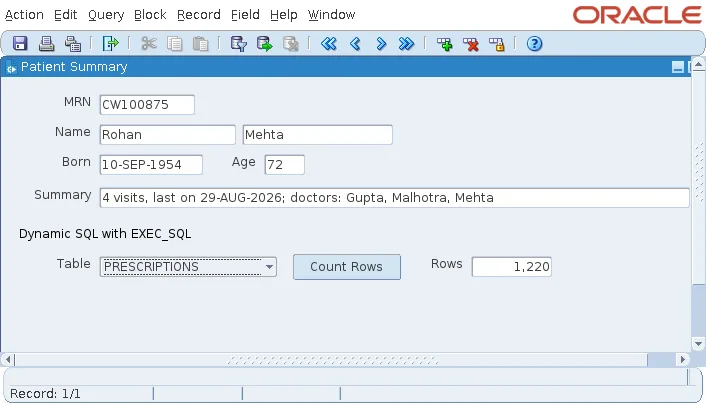
The POST-QUERY trigger of PATIENTS fills two display items, one from the form's program unit and one from a stored function in the database.
Example (POST-QUERY trigger on PATIENTS):
:patients.age     := cw_util.age_in_years(:patients.birth_date);   -- a form program unit
:patients.summary := cw_api.patient_summary(:patients.patient_id); -- a stored function
Parameters are covered in how to pass parameters to a form, and system variables in system variables in Oracle Forms.
Indirect References with NAME_IN and COPY
A bind variable names its item when the code is written. Code that must work with an item whose name is known only at run time uses two built-ins instead. That includes a program unit in a library, which does not know the forms that call it, and menu code, which cannot use bind variables at all.
- NAME_IN('block.item') returns the value of the item, parameter, global, or system variable named by a string.
- COPY(value, 'block.item') assigns a value to an item named by a string.
Syntax:
name_in(variable_name varchar2) return varchar2
copy(source varchar2, destination varchar2)
Both work with character values, so convert numbers and dates with TO_CHAR and TO_NUMBER or TO_DATE, in the format of the item. The dynamic SQL example in how to run dynamic SQL in Oracle Forms reads an item with NAME_IN and writes one with COPY.
Two PL/SQL Engines
A form runs its PL/SQL in the Forms runtime, on the Forms server, not in the database. The Form Compiler says so when it starts, reporting PL/SQL Version 23.5.0.24.7 (Limited Production). The word Limited matters: Forms has its own PL/SQL engine, which runs the procedural code of triggers and program units and sends each SQL statement in them to the database.
That engine accepts most of PL/SQL, including packages, records, collections, exceptions, cursors, %TYPE and %ROWTYPE, CASE, and the REGEXP_ functions. Its SQL parser and feature set, however, are older than the database's.
What the Forms PL/SQL Engine Rejects
Each of the following was tried in a program unit of a form compiled by Forms 14.1.2 against Oracle AI Database 26ai:
| Feature | Example | Error |
|---|---|---|
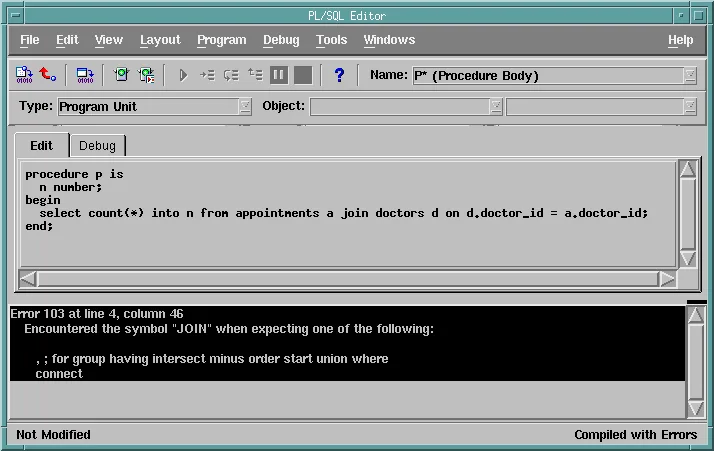
| ANSI joins | from a join b on ... | PLS-103: Encountered the symbol "JOIN" |
| Analytic functions | count(*) over () | PLS-103 |
| WITH subquery factoring | with t as (...) select ... | PLS-103 |
| Row limiting | fetch first 1 row only | PLS-103 |
| LISTAGG | listagg(x, ',') within group (...) | PLS-103 |
| MERGE | merge into ... using ... | PLS-103 |
| Native dynamic SQL | execute immediate '...' | PLS-591: this feature is not supported in client-side programs |
| Bulk binds | bulk collect into, forall | PLS-591 |
| RETURNING INTO | update ... returning x into v | PLS-591 |
| SQL BOOLEAN | where true | PLS-382: expression is of wrong type |
These compile fine: CASE expressions, EXISTS, REGEXP_LIKE, date literals, q-quoted strings, COALESCE, JSON_VALUE, and %ROWTYPE records.
Four Ways Around the Limits
All four send the SQL to the database's own engine, where every feature works:
- Stored program units. Put the SQL in a procedure, function, or package in the database and call it from the form. This is the best choice for anything but the simplest queries: the code runs next to the data, in one round trip, and other applications can use it.
- Views. A view can use any SQL, and the form queries it like a table, even as the base of a block.
- Text sent to the database. Record group queries, the data queries of trees, and block data sources from a query are strings that Forms sends as they are, so they can use any SQL. The tree in how to create a hierarchical tree using FTREE uses CONNECT BY and ORDER SIBLINGS BY this way.
- Dynamic SQL with FORMS_DDL and EXEC_SQL.
Call Stored Program Units
The summary in the sample form comes from the stored function CW_API.PATIENT_SUMMARY, which the CareWell schema installation creates. It uses an ANSI join and LISTAGG, which the form itself could not compile.
Part of CW_API.PATIENT_SUMMARY in the database:
select listagg(distinct d.last_name, ', ') within group (order by d.last_name)
into   v_doctors
from   visits v
       join doctors d on d.doctor_id = v.doctor_id
where  v.patient_id = p_patient_id;
Called from the form, it returns 4 visits, last on 29-AUG-2026; doctors: Gupta, Malhotra, Mehta. The form calls a stored program unit exactly as it calls its own, and the Form Compiler checks the call against the database when it compiles the form, which is one reason it needs a connection.
Save Round Trips
Every call to the database is a round trip from the Forms server to the database. A POST-QUERY trigger that runs three queries for each record fetched makes three round trips per record, while one stored function that returns everything the record needs makes one.
Built-in Packages and the Syntax Palette
Besides hundreds of built-ins, Forms has built-in packages, listed under Built-in Packages in the Object Navigator. Expanding one shows its procedures and functions.
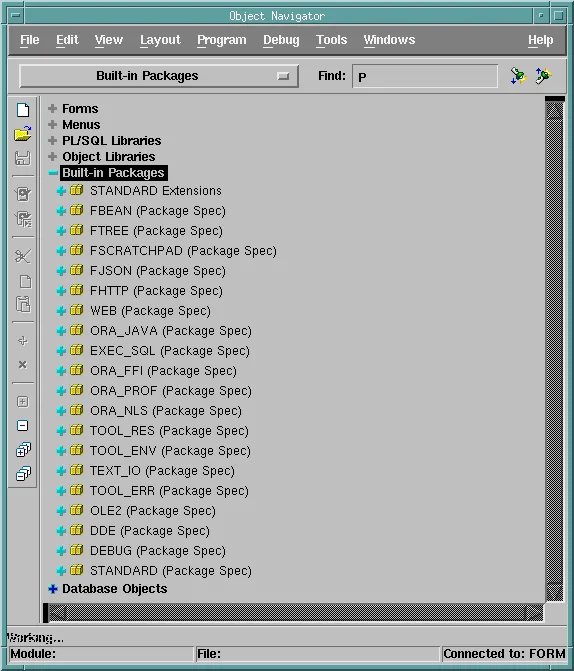
| Package | Purpose |
|---|---|
| STANDARD Extensions | The Forms built-ins themselves. |
| FTREE, FBEAN, WEB | Trees, Java beans, and browser pages from the form. |
| FHTTP, FJSON (new in 14.1.2) | Call REST services, and read and write JSON. |
| FSCRATCHPAD (new in 14.1.2) | A buffer in which code builds and reads text and files, such as the bodies of REST requests. |
| EXEC_SQL, ORA_JAVA, ORA_FFI | Dynamic SQL, calls to Java classes on the Forms server, and calls to C libraries. |
| TEXT_IO, TOOL_ENV, ORA_NLS, ORA_PROF | Files on the Forms server, environment variables, language settings, and timing code. |
| TOOL_ERR, TOOL_RES | The error stack of these packages, and resource files. |
| DEBUG | The debugger. |
| OLE2, DDE | Windows interfaces of client-server Forms, kept for compatibility. On the web they run on the server, not the user's computer; WebUtil offers client-side equivalents. |
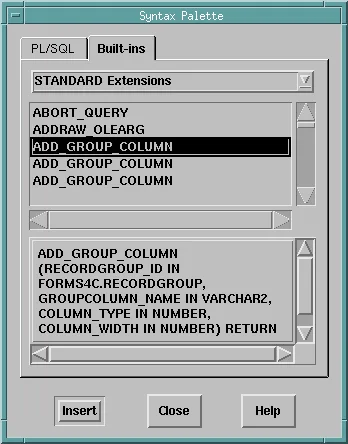
The PL/SQL Editor's Tools, Syntax Palette lists PL/SQL constructs and the built-ins of each package, with their parameters. Insert pastes the selected one into the editor.
For TEXT_IO in practice, see how to read and write files in Oracle Forms.
Conclusion
PL/SQL in Oracle Forms lives in triggers, which run on events, and in program units, best grouped in a package, that triggers call. Code refers to items, parameters, globals, and system variables with bind variables such as :block.item, or indirectly with NAME_IN and COPY. The Forms runtime runs PL/SQL with its own limited engine, which rejects ANSI joins, analytic functions, WITH, FETCH FIRST, MERGE, native dynamic SQL, bulk binds, and RETURNING INTO, so move such SQL into stored program units or views, or send it as text, which also saves round trips.
