
The PL/SQL engine of Oracle Forms does not support EXECUTE IMMEDIATE; a form that tries it fails to compile with PLS-591: this feature is not supported in client-side programs. When a form needs to run a statement built at run time, it uses the two tools Forms provides instead: the FORMS_DDL built-in and the EXEC_SQL package.
This guide shows both in Oracle Forms 14.1.2: FORMS_DDL for statements and PL/SQL blocks, and EXEC_SQL for queries that return results, with a safe, injection-proof example that counts the rows of a table the user chooses.
Sample Form for This Guide
The examples and screenshots use the sample form CH17_SUMMARY from the Oracle Forms code repository on GitHub. Download it, open it in Forms Builder, and connect as CAREWELL to follow along.
| Form | File | What it shows |
|---|---|---|
| CH17_SUMMARY | forms/ch17/ch17_summary.fmb | A patients form with a CW_UTIL package, a stored function, and a Count Rows button |
The forms run against the CareWell Clinic sample schema, which you install first.
FORMS_DDL vs. EXEC_SQL
| FORMS_DDL | EXEC_SQL | |
|---|---|---|
| Runs | DDL, DML, and PL/SQL blocks | Any statement, including queries |
| Returns query results | No | Yes |
| Bind variables | No | Yes, with BIND_VARIABLE |
| Other connections | No | Yes, with OPEN_CONNECTION |
Run a Statement with FORMS_DDL
FORMS_DDL runs a SQL statement or a PL/SQL block, given as a string, in the database. Its name is historical: it runs DML and PL/SQL too.
Syntax:
forms_ddl(statement varchar2)
Example:
forms_ddl('begin dbms_stats.gather_table_stats(user, ''PATIENTS''); end;');
if not form_success then
  message('Statistics were not gathered: ' || dbms_error_text);
end if;
Rules for FORMS_DDL
- A PL/SQL block needs its BEGIN and END;, while a single statement has no trailing semicolon.
- FORM_SUCCESS tells whether it worked, and DBMS_ERROR_CODE and DBMS_ERROR_TEXT give the database error.
- FORMS_DDL cannot return query results.
- A DDL statement commits, and so ends the form's transaction. Commit or roll back the form's changes first; :SYSTEM.FORM_STATUS is CHANGED when there are any.
Run a Query with EXEC_SQL
The built-in package EXEC_SQL runs any statement, including queries, and returns its results. It is the Forms counterpart of the database's DBMS_SQL.
The sample summary form's Count Rows button counts the rows of the table chosen in a list.
Example (WHEN-BUTTON-PRESSED trigger on CTL.COUNT_ROWS):
declare
  v_table varchar2(30) := name_in('CTL.TABLE_NAME');   -- read an item by its name
  cur     exec_sql.curstype;
  v_count number;
  n       pls_integer;
begin
  if v_table is null then
    message('Choose a table first.');
    raise form_trigger_failure;
  end if;
  cur := exec_sql.open_cursor;
  exec_sql.parse(cur, 'select count(*) from ' || dbms_assert.simple_sql_name(v_table));
  exec_sql.define_column(cur, 1, v_count);
  n := exec_sql.execute(cur);
  if exec_sql.fetch_rows(cur) > 0 then
    exec_sql.column_value(cur, 1, v_count);
  end if;
  exec_sql.close_cursor(cur);
  copy(to_char(v_count, '99G999'), 'CTL.ROW_COUNT');     -- set an item by its name
end;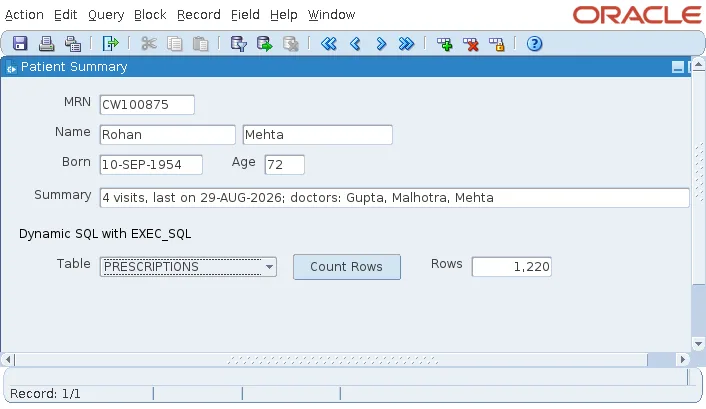
How the Example Works
- NAME_IN reads the chosen table from the item CTL.TABLE_NAME by its name.
- OPEN_CURSOR opens a cursor, and PARSE parses the statement.
- DEFINE_COLUMN declares the query's column, EXECUTE runs it, and FETCH_ROWS fetches the row.
- COLUMN_VALUE reads the count, and CLOSE_CURSOR closes the cursor.
- COPY writes the formatted count into CTL.ROW_COUNT by its name.
NAME_IN and COPY are explained in how to write PL/SQL in Oracle Forms.
Prevent SQL Injection
A table name cannot be a bind variable, so the example concatenates it into the statement. DBMS_ASSERT.SIMPLE_SQL_NAME, a database function called from the form, rejects anything but a simple name, so the string cannot be turned into another statement.
For values, as opposed to names, use bind variables instead: write :name in the statement and set it with BIND_VARIABLE. They are safer than concatenated values and let the database reuse its cached cursors.
EXEC_SQL Syntax
Syntax:
exec_sql.open_cursor [(connid)] return exec_sql.curstype
exec_sql.parse([connid,] curs_id, statement varchar2 [, language pls_integer])
exec_sql.define_column([connid,] curs_id, position pls_integer,
                       column {number | date | varchar2} [, column_size pls_integer])
exec_sql.bind_variable([connid,] curs_id, name varchar2, value)
exec_sql.execute([connid,] curs_id) return pls_integer
exec_sql.fetch_rows([connid,] curs_id) return pls_integer
exec_sql.column_value([connid,] curs_id, position pls_integer, value out)
exec_sql.close_cursor([connid,] curs_id in out)
The optional connection argument lets EXEC_SQL work with other connections, to another database or another user, opened with EXEC_SQL.OPEN_CONNECTION. FORMS_DDL has no such feature.
Conclusion
Oracle Forms does not support EXECUTE IMMEDIATE, so dynamic SQL in a form uses FORMS_DDL or EXEC_SQL. FORMS_DDL runs a statement or PL/SQL block and reports success through FORM_SUCCESS and DBMS_ERROR_TEXT, but a DDL statement commits the form's transaction. EXEC_SQL follows the DBMS_SQL steps to run queries and return rows, supports bind variables and extra connections, and, combined with DBMS_ASSERT for object names, keeps dynamic statements safe from SQL injection.
