
Some data is naturally a hierarchy: an organization chart, a bill of materials, or product categories with subcategories. In Oracle Forms, a hierarchical tree item shows such data as nodes that open and close, like the folders of a file manager or the Object Navigator itself.
This guide builds a tree of medicine categories and medicines in Oracle Forms 14.1.2. It covers the tree item's properties, the five-column query that fills it, node icons, the triggers that fire when the user clicks a node, and the FTREE package.
Sample Form for This Guide
The examples and screenshots use the sample form CH12_MEDICINES from the Oracle Forms code repository on GitHub. Download it, open it in Forms Builder, and connect as CAREWELL to follow along.
| Form | File | What it shows |
|---|---|---|
| CH12_MEDICINES | forms/ch12/ch12_medicines.fmb | A tree of medicine categories and medicines beside a details block |
The forms run against the CareWell Clinic sample schema, which you install first.
What You Build
The sample form shows the clinic's medicine categories, each with its medicines underneath. Selecting a medicine shows its details in a block on the right; selecting a category lists all its medicines, including those in its subcategories.
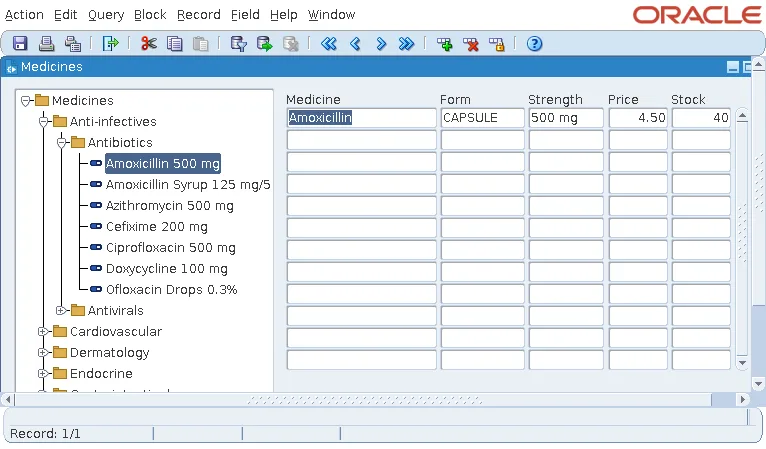
The categories come from the table MEDICINE_CATEGORIES, where each category's PARENT_ID points to the category above.
Create the Tree Item
A tree is an item of type Hierarchical Tree. It holds no value that Forms queries or saves, so it belongs in a control block, here NAV, and usually gets its own area of the canvas.
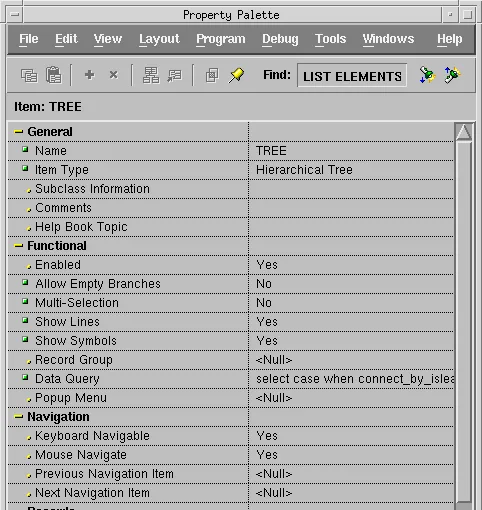
| Property | What it does |
|---|---|
| Allow Empty Branches | Whether a node without children can still show the symbol that opens it. With No, nodes without children are leaves. |
| Multi-Selection | Whether the user can select several nodes at once, with Ctrl and Shift. |
| Show Lines | Lines that connect each node to its parent. |
| Show Symbols | The symbols that open and close nodes. |
| Record Group or Data Query | Where the tree's data comes from: a record group of the form, or a query Forms runs to fill the tree. |
The tree fills when code calls FTREE.POPULATE_TREE, usually in the WHEN-NEW-FORM-INSTANCE trigger.
Fill the tree when the form starts:
ftree.populate_tree('NAV.TREE');Write the Tree Query: Five Columns
The query or record group of a tree must return five columns, in this order:
| Column | Meaning |
|---|---|
| 1. Initial state | 1 for a node shown open, -1 for a node shown closed, 0 for a leaf. |
| 2. Depth | 1 for the top level, 2 for its children, and so on. |
| 3. Label | The text the user sees. |
| 4. Icon | The name of an icon file, or null for none. |
| 5. Value | What code reads to know what the user selected. |
The rows must come in tree order, with each node followed by its children. Oracle's hierarchical query, CONNECT BY, returns rows in exactly that order and gives the depth as the pseudocolumn LEVEL.
The sample query builds one hierarchy of categories and medicines with a UNION ALL, then walks it.
The tree's data query:
select case when connect_by_isleaf = 1 then 0 when level = 1 then 1 else -1 end,
       level, label, case when kind = 'M' then 'pill' else 'folder' end, node_id
from  (select 'C' || category_id as node_id, 'C' || parent_id as parent_id,
              category_name as label, 'C' as kind
       from   medicine_categories
       union all
       select 'M' || medicine_id, 'C' || category_id, medicine_name || ' ' || strength, 'M'
       from   medicines)
start with parent_id = 'C'
connect by prior node_id = parent_id
order siblings by kind, label
A few details make it work:
- The prefixes C and M in the values keep categories and medicines apart, both as nodes and in the trigger that reads the selection.
- The top category has no parent, so its 'C' || parent_id is just C, which is the START WITH condition.
- CONNECT_BY_ISLEAF is 1 for nodes without children, which become leaves. The top level starts open, and every other category starts closed.
- ORDER SIBLINGS BY sorts the children of each node, subcategories before medicines and each by name, without breaking the tree order.
Forms sends this query to the database as text when the tree is populated, so it can use any SQL the database accepts, even features the Forms PL/SQL compiler does not allow in triggers.
Add Node Icons
The icon column names an icon file, which the Forms client finds the same way it finds button icons. In the sample, carewell_icons.jar holds a folder and a pill. Deploying icons in a JAR is explained in how to create push buttons in Oracle Forms.
There is one catch. Forms converts the icon names in a tree's data to uppercase: the query says folder, and FTREE.GET_TREE_NODE_PROPERTY returns FOLDER. File names in a JAR are case-sensitive, so the icon files must be named in uppercase too, FOLDER.gif and PILL.gif. With lowercase names only, the tree shows no icons.
An icon set later with FTREE.SET_TREE_NODE_PROPERTY keeps the case it is given.
Respond to Clicks with Tree Triggers
Three triggers fire on user actions in a tree, defined on the tree item, its block, or the form:
- WHEN-TREE-NODE-SELECTED: the user selects or deselects a node.
- WHEN-TREE-NODE-ACTIVATED: the user double-clicks a node, or presses Enter on it.
- WHEN-TREE-NODE-EXPANDED: the user opens or closes a node.
In each, :SYSTEM.TRIGGER_NODE is the node, of type FTREE.NODE, and :SYSTEM.TRIGGER_NODE_SELECTED is TRUE when the node was selected and FALSE when it was deselected. The triggers fire only on the user's actions, never on your code's.
The sample form queries the medicines when the user selects a node.
Example (WHEN-TREE-NODE-SELECTED trigger on NAV.TREE):
declare
  v_value varchar2(100);
begin
  if :system.trigger_node_selected = 'TRUE' then
    v_value := ftree.get_tree_node_property('NAV.TREE', :system.trigger_node,
                                            ftree.node_value);
    -- a medicine: that medicine; a category: its medicines and its subcategories'
    if substr(v_value, 1, 1) = 'M' then
      set_block_property('MEDICINES', onetime_where,
                         'medicine_id = ' || substr(v_value, 2));
    else
      set_block_property('MEDICINES', onetime_where,
        'category_id in (select category_id from medicine_categories ' ||
        'start with category_id = ' || substr(v_value, 2) ||
        ' connect by prior category_id = parent_id)');
    end if;
    go_block('MEDICINES');
    execute_query;
  end if;
end;
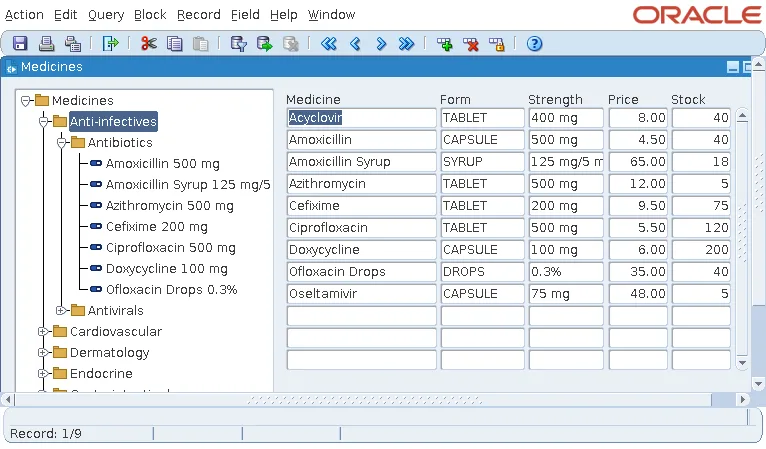
The trigger reads the node's value and sets the WHERE condition of the next query of MEDICINES with ONETIME_WHERE. For a medicine, that is the medicine itself. For a category, it is the medicines of the category and of all the categories below it, found with another CONNECT BY.
Selecting Anti-infectives lists the medicines of Antibiotics and Antivirals.
ONETIME_WHERE is covered in SET_BLOCK_PROPERTY in Oracle Forms.
The FTREE Package
The built-ins for trees are in the package FTREE, and each takes the tree by name or ID. A node is a value of type FTREE.NODE, and FTREE.ROOT_NODE stands for the invisible root above the top-level nodes.
| Built-in | What it does |
|---|---|
| POPULATE_TREE | Clears the tree and fills it from its record group or data query. |
| SET_TREE_PROPERTY, GET_TREE_PROPERTY | Set or read the tree's properties: RECORD_GROUP, QUERY_TEXT, ALLOW_EMPTY_BRANCHES, NODE_COUNT, SELECTION_COUNT, and others. |
| ADD_TREE_DATA | Adds the rows of a query or record group under a node. |
| ADD_TREE_NODE, DELETE_TREE_NODE | Add one node with its state, label, icon, and value; remove a node and its children. |
| FIND_TREE_NODE | Searches for a node by label or value, from a node down. |
| GET_TREE_NODE_PARENT | Returns the parent of a node. |
| GET_TREE_NODE_PROPERTY, SET_TREE_NODE_PROPERTY | Read or set a node's NODE_STATE, NODE_DEPTH, NODE_LABEL, NODE_ICON, and NODE_VALUE. |
| GET_TREE_SELECTION, SET_TREE_SELECTION | Read the selected nodes; select or deselect a node. |
| POPULATE_GROUP_FROM_TREE | Copies a node and its children into a record group. |
FTREE.POPULATE_TREE and FTREE.SET_TREE_PROPERTY
Syntax:
ftree.populate_tree(item_name varchar2 | item_id item)
ftree.set_tree_property(item_name varchar2 | item_id item, property number,
                        value {number | varchar2 | recordgroup})
To show another set of data, change the query with QUERY_TEXT or the group with RECORD_GROUP, then populate the tree again.
FTREE.GET_TREE_NODE_PROPERTY
Syntax:
ftree.get_tree_node_property(item_name varchar2 | item_id item, node ftree.node,
                             property number) return varchar2
FTREE.FIND_TREE_NODE
Syntax:
ftree.find_tree_node(item_name varchar2 | item_id item, search_string varchar2
                     [, search_type number [, search_by number
                     [, search_root ftree.node [, start_point ftree.node]]]]) return ftree.node
SEARCH_TYPE is FTREE.FIND_NEXT or FTREE.FIND_NEXT_CHILD, and SEARCH_BY is FTREE.NODE_LABEL (the default) or FTREE.NODE_VALUE. The function returns a null node when nothing matches, so test the result with FTREE.ID_NULL.
Conclusion
A hierarchical tree item in Oracle Forms shows nodes that open and close, and it lives in a control block. Fill it from a data query or record group with five columns (state, depth, label, icon, and value) in tree order, which CONNECT BY produces naturally, and call FTREE.POPULATE_TREE when the form starts. Name icon files in uppercase, react to the user with WHEN-TREE-NODE-SELECTED, ACTIVATED, and EXPANDED using :SYSTEM.TRIGGER_NODE, and use the FTREE package to add, find, and change nodes.
