
Some rows exist in no table. A doctor's free time slots are computed from the working day and the appointments; other data may come from a web service or a system SQL cannot reach. For such rows, Oracle Forms lets triggers do what Forms would otherwise do with SQL.
This guide builds a block on transactional triggers in Oracle Forms 14.1.2 that shows a doctor's day in half-hour slots. It covers the triggers that replace querying and saving, CREATE_QUERIED_RECORD, and the RECORDS_TO_FETCH block property.
Sample Form for This Guide
The examples and screenshots use the sample form CH27_SLOTS from the Oracle Forms code repository on GitHub. Download it, open it in Forms Builder, and connect as CAREWELL to follow along.
| Form | File | What it shows |
|---|---|---|
| CH27_SLOTS | forms/ch27/ch27_slots.fmb | A doctor's day in half-hour slots, computed by code |
The forms run against the CareWell Clinic sample schema, which you install first.
Transactional Triggers at a Glance
With the block's Query Data Source Type set to Transactional triggers, these triggers replace Forms' own processing:
| Trigger | Replaces | What to do in it |
|---|---|---|
| ON-SELECT | Opening the query | Prepare the rows. |
| ON-FETCH | Fetching | Create records with CREATE_QUERIED_RECORD and fill them, up to GET_BLOCK_PROPERTY(block, RECORDS_TO_FETCH) at each call. Forms calls it again as the user scrolls, until a call creates no record. |
| ON-COUNT | Count Query | Return the number of rows. |
| ON-LOCK, ON-INSERT, ON-UPDATE, ON-DELETE, ON-COMMIT | The statements of a save | Write the changes, with DML Data Target Type also set to Transactional triggers. |
Other block data sources are compared in how to base a block on stored procedures, and a read-only query block in how to base a block on a FROM clause query.
Example: a Doctor's Time Slots
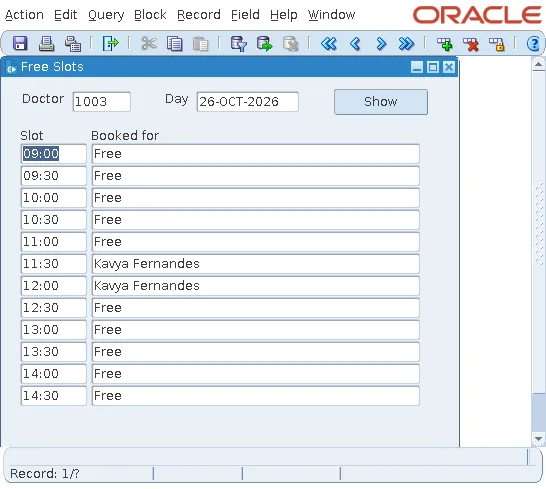
The sample slots form shows a doctor's day in half-hour slots, and who is booked in each.
A Package That Computes the Slots
A package of the form computes the slots one at a time.
Program unit SLOTS (package specification):
package slots is
  -- the half-hour slots of a doctor's day, for a block on transactional triggers
  procedure open_day(p_doctor_id number, p_day date);
  function next_slot(p_start out date, p_patient out varchar2) return boolean;
end slots;
Program unit SLOTS (package body):
package body slots is
  g_doctor number;
  g_next   date;                                  -- the next slot to return
  g_end    date;                                  -- the end of the day

  procedure open_day(p_doctor_id number, p_day date) is
  begin
    g_doctor := p_doctor_id;
    g_next   := trunc(p_day) + 9 / 24;            -- 09:00
    g_end    := trunc(p_day) + 17 / 24;           -- 17:00
  end open_day;

  function next_slot(p_start out date, p_patient out varchar2) return boolean is
  begin
    if g_next is null or g_next >= g_end then
      return false;
    end if;
    p_start := g_next;
    select min(p.first_name || ' ' || p.last_name) into p_patient
      from appointments a, patients p              -- no ANSI join in Forms PL/SQL
     where p.patient_id = a.patient_id
       and a.doctor_id = g_doctor
       and a.status <> 'CANCELLED'
       and a.appt_start < g_next + 30 / 1440
       and a.appt_start + a.duration_min / 1440 > g_next;
    g_next := g_next + 30 / 1440;
    return true;
  end next_slot;
end slots;
The join is written in the WHERE clause, because the PL/SQL of Forms does not accept ANSI joins.
ON-SELECT Starts the Day
Example (ON-SELECT trigger on the SLOTS block):
slots.open_day(:ctl.doctor_id, :ctl.day);
ON-FETCH Creates the Records
Example (ON-FETCH trigger on the SLOTS block):
declare
  v_start   date;
  v_patient varchar2(61);
begin
  for i in 1 .. get_block_property('SLOTS', records_to_fetch) loop   -- rows Forms asks for
    exit when not slots.next_slot(v_start, v_patient);
    create_queried_record;                          -- a new record, status QUERY
    :slots.slot_start := v_start;
    :slots.booked_for := nvl(v_patient, 'Free');
  end loop;
end;
The appointment of Kavya Fernandes at 11:45, for thirty minutes, covers two slots, 11:30 and 12:00, which is why both show her name.
CREATE_QUERIED_RECORD and RECORDS_TO_FETCH
CREATE_QUERIED_RECORD creates a record with the status QUERY, as if it had been fetched. The user can scroll, and nothing counts as a change: Save answered FRM-40401: No changes to save.
:SYSTEM.RECORDS_TO_FETCH, which older code uses, does not compile in Forms 14.1.2; it fails with "bad bind variable". The block property RECORDS_TO_FETCH, read with GET_BLOCK_PROPERTY as in the trigger above, replaces it. Block properties are covered in SET_BLOCK_PROPERTY in Oracle Forms.
A Query-Only Block
The slots block is query-only, so its DML Data Target Type is None. With Transactional triggers as the DML target and no ON- triggers for the save, the compiler warned FRM-30199: Transactional triggers do not exist for this block.
If users must change such rows, set DML Data Target Type to Transactional triggers and write ON-LOCK, ON-INSERT, ON-UPDATE, ON-DELETE, and ON-COMMIT as needed. That is the price of this data source: you write everything, fetching, counting, locking, and saving, yourself.
Conclusion
A block on transactional triggers in Oracle Forms gets its rows from code instead of SQL. ON-SELECT prepares the rows, ON-FETCH creates them with CREATE_QUERIED_RECORD up to the RECORDS_TO_FETCH block property per call, and ON-COUNT answers Count Query, while ON-LOCK, ON-INSERT, ON-UPDATE, ON-DELETE, and ON-COMMIT handle saving when the block allows changes. Use it for rows that exist in no table, and keep a query-only block's DML Data Target Type at None.
