
Some data a form must show does not sit in any single table: a report of bookings per doctor, ranked, with totals. You could create a view for it, but when only one block needs the query, a FROM clause query block keeps it in the form.
This guide builds a FROM clause query block in Oracle Forms 14.1.2 that counts and ranks each doctor's bookings. It covers the subquery, the primary key requirement, the SQL Forms actually sends, and how user criteria apply.
Sample Form for This Guide
The examples and screenshots use the sample form CH27_WORKLOAD from the Oracle Forms code repository on GitHub. Download it, open it in Forms Builder, and connect as CAREWELL to follow along.
| Form | File | What it shows |
|---|---|---|
| CH27_WORKLOAD | forms/ch27/ch27_workload.fmb | Each doctor's bookings for November 2026, counted and ranked |
The forms run against the CareWell Clinic sample schema, which you install first.
FROM Clause Query Blocks at a Glance
| Aspect | Behavior |
|---|---|
| Where the query lives | In the block's Query Data Source Name, in parentheses, with Query Data Source Type set to FROM clause query. |
| SQL allowed | Everything the database accepts, including ANSI joins, analytic functions, and LISTAGG. |
| Items | Named after the subquery's columns. |
| Requirement | At least one item marked Primary Key. |
| User criteria | Applied to the subquery's result, as bind variables. |
| Changes | Read-only, unless DML Data Target Type sends them elsewhere. |
Other block data sources are compared in how to base a block on stored procedures.
Write the Subquery
A FROM clause query block queries a subquery, written in its Query Data Source Name in parentheses, as if it were a view only this block uses. The sample workload form counts each doctor's bookings for November 2026 and ranks the doctors.
Query Data Source Name of the block WORKLOAD:
(select d.doctor_id,
        d.first_name || ' ' || d.last_name as doctor,
        dp.dept_name,
        count(a.appt_id) as appts,
        nvl(sum(a.duration_min), 0) as minutes,
        rank() over (order by count(a.appt_id) desc) as busiest
 from   doctors d
        join departments dp on dp.dept_id = d.dept_id
        left join appointments a
          on  a.doctor_id = d.doctor_id
          and a.status = 'BOOKED'
          and a.appt_start >= date '2026-11-01' and a.appt_start < date '2026-12-01'
 group  by d.doctor_id, d.first_name, d.last_name, dp.dept_name)
The subquery is sent to the database as text, so it can use everything the database's SQL has, such as ANSI joins, analytic functions, and LISTAGG, which the PL/SQL of Forms refuses. See how to write PL/SQL in Oracle Forms for those limits. The block's items are named after the subquery's columns.
Mark a Primary Key Item
Without a table, there is no ROWID to identify rows, and the form failed to compile until an item was marked Primary Key.
Output:
FRM-30100: Block must have at least one primary key item.
Here DOCTOR_ID is the natural choice.
The SQL Forms Sends
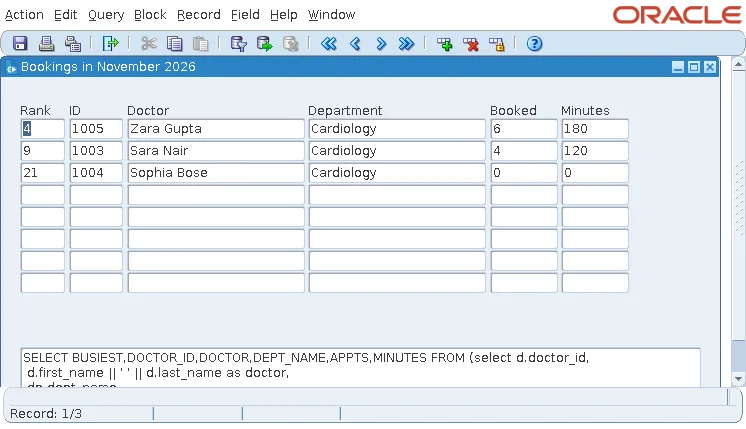
Forms puts the subquery in the FROM clause of its own SELECT, and adds the block's WHERE Clause, ORDER BY Clause, and the user's criteria outside it. With Cardiology typed in Department in Enter Query mode, the database, in V$SQL, received this statement.
Output:
SELECT BUSIEST,DOCTOR_ID,DOCTOR,DEPT_NAME,APPTS,MINUTES FROM (select d.doctor_id,
 ...
 group by d.doctor_id, d.first_name, d.last_name, dp.dept_name) WHERE (DEPT_NAME=:1)
 order by busiest, doctor
Criteria Apply Outside the Subquery
The criterion became a bind variable, :1, and was applied to the subquery's result. So the ranks stayed those computed over all the doctors: 4, 9, and 21.
A condition that must apply inside the subquery, before the grouping and the ranking, belongs in the subquery itself. Query by example is covered in how to search records using query by example.
Read-Only by Default
A FROM clause query block is read-only unless its DML Data Target Type sends changes elsewhere, to a table or to procedures. That makes it a natural fit for reports and dashboards inside a form.
Conclusion
A FROM clause query block in Oracle Forms queries a subquery written in parentheses in its Query Data Source Name, with the full SQL of the database available. Mark at least one item as Primary Key, or the form fails to compile with FRM-30100, and remember that user criteria and the block's WHERE clause apply to the subquery's result, not inside it. The block is read-only unless its DML Data Target Type sends changes to a table or procedures.
