
Some applications do not let forms touch the tables at all. Every change goes through a PL/SQL API in the database that checks the rules and writes the audit trail, so every program that changes the data obeys them. Oracle Forms supports this with blocks based on stored procedures.
This guide builds such a block in Oracle Forms 14.1.2: the package the block needs, the Data Block Wizard pages for procedures, the properties it sets, what changes for query by example, and how errors raised by the procedures reach the user.
Sample Form for This Guide
The examples and screenshots use the sample form CH27_FEE_PROC from the Oracle Forms code repository on GitHub. Download it, open it in Forms Builder, and connect as CAREWELL to follow along.
| Form | File | What it shows |
|---|---|---|
| CH27_FEE_PROC | forms/ch27/ch27_fee_proc.fmb | A department's fees, queried and updated through the CW_FEE_API package |
The forms run against the CareWell Clinic sample schema, which you install first.
Block Data Sources at a Glance
A block has two properties that decide where its rows come from and where its changes go:
- Query Data Source Type: Table (a table or view), Procedure, FROM clause query, or Transactional triggers.
- DML Data Target Type: Table, Procedure, or Transactional triggers, with DML Data Target Name for a table or view other than the one queried.
| Data source | Best for | Trade-off |
|---|---|---|
| Table | Most blocks. Forms writes every statement, locks rows, and knows ROWIDs. A view with INSTEAD OF triggers extends it to joins. | The form writes to the tables directly. |
| Procedures | Applications where the database owns the rules and every client uses the same API. | Query by example no longer filters, and locking is the API's job. |
| FROM clause query | A read-only report with all of SQL, without creating a view. | Criteria apply to its result. |
| Transactional triggers | Rows from anywhere. | You write everything: fetching, counting, locking, and saving. |
Table blocks are covered in how to create data blocks in Oracle Forms.
The API the Block Needs
A block on procedures needs a package with:
- A record type whose fields are the block's columns.
- A query procedure that returns the rows, as a REF CURSOR of that record or as a table of it.
- For each DML operation the block allows, a procedure that takes a table of records.
CW_FEE_API, installed with the sample schema, lets forms query the fees of a department and update them. The update checks the range and writes the audit row itself.
Database package CW_FEE_API (specification):
create or replace package cw_fee_api as
  -- the fees of a department's doctors, for a block based on procedures
  type fee_rec is record (
    doctor_id   doctors.doctor_id%type,
    first_name  doctors.first_name%type,
    last_name   doctors.last_name%type,
    consult_fee doctors.consult_fee%type);
  type fee_cur is ref cursor return fee_rec;
  type fee_tab is table of fee_rec index by binary_integer;

  procedure query_fees(p_fees in out fee_cur, p_dept_id in number);
  procedure lock_fees(p_fees in out fee_tab);
  procedure update_fees(p_fees in out fee_tab);
end cw_fee_api;
The rule and the audit now live in the database, so every program that changes fees through the API obeys them, where a PRE-UPDATE trigger would protect only its own form. That trigger-based approach is shown in how to save changes using commit processing.
Database package CW_FEE_API (body):
create or replace package body cw_fee_api as
  procedure query_fees(p_fees in out fee_cur, p_dept_id in number) is
  begin
    open p_fees for
      select doctor_id, first_name, last_name, consult_fee
      from   doctors
      where  dept_id = p_dept_id
      order  by last_name;
  end query_fees;

  procedure lock_fees(p_fees in out fee_tab) is
    v_id doctors.doctor_id%type;
  begin
    for i in 1 .. p_fees.count loop
      select doctor_id into v_id from doctors
      where  doctor_id = p_fees(i).doctor_id for update nowait;
    end loop;
  end lock_fees;

  procedure update_fees(p_fees in out fee_tab) is
    v_old doctors.consult_fee%type;
  begin
    for i in 1 .. p_fees.count loop
      if p_fees(i).consult_fee not between 50 and 500 then
        raise_application_error(-20010, 'Fees are between 50 and 500.');
      end if;
      select consult_fee into v_old from doctors where doctor_id = p_fees(i).doctor_id;
      update doctors set consult_fee = p_fees(i).consult_fee
      where  doctor_id = p_fees(i).doctor_id;
      insert into audit_log (table_name, row_key, action, details)
      values ('DOCTORS', p_fees(i).doctor_id, 'UPDATE',
              'consult_fee ' || v_old || ' -> ' || p_fees(i).consult_fee);
    end loop;
  end update_fees;
end cw_fee_api;
Create the Block with the Data Block Wizard
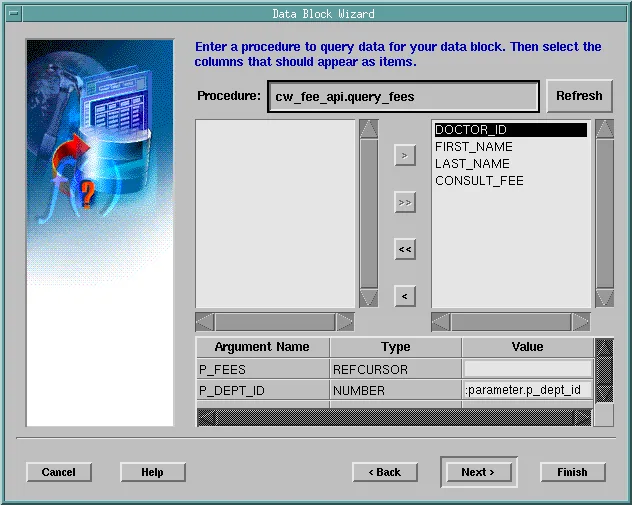
Choose Stored Procedure on the second page of the Data Block Wizard. The next page asks for the query procedure: type its name and click Refresh, and the wizard reads the procedure's arguments from the database and the columns of its record type. Move the columns the block needs to the right.
Arguments other than the cursor need a Value, evaluated when the block queries. Here it is :parameter.p_dept_id, a parameter of the form.
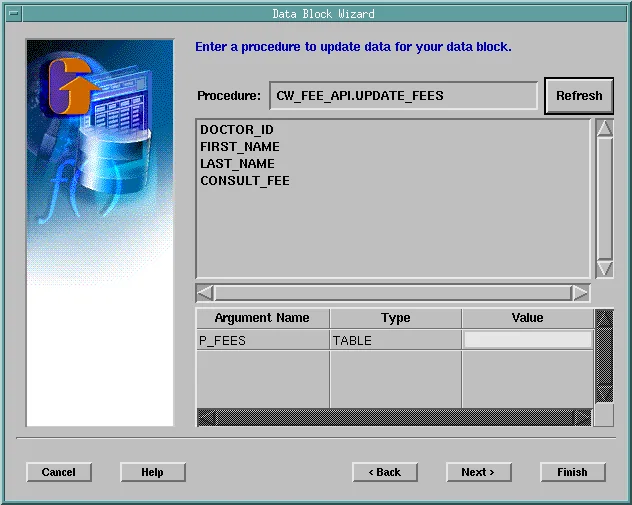
Four similar pages follow, for the insert, update, delete, and lock procedures. CW_FEE_API has only an update and a lock procedure, so the insert and delete pages stay empty. Name the block FEES and choose to create it.
What the Wizard Sets
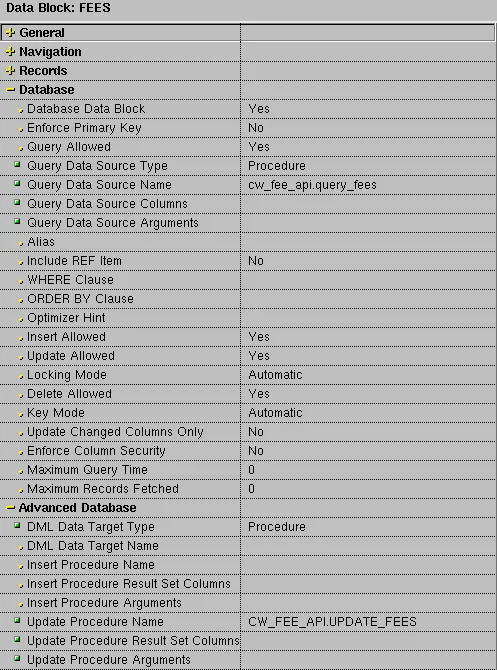
- Query Data Source Type is Procedure, and Query Data Source Name is the query procedure.
- Query Data Source Columns lists the columns and their types, and Query Data Source Arguments the arguments with their types, modes, and values.
- DML Data Target Type is Procedure, and the Insert, Update, Delete, and Lock Procedure properties, each with its own columns and arguments, name the procedures.
Complete and Run the Form
The sample form was completed from the wizard's block with a layout, the parameter P_DEPT_ID with the initial value 101 (Cardiology), Insert Allowed and Delete Allowed set to No because the API has no such procedures, and Update Allowed set to No on every item except the fee.
When the form runs, it queries through QUERY_FEES. Changing Zara Gupta's fee from 80 to 85 and saving calls LOCK_FEES and UPDATE_FEES, and the database then holds the new fee and its audit row.
Output:
  AUDIT_ID ROW_KEY  DETAILS
---------- -------- --------------------
         1 1005     consult_fee 80 -> 85
Query by Example Does Not Reach the Procedure
With Gupta typed in Last Name in Enter Query mode, the block still showed all three doctors: Forms cannot add a condition to a procedure's cursor. Criteria a procedure must honor have to be its arguments, as the department is here.
Handle Errors from the API
The calls to the procedures run in triggers that Forms generates at run time, named QUERY-PROCEDURE, LOCK-PROCEDURE, UPDATE-PROCEDURE, and so on; they do not appear in the .fmb. An exception raised by a procedure comes out of that trigger. Without an ON-ERROR trigger, a fee of 600 gave this message.
Output:
FRM-40735: UPDATE-PROCEDURE trigger raised unhandled exception ORA-20010.
The message of RAISE_APPLICATION_ERROR is lost to the user, but not to code. In ON-ERROR, DBMS_ERROR_CODE was -20010, and DBMS_ERROR_TEXT held ORA-20010: Fees are between 50 and 500., followed by the ORA-06512 lines of the call stack.
The form's ON-ERROR shows the API's own message, and passes other errors to the CW_ERR package.
Example (ON-ERROR trigger on the fees form):
declare
  v_msg varchar2(400) := substr(dbms_error_text, 12);   -- after 'ORA-20010: '
begin
  if error_code in (40735, 40508, 40509, 40510)
     and dbms_error_code between -20999 and -20000 then  -- raise_application_error
    if instr(v_msg, 'ORA-') > 0 then                     -- drop the ORA-06512 lines
      v_msg := rtrim(substr(v_msg, 1, instr(v_msg, 'ORA-') - 1), chr(10) || ' ');
    end if;
    message(v_msg);
    raise form_trigger_failure;
  else
    cw_err.on_error;                                    -- the rest
  end if;
end;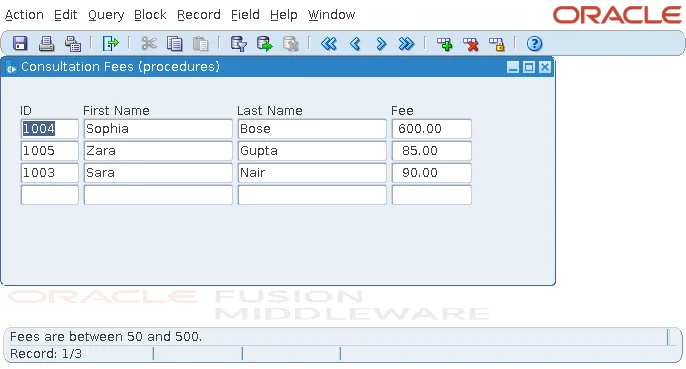
Errors numbered -20000 to -20999 are the application's, and their text is written for users; the API decides what to say, and every client shows it. CW_ERR is explained in how to handle errors using ON-ERROR.
Conclusion
A block on stored procedures in Oracle Forms needs a package with a record type, a query procedure returning a REF CURSOR or table of records, and a table-of-records procedure for each allowed operation. The Data Block Wizard reads them and sets Query Data Source Type, DML Data Target Type, and the procedure properties. Query criteria must be procedure arguments, because query by example cannot filter a procedure's cursor, and exceptions arrive as FRM-40735 in generated triggers, so show DBMS_ERROR_TEXT from ON-ERROR to give users the API's own message.
