
Properties set in Forms Builder are only the starting point. While a form runs, an item may need to become read-only for a user without the right role, change its prompt, or hide itself. SET_ITEM_PROPERTY and its companions make those changes from code.
This guide covers changing items at run time in Oracle Forms 14.1.2: the FIND_, GET_, and SET_ pattern every object follows, the item properties you change most, generic code that walks every item of a block, radio buttons, and record status.
Sample Form for This Guide
The examples and screenshots use the sample form CH22_RUNTIME from the Oracle Forms code repository on GitHub. Download it, open it in Forms Builder, and connect as CAREWELL to follow along.
| Form | File | What it shows |
|---|---|---|
| CH22_RUNTIME | forms/ch22/ch22_runtime.fmb | A patient block with a Read only switch, and the properties of its own session |
The forms run against the CareWell Clinic sample schema, which you install first.
The FIND_, GET_, SET_ Pattern
Every kind of object in Oracle Forms follows the same pattern:
| Built-in | What it does |
|---|---|
| FIND_object(name) | Returns the object's ID, of a type named after the object: ITEM, BLOCK, WINDOW, CANVAS, VIEWPORT, TAB_PAGE, LOV, ALERT, EDITOR, RECORDGROUP, GROUPCOLUMN, RELATION, FORMMODULE, MENUITEM, or TIMER. |
| GET_object_PROPERTY(name_or_id, property) | Returns a property as text. |
| SET_object_PROPERTY(name_or_id, property, value) | Changes it, for the rest of the session. |
| ID_NULL(id) | Returns TRUE when FIND_ found nothing, the way to test whether an object exists. |
Every GET_ and SET_ built-in accepts either the name or the ID. Looking up the ID once is faster when code sets several properties of one object, and an ID stays valid while the object exists.
Example:
declare
  it item := find_item('PATIENTS.PHONE');
begin
  if not id_null(it) then
    set_item_property(it, required, property_true);
    set_item_property(it, prompt_text, 'Phone *');
  end if;
end;
Property values are constants: PROPERTY_TRUE and PROPERTY_FALSE for Yes and No properties, named constants for the others, and strings or numbers where the property takes them. The GET_ functions return 'TRUE' and 'FALSE' as text. The same pattern for forms and blocks is shown in SET_FORM_PROPERTY and SET_BLOCK_PROPERTY.
SET_ITEM_PROPERTY and GET_ITEM_PROPERTY
Syntax:
set_item_property(item_name varchar2 | item_id item, property number,
                  value {varchar2 | number})
set_item_property(item_name varchar2 | item_id item, property number, x number [, y number])
get_item_property(item_name varchar2 | item_id item, property number) return varchar2
Item Properties Commonly Changed at Run Time
| Property | Values | Effect |
|---|---|---|
| ENABLED | PROPERTY_TRUE, PROPERTY_FALSE | Grayed out and unreachable. |
| VISIBLE | PROPERTY_TRUE, PROPERTY_FALSE | Hidden. Hiding an item also changes other properties, such as ENABLED and NAVIGABLE, so set them again when you show it. |
| INSERT_ALLOWED, UPDATE_ALLOWED | PROPERTY_TRUE, PROPERTY_FALSE | Read-only in new or queried records. |
| NAVIGABLE | PROPERTY_TRUE, PROPERTY_FALSE | Reachable with Tab. |
| REQUIRED | PROPERTY_TRUE, PROPERTY_FALSE | Must have a value. |
| PROMPT_TEXT, LABEL | Text | The prompt of an item, the label of a button or check box. |
| VISUAL_ATTRIBUTE, BACKGROUND_COLOR, FOREGROUND_COLOR | A named visual attribute, a color | Its look. |
| FORMAT_MASK, HINT_TEXT, TOOLTIP_TEXT | Text | How it shows data and helps the user. |
| POSITION, WIDTH, HEIGHT | Numbers | Where it is and how big. |
| LOV_NAME | An LOV | The LOV attached to it. |
GET_ITEM_PROPERTY returns these and more that code often needs to read: ITEM_TYPE (TEXT ITEM, DISPLAY ITEM, LIST, CHECKBOX, RADIO GROUP, BUTTON, and so on), DATATYPE, BASE_TABLE (whether it is a database item), ITEM_CANVAS, DATABASE_VALUE, NEXTITEM and PREVIOUSITEM, and MAX_LENGTH.
Every Record or One Record
SET_ITEM_PROPERTY changes the item in every record of its block. For one record, use SET_ITEM_INSTANCE_PROPERTY and read it back with GET_ITEM_INSTANCE_PROPERTY, as shown in how to highlight records using visual attributes.
Generic Code: Walk the Items of a Block
Because GET_BLOCK_PROPERTY(..., FIRST_ITEM) and GET_ITEM_PROPERTY(..., NEXTITEM) return item names, code can visit every item of a block without knowing them in advance. That is the basis of reusable procedures that live in PL/SQL libraries.
SET_BLOCK_READ_ONLY makes every data item of a block read-only, or editable again.
Program unit SET_BLOCK_READ_ONLY:
procedure set_block_read_only(p_block varchar2, p_read_only boolean) is
  v_item  varchar2(61) := get_block_property(p_block, first_item);
  v_name  varchar2(61);
  v_value number := case when p_read_only then property_false else property_true end;
begin
  while v_item is not null loop
    v_name := p_block || '.' || v_item;
    if get_item_property(v_name, item_type) in ('TEXT ITEM', 'LIST', 'RADIO GROUP')
       and get_item_property(v_name, base_table) = 'TRUE'
       and get_item_property(v_name, item_canvas) is not null then
      set_item_property(v_name, update_allowed, v_value);
      set_item_property(v_name, insert_allowed, v_value);
    end if;
    v_item := get_item_property(v_name, nextitem);
  end loop;
  set_block_property(p_block, delete_allowed, v_value);
end;
It skips buttons, display items, non-database items, and items that are on no canvas. Items on no canvas have no display to change, and setting their properties fails with FRM-41014: Cannot set property of null canvas item.
Example: a Read Only Switch
The sample form's Read only check box calls the procedure, changes the prompt of Last Name, and disables one radio button.
Example (WHEN-CHECKBOX-CHANGED trigger on CTL.READ_ONLY):
declare
  v_ro boolean := checkbox_checked('CTL.READ_ONLY');
begin
  set_block_read_only('PATIENTS', v_ro);
  set_item_property('PATIENTS.LAST_NAME', prompt_text,
    case when v_ro then 'Last Name (read only)' else 'Last Name' end);
  set_radio_button_property('PATIENTS.GENDER', 'OTHER', enabled,
    case when v_ro then property_false else property_true end);
end;
With the switch on, typing in Last Name is refused.
Output:
FRM-40200: Field is protected against update.
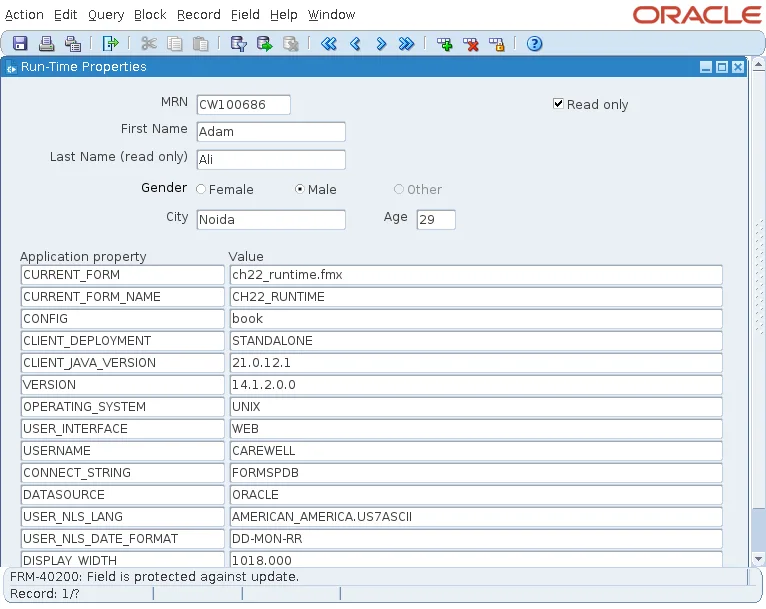
The form creates the check box's record when it starts, with GO_BLOCK('CTL'). A control block has no record until the cursor has been in it; until then, its check box shows an arbitrary state, and its first click only creates the record.
Change Radio Buttons
Syntax:
set_radio_button_property(item_name varchar2 | item_id item, button_name varchar2,
                          property number, value {varchar2 | number})
get_radio_button_property(item_name varchar2 | item_id item, button_name varchar2,
                          property number) return varchar2
A radio button is named by its group and its own name. Its properties include ENABLED, VISIBLE, LABEL, VISUAL_ATTRIBUTE, and POSITION. In the screenshot above, Other is disabled. Radio groups are covered in how to use radio groups in Oracle Forms.
Read and Set Record Status
Syntax:
get_record_property(record_number number, block_name varchar2, property number) return varchar2
set_record_property(record_number number, block_name varchar2, property number, value number)
The one property is STATUS. GET_RECORD_PROPERTY returns NEW, INSERT, QUERY, or CHANGED for any record of a block, whereas :SYSTEM.RECORD_STATUS knows only the current one.
SET_RECORD_PROPERTY sets it to NEW_STATUS, INSERT_STATUS, QUERY_STATUS, or CHANGED_STATUS. Marking a record QUERY_STATUS after code has filled it keeps Forms from saving it, and INSERT_STATUS makes a record built by code count as new data.
:SYSTEM.CURSOR_RECORD and :SYSTEM.TRIGGER_RECORD give record numbers, and GO_RECORD, FIRST_RECORD, LAST_RECORD, NEXT_RECORD, and PREVIOUS_RECORD move among them. For another way to process every record, see how to loop through a tabular data block, and for more run-time item examples, how to change item properties at run time.
Conclusion
Every Oracle Forms object follows the FIND_, GET_, SET_ pattern, with ID_NULL to test that an object exists. SET_ITEM_PROPERTY changes an item in every record, whether it is enabled, visible, insertable, updatable, required, or how it is prompted and colored, while SET_ITEM_INSTANCE_PROPERTY changes one record. Walk a block's items with FIRST_ITEM and NEXTITEM for generic code, skipping items with no canvas, and use the radio button and record property built-ins for the rest.
