
When the user must pick one of a few values and should see all of them at once, a radio group is the natural choice. Each option is a button, and selecting one stores its value in the item.
This guide covers radio groups in Oracle Forms 14.1.2: how they are built from radio buttons, why a new record needs an initial value, what happens to values without a button, and the trigger and built-ins that work with them.
Sample Form for This Guide
The examples and screenshots use the sample form CH10_PATIENT from the Oracle Forms code repository on GitHub. Download it, open it in Forms Builder, and connect as CAREWELL to follow along.
| Form | File | What it shows |
|---|---|---|
| CH10_PATIENT | forms/ch10/ch10_patient.fmb | The GENDER radio group with three buttons |
The forms run against the CareWell Clinic sample schema, which you install first.
Radio Group, List Item, or Check Box?
| Item type | Best for | Example |
|---|---|---|
| Check box | Exactly two values | Active: Y or N |
| Radio group | Two to five choices the user should see side by side | Gender: Female, Male, Other |
| List item | More choices, or choices that come from a table | Insurance plan, city |
Radio groups take space on the canvas for every option, so for more than about five choices, use a list instead.
How a Radio Group Is Built
A radio group is an item whose choices are radio buttons, which appear as objects under the item in the Object Navigator. Each radio button has three things of its own:
- A Label, the text shown next to the button.
- A Radio Button Value, the value the item takes when the button is selected.
- Its own position on the canvas, so you can arrange the buttons in a row or a column.
In the sample patient form, GENDER has three buttons: Female (F), Male (M), and Other (X).
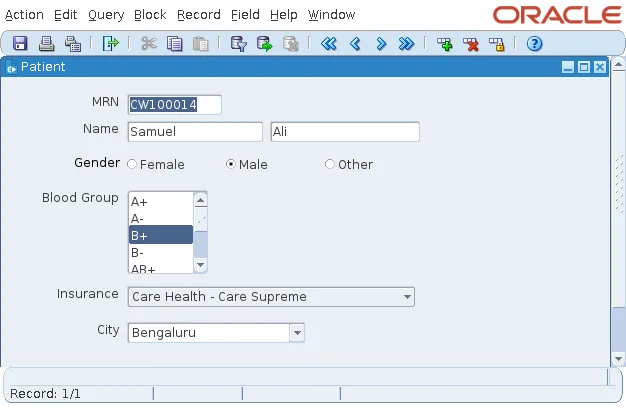
The group itself has no prompt. The label Gender in the screenshot is a text object drawn on the canvas with the Layout Editor.
Initial Value and Other Values
A radio group always has one button selected. That leads to two rules:
- In a new record, the group needs an Initial Value equal to one of its buttons' values, unless it maps other values.
- Like a list item, a radio group has a Mapping of Other Values property. When it is blank, Forms rejects queried records whose value has no button, and they silently do not appear in the block.
Set Mapping of Other Values to one of the button values when the column may hold values the form does not offer, or make sure the column's check constraint allows only the buttons' values, as GENDER's does.
React to a Choice with WHEN-RADIO-CHANGED
WHEN-RADIO-CHANGED fires when the user selects another radio button, before the item is validated. Use it for anything that should follow the choice at once, such as showing or hiding related items.
It works like the triggers of the other choice items: WHEN-LIST-CHANGED for list items and WHEN-CHECKBOX-CHANGED for check boxes, shown in how to use check boxes in Oracle Forms.
Change Radio Buttons at Run Time
Radio buttons have their own pair of built-ins, GET_RADIO_BUTTON_PROPERTY and SET_RADIO_BUTTON_PROPERTY. They read and change a single button's label, its visibility, and whether it can be selected, so you can, for example, disable an option that does not apply to the current record.
To select a button from code, assign the group the button's value, just as you would set any item:
- Setting GENDER to F selects Female.
- Reading GENDER returns the value of the selected button.
Lists for longer sets of choices, including how to fill them from the database, are covered in how to create list items in Oracle Forms.
Conclusion
A radio group in Oracle Forms is an item whose values belong to its radio buttons, each with a label, a value, and its own position. It always has one button selected, so give it an Initial Value for new records and a Mapping of Other Values if the column can hold values without a button. Use radio groups for two to five visible choices, react with WHEN-RADIO-CHANGED, and adjust individual buttons with GET_RADIO_BUTTON_PROPERTY and SET_RADIO_BUTTON_PROPERTY.
