
Once a report exists, users want to run it from the form they are working in, with the form's own values as parameters, and see the output right away. Oracle Forms does this with a report object and the RUN_REPORT_OBJECT built-in.
This guide covers running Oracle Reports 14.1.2 from Oracle Forms 14.1.2: the report object and its properties, the environment setting Forms needs to reach Reports, RUN_REPORT_OBJECT and job status, showing the output, data parameters, and the security settings that decide whether a report runs at all.
Sample Form for This Guide
The examples and screenshots use the sample form CH33_REPORTS from the Oracle Forms code repository on GitHub. Download it, open it in Forms Builder, and connect as CAREWELL to follow along.
| Form | File | What it shows |
|---|---|---|
| CH33_REPORTS | forms/ch33/ch33_reports.fmb | A form that runs the weekly schedule report with RUN_REPORT_OBJECT |
The forms run against the CareWell Clinic sample schema, which you install first.
Report Built-ins at a Glance
| Built-in | What it does |
|---|---|
| RUN_REPORT_OBJECT | Runs a report and returns the job's identifier. |
| REPORT_OBJECT_STATUS | Returns a job's status, such as FINISHED or RUNNING. |
| SET_REPORT_OBJECT_PROPERTY | Changes a report object's properties at run time. |
| COPY_REPORT_OBJECT_OUTPUT | Copies a finished job's output to a file of the Forms server. |
| CANCEL_REPORT_OBJECT | Cancels a job. |
Building the report itself is covered in how to create a report with Oracle Reports 14.1.2.
Create a Report Object
A form runs a report through a report object, under Reports in the Object Navigator. Its properties describe the run.
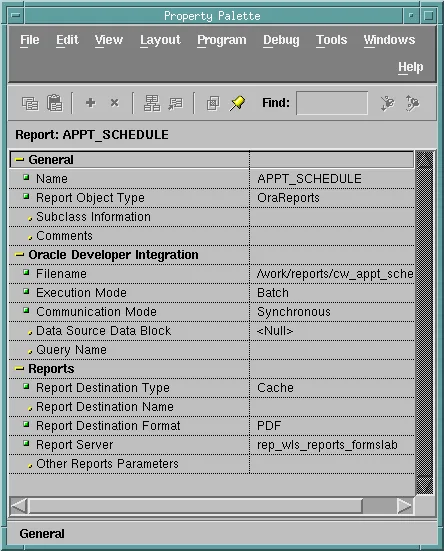
| Property | Setting |
|---|---|
| Report Object Type | OraReports for Oracle Reports. The default of a new report object is OraBIP, Oracle Analytics Publisher, whose own properties replace those below. A property of the other type raises FRM-41222: Invalid property for this report object type. |
| Filename | The .rdf (or .rep, .jsp) file, as the Reports server finds it: a full path, or a name in the server's REPORTS_PATH. |
| Execution Mode | Batch, without the Runtime Parameter Form, or Runtime. |
| Communication Mode | Synchronous, where the form waits for the report, or Asynchronous. |
| Report Destination Type, Name, Format | Where the output goes and in which format; Cache and PDF here. Mail, FTP, WebDAV, and printer destinations have their own properties. |
| Report Server | The name of the Reports server, here rep_wls_reports_formslab. |
| Other Reports Parameters | Any other command-line parameters, such as paramform=no. |
Set COMPONENT_CONFIG_PATH
The Forms runtime reaches Reports through the configuration of the Reports Tools instance, which it finds in the environment variable COMPONENT_CONFIG_PATH. The full domain's default.env mentions the variable only in a comment. Without it, the run returned job number 0, meaning no job at all, and asking for its status failed with FRM-41217: Unable to get report job status.
Set the variable on the Environment Configuration page of Fusion Middleware Control, which manages default.env.
The default.env setting:
COMPONENT_CONFIG_PATH=/u01/oracle/domains/forms_full/config/fmwconfig/components/ReportsToolsComponent/reptools1
Run the Report with RUN_REPORT_OBJECT
Syntax:
run_report_object(report_id report_object | report_name varchar2 [, paramlist_id paramlist]) return varchar2
report_object_status(report_id varchar2) return varchar2
set_report_object_property(report_id report_object, property number, value varchar2 | number)
copy_report_object_output(report_id varchar2, output_file varchar2)
cancel_report_object(report_id varchar2)
RUN_REPORT_OBJECT returns the job's identifier, made of the server's name and the job number, such as rep_wls_reports_formslab_5. The parameter list passes the report's parameters, and PARAMFORM=NO.
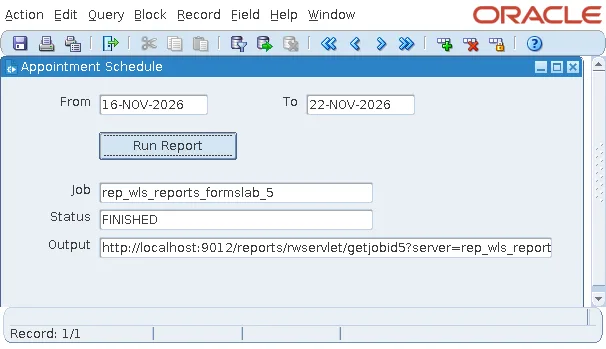
The sample form's Run Report button passes the form's dates to the report.
Example (WHEN-BUTTON-PRESSED trigger on CTL.RUN):
declare
  v_report  report_object := find_report_object('APPT_SCHEDULE');
  v_params  paramlist     := get_parameter_list('CW_REPORT');
  v_job     varchar2(100);
begin
  if not id_null(v_params) then
    destroy_parameter_list(v_params);
  end if;
  v_params := create_parameter_list('CW_REPORT');
  add_parameter(v_params, 'P_FROM', text_parameter, to_char(:ctl.p_from, 'YYYY-MM-DD'));
  add_parameter(v_params, 'P_TO', text_parameter, to_char(:ctl.p_to, 'YYYY-MM-DD'));
  add_parameter(v_params, 'PARAMFORM', text_parameter, 'NO');     -- no parameter form

  v_job := run_report_object(v_report, v_params);                  -- 'server_jobid'
  :ctl.job    := v_job;
  :ctl.status := report_object_status(v_job);
  if :ctl.status = 'FINISHED' then                                 -- show the output
    :ctl.url := 'http://localhost:9012/reports/rwservlet/getjobid'
             || substr(v_job, instr(v_job, '_', -1) + 1)
             || '?server=rep_wls_reports_formslab';
    web.show_document(:ctl.url, '_blank');
  end if;
end;
The report ran as job 5, finished, and the form built the URL of its output.
Parameter lists are covered in how to pass values between forms.
Job Status and Asynchronous Runs
Among the statuses REPORT_OBJECT_STATUS returns are FINISHED, RUNNING, and ENQUEUED, and, when things go wrong, TERMINATED_WITH_ERROR or CANCELED. A synchronous run returns when the job is done; an asynchronous run returns at once, and a repeating timer can check the status until the job finishes, as in how to use timers in Oracle Forms.
No Password Needed
The query ran as the form's own database user: RUN_REPORT_OBJECT passes the connection of the Forms session to the Reports server, so no password appears in the form or the parameters.
Show the Output
The output is in the server's cache. getjobid<n> is the servlet's command that returns it, and the built-in WEB.SHOW_DOCUMENT(url, target) opens a URL in the user's browser; _blank opens a new window.
The test's Forms client ran in a container without a desktop browser, and reported it.
Output:
FRM-92022: cannot launch URL http://localhost:9012/reports/rwservlet/getjobid3?server=rep_wls_reports_formslab
with target _blank. full details: The BROWSE action is not supported on the current platform!
Requested from a browser, the URL returned the job's PDF, and on a user's computer the same call opens it. See also WEB.SHOW_DOCUMENT in Oracle Forms.
Other ways to deliver output avoid the browser altogether: a Mail destination sends it, a File destination writes it where another system collects it, and COPY_REPORT_OBJECT_OUTPUT copies a finished job's output to a file of the Forms server.
Data Parameters: Avoid Them
ADD_PARAMETER has a second kind of parameter, DATA_PARAMETER, whose value is the name of a record group of the form. Forms' help describes it as data that replaces a query of the report, for example the record group RG_WILSON, with the columns of Q_1, in place of the query.
Example:
add_parameter(v_params, 'Q_1', data_parameter, 'RG_WILSON');
In testing, a parameter list with this line made RUN_REPORT_OBJECT fail with FRM-41214: Unable to run report, and no job reached the server; without it, the same code ran the report. Oracle's Forms Migration Assistant confirms it: its rules warn that DATA_PARAMETER will not work with RUN_REPORT_OBJECT, as described in how to upgrade Oracle Forms applications to 14.1.2. Pass values as text parameters, and let the report query the database itself.
Reports Security
Reports Services checks every job against the domain's policy store. Its application roles, in the stripe reports, have permissions of the class oracle.reports.server.ReportsPermission:
- RW_ADMINISTRATOR and RW_DEVELOPER may run any report (report=*).
- RW_BASIC_USER and RW_POWER_USER may run only the reports granted to them, test.rdf out of the box, and use a few web commands.
The servlet must therefore know who is asking. Without single sign-on, a report request failed with REP-51019: System user authentication is missing. Given the administrator as authid, a user without a Reports role, it failed again.
Output:
REP-56071: The requested operation is unauthorized.
RUN_REPORT_OBJECT passes no user of its own. With a secured server, Forms and Reports use single sign-on, and each report is granted to the roles of those who run it, in Fusion Middleware Control or with WLST's grantPermission. The test domain, without single sign-on, ran its jobs without the check by removing the securityId from the job element of the in-process server's rwserver.conf, a setting for a development domain only.
Web Commands
The servlet's web commands, getjobid, showjobid, showmyjobs, showjobs, and getserverinfo, are disabled by default: getjobid answered REP-52262: Diagnostic output is disabled. The webcommandaccess element of rwservlet.properties enables them by level; L1 enables those that return a user's own jobs, which is what showing the output needs.
For older examples of calling reports, see how to call Oracle Reports from Oracle Forms and running reports synchronously vs. asynchronously.
Conclusion
To run Oracle Reports from a form, create a report object of type OraReports, not the default OraBIP, set COMPONENT_CONFIG_PATH so Forms can reach the Reports Tools configuration, and call RUN_REPORT_OBJECT with a parameter list of text parameters. It passes the form's own connection, returns a job ID whose output getjobid returns and WEB.SHOW_DOCUMENT shows, and REPORT_OBJECT_STATUS reports progress. Avoid DATA_PARAMETER, and plan security with single sign-on, report grants, and webcommandaccess before going to production.
