
A form's program units belong to that form. Code every form of an application needs, such as a message box that asks a question, a check of the user's role, or a procedure that makes a block read-only, would otherwise have to be copied into each form and changed in every copy.
A PL/SQL library holds such code once. A form attaches the library and calls its procedures, functions, and packages as if they were its own, and when the library changes, every form that attaches it uses the new code. This guide builds a library in Oracle Forms 14.1.2, attaches it to a form, deploys it, and explains what happens when it changes.
Sample Form for This Guide
The examples and screenshots use the sample form CH23_LIBRARY and the library CW_LIB from the Oracle Forms code repository on GitHub. Download them, open them in Forms Builder, and connect as CAREWELL to follow along.
| Form | File | What it shows |
|---|---|---|
| CH23_LIBRARY | forms/ch23/ch23_library.fmb | A patients form that attaches CW_LIB and calls it from five triggers |
| CW_LIB | forms/ch23/cw_lib.pll | The PL/SQL library, with its text version cw_lib.pld in the same folder |
The forms run against the CareWell Clinic sample schema, which you install first.
PL/SQL Libraries at a Glance
| File | What it is | Needed at run time |
|---|---|---|
| .pll | The library as Forms Builder saves it: source and compiled code. You attach and open this file. | Only if no .plx is found |
| .plx | The compiled library without its source, written by Compile Module or the compiler. | Yes, deploy this one |
| .pld | The library as text, the units one after another. | No |
What a Library Holds
A library holds program units only: procedures, functions, package specs, and package bodies. It has no blocks, items, alerts, or triggers. Its code runs in the Forms runtime, like the form's own code, so it can call every Forms built-in, such as SHOW_ALERT, SET_ITEM_PROPERTY, and GO_BLOCK, and the SQL of the database.
Libraries suit code that works with any form: messages, generic property changes, checks of the user's privileges, and formatting. Code that works with data, rules every program must obey whatever calls it, belongs in the database as stored program units, where reports, batch jobs, and other applications can use it too. A common split: the library shows the message, and the database decides. See how to write PL/SQL in Oracle Forms for where code lives.
Create a Library in Forms Builder
Choose File, New, PL/SQL Library, or select the PL/SQL Libraries node in the Object Navigator and click Create. Forms Builder names it LIB_001, or the next free number, until you save it under a file name. A library has two nodes: Program Units and Attached Libraries, because a library can attach other libraries.
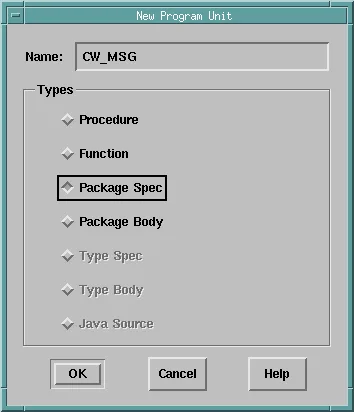
Select Program Units and click Create. The New Program Unit dialog asks for the name and the type of the unit. For a package, create the spec first, then a second unit with the same name and the type Package Body.
The PL/SQL Editor opens with a skeleton of the unit, which you replace with your code. Compile with Program, Compile PL/SQL, All (Shift+Ctrl+K), or Incremental (Ctrl+K) for the units changed since the last compile. Errors appear in the Compile window and at the bottom of the editor, and Goto Error takes you to the line.
Save and Build the Library
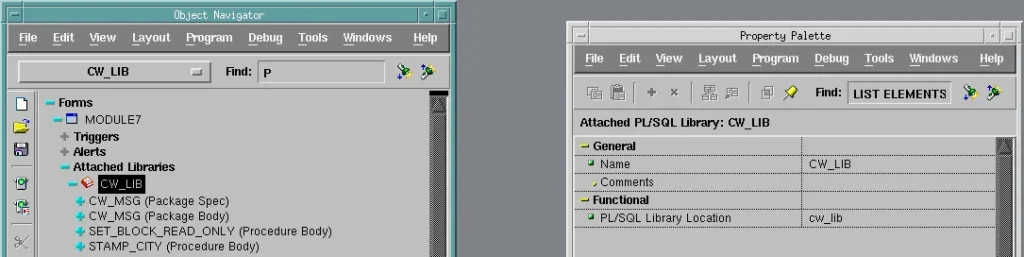
Save the library with File, Save (Ctrl+S) as a .pll file. The navigator then shows it under its file name, CW_LIB, and its Property Palette has only two properties: Name and PL/SQL Library Location, the file.
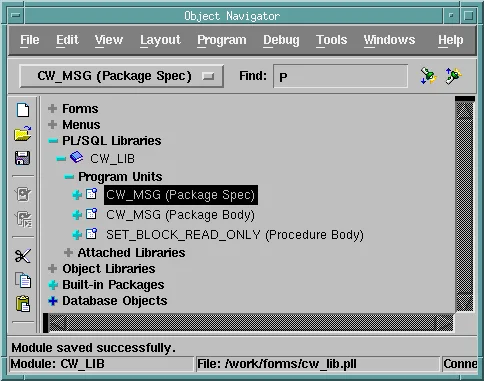
Program, Compile Module (Ctrl+T) compiles every unit and writes the .plx file, the library's runtime version, next to the .pll. The status bar says Module built successfully.
Example: a Message Box Package
One alert whose message is set at run time can replace many alerts with fixed messages, as shown in how to show alerts using SHOW_ALERT. The package CW_MSG wraps that in a function:
- ASK shows a message in the alert of a style, with button labels the caller chooses, and returns the number of the button pressed.
- INFORM shows a note.
- FAIL shows a stop message and stops the trigger.
Library CW_LIB, package CW_MSG (specification):
package cw_msg is
  -- shows a message box and returns the button pressed: 1, 2, or 3
  function ask(p_text varchar2, p_buttons varchar2 default 'OK',
               p_style varchar2 default 'NOTE') return pls_integer;
  procedure inform(p_text varchar2);
  procedure fail(p_text varchar2);        -- stop alert, then FORM_TRIGGER_FAILURE
end cw_msg;
A library cannot contain alerts, so each form that uses CW_MSG must have three alerts named CW_NOTE, CW_CAUTION, and CW_STOP, of the matching styles: one button for the note and stop alerts, two for the caution alert. An object library can keep such objects so every form gets the same three. ASK checks that the alert exists, because without it SHOW_ALERT would fail with a message the user cannot act on.
Library CW_LIB, package CW_MSG (body):
package body cw_msg is
  function ask(p_text varchar2, p_buttons varchar2 default 'OK',
               p_style varchar2 default 'NOTE') return pls_integer is
    v_alert varchar2(30) := 'CW_' || upper(p_style);   -- CW_NOTE, CW_CAUTION, CW_STOP
    v_rest  varchar2(100) := p_buttons || ',';
    v_btn   number;
  begin
    if id_null(find_alert(v_alert)) then
      message('CW_MSG: the form has no alert ' || v_alert);
      raise form_trigger_failure;
    end if;
    set_alert_property(v_alert, alert_message_text, p_text);
    for i in 1 .. 3 loop                              -- labels from 'Yes,No'
      exit when v_rest is null;
      set_alert_button_property(v_alert,
        case i when 1 then alert_button1 when 2 then alert_button2 else alert_button3 end,
        label, substr(v_rest, 1, instr(v_rest, ',') - 1));
      v_rest := substr(v_rest, instr(v_rest, ',') + 1);
    end loop;
    v_btn := show_alert(v_alert);
    return case v_btn when alert_button1 then 1 when alert_button2 then 2 else 3 end;
  end ask;

  procedure inform(p_text varchar2) is
    n pls_integer;
  begin
    n := ask(p_text);
  end inform;

  procedure fail(p_text varchar2) is
    n pls_integer;
  begin
    n := ask(p_text, 'OK', 'STOP');
    raise form_trigger_failure;
  end fail;
end cw_msg;
Three Details of the Body
- ALERT_BUTTON1 to ALERT_BUTTON3: the button argument of SET_ALERT_BUTTON_PROPERTY is one of these constants, not the numbers 1 to 3. A plain number compiles, but fails at run time with FRM-41311: Invalid argument or argument ordering for SET_ALERT_BUTTON_PROPERTY.
- Buttons are not added at run time. The loop stops after the last label given; the number of buttons an alert shows is the number that have a label in Forms Builder.
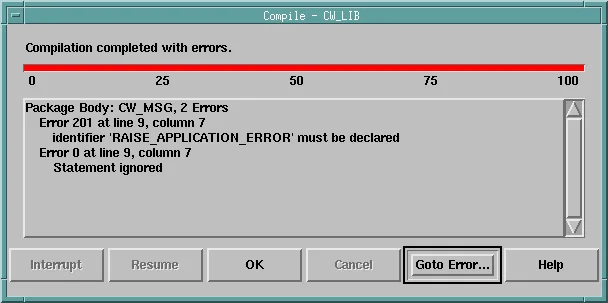
- No RAISE_APPLICATION_ERROR. The PL/SQL of Forms does not know that procedure, which belongs to the database's DBMS_STANDARD package, so code using it fails to compile. In form and library code, report the problem with MESSAGE or an alert and raise FORM_TRIGGER_FAILURE.
FAIL raises FORM_TRIGGER_FAILURE after the alert. An exception raised in a library procedure propagates to the trigger that called it, as it would from a program unit of the form, so a WHEN-VALIDATE-ITEM that calls CW_MSG.FAIL fails, and the cursor stays in the item.
Refer to Form Objects with NAME_IN and COPY
A library is compiled on its own, without any form, so its code cannot name the form's items. A bind variable such as :patients.city does not compile in a library.
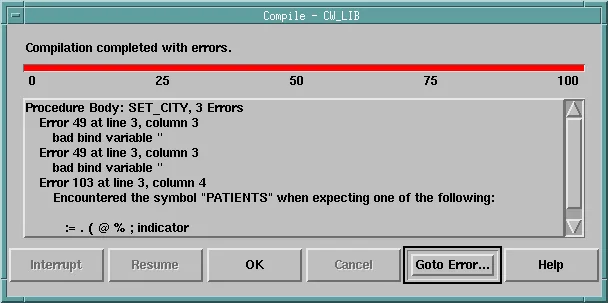
The same applies to :GLOBAL, :PARAMETER, and :SYSTEM variables. Library code refers to them by name, as text, with two built-ins:
- NAME_IN(name) returns the value of an item, a global variable, a parameter, or a system variable, as text: NAME_IN('PATIENTS.CITY'), NAME_IN('GLOBAL.CW_CITY'), NAME_IN('SYSTEM.CURSOR_ITEM').
- COPY(value, name) assigns a value to an item or a global variable: COPY('Pune', 'PATIENTS.CITY').
Syntax:
name_in(variable_name varchar2) return varchar2
copy(source varchar2, destination varchar2)
Because the names are text, the code works with whatever block the caller names. STAMP_CITY fills an empty City in any block that has a CITY item, from a global variable.
Library CW_LIB, procedure STAMP_CITY:
procedure stamp_city(p_block varchar2) is
begin
  if name_in(p_block || '.CITY') is null then             -- read :<block>.city
    copy(name_in('GLOBAL.CW_CITY'), p_block || '.CITY');   -- write it from :global.cw_city
  end if;
end stamp_city;
NAME_IN returns text, so convert numbers and dates with TO_NUMBER and TO_DATE, using the item's format mask, and pass COPY text the item can convert. Like an assignment in a trigger, COPY marks the item Changed, so it is validated when the cursor leaves it.
Or Pass Names to the GET_ and SET_ Built-ins
The other way to write generic code is to pass object names as parameters and use GET_ and SET_ built-ins. SET_BLOCK_READ_ONLY works that way, and moves into the library unchanged: removed from the form's program units and created in the library, it is called exactly as before.
Library CW_LIB, procedure SET_BLOCK_READ_ONLY:
procedure set_block_read_only(p_block varchar2, p_read_only boolean) is
  v_item  varchar2(61) := get_block_property(p_block, first_item);
  v_name  varchar2(61);
  v_value number := case when p_read_only then property_false else property_true end;
begin
  while v_item is not null loop
    v_name := p_block || '.' || v_item;
    if get_item_property(v_name, item_type) in ('TEXT ITEM', 'LIST', 'RADIO GROUP')
       and get_item_property(v_name, base_table) = 'TRUE'
       and get_item_property(v_name, item_canvas) is not null then
      set_item_property(v_name, update_allowed, v_value);
      set_item_property(v_name, insert_allowed, v_value);
    end if;
    v_item := get_item_property(v_name, nextitem);
  end loop;
  set_block_property(p_block, delete_allowed, v_value);
end;
How it walks the items of a block is explained in SET_ITEM_PROPERTY in Oracle Forms.
Attach a Library to a Form
To use a library, a form attaches it. In the form's Attached Libraries node, click Create. The Attach Library dialog asks for the library, and Browse finds the .pll file with its full path.
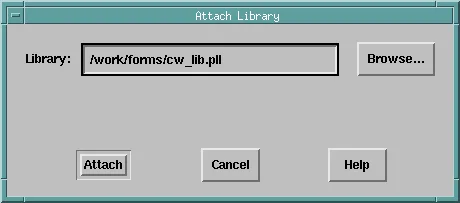
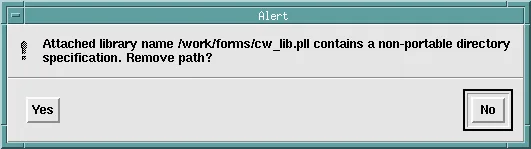
Attach then asks whether to remove the path. Answer Yes. The form then records only the name, cw_lib, and looks for the library at run time in the directories of FORMS_PATH, the same variable that finds forms and menus. A form that records a full path such as /work/forms/cw_lib.pll works only where that directory exists, not on the test and production servers.
The library's units then appear under the form's Attached Libraries node. They are read-only there; to change them, open the library itself.
Attachment Rules
- On Linux and UNIX, file names are case-sensitive, and so is the name of an attachment: attach cw_lib, the name of the file, not CW_LIB. In tests, a form attached as CW_LIB gave errors that were hard to trace: identifiers of the library that "must be declared" when the form was compiled, and FRM-40039 when it ran. Name library files in lowercase, and attach them by that name.
- A form can attach several libraries, and a library can attach others.
- When a form has a program unit with the same name as one of a library, the form's own unit is called, without any warning. Keep names unique, for example with a prefix per library.
Use the Library in a Form
The sample library form lists the patients of Pune. It attaches CW_LIB, has the three alerts, and calls the library in five triggers. When the form starts, the block is queried and made read-only.
Example (WHEN-NEW-FORM-INSTANCE trigger on the form):
go_block('PATIENTS');
execute_query;
set_block_read_only('PATIENTS', true);          -- from CW_LIB
Typing in the block then gives this message.
Output:
FRM-40200: Field is protected against update.
The Edit button unlocks the block, and becomes Lock.
Example (WHEN-BUTTON-PRESSED trigger on CTL.EDIT):
declare
  v_editing boolean := get_item_property('CTL.EDIT', label) = 'Edit';
begin
  set_block_read_only('PATIENTS', not v_editing);
  set_item_property('CTL.EDIT', label, case when v_editing then 'Lock' else 'Edit' end);
  go_block('PATIENTS');
end;
Remove Record (Ctrl+Up) asks before it deletes.
Example (KEY-DELREC trigger on the PATIENTS block):
if cw_msg.ask('Delete ' || :patients.first_name || ' ' || :patients.last_name
              || ' and every record of this patient?', 'Delete,Keep', 'CAUTION') = 1 then
  delete_record;
end if;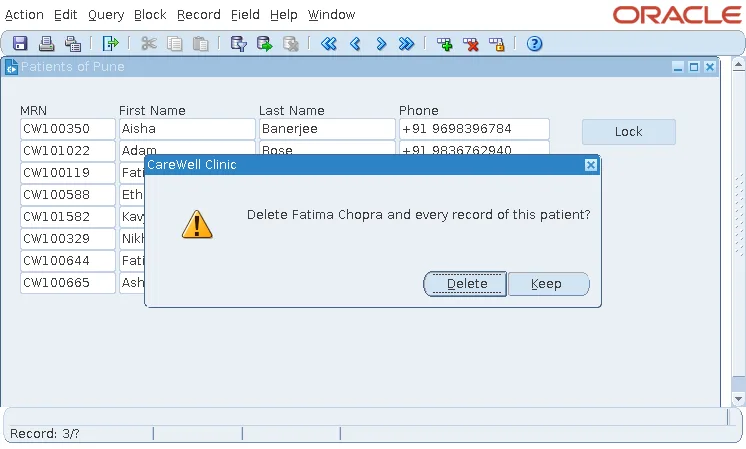
A phone number in the wrong format is refused by CW_MSG.FAIL. The trigger uses REGEXP_LIKE, which the PL/SQL of Forms supports.
Example (WHEN-VALIDATE-ITEM trigger on PATIENTS.PHONE):
if not regexp_like(:patients.phone, '^\+91 [6-9][0-9]{9}$') then
  cw_msg.fail('Enter the phone as +91, a space, and ten digits: +91 9880200017.');
end if;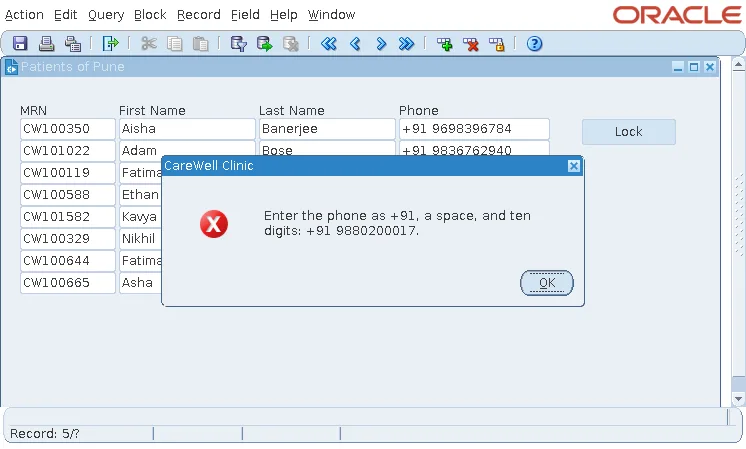
A successful save is confirmed. :SYSTEM.FORM_STATUS is QUERY again only when everything was saved.
Example (KEY-COMMIT trigger on the form):
commit_form;
if :system.form_status = 'QUERY' then
  cw_msg.inform('Your changes are saved.');
end if;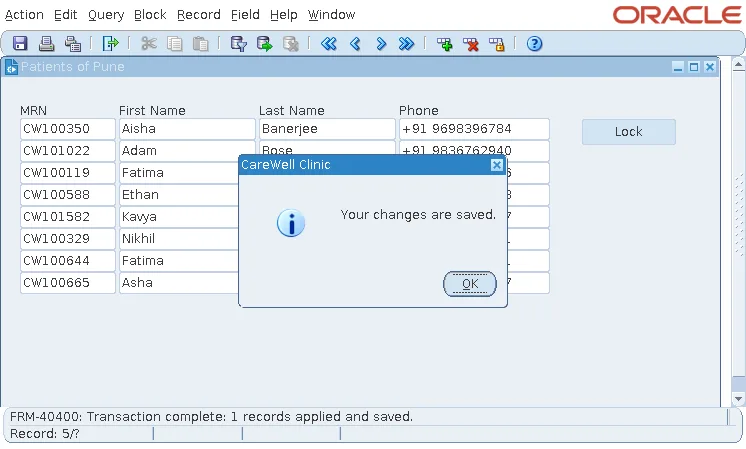
Compile and Deploy Libraries
The runtime looks for the .plx in FORMS_PATH, and uses the .pll when it finds no .plx. Deploy the .plx of every library with the .fmx files: it is smaller, it loads without compiling, and it does not give away the source. When neither file is found, the form does not start.
Output:
FRM-40039: Cannot attach library CW_LIB while opening form CH23_LIBRARY.
Compile from the Command Line
frmcmp_batch compiles libraries with module_type=library.
Syntax:
frmcmp_batch module=cw_lib.pll userid=user/password@db module_type=library compile_all=yes
The same compiler converts between the binary and text versions: script=yes writes cw_lib.pld from cw_lib.pll, and parse=yes builds cw_lib.pll from cw_lib.pld. The text version can be compared, reviewed, and kept in version control.
Syntax:
frmcmp_batch module=cw_lib.pld userid=user/password@db module_type=library parse=yes
Compile the libraries before the forms that attach them. A form's compilation reads the specs of its libraries, and when it cannot find a library, every call to it fails with PL/SQL ERROR 201, the identifier must be declared. The compiler's other parameters are covered in how to compile Oracle Forms modules.
What Happens When a Library Changes
The runtime loads a library when a form that attaches it starts, so a changed library reaches users the next time they open the form. Tests showed:
| Change | Result without recompiling the form |
|---|---|
| A changed package body | Worked. |
| A new unit in a spec | Worked. |
| A new parameter with a default, at the end | Worked. |
| Parameters swapped, ASK(p_text, p_style, p_buttons) in place of ASK(p_text, p_buttons, p_style) | No error at all. The form, compiled against the old spec, passed 'Delete,Keep' as the style, and ASK reported CW_MSG: the form has no alert CW_DELETE,KEEP. |
Forms does not check that a form was compiled against the current spec of its libraries. Two rules follow:
- Treat a library's specs as a contract: add units, and add parameters with defaults at the end, but do not change or reorder what exists.
- After any change to a spec, recompile every form that attaches the library.
Library Data
A package in a library can have variables, which keep their values while the form runs. Each form has its own copy of them, so two forms that attach the same library do not see each other's values, unless one opens the other with the option to share library data.
Conclusion
A PL/SQL library (.pll) holds procedures, functions, and packages that many Oracle Forms share, and forms attach it and call its units as their own. Create libraries and their units in Forms Builder, use NAME_IN and COPY or GET_ and SET_ built-ins instead of bind variables, and report errors with alerts and FORM_TRIGGER_FAILURE rather than RAISE_APPLICATION_ERROR. Attach libraries without a path and by their lowercase file name, deploy the .plx, and recompile every attached form after a change to a spec, because Forms will not warn you.
