
An alert is a modal message box. It tells the user something, or asks a question, and waits for an answer before the form continues. Alerts are how a form confirms a delete, refuses an action, or warns about something the user should know.
This guide covers alerts in Oracle Forms 14.1.2: their properties and styles, showing one with SHOW_ALERT and acting on the button the user pressed, and building the message at run time so one alert can serve many situations.
Sample Form for This Guide
The examples and screenshots use the sample form CH16_VISITS from the Oracle Forms code repository on GitHub. Download it, open it in Forms Builder, and connect as CAREWELL to follow along.
| Form | File | What it shows |
|---|---|---|
| CH16_VISITS | forms/ch16/ch16_visits.fmb | A patient's visits with four alerts that confirm and refuse |
The forms run against the CareWell Clinic sample schema, which you install first.
Alert Properties at a Glance
An alert is an object of the form, under Alerts in the Object Navigator.
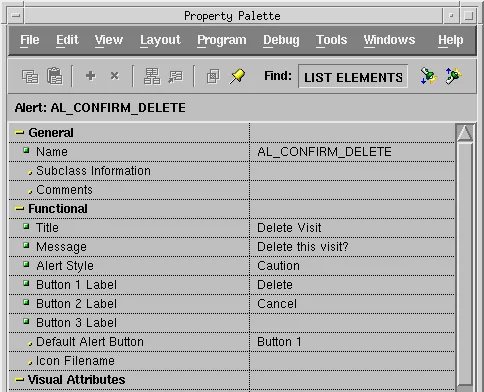
| Property | What it sets |
|---|---|
| Title | The text in the title bar. |
| Message | What the alert says, up to 1,000 characters. |
| Alert Style | Stop, Caution, or Note, which chooses the icon. |
| Button 1 Label, Button 2 Label, Button 3 Label | Up to three buttons. An empty label hides its button. |
| Default Alert Button | The button that Enter presses. |
Alert Styles
| Style | Icon | Use it for |
|---|---|---|
| Stop | A red cross | An action that cannot be done. |
| Caution | A warning sign | An action that needs confirmation. |
| Note | An information sign | A message the user should read. |
The sample visits form has four alerts: AL_CANNOT_DELETE (Stop, with one OK button), AL_CONFIRM_DELETE (Caution, with Delete and Cancel), AL_CLEAR_NOTES (Caution, with Yes and No), and AL_NO_NOTES (Note, with OK).
Show an Alert and Act on the Answer
SHOW_ALERT displays an alert and returns the button the user pressed: ALERT_BUTTON1, ALERT_BUTTON2, or ALERT_BUTTON3. The form waits until the user answers.
The sample form's Clear Notes button asks before it clears the notes of the current visit, and says so when there is nothing to clear.
Example (WHEN-BUTTON-PRESSED trigger on CTL.CLEAR_NOTES):
declare
  v_button number;
begin
  if :visits.notes is null then
    v_button := show_alert('AL_NO_NOTES');           -- a note: one OK button
  elsif show_alert('AL_CLEAR_NOTES') = alert_button1 then
    :visits.notes := null;
  end if;
end;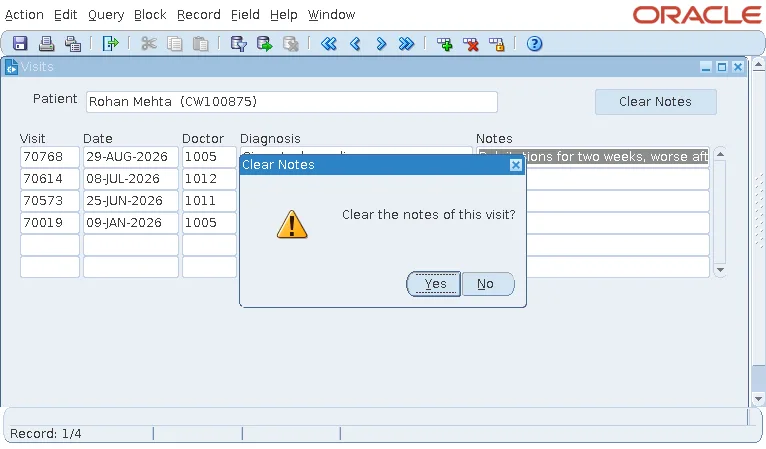
Because SHOW_ALERT is a function, even an alert with only an OK button must be called in an assignment, such as v_button := show_alert('AL_NO_NOTES');, or in an IF.
Build the Message at Run Time
An alert's message is usually built from the data. SET_ALERT_PROPERTY changes the message or the title, and SET_ALERT_BUTTON_PROPERTY a button's label, before the alert is shown.
The KEY-DELREC trigger of VISITS fires when the user asks to delete a record and replaces Forms' own deletion. It refuses to delete a visit that has been billed, and asks for confirmation otherwise.
Example (KEY-DELREC trigger on VISITS):
declare
  v_invoice invoices.invoice_id%type;
  v_rx      number;
  v_button  number;
begin
  begin
    select invoice_id into v_invoice
    from   invoices
    where  visit_id = :visits.visit_id and rownum = 1;
  exception
    when no_data_found then v_invoice := null;
  end;

  if v_invoice is not null then
    set_alert_property('AL_CANNOT_DELETE', alert_message_text,
      'Visit ' || :visits.visit_id || ' is billed on invoice ' || v_invoice ||
      '. It can''t be deleted.');
    v_button := show_alert('AL_CANNOT_DELETE');
    raise form_trigger_failure;
  end if;

  select count(*) into v_rx from prescriptions where visit_id = :visits.visit_id;
  set_alert_property('AL_CONFIRM_DELETE', alert_message_text,
    'Delete the visit of ' || to_char(:visits.visit_date, 'DD-MON-YYYY') ||
    ' and its ' || v_rx || ' prescriptions?');
  if show_alert('AL_CONFIRM_DELETE') = alert_button1 then
    delete_record;
  end if;
end;
Every completed visit in the sample data has an invoice, so pressing Ctrl+Up on a visit shows the stop alert, with the numbers of the visit and its invoice.
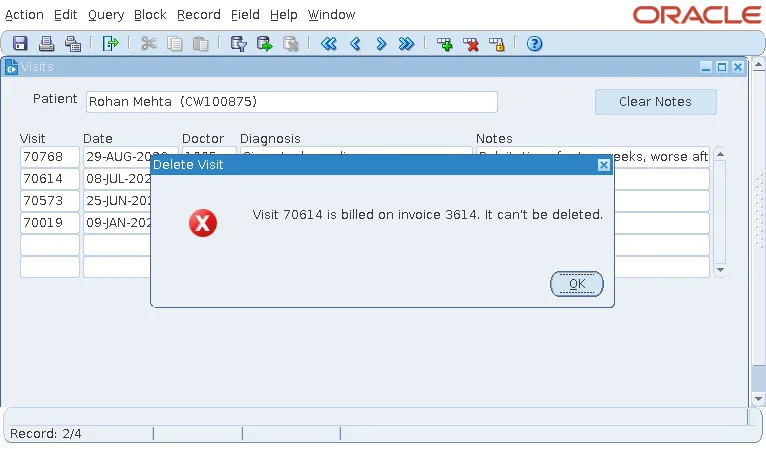
RAISE FORM_TRIGGER_FAILURE then ends the trigger. Because the trigger never called DELETE_RECORD, the record stays.
One Alert per Style
One alert with a message set at run time replaces many alerts with fixed messages. A form usually has one alert of each style, often kept in a PL/SQL library with a small function that sets the message, shows the alert, and returns the button.
Alert Built-ins
Syntax:
show_alert(alert_name varchar2 | alert_id alert) return number
set_alert_property(alert_name varchar2 | alert_id alert, property number, message varchar2)
set_alert_button_property(alert_name varchar2 | alert_id alert, button number,
property varchar2, value varchar2)- SET_ALERT_PROPERTY sets ALERT_MESSAGE_TEXT, TITLE, or ICON_NAME.
- SET_ALERT_BUTTON_PROPERTY sets the LABEL of button ALERT_BUTTON1, ALERT_BUTTON2, or ALERT_BUTTON3.
- FIND_ALERT returns an alert's ID.
For a message that needs no answer, MESSAGE writes to the message line at the bottom of the form instead, as described in the MESSAGE built-in in Oracle Forms. For more alert examples, see how to handle user responses with alerts.
Conclusion
An alert in Oracle Forms is a modal message box with a style (Stop, Caution, or Note), a message, and up to three buttons. SHOW_ALERT displays it and returns ALERT_BUTTON1, ALERT_BUTTON2, or ALERT_BUTTON3, so always call it in an assignment or an IF. Use SET_ALERT_PROPERTY and SET_ALERT_BUTTON_PROPERTY to build the message and labels from the data, and one alert per style can serve the whole application.
