
Every form starts with the default menu: Action, Edit, Query, Block, Record, Field, Help, and Window, with its toolbar. It suits a developer testing forms, but not a real application, because it offers every action to every user and nothing specific to the application.
This guide builds a custom menu module in Oracle Forms 14.1.2, with a Clinic menu that opens the application's forms. It covers menu items and their types, toolbar buttons, magic items, menu code and what it can refer to, popup menus, and changing menus at run time.
Sample Form for This Guide
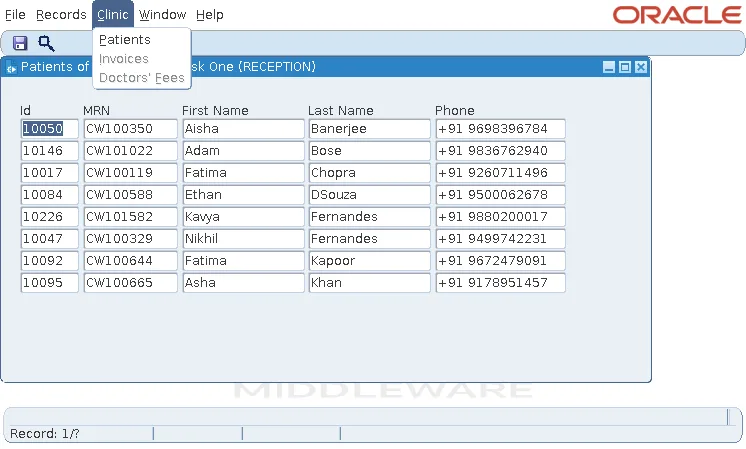
The examples and screenshots use the sample form CH25_PATIENTS and the menu module CW_MENU from the Oracle Forms code repository on GitHub. Download them, open them in Forms Builder, and connect as CAREWELL to follow along.
| Form | File | What it shows |
|---|---|---|
| CH25_PATIENTS | forms/ch25/ch25_patients.fmb | The patient list with a custom menu, a popup menu, and role checks |
| CW_MENU | forms/ch25/cw_menu.mmb | The menu module of the sample clinic application |
The forms run against the CareWell Clinic sample schema, which you install first.
The Menu of a Form
A form's Menu Module property names the menu it shows:
| Value | Menu |
|---|---|
| DEFAULT&SMARTBAR (default) | The default menu and its toolbar. |
| DEFAULT | The default menu without the toolbar. |
| The name of a menu module | A .mmx file, found in FORMS_PATH like forms and libraries. On Linux, write it as the file is named, in lowercase. |
| Nothing | No menu at all. |
A menu module is a module of its own: .mmb in Forms Builder, .mmt as text, and .mmx compiled, which frmcmp_batch builds with module_type=menu. The form reads it when it starts, so changing the menu does not require the forms to be compiled again. See how to create modules in Oracle Forms for the module files.
Build a Menu Module
File, New, Menu creates a menu module. It contains menus, each a list of menu items. One menu, named in the module's Main Menu property, is the menu bar, and the others are submenus that its items open.
Tools, Menu Editor shows the structure as the user will see it and edits it in place: Create Right adds an item to the bar, Create Down adds an item below the selected one, and double-clicking a label changes it.
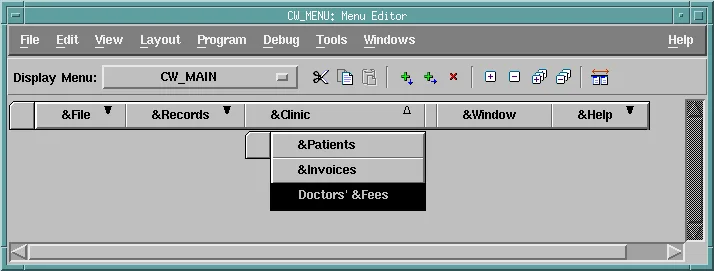
The sample CW_MENU has five entries in its bar: File (Save, Clear, Exit), Records (Enter Query, Execute Query, Insert, Delete), Clinic (Patients, Invoices, Doctors' Fees), Window, and Help (About CareWell).
Menu Item Properties
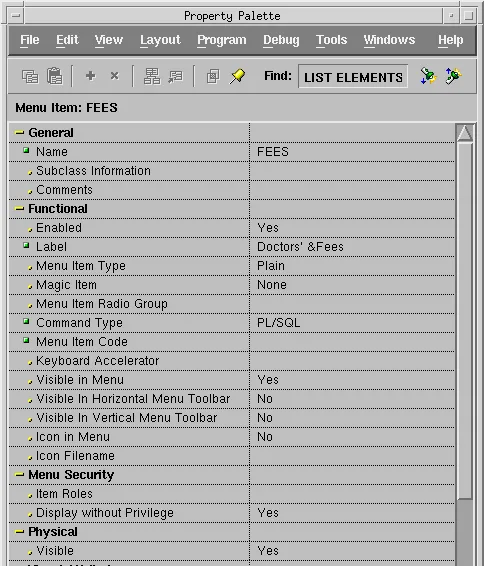
| Property | What it sets |
|---|---|
| Label | The text; & marks the letter that selects the item with the keyboard, as in Doctors' &Fees. |
| Menu Item Type | Plain; Check and Radio, which show a state (with Menu Item Radio Group for radio items); Separator, a line; or Magic. |
| Command Type | PL/SQL runs the Menu Item Code; Menu opens the submenu named in Submenu Name; Null does nothing, as for separators. |
| Visible in Horizontal Menu Toolbar | Adds the item to the menu's toolbar as a button, with the image in Icon Filename. CW_MENU shows Save and Execute Query there. |
| Keyboard Accelerator | A shortcut key. |
| Item Roles, Display without Privilege | Menu security. |
Setting the label can also rename the item after the label's words; in a test, &Enter Query became ENTER_QUERY. The name is what code uses, so check it in the navigator. Toolbar icons are deployed like button icons, as described in how to create push buttons in Oracle Forms.
Magic Items
A magic item is one that Forms fills: Cut, Copy, Paste, Clear, Undo, Help, About, Quit, Page Setup, or Window. CW_MENU's Window item is magic, so at run time it lists the open forms' windows, with Cascade and Tile.
A magic item's Command Type must be Null. For Window, a PL/SQL command type failed to compile with FRM-31646: Magic menu item WINDOW has invalid command type.
The Menu Module's Own Properties
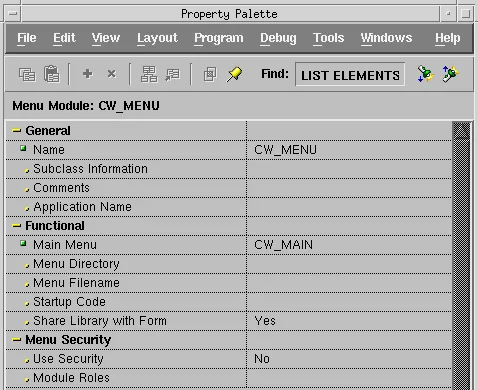
The module has the Main Menu, a Startup Code property whose PL/SQL runs when the menu is loaded, and Share Library with Form, Yes by default, so the menu's attached libraries share their package data with the form. Its Menu Security properties are covered in how to secure menus with roles.
Write Menu Code
Menu item code is PL/SQL like a trigger's, and runs when the user chooses the item, in the context of the current form. DO_KEY('commit_form') does what the Save key does in that form, including its KEY-COMMIT trigger.
The Clinic items open a form, or go to it if it is already open.
Menu item code for FEES in the CLINIC menu:
if id_null(find_form('CH21_FEES')) then
  open_form('ch21_fees');                    -- not open yet
else
  go_form('CH21_FEES');                      -- already open: go to it
end if;
FIND_FORM and GO_FORM are covered in how to open another form.
What Menu Code Can Refer To
A menu module is compiled without any form, so its code cannot name the items of a form. :patients.mrn in a menu item does not compile.
Output:
PL/SQL ERROR 49 at line 1, column 9
bad bind variable 'patients.mrn'
Global and system variables are not items of a form, so menu code may use them directly; items are read and written with NAME_IN and COPY. About CareWell uses all three: a global set at sign-in, the current item from :SYSTEM.CURSOR_ITEM, and that item's value.
Menu item code for ABOUT in the HELP menu:
message('Signed in as ' || :global.cw_user || '. ' || :system.cursor_item
        || ' = ' || name_in(:system.cursor_item));
With the cursor on Kavya Fernandes's last name, it shows this on the message line.
Output:
Signed in as RECEPTION1. PATIENTS.LAST_NAME = Fernandes
Create a Popup Menu
A popup menu appears when the user right-clicks an item or a canvas. Unlike a menu module, it belongs to the form: it is created under Popup Menus in the form's navigator, with the same kinds of items, and an item or canvas shows it when its Popup Menu property names it. Because it is part of the form, its code can refer to the form's items.
The sample patients form has a popup menu POP_PATIENT on the items of the patient block. Its Appointments item calls the appointments form for the patient right-clicked.
Menu item code for APPOINTMENTS in the popup menu POP_PATIENT:
declare
  v_list paramlist := get_parameter_list('CW_PATIENT');
begin
  if not id_null(v_list) then
    destroy_parameter_list(v_list);
  end if;
  v_list := create_parameter_list('CW_PATIENT');
  add_parameter(v_list, 'P_PATIENT_ID', text_parameter, :patients.patient_id);
  call_form('ch24_appointments', no_hide, no_replace, no_query_only, v_list);
end;
Adapt It in PRE-POPUP-MENU
Before the menu appears, Forms fires PRE-POPUP-MENU, the place to adapt it to the record or the user. Only doctors and administrators may see a patient's visits.
Example (PRE-POPUP-MENU trigger on the PATIENTS block):
set_menu_item_property('POP_PATIENT.VISITS', enabled,
  case when cw_sec.has_role('ADMIN,DOCTOR') then property_true else property_false end);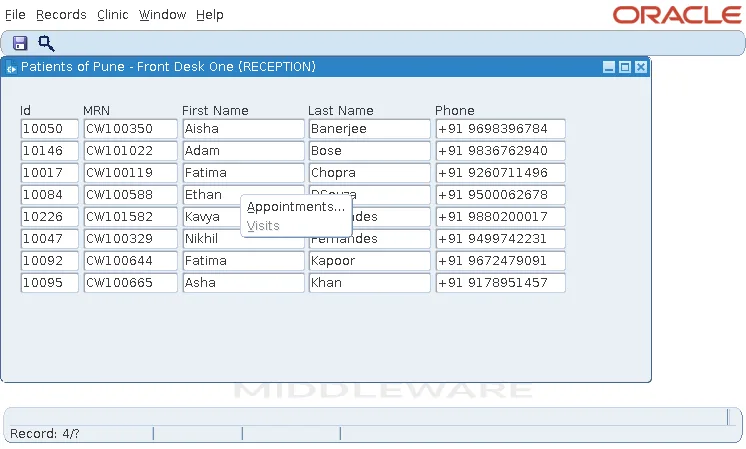
For Dr. Sara Nair, Visits is enabled. The CW_SEC package that answers the role question is explained in the menu security guide.
Change Menus at Run Time
Menu items are objects with properties, which forms read and change like other objects.
Syntax:
find_menu_item(menuitem_name varchar2) return menuitem
get_menu_item_property(menuitem_id menuitem | menuitem_name varchar2, property number) return varchar2
set_menu_item_property(menuitem_id menuitem | menuitem_name varchar2, property number, value number | varchar2)
replace_menu(menu_module_name varchar2 [, menu_type number [, starting_menu varchar2 [, group_name varchar2]]])
- A menu item's name is the name of its menu and the item's own, such as 'CLINIC.FEES': the menu, not the item of the bar that opens it.
- The properties are ENABLED, VISIBLE, CHECKED (for check and radio items), LABEL, and ICON_NAME.
- REPLACE_MENU replaces the current form's menu with another menu module.
- CALL_FORM with DO_REPLACE does the same for the form it calls, which otherwise keeps the calling form's menu; the appointments form called from the popup menu showed CW_MENU, not the default menu.
Conclusion
A form's Menu Module property names its menu: DEFAULT&SMARTBAR, DEFAULT, a menu module file, or none. A menu module holds menus of plain, check, radio, separator, or magic items, whose PL/SQL runs in the current form and can use globals and system variables but not a form's items, so use NAME_IN and COPY. Popup menus belong to the form, can use its items, and are adjusted in PRE-POPUP-MENU, while FIND_MENU_ITEM, SET_MENU_ITEM_PROPERTY, and REPLACE_MENU change menus at run time.
