
Large Forms applications stay consistent because their items are not styled one at a time. A key looks and behaves the same in every form, and so do amounts, dates, and read-only fields, because they all inherit their properties from a small set of property classes.
This guide explains property classes in Oracle Forms 14.1.2: how they differ from visual attributes, how to create one and base items on it, how inheritance and overriding work, and the two rules to remember.
Sample Form for This Guide
The examples and screenshots use the sample form CH14_SCHEDULE from the Oracle Forms code repository on GitHub. Download it, open it in Forms Builder, and connect as CAREWELL to follow along.
| Form | File | What it shows |
|---|---|---|
| CH14_SCHEDULE | forms/ch14/ch14_schedule.fmb | The property class PC_READONLY and the item APPT_START based on it |
The forms run against the CareWell Clinic sample schema, which you install first.
Property Class vs. Visual Attribute
| Visual attribute | Property class | |
|---|---|---|
| Holds | Colors and fonts only | Any properties, and triggers |
| Applied with | Visual Attribute Group | Subclass Information |
| Changeable at run time | Yes, per item or record | No, resolved when the form is compiled |
Visual attributes, and how to apply them at run time, are covered in how to highlight records using visual attributes.
Create a Property Class
A property class is an object of the form, under Property Classes in the Object Navigator. It starts with no properties of its own. You add them with the Add Property button of its Property Palette, and then set their values.
The sample schedule form has a property class PC_READONLY for items that show a value the user must not change. It sets four properties:
- Insert Allowed: No
- Update Allowed: No
- Keyboard Navigable: No
- A light gray background
Base an Item on the Property Class
Any object whose Subclass Information names the property class inherits the properties the class has, but only those that apply to the object's type. In the sample, the item APPT_START is based on PC_READONLY.
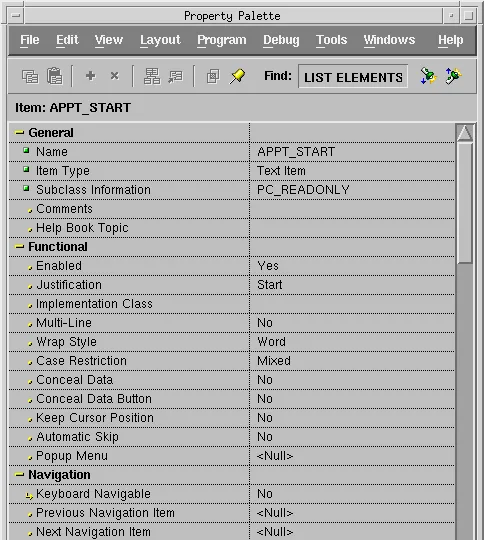
Inherited and Overridden Properties
The Property Palette shows where each value comes from:
| Marker | Meaning |
|---|---|
| An arrow | The property is inherited from the class and follows any change to it. |
| A red cross over the arrow | You changed the property in the item. It overrides the class and no longer follows it. |
The Inherit button of the palette's toolbar returns an overridden property to the class's value.
Build a Consistent Application with Property Classes
Property classes can be based on other property classes, and they can live in object libraries, where every form of an application can share them. That is how large Forms applications keep a consistent look: a small set of classes for keys, amounts, dates, read-only items, and toolbar buttons, defined once and inherited everywhere.
Object libraries are one of the four kinds of modules described in how to create modules in Oracle Forms.
Two Rules About Inheritance
- Inheritance is resolved in Forms Builder. A change to a class reaches the running application only when the forms that use it are compiled again, so recompile every form that uses a class after changing it, as shown in how to compile Oracle Forms modules.
- A property class can also hold triggers, under its Triggers node. An object based on the class inherits them, unless it has its own trigger of the same name.
Conclusion
Property classes in Oracle Forms give many objects the same properties, and even the same triggers. Create one under Property Classes, add the properties it should set with Add Property, and name it in each object's Subclass Information; objects inherit every property that applies to them and do not override. Keep classes in an object library to share them across an application, and recompile the forms that use a class whenever you change it.
