
Most tables take their primary keys from a sequence, and so do most Oracle Forms applications. The question is when the form should fetch the next value: when the user creates a record, when the database inserts the row, or just before Forms inserts it.
This guide compares the three ways to fill a key from a sequence in Oracle Forms 14.1.2 and shows the one that wastes no numbers: a PRE-INSERT trigger that sets the patient key and derives a medical record number from it.
Sample Form for This Guide
The examples and screenshots use the sample form CH07_PATIENTS from the Oracle Forms code repository on GitHub. Download it, open it in Forms Builder, and connect as CAREWELL to follow along.
| Form | File | What it shows |
|---|---|---|
| CH07_PATIENTS | forms/ch07/ch07_patients.fmb | The PRE-INSERT trigger that fills the patient key |
The forms run against the CareWell Clinic sample schema, which you install first.
Three Ways to Fill a Key from a Sequence
| Method | How it works | Drawback |
|---|---|---|
| Item Initial Value | Set the item's Initial Value property to :SEQUENCE.PATIENTS_SEQ.NEXTVAL. The key is filled as soon as the user creates a record. | Uses up a number for every record created, even those the user never saves. |
| Database trigger | A trigger sets the key when a row is inserted without one. Set the block's DML Returning Value to Yes so the form learns the value. | Needs the trigger in the database. A column default does not work, because Forms inserts a null into every column that has an item. |
| PRE-INSERT trigger | Forms fires it for each new record just before inserting it. | None for most forms: only saved records use numbers. |
The PRE-INSERT trigger is usually the best choice, and it is the one the sample form CH07_PATIENTS uses.
Example: A PRE-INSERT Trigger for the Patient Key
The PRE-INSERT trigger of the PATIENTS block takes the next value of the sequence PATIENTS_SEQ and derives the patient's medical record number from it.
Example (PRE-INSERT trigger on the PATIENTS block):
:patients.patient_id := patients_seq.nextval;
:patients.mrn        := 'CW' || to_char(100000 + (:patients.patient_id - 10000) * 7);
Because PRE-INSERT runs inside the save, Forms has already validated the record by the time the trigger fires. If the insert fails later, the transaction rolls back, but the sequence number is still used, as it always is with sequences.
Keep the Key Items Read-Only
The items PATIENT_ID and MRN cannot be typed into. Their Insert Allowed, Update Allowed, and Keyboard Navigable properties are set to No, so the user enters only the patient's details, and the cursor skips the key items.
The Result
After the user fills in a new patient and clicks Save, Forms fires the trigger, inserts the row, and shows the key and MRN the trigger set.
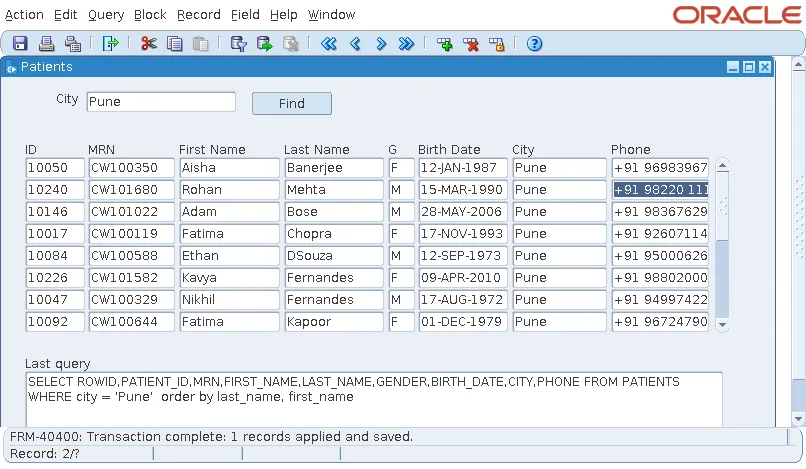
A query in SQL*Plus confirms the row.
Check the new row:
select patient_id, mrn, first_name, last_name, city, registered_on
from   patients
where  patient_id = 10240;
Output:
PATIENT_ID MRN        FIRST_NAME LAST_NAME  CITY   REGISTERE
---------- ---------- ---------- ---------- ------ ---------
     10240 CW101680   Rohan      Mehta      Pune   27-SEP-26
The key 10240 is the first value after the sample data, and the MRN follows the formula in the trigger: 100000 + (10240 - 10000) * 7 = 101680. REGISTERED_ON is not an item of the block, so the database gave it its default, the current date.
When to Use the Other Methods
- Use the Initial Value property when the user must see the key while typing the record, and gaps in the numbers do not matter.
- Use a database trigger with DML Returning Value when other programs also insert into the table, so every insert gets its key the same way.
- Remember that an identity column is filled by the database itself, so the form must not try to insert a value into it.
For the blocks these triggers belong to, see how to create data blocks in Oracle Forms. The sequences and their key ranges are described in the CareWell Clinic sample schema.
Conclusion
To populate a primary key from a sequence in Oracle Forms, you can use the item's Initial Value, a database trigger with DML Returning Value set to Yes, or a PRE-INSERT trigger. The PRE-INSERT trigger is the most economical, because Forms fires it only for records it is about to insert, so abandoned records use no numbers. Make the key items non-enterable, and the user types only the real data while the trigger fills the key and any values derived from it.
