
Different users should see different things: a receptionist changes patient details, a billing clerk works with invoices, only an administrator changes doctors' fees. In Oracle Forms, you can control this with the application's own table of users and roles, or with the database-role security built into menu modules.
This guide covers both approaches in Oracle Forms 14.1.2: a library package that loads the user and disables what their role may not use, the checks each form must still make, and database-role menu security with its setup and the surprises found in testing.
Sample Form for This Guide
The examples and screenshots use the sample form CH25_PATIENTS and the menu module CW_MENU from the Oracle Forms code repository on GitHub. Download them, open them in Forms Builder, and connect as CAREWELL to follow along.
| Form | File | What it shows |
|---|---|---|
| CH25_PATIENTS | forms/ch25/ch25_patients.fmb | The patient list with a custom menu, a popup menu, and role checks |
| CW_MENU | forms/ch25/cw_menu.mmb | The menu module of the sample clinic application |
The forms run against the CareWell Clinic sample schema, which you install first.
Two Approaches at a Glance
| Application roles | Database-role menu security | |
|---|---|---|
| Users connect as | One shared database user | Their own database users |
| Roles come from | An application table, here APP_USERS | Database roles granted to each user |
| Enforced by | Your code in a library and in each form | The menu module's Use Security, Module Roles, and Item Roles |
Application Roles: Who May Do What
Every user of the sample clinic connects to the database as the same user, CAREWELL, so the database cannot tell the receptionist from the doctor. The application knows them from its own table, APP_USERS, whose APP_ROLE is one of ADMIN, DOCTOR, RECEPTION, BILLING, and PHARMACY. The table is part of the CareWell Clinic sample schema.
The package CW_SEC, in the library CW_LIB, loads the user and answers questions about the role.
Library CW_LIB, package CW_SEC (specification):
package cw_sec is
  -- the user of the application, from APP_USERS (every user connects as CAREWELL)
  username  varchar2(30);
  full_name varchar2(60);
  app_role  varchar2(20);
  procedure login(p_username varchar2);
  function has_role(p_roles varchar2) return boolean;  -- has_role('ADMIN,BILLING')
  procedure apply_menu;                    -- disables what the role may not use
end cw_sec;
Library CW_LIB, package CW_SEC (body):
package body cw_sec is
  procedure login(p_username varchar2) is
  begin
    select username, full_name, app_role into username, full_name, app_role
      from app_users
     where username = upper(p_username) and active = 'Y';
    copy(username, 'GLOBAL.CW_USER');                   -- for menu code and other forms
  exception
    when no_data_found then
      cw_msg.fail('Unknown or inactive user: ' || p_username);
  end login;

  function has_role(p_roles varchar2) return boolean is
  begin
    return instr(',' || upper(p_roles) || ',', ',' || app_role || ',') > 0;
  end has_role;

  procedure apply_menu is
    procedure allow(p_item varchar2, p_roles varchar2) is
      v_item menuitem := find_menu_item(p_item);
    begin
      if not id_null(v_item) and not has_role(p_roles) then
        set_menu_item_property(v_item, enabled, property_false);   -- only ever disable
      end if;
    end allow;
  begin
    allow('CLINIC.INVOICES', 'ADMIN,BILLING');
    allow('CLINIC.FEES', 'ADMIN');
    allow('RECORDS.DELETE', 'ADMIN,RECEPTION');
  end apply_menu;
end cw_sec;
LOGIN copies the user name into a global variable, so menu code and other forms can read it. APPLY_MENU only ever disables items, for a reason explained below. Libraries are covered in how to create a PL/SQL library.
Apply the Roles When the Form Starts
How the form learns who the user is depends on the installation: a login form of the application, or the identity from single sign-on. The sample patients form takes it from a parameter, P_USER, passed in the URL as otherparams=P_USER=BILLING1, as shown in how to pass parameters to a form.
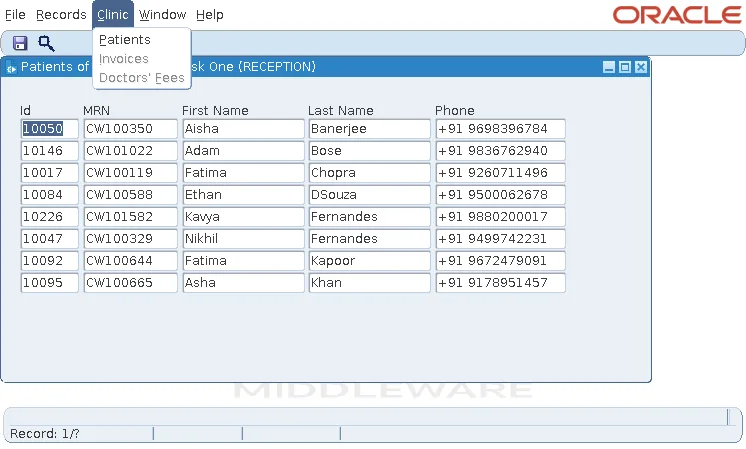
Its WHEN-NEW-FORM-INSTANCE trigger loads the user, adjusts the menu, shows the user in the window's title, and makes the block read-only for roles that must not change patients.
Example (WHEN-NEW-FORM-INSTANCE trigger, patients form):
begin
  cw_sec.login(:parameter.p_user);
  cw_sec.apply_menu;
  set_window_property('MAIN_WIN', title,
    'Patients of Pune - ' || cw_sec.full_name || ' (' || cw_sec.app_role || ')');
  if not cw_sec.has_role('ADMIN,RECEPTION') then
    set_block_read_only('PATIENTS', true);             -- doctors and others only look
  end if;
  go_block('PATIENTS');
  execute_query;
end;
The Results for Three Users
| User | What they get |
|---|---|
| RECEPTION1 | Can change patients; Invoices and Doctors' Fees are disabled. |
| BILLING1 | Invoices enabled, Doctors' Fees disabled, and cannot change patients: typing in the block gives FRM-40200: Field is protected against update. |
| DR_NAIR | Cannot change patients either, but can open a patient's visits from the popup menu. |
A Disabled Menu Item Is Not Protection
Disabling a menu item is a convenience, not a protection. The forms themselves must check the role: the fees form, opened some other way, must still refuse to run for anyone but an administrator. Put the check at the top of each form's WHEN-NEW-FORM-INSTANCE, and keep the rules that protect data in the database, where no form can skip them.
Menu Security with Database Roles
Menu modules have a security feature of their own, based on database roles. It suits applications whose users connect as their own database users, each granted the roles of their job.
Set Up the Roles View
Menu security needs a view that Forms reads, FRM50_ENABLED_ROLES, created by the script frmsec.sql in the tools/dbtab/forms directory of the Forms installation, run as SYSTEM. The script does not grant access to the view, so the test setup granted it to PUBLIC and created two roles.
Run in SQL*Plus as SYSTEM, after frmsec.sql:
-- first run frmsec.sql, from ORACLE_HOME/tools/dbtab/forms of the Forms installation
grant select on frm50_enabled_roles to public;
create role cw_user_role;                        -- every user of the menu
create role cw_fees_role;                        -- those who may change doctors' fees
grant cw_user_role to carewell;
Output:
Grant succeeded.
Role created.
Role created.
Grant succeeded.
Configure the Menu Module
A variant of CW_MENU then uses these settings:
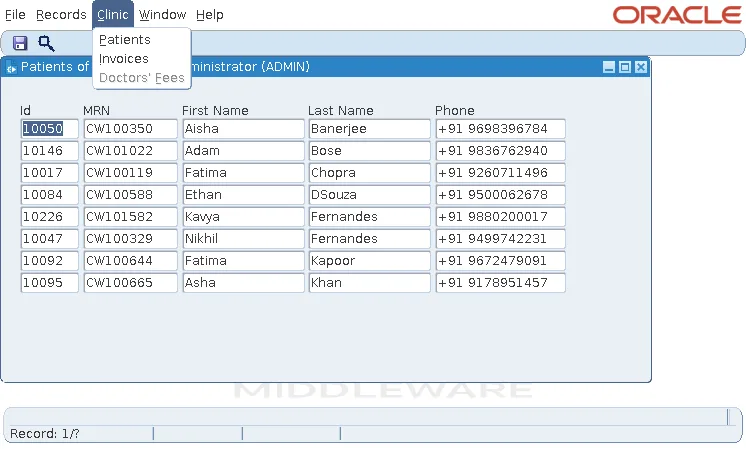
- The module's Use Security is Yes, and Module Roles lists both roles.
- Every item has the role CW_USER_ROLE in Item Roles.
- The item Doctors' Fees has only CW_FEES_ROLE.
With Display without Privilege at Yes, the default, an item the user's roles do not allow is shown disabled; with No, it is not shown at all. Granting CW_FEES_ROLE to CAREWELL enabled it.
What Testing Showed
| Situation | Result |
|---|---|
| The user has none of the Module Roles | The menu does not start: FRM-10249: No authorization to run application cw_menu. |
| An item has no Item Roles while Use Security is Yes | The item is available to no one. With roles only on the module and on Doctors' Fees, the form started with FRM-10247: No active items in root menu of application. |
| Code enables an item | SET_MENU_ITEM_PROPERTY(..., ENABLED, PROPERTY_TRUE) enabled Doctors' Fees for a user without the role, and the item ran. That is why CW_SEC.APPLY_MENU only ever disables items. |
| The form's Menu Role property is set | The menu runs as if the user had only that role, which the user must have, or FRM-10214: No authorization to run any application appears. Use it to test what a role sees, and leave it empty in production. |
The two approaches combine: database roles for what the database itself protects, and the application's own roles for what its users may see and do. Building the menu itself is covered in how to create a menu in Oracle Forms.
Conclusion
To control what each Oracle Forms user may do, load their role from an application table in a library package, disable the menu items the role may not use, and make each form check the role itself, because a disabled menu item is only a convenience. When users connect as their own database users, database-role menu security adds Module Roles and Item Roles, but it needs FRM50_ENABLED_ROLES, a role on every item, and code that never re-enables items.
