
Windows in Oracle Forms behave a little differently from what you might expect. Navigating to an item opens its window by itself, and clicking a window's close box does not close it unless your code does.
This guide covers windows in Oracle Forms 14.1.2: document and dialog windows, modal dialogs, opening a window by navigation, closing it correctly, the window triggers, and the built-ins that show, hide, and change windows at run time.
Sample Form for This Guide
The examples and screenshots use the sample form CH13_PATIENT_FILE from the Oracle Forms code repository on GitHub. Download it, open it in Forms Builder, and connect as CAREWELL to follow along.
| Form | File | What it shows |
|---|---|---|
| CH13_PATIENT_FILE | forms/ch13/ch13_patient_file.fmb | A main window and the modal dialog ALLERGY_WIN |
The forms run against the CareWell Clinic sample schema, which you install first.
Window Properties at a Glance
| Property | What it does |
|---|---|
| Window Style | Document, a working window the user can minimize and maximize within the Forms client's frame, or Dialog, a window for a short task that appears on top. |
| Modal | Makes a dialog block the rest of the form until it is closed. Forms ignores some properties of modal windows, such as their scroll bars. |
| Title, Icon Filename, Width, Height, X Position, Y Position | The window's look and place. |
| Center on Startup | Places the window in the middle of the frame. |
| Close, Move, Resize, Minimize, Maximize Allowed | Enable the controls of the title bar. |
| Hide on Exit | For a modeless window, hides it when the cursor goes to an item of another window. |
| Show Horizontal Scroll Bar, Show Vertical Scroll Bar | Add scroll bars when the canvas is larger than the window. |
| Inherit Menu | Shows the form's menu in the window, which matters for windows outside the frame. |
A window shows canvases, and the canvases hold the items. The canvas side is covered in how to use canvases in Oracle Forms.
Open a Window by Navigation
Forms opens a window by itself when the cursor moves to an item on one of its canvases. You rarely need SHOW_WINDOW for that.
In the sample patient file form, a patient's allergies are an item of the block PATIENTS, but the item sits on the canvas ALLERGY_CNV of ALLERGY_WIN, a modal dialog. The Allergies... button opens the dialog with one statement.
The Allergies... button's WHEN-BUTTON-PRESSED trigger:
go_item('PATIENTS.ALLERGIES');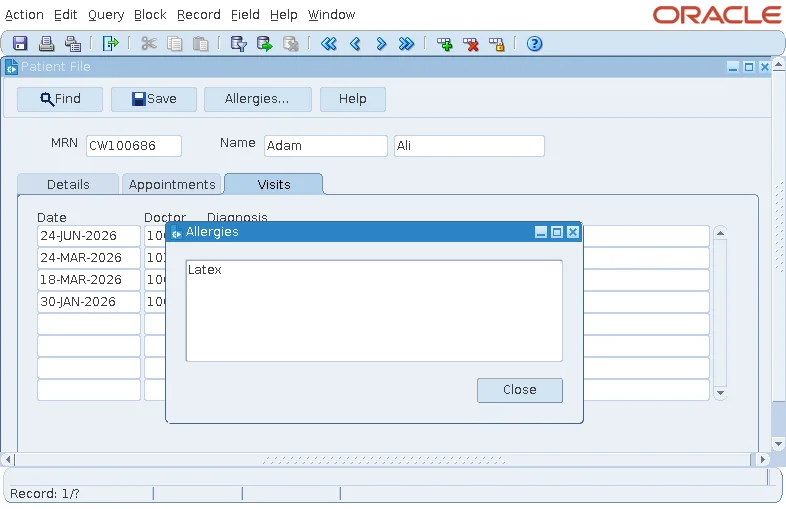
Close a Dialog in the Right Order
The dialog's Close button does the reverse: it moves the cursor out of the dialog, then hides it.
The Close button's WHEN-BUTTON-PRESSED trigger:
go_item('PATIENTS.MRN');
hide_window('ALLERGY_WIN');
The order matters. A window that still holds the cursor is shown again, because the cursor is in it, so always move the cursor out before hiding the window.
Handle the Close Box with WHEN-WINDOW-CLOSED
Clicking the close box in a window's title bar does not close the window. It fires the form's WHEN-WINDOW-CLOSED trigger, and the window closes only if the trigger closes it. Without the trigger, the close box does nothing.
The sample form closes the dialog, or leaves the form when the main window is closed.
Example (WHEN-WINDOW-CLOSED trigger on the form):
if :system.event_window = 'ALLERGY_WIN' then
  go_item('PATIENTS.MRN');                -- leave the dialog's item first
  hide_window('ALLERGY_WIN');
else
  exit_form;
end if;
:SYSTEM.EVENT_WINDOW names the window whose close box was clicked. For more on leaving forms, see EXIT_FORM, CLOSE_FORM, and NEW_FORM in Oracle Forms.
The Other Window Triggers
| Trigger | Fires when |
|---|---|
| WHEN-WINDOW-CLOSED | The user clicks a window's close box. |
| WHEN-WINDOW-ACTIVATED | A window gains the focus. |
| WHEN-WINDOW-DEACTIVATED | A window loses the focus. |
| WHEN-WINDOW-RESIZED | The user or code resizes a window, for example to rearrange items for the new size. |
Built-ins for Windows
Syntax:
show_window(window_name varchar2 | window_id window [, x number, y number])
hide_window(window_name varchar2 | window_id window)
set_window_property(window_name varchar2 | window_id window, property number,
                    value {number | varchar2} [, y number])
get_window_property(window_name varchar2 | window_id window, property number) return varchar2
SET_WINDOW_PROPERTY sets TITLE, VISIBLE, WINDOW_STATE (NORMAL, MAXIMIZE, or MINIMIZE), POSITION, WIDTH, HEIGHT, and others. MOVE_WINDOW and RESIZE_WINDOW are shortcuts for position and size, and FIND_WINDOW returns a window's ID.
Maximize the Application Window
The constant FORMS_MDI_WINDOW names the Forms client's frame, so this call maximizes the whole application, a common line in a form's startup trigger.
Example:
set_window_property(forms_mdi_window, window_state, maximize)
A window's title can also be set at design time, as shown at the end of how to create your first form using the Data Block Wizard.
Conclusion
Oracle Forms windows are document or dialog windows, modal or not, and they open by themselves when the cursor moves to one of their items. Close a dialog by moving the cursor out before calling HIDE_WINDOW, and write a WHEN-WINDOW-CLOSED trigger, using :SYSTEM.EVENT_WINDOW, because the close box does nothing on its own. Use SHOW_WINDOW, HIDE_WINDOW, and SET_WINDOW_PROPERTY to change windows at run time, and FORMS_MDI_WINDOW to control the application frame itself.
