
A form sometimes needs to know about its own environment: which user is connected, to which database, which form is running, on which client and Java version, with which language settings. GET_APPLICATION_PROPERTY answers all of those questions.
This guide covers GET_APPLICATION_PROPERTY in Oracle Forms 14.1.2 with a form that lists its own session's properties when it starts, a table of every property it can return, and the properties SET_APPLICATION_PROPERTY can change.
Sample Form for This Guide
The examples and screenshots use the sample form CH22_RUNTIME from the Oracle Forms code repository on GitHub. Download it, open it in Forms Builder, and connect as CAREWELL to follow along.
| Form | File | What it shows |
|---|---|---|
| CH22_RUNTIME | forms/ch22/ch22_runtime.fmb | A patient block with a Read only switch, and the properties of its own session |
The forms run against the CareWell Clinic sample schema, which you install first.
GET_APPLICATION_PROPERTY Syntax
Syntax:
get_application_property(property number) return varchar2
It returns facts about the running application and its session, always as text.
Example: List the Properties of the Session
The sample runtime form lists fourteen properties when it starts, one per record of a block called APP, then queries its patient block.
Example (WHEN-NEW-FORM-INSTANCE trigger on the form):
declare
  procedure show(p_name varchar2, p_value varchar2) is
  begin
    if :app.property is not null then
      create_record;
    end if;
    :app.property := p_name;
    :app.value    := p_value;
  end;
begin
  go_block('CTL');                   -- create the record of the check box
  go_block('APP');
  show('CURRENT_FORM',         get_application_property(current_form));
  show('CURRENT_FORM_NAME',    get_application_property(current_form_name));
  show('CONFIG',               get_application_property(config));
  show('CLIENT_DEPLOYMENT',    get_application_property(client_deployment));
  show('CLIENT_JAVA_VERSION',  get_application_property(client_java_version));
  show('VERSION',              get_application_property(version));
  show('OPERATING_SYSTEM',     get_application_property(operating_system));
  show('USER_INTERFACE',       get_application_property(user_interface));
  show('USERNAME',             get_application_property(username));
  show('CONNECT_STRING',       get_application_property(connect_string));
  show('DATASOURCE',           get_application_property(datasource));
  show('USER_NLS_LANG',        get_application_property(user_nls_lang));
  show('USER_NLS_DATE_FORMAT', get_application_property(user_nls_date_format));
  show('DISPLAY_WIDTH',        get_application_property(display_width));
  first_record;
  go_block('PATIENTS');
  execute_query;
end;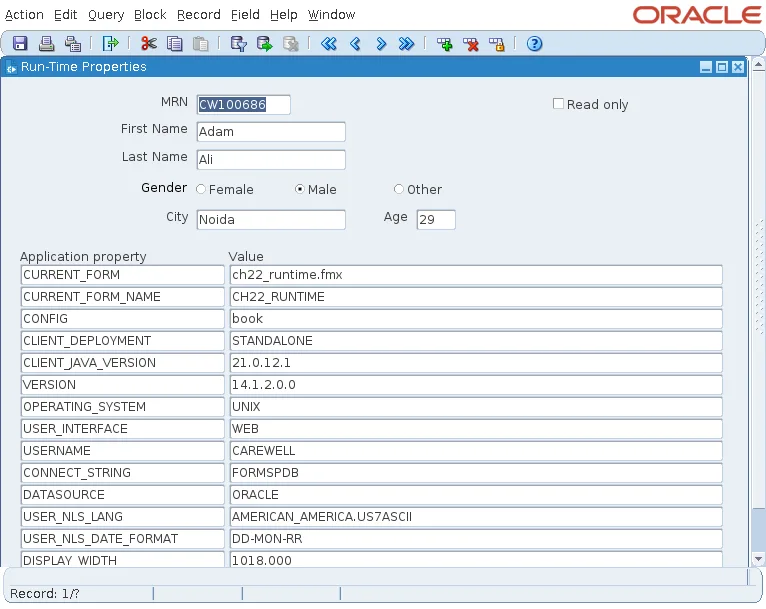
In the test environment, the form ran in the Forms Standalone Launcher on Java 21, with Forms 14.1.2.0.0 on a Linux server, connected as CAREWELL to FORMSPDB. Your values will reflect your own setup.
Every Property GET_APPLICATION_PROPERTY Returns
| Property | Returns |
|---|---|
| APPLICATION_INSTANCE | A Windows instance handle; null elsewhere. |
| BUILTIN_DATE_FORMAT, PLSQL_DATE_FORMAT | The date formats used by built-ins and by PL/SQL in the form. |
| CALLING_FORM | The name of the form that called this one with CALL_FORM, or null. |
| CLIENT_DEPLOYMENT | STANDALONE, WEBSTART, or EMBEDDED (in a browser). |
| CLIENT_JAVA_VERSION | The Java version of the Forms client. |
| CONFIG | The formsweb.cfg section that started the application. |
| CONNECT_STRING | The database part of the connection. |
| CURRENT_FORM, CURRENT_FORM_NAME | The .fmx file and the module name of the current form. |
| CURSOR_STYLE | The current mouse cursor style. |
| DATASOURCE | ORACLE, or the kind of non-Oracle source. |
| DATETIME_LOCAL_TZ, DATETIME_SERVER_TZ | The time zones used for DATETIME items. |
| DISPLAY_WIDTH, DISPLAY_HEIGHT | The size of the display, in the form's units. |
| ERROR_DATE/DATETIME_FORMAT, OUTPUT_DATE/DATETIME_FORMAT, USER_DATE/DATETIME_FORMAT | The date formats used in error messages, for output, and for input. |
| FLAG_USER_VALUE_TOO_LONG | Whether values longer than Maximum Length are refused or truncated. |
| HTTP_DIAGNOSTIC_LEVEL | How much of REST calls is logged. New in 14.1.2. |
| IS_PROXY_CONNECTION | Whether the session is a proxy connection. |
| MASTER_SYSTEM_EVENT_FORM | The form that receives system events. |
| OPERATING_SYSTEM, USER_INTERFACE | The server's operating system, and WEB for web-deployed forms. |
| PASSWORD, USERNAME | The credentials of the session. |
| SAVEPOINT_NAME | The last savepoint, in ON-SAVEPOINT and ON-ROLLBACK. |
| SSO_USERID, SSO_USRDN, SSO_SUBDN | The single sign-on identity. |
| TIMER_NAME | The timer that expired, in WHEN-TIMER-EXPIRED. |
| USER_IP_ADDRESS | The IP address of the user's computer. |
| USER_NLS_LANG, USER_NLS_LANGUAGE, USER_NLS_TERRITORY, USER_NLS_CHARACTER_SET, USER_NLS_DATE_FORMAT | The session's language settings. |
| VERSION | The version of the Forms runtime. |
Handle PASSWORD with Care
PASSWORD returns the password of the session's database user in clear text. Never display it, log it, or pass it where it could be seen. The only legitimate use is to hand the connection to another tool, and even then single sign-on or a proxy connection is the better design.
SET_APPLICATION_PROPERTY
SET_APPLICATION_PROPERTY sets the properties that can change:
- CURSOR_STYLE, for example BUSY while a long task runs.
- BUILTIN_DATE_FORMAT and PLSQL_DATE_FORMAT.
- DATETIME_LOCAL_TZ, FLAG_USER_VALUE_TOO_LONG, HTTP_DIAGNOSTIC_LEVEL, MASTER_SYSTEM_EVENT_FORM, and MENU_BUFFERING.
- The idle settings CLIENT_IDLE_TIME, DB_IDLE_TIME, DB_IDLE_REPEAT, and MAX_EVENT_WAIT, which raise system events when the user or the database connection has been idle.
- DATABASE_NAME_ENABLED, set in PRE-LOGON, which makes Forms ignore the database name the user gives and use the server's default.
For more examples, see GET_APPLICATION_PROPERTY in Oracle Forms and SET_APPLICATION_PROPERTY in Oracle Forms. Item properties at run time are covered in SET_ITEM_PROPERTY in Oracle Forms.
Conclusion
GET_APPLICATION_PROPERTY reports the running form, the user and connection, the client deployment and Java version, the server's operating system, and the session's language and date settings, all as text. Use it to adapt a form to its environment, never expose PASSWORD, and use SET_APPLICATION_PROPERTY for the few settings that can change at run time, such as the cursor style, date formats, and idle events.
