
Many Forms applications connect every user to the database with one account that belongs to the application. The database then cannot tell the receptionist from the billing clerk, so the application must know who is using it. That starts with a sign-in form.
This guide builds a sign-in form in Oracle Forms 14.1.2: the user picks a name from a list of active users, the application loads the user's role into a shared library, and the sign-in form replaces itself with the home form. It ends with what a production sign-in needs on top.
Sample Form for This Guide
The examples and screenshots use the sample forms CW_LOGIN and CW_MAIN from the Oracle Forms code repository on GitHub, with the PL/SQL library cw_lib.pll attached. Download them, open them in Forms Builder, and connect as CAREWELL to follow along.
| Form | File | What it shows |
|---|---|---|
| CW_LOGIN | forms/ch40/cw_login.fmb | The sign-in form |
| CW_MAIN | forms/ch40/cw_main.fmb | The home form that replaces it |
The forms run against the CareWell Clinic sample schema, which you install first.
Build the Form
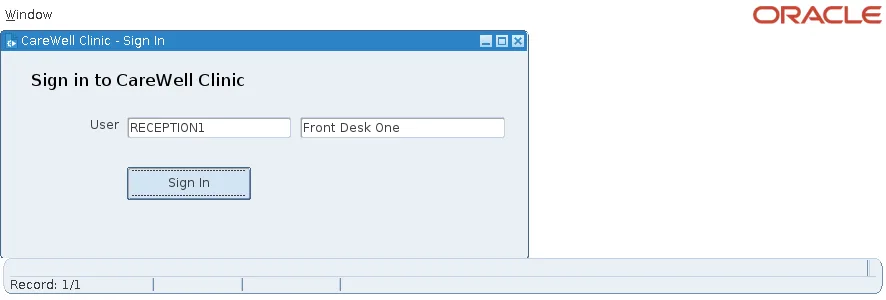
The sign-in form is deliberately small, and unlike the other forms of the application, it is not created from the template:
- No menu. There is nothing to open before the user signs in.
- A control block, CTL, with a User item (upper case, required) and a display item for the full name.
- An LOV on the User item, with Validate from List, so only listed users are accepted.
- A Sign In button.
- The library cw_lib attached.
The LOV's query lists the active rows of the application's user table.
The LOV's record group query:
select username, full_name, initcap(app_role) as role from app_users where active = 'Y' order by full_name
It returns USERNAME to CTL.USERNAME and FULL_NAME to CTL.FULL_NAME. Creating LOVs is covered in how to create an LOV in Oracle Forms using the LOV Wizard.
Sign the User In
The Sign In button runs two lines.
Example (WHEN-BUTTON-PRESSED trigger on CTL.SIGN_IN):
cw_sec.login(:ctl.username);                    -- fails with a message for an unknown user
new_form('cw_main', full_rollback, no_query_only, share_library_data);
CW_SEC.LOGIN, in the library, reads the user's user name, full name, and role from APP_USERS into package variables. For a user who does not exist or is inactive, it stops with a message instead. The package is described in how to secure menus with roles in Oracle Forms.
Replace the Sign-In Form with NEW_FORM
NEW_FORM closes the sign-in form and starts the home form in its place, so the user cannot go back to it. The arguments matter:
| Argument | Meaning |
|---|---|
| FULL_ROLLBACK | Roll back any changes of the closing form; the sign-in form has none. |
| NO_QUERY_ONLY | The home form runs normally, not in query-only mode. |
| SHARE_LIBRARY_DATA | The home form shares the library's package variables, so it finds the user and role that LOGIN just set. |
Without SHARE_LIBRARY_DATA, the home form would get its own, empty copy of the package and would not know who signed in. The ways to start a form are compared in how to open another form in Oracle Forms.
What the Next Form Sees
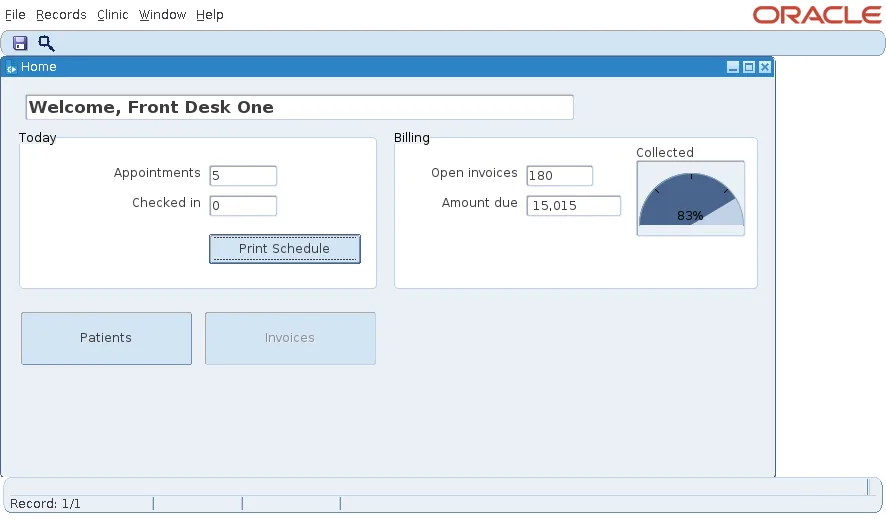
The home form's startup reads the shared package: it greets the user by name, puts the user and role in the window title, and disables what the role may not use. For a receptionist, the Invoices button and menu item are disabled.
What a Production Sign-In Needs
This form only asks who the user is. It checks no password, which is fine for a sample and not for production. Two better options:
- Check a password against a stored hash in APP_USERS, never against plain text.
- Better still, take the user from single sign-on. The identity then comes from the identity provider, and the form has nothing to check.
Single sign-on is discussed in how to secure Oracle Forms applications.
Conclusion
A sign-in form for an application whose users share one database account is a small form without a menu: an LOV of active users, and a button that loads the user and role into a library package, then replaces the form with NEW_FORM and SHARE_LIBRARY_DATA. Every later form reads the same package. For production, add a hashed password check or, better, single sign-on.
