
A record group is a table in the form's memory, with columns and rows, that lives only while the form runs. Lists of values, list items, and hierarchical trees all show record groups, and your own code can use them as arrays.
This guide explains the three kinds of record groups in Oracle Forms 14.1.2 and shows how to build one entirely in code, fill it row by row, and switch a list of values to it. It then covers the record group built-ins for reading and changing groups.
Sample Form for This Guide
The examples and screenshots use the sample form CH15_BOOKING from the Oracle Forms code repository on GitHub. Download it, open it in Forms Builder, and connect as CAREWELL to follow along.
| Form | File | What it shows |
|---|---|---|
| CH15_BOOKING | forms/ch15/ch15_booking.fmb | An appointment booking form with four lists of values |
The forms run against the CareWell Clinic sample schema, which you install first.
Three Kinds of Record Groups
| Kind | Filled by | Best for |
|---|---|---|
| Query record group | A SQL query that Forms runs when the group is populated, each time its LOV is displayed unless told otherwise. | Data from the database. Most record groups are query groups. |
| Static record group | Values typed at design time in its Column Specifications. | A short fixed list that does not come from the database. |
| Created at run time | Code, with CREATE_GROUP or CREATE_GROUP_FROM_QUERY. | Whatever the code puts in it. |
Besides LOVs, record groups fill list items and trees, pass data to Oracle Reports, and serve as arrays in form code. Filling a list item from a query group is shown in how to create list items in Oracle Forms.
Example: Build a Record Group in Code
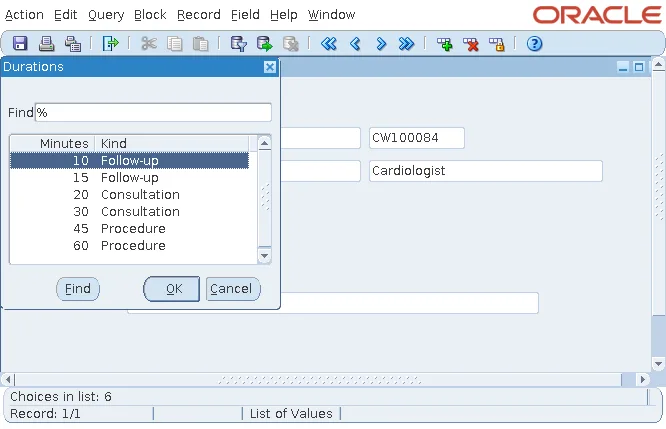
The durations of an appointment, 10, 15, 20, 30, 45, or 60 minutes, do not come from any table. The sample booking form builds a record group of durations when the form starts, and switches the list of values LOV_DURATIONS to it.
Example (WHEN-NEW-FORM-INSTANCE trigger on the form):
declare
  rg     recordgroup;
  c_min  groupcolumn;
  c_desc groupcolumn;
  type t_mins is table of number;
  mins   t_mins := t_mins(10, 15, 20, 30, 45, 60);
begin
  rg     := create_group('RG_DURATIONS_RT');
  c_min  := add_group_column(rg, 'MINUTES', number_column);
  c_desc := add_group_column(rg, 'DESCRIPTION', char_column, 30);
  for i in 1 .. mins.count loop
    add_group_row(rg, end_of_group);
    set_group_number_cell(c_min, i, mins(i));
    set_group_char_cell(c_desc, i,
      case when mins(i) <= 15 then 'Follow-up' when mins(i) <= 30 then 'Consultation'
           else 'Procedure' end);
  end loop;
  set_lov_property('LOV_DURATIONS', group_name, 'RG_DURATIONS_RT');
  go_item('APPOINTMENTS.PATIENT_NAME');
end;
Here is what each call does:
| Call | What it does |
|---|---|
| CREATE_GROUP | Creates an empty group named RG_DURATIONS_RT. |
| ADD_GROUP_COLUMN | Adds columns of type CHAR_COLUMN, NUMBER_COLUMN, DATE_COLUMN, or LONG_COLUMN. A character column takes a width. |
| ADD_GROUP_ROW | Adds a row, here at END_OF_GROUP. |
| SET_GROUP_NUMBER_CELL, SET_GROUP_CHAR_CELL | Set the cells of the new row. |
| SET_LOV_PROPERTY with GROUP_NAME | Gives the LOV the new group. The group's columns must have the names of the LOV's column mapping. |
The LOV then shows the six durations, each with a description computed in the loop.
Built-ins That Create and Fill Record Groups
Syntax:
create_group(recordgroup_name varchar2 [, scope number [, array_fetch_size number]])
             return recordgroup
create_group_from_query(recordgroup_name varchar2, query varchar2
                        [, scope number [, array_fetch_size number]]) return recordgroup
add_group_column(recordgroup_name varchar2 | recordgroup_id recordgroup,
                 groupcolumn_name varchar2, column_type number [, column_width number])
                 return groupcolumn
add_group_row(recordgroup_name varchar2 | recordgroup_id recordgroup, row_number number)
populate_group(recordgroup_name varchar2 | recordgroup_id recordgroup) return number
populate_group_with_query(recordgroup_name varchar2 | recordgroup_id recordgroup,
query varchar2) return number- The scope is FORM_SCOPE, the default, or GLOBAL_SCOPE, for a group that every form of a multi-form application can use.
- POPULATE_GROUP runs a query group's query again.
- POPULATE_GROUP_WITH_QUERY gives the group a new query and runs it.
- Both return 0 when they succeed, or an Oracle error number, so always check the result.
More examples of POPULATE_GROUP are in POPULATE_GROUP in Oracle Forms.
Built-ins That Read and Change Record Groups
| Built-ins | Purpose |
|---|---|
| GET_GROUP_ROW_COUNT, GET_GROUP_CHAR_CELL, GET_GROUP_NUMBER_CELL, GET_GROUP_DATE_CELL | Read the rows and cells. A column is named GROUP.COLUMN, or given by its ID from FIND_COLUMN. |
| SET_GROUP_CHAR_CELL, SET_GROUP_NUMBER_CELL, SET_GROUP_DATE_CELL | Set cells. |
| DELETE_GROUP_ROW, DELETE_GROUP | Remove rows, or the whole group. |
| SET_GROUP_SELECTION, GET_GROUP_SELECTION, GET_GROUP_SELECTION_COUNT, UNSET_GROUP_SELECTION, RESET_GROUP_SELECTION | Mark rows as selected, for code that works on a subset. |
| FIND_GROUP, ID_NULL | Return a group's ID, and tell whether it exists. |
Create a Group Only Once
CREATE_GROUP fails if a group of the same name already exists, so code that may run more than once should first look the group up with FIND_GROUP and test the result with ID_NULL. Create the group only when it does not exist yet, and otherwise reuse it or delete its rows.
The LOV side of the booking form, including the LOV Wizard and Validate from List, is covered in how to create an LOV using the LOV Wizard.
Conclusion
A record group in Oracle Forms is a table in the form's memory, filled by a query, by static values, or by code. To build one at run time, call CREATE_GROUP, add columns with ADD_GROUP_COLUMN, add rows with ADD_GROUP_ROW, and set cells with the SET_GROUP_ cell built-ins, then give it to an LOV with SET_LOV_PROPERTY and GROUP_NAME. Use POPULATE_GROUP and POPULATE_GROUP_WITH_QUERY for query groups, check their return code, and guard creation with FIND_GROUP and ID_NULL.
