
When a column can hold only two values, such as Y and N or active and inactive, a check box is the clearest way to show it. The user ticks or unticks it, and Forms stores the matching value.
This guide covers check boxes in Oracle Forms 14.1.2: the values they store, what they do with any other value, the trigger that fires when the user clicks one, and how to read and set them from PL/SQL.
Sample Form for This Guide
The examples and screenshots use the sample form CH10_DOCTOR from the Oracle Forms code repository on GitHub. Download it, open it in Forms Builder, and connect as CAREWELL to follow along.
| Form | File | What it shows |
|---|---|---|
| CH10_DOCTOR | forms/ch10/ch10_doctor.fmb | The ACTIVE check box and its WHEN-CHECKBOX-CHANGED trigger |
The forms run against the CareWell Clinic sample schema, which you install first.
Check Box Properties at a Glance
| Property | What it sets |
|---|---|
| Value when Checked | The value stored when the box is ticked. |
| Value when Unchecked | The value stored when it is not. |
| Check Box Mapping of Other Values | What to do with any other value: Not Allowed, Checked, or Unchecked. |
| Initial Value | The state of the box in a new record. |
| Label | The text shown next to the box. |
Create a Check Box
Set an item's Item Type to Check Box, then set the two values it maps to. In the sample doctor form, the item ACTIVE stores Y when checked and N when unchecked, the two values the column's check constraint allows. Its Initial Value is Y, so a new doctor starts out active.
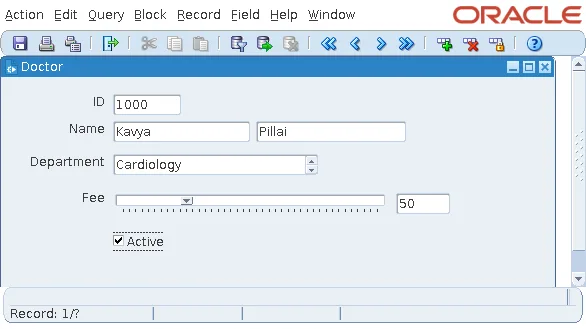
A check box's text is its Label property, shown next to the box. Unlike a text item, it needs no separate prompt.
Handle Other Values
A database column may hold a value that is neither the checked nor the unchecked value. Check Box Mapping of Other Values decides what happens then:
| Setting | Effect |
|---|---|
| Not Allowed (default) | Forms rejects queried records that have another value, so they silently do not appear in the block. |
| Checked | Every other value is shown as checked. |
| Unchecked | Every other value is shown as unchecked. |
Checked is useful for a column where anything but N means yes. If records seem to vanish from a block after a query, check this property first, because the default rejects them without a message.
React to a Click with WHEN-CHECKBOX-CHANGED
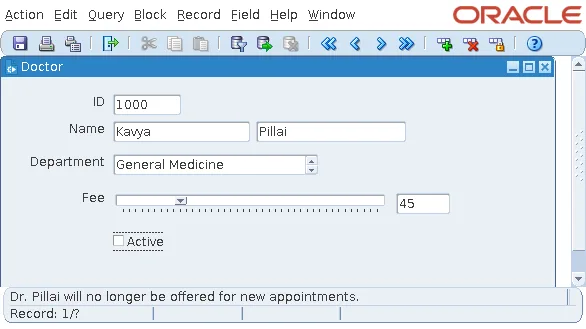
WHEN-CHECKBOX-CHANGED fires when the user checks or unchecks the box, before the item is validated. The sample form warns the user who unchecks ACTIVE.
Example (WHEN-CHECKBOX-CHANGED trigger on DOCTORS.ACTIVE):
if not checkbox_checked('DOCTORS.ACTIVE') then
  message('Dr. ' || :doctors.last_name || ' will no longer be offered for new appointments.');
end if;
Output:
Dr. Pillai will no longer be offered for new appointments.
Read a Check Box with CHECKBOX_CHECKED
CHECKBOX_CHECKED returns TRUE if a check box is checked, as the trigger above uses it.
Syntax:
checkbox_checked(item_name varchar2 | item_id item) return boolean
Using CHECKBOX_CHECKED instead of comparing the item to Y keeps your code working even if someone later changes the values the box maps to.
Set a Check Box from Code
There is no built-in to tick a box. To check or uncheck it from code, assign it its checked or unchecked value.
Example:
:doctors.active := 'N';
For choices with more than two values, use a list item or a radio group instead. List items, including the spin list and slider in the same form, are covered in how to create list items in Oracle Forms.
Conclusion
A check box in Oracle Forms stores its Value when Checked or Value when Unchecked, starts in the state of its Initial Value, and shows its Label beside the box. Set Check Box Mapping of Other Values to Checked or Unchecked when the column can hold other values, or records will silently be rejected. React to clicks with WHEN-CHECKBOX-CHANGED, read the state with CHECKBOX_CHECKED, and set it by assigning the checked or unchecked value.
