
A doctor calls in sick, and the receptionist must cancel that doctor's appointments for the day. Opening each one is slow. Users want to tick the rows, press one button, and have all of them handled in one save.
This guide shows how to process selected rows in Oracle Forms 14.1.2: a check box on each row, a running count of the checked rows, a Select All button, and a loop that changes the checked records and commits them together.
Sample Form for This Guide
The examples and screenshots use the sample form CH39_DAY from the Oracle Forms code repository on GitHub. Download it, open it in Forms Builder, and connect as CAREWELL to follow along.
| Form | File | What it shows |
|---|---|---|
| CH39_DAY | forms/ch39/ch39_day.fmb | Selecting and cancelling a day's appointments |
The forms run against the CareWell Clinic sample schema, which you install first.
Add a Selection Check Box
Add a check box, SEL, to the multi-record block. It is not a database item: it only marks rows for the action. Set its checked value to Y and its unchecked value to N. Check box properties are covered in how to use check boxes in Oracle Forms.
A display item in the control block, CTL.SELECTED, shows how many rows are checked.
Count the Rows as the User Checks Them
Each click adds one to the count or takes one away.
Example (WHEN-CHECKBOX-CHANGED trigger on APPOINTMENTS.SEL):
-- the count of selected rows, kept as the user checks and unchecks
:ctl.selected := nvl(:ctl.selected, 0) + case :appointments.sel when 'Y' then 1 else -1 end;
Set the Check Box of Fetched Records
In a test, clicking the check box of a queried row had strange effects on the count. The reason is that Initial Value applies only to records the user creates: a fetched record's check box starts as null, not N.
POST-QUERY sets it for every fetched record, while it fills the names of the patient and the doctor.
Example (POST-QUERY trigger on block APPOINTMENTS):
select p.first_name || ' ' || p.last_name, d.first_name || ' ' || d.last_name
  into :appointments.patient_name, :appointments.doctor_name
  from patients p, doctors d
 where p.patient_id = :appointments.patient_id
   and d.doctor_id = :appointments.doctor_id;
:appointments.sel := 'N';     -- Initial Value is for new records only: a fetched record starts with null
Select All Rows
Select All walks the block from the first record to the last, checking every row and counting as it goes.
Example (WHEN-BUTTON-PRESSED trigger on CTL.SELECT_ALL):
go_block('APPOINTMENTS');
first_record;
:ctl.selected := 0;
loop
  exit when :appointments.appt_id is null;           -- an empty block
  :appointments.sel := 'Y';
  :ctl.selected := :ctl.selected + 1;
  exit when :system.last_record = 'TRUE';
  next_record;
end loop;
first_record;
The loop stops at the last record with :SYSTEM.LAST_RECORD. On the way, NEXT_RECORD fetches records that were not fetched yet, so every row of the query is included, not only those on the screen.
Act on the Checked Rows
The Cancel Selected button asks for confirmation, walks the block with the same loop, changes the checked records as a user would, and saves them all with COMMIT_FORM.
Example (WHEN-BUTTON-PRESSED trigger on CTL.CANCEL_SELECTED):
declare
  v_n pls_integer := 0;
begin
  if nvl(:ctl.selected, 0) = 0 then
    message('Check the appointments to cancel first.');
    return;
  end if;
  set_alert_property('CONFIRM', ALERT_MESSAGE_TEXT,
                     'Cancel ' || :ctl.selected || ' appointments of ' || to_char(:ctl.day, 'DD-MON-YYYY') || '?');
  if show_alert('CONFIRM') <> ALERT_BUTTON1 then
    return;
  end if;
  go_block('APPOINTMENTS');
  first_record;
  loop
    if :appointments.sel = 'Y' then
      :appointments.status := 'CANCELLED';
      :appointments.reason := 'Doctor unavailable';
      v_n := v_n + 1;
    end if;
    exit when :system.last_record = 'TRUE';
    next_record;
  end loop;
  :system.message_level := '5';        -- the message below replaces FRM-40400
  commit_form;
  :system.message_level := '0';
  if :system.form_status = 'QUERY' then       -- saved
    message(v_n || ' appointments cancelled.');
    :ctl.selected := 0;
    execute_query;
  end if;
end;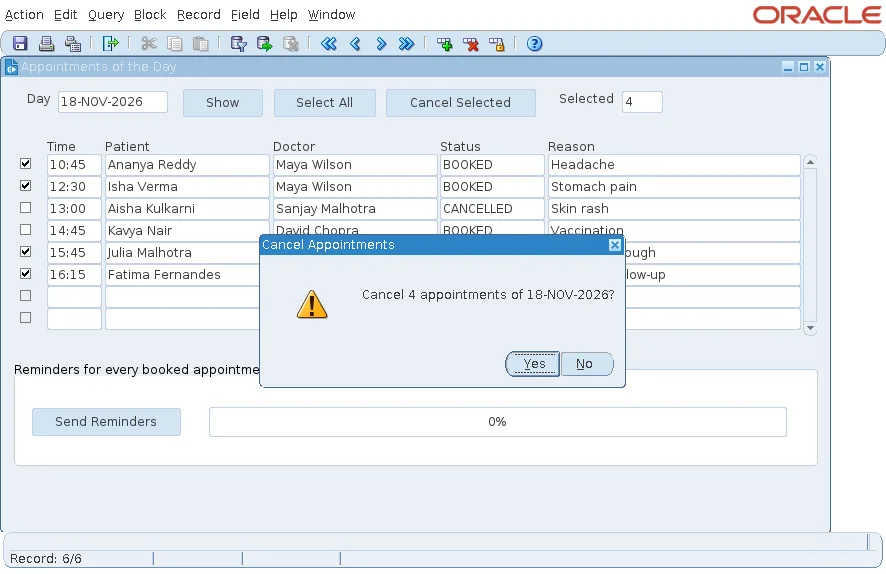
Because the loop only changes items, COMMIT_FORM saves the records with the form's own statements, locking, and triggers, exactly as if the user had edited each one. The alert is described in how to show alerts in Oracle Forms using SHOW_ALERT.
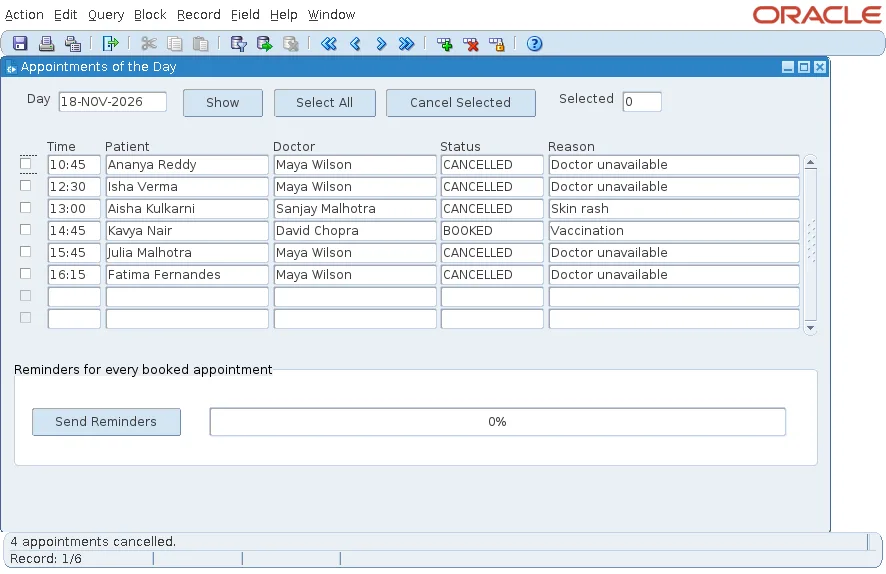
After the alert, the four appointments were cancelled with the reason Doctor unavailable and saved in one transaction.
Replace the Save Message with Your Own
After COMMIT_FORM, Forms shows FRM-40400: Transaction complete. When the trigger then shows a message of its own, Forms displays FRM-40400 as an alert that the user must dismiss first.
Setting :SYSTEM.MESSAGE_LEVEL to 5 around COMMIT_FORM hides FRM-40400 and leaves only the trigger's message, 4 appointments cancelled. :SYSTEM.FORM_STATUS is QUERY after a successful save, which tells the trigger that it may report success, clear the count, and query again.
Conclusion
To act on selected rows in Oracle Forms, add a non-database check box, keep a count in WHEN-CHECKBOX-CHANGED, and set the box to N for fetched records in POST-QUERY. Walk the block with FIRST_RECORD, NEXT_RECORD, and :SYSTEM.LAST_RECORD, change the checked records as a user would, and save them in one COMMIT_FORM, checking :SYSTEM.FORM_STATUS before you report success.
