
Some things a form must react to do not come from the user at all: the user has been away too long, the database connection has been idle, or another session changed the rows on screen. Oracle Forms handles these with event objects, and Forms 14.1.2 adds database change notifications that refresh a form without polling queries.
This guide covers events in Oracle Forms 14.1.2 with a waiting-room screen: the kinds of events, the client-idle event, and object change notification, with the three things every installation needs for database events to work.
Sample Form for This Guide
The examples and screenshots use the sample form CH29_WAITING_ROOM from the Oracle Forms code repository on GitHub. Download it, open it in Forms Builder, and connect as CAREWELL to follow along.
| Form | File | What it shows |
|---|---|---|
| CH29_WAITING_ROOM | forms/ch29/ch29_waiting_room.fmb | A waiting-room screen with a clock, a patient finder, and database events |
The forms run against the CareWell Clinic sample schema, which you install first.
Kinds of Events
An event is an object of the form, under Events in the navigator. Its Event Type says what raises it, and its WHEN-EVENT-RAISED trigger, defined on the event itself, handles it.
| Kind | Raised by | Examples |
|---|---|---|
| System events | Forms | Client Idle, Database Idle, Logout (single sign-off or the end of the single sign-on session), Notification (a message the administrator sends), Media Completion, and MDI Resize. |
| Database events | The database | Messages from an Advanced Queuing queue, and, new in 14.1.2, Object Change Notification and Query Result Change Notification. |
| User-defined events | Java beans and JavaScript in the client | Any event the component raises. |
Define the Trigger on Each Event
A form-level WHEN-EVENT-RAISED also receives the events of every event object that has no trigger of its own. There, :SYSTEM.LAST_EVENT named the client-idle event SYSTEM_CLIENT_IDLE, but was empty for the database event below. Define the trigger on each event instead.
Handle the Client Being Idle
The sample waiting room has an event IDLE of type Client Idle. The form's WHEN-NEW-FORM-INSTANCE sets how long the user must do nothing before it is raised, in seconds; 20 here, to keep the test short.
Set the idle time:
set_application_property(client_idle_time, 20);
The event's trigger writes on the form's last line.
Example (WHEN-EVENT-RAISED trigger on the event IDLE):
:ctl.info := 'No activity since ' || to_char(sysdate - 20 / 86400, 'HH24:MI:SS');
Twenty-five seconds after the last keystroke, the line read as follows.
Output:
No activity since 05:32:34
The clock's timer kept expiring every second meanwhile, because timers are not user activity; see how to use timers in Oracle Forms. A real application would do more here, such as hiding sensitive data, or signing the user out after a warning.
DB_IDLE_TIME and DB_IDLE_REPEAT raise Database Idle when the form has not used its database connection for the given time, once or repeatedly. Both are application properties, described in GET_APPLICATION_PROPERTY in Oracle Forms.
Refresh a Form When Rows Change in the Database
The waiting room must show a check-in as soon as the front desk records it, in another form on another computer. A repeating timer that queries every few seconds would work, but costs a query every few seconds for every screen. Forms 14.1.2 lets the database say when something changed instead, through the database's Continuous Query Notification, exposed as a database event:
- Object Change Notification (OCN) is raised when a table the event names is changed: rows inserted, updated, or deleted, each chosen with Notify on Insert, Notify on Update, and Notify on Delete.
- Query Result Change Notification (QRCN) is raised only when the rows returned by a block's query change; the event names the block.
Configure the Event
The event APPT_CHANGED has these settings:
- Event Type: Database.
- Database Event Type: Object Change Notification.
- Database Object Name: APPOINTMENTS.
- The three Notify on properties set.
- Auto Subscribe set, so the form registers with the database when it starts.
Its trigger queries the block again.
Example (WHEN-EVENT-RAISED trigger on the event APPT_CHANGED):
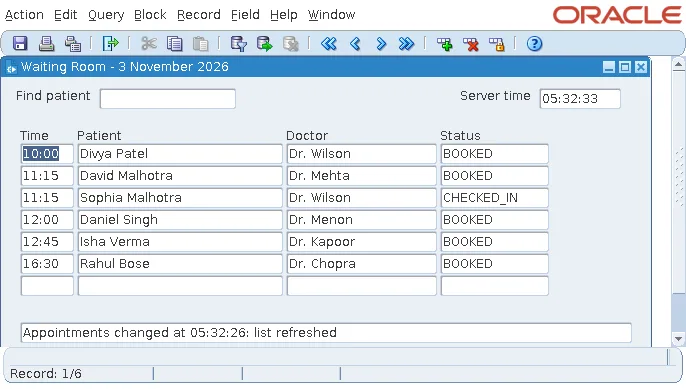
:ctl.info := 'Appointments changed at ' || to_char(sysdate, 'HH24:MI:SS')
              || ': list refreshed';
go_block('APPOINTMENTS');
execute_query;
With the waiting room open, another session set Sophia Malhotra's appointment to CHECKED_IN and committed. Seconds later, the waiting room showed it.
Three Things Database Events Need
1. A Privilege
Continuous Query Notification requires the CHANGE NOTIFICATION system privilege, granted to the schema user; in the test, CAREWELL. Forms does the rest of the registration, and USER_CHANGE_NOTIFICATION_REGS listed the form's registration while it ran.
2. A Network Path Back
The database delivers a notification by connecting to the Forms server, at the address it saw the connection come from. In a container setup, the first attempt connected to the database through a port of the host, and the registration showed the host's address, which the database could not use to reach the Forms server. Connecting to the database directly, the registration showed the Forms server's own address, and notifications arrived. Firewalls between the database and the Forms servers must let these connections through.
3. Polling from the Client
The Forms server cannot push anything to the client: it runs WHEN-EVENT-RAISED when the client next contacts it. With the defaults, that is at the next user action, or at the client's heartbeat, every two minutes according to Oracle's documentation. Set maxEventWait, in milliseconds, in the configuration section to have the client ask more often.
A formsweb.cfg section:
[waitingroom]
maxEventWait=3000
A waiting room that no one touches needs it; a form that users work in constantly does not.
Conclusion
Event objects in Oracle Forms handle system events, such as Client Idle, Database Idle, and Logout, and database events, in WHEN-EVENT-RAISED triggers defined on each event. New in 14.1.2, Object Change Notification and Query Result Change Notification refresh a form when the database changes, instead of polling with queries. They need the CHANGE NOTIFICATION privilege, a network path from the database to the Forms server, and a maxEventWait setting for screens nobody touches.
