
Patients on long-term treatment get the same medicines at every visit. Rather than typing the prescription again, the doctor wants to repeat the last one and change only what changed. The same need appears wherever last month's order, last year's budget, or a template has to be copied into new records.
This guide shows how to copy records from the database into a detail block in Oracle Forms 14.1.2 with CREATE_RECORD, so they become new records the user can check, edit, and save.
Sample Form for This Guide
The examples and screenshots use the sample form CH39_VISIT from the Oracle Forms code repository on GitHub. Download it, open it in Forms Builder, and connect as CAREWELL to follow along.
| Form | File | What it shows |
|---|---|---|
| CH39_VISIT | forms/ch39/ch39_visit.fmb | Repeating the last prescription |
The forms run against the CareWell Clinic sample schema, which you install first.
How the Copy Works
The form has a master block, VISITS, and a detail block, PRESCRIPTIONS, joined by a relation. The Repeat Last Prescription button does three things:
- It finds the patient's latest earlier visit that has a prescription.
- It reads that visit's prescription lines.
- It creates one new record in the detail block for each line and fills its items.
Example (WHEN-BUTTON-PRESSED trigger on CTL.REPEAT):
-- copies the prescription of the patient's previous visit into this visit, as new records to check and save
declare
  v_prev  visits.visit_id%type;
  v_date  date;
  v_n     pls_integer := 0;
begin
  if :visits.visit_id is null then
    message('Save the visit first.');
    return;
  end if;
  for v in (select visit_id, visit_date from visits v
             where patient_id = :visits.patient_id and visit_date < :visits.visit_date
               and exists (select null from prescriptions r where r.visit_id = v.visit_id)
             order by visit_date desc) loop
    v_prev := v.visit_id;
    v_date := v.visit_date;
    exit;                                   -- the latest one
  end loop;
  if v_prev is null then
    message('No earlier prescription for this patient.');
    return;
  end if;
  go_block('PRESCRIPTIONS');
  last_record;                              -- after the lines the visit already has
  for r in (select r.medicine_id, m.medicine_name, r.dosage, r.frequency, r.days, r.quantity
              from prescriptions r, medicines m
             where m.medicine_id = r.medicine_id and r.visit_id = v_prev
             order by r.rx_id) loop
    if :prescriptions.medicine_id is not null then
      create_record;
    end if;
    :prescriptions.medicine_id   := r.medicine_id;
    :prescriptions.medicine_name := r.medicine_name;
    :prescriptions.dosage        := r.dosage;
    :prescriptions.frequency     := r.frequency;
    :prescriptions.days          := r.days;
    :prescriptions.quantity      := r.quantity;
    v_n := v_n + 1;
  end loop;
  first_record;
  message(v_n || ' lines copied from the visit of ' || to_char(v_date, 'DD-MON-YYYY')
          || '. Check them and save.');
end;
Find One Row of an Ordered Query
The first loop only finds the latest visit. A cursor FOR loop over a query ordered by date descending, with EXIT after the first row, reads that one row and nothing more. It also handles the case of no earlier visit without an exception: v_prev simply stays null.
Create the Records
The second loop goes to the last record of the detail block, so the copied lines come after any lines the visit already has. For each line it calls CREATE_RECORD, unless the current record is still empty, and assigns the values to the items.
Assigning to items is exactly what a user typing would do. The records are new, so Forms inserts them with the rest of the form's changes when the user saves, or not at all if the user clears them.
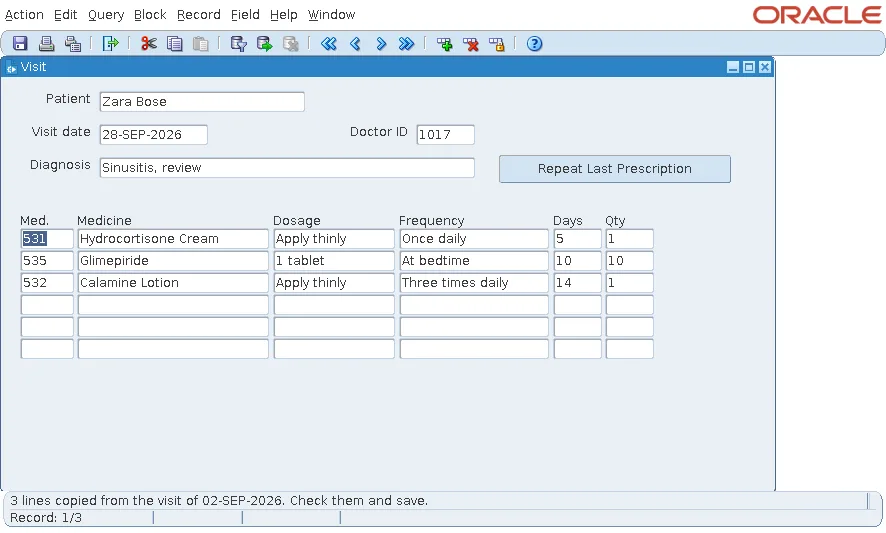
For a patient's new visit on 28 September, the button brought the three medicines of the visit of 2 September as new records.
What Fills the Keys
The copied records get their keys the same way as records the user types:
| Column | Filled by |
|---|---|
| VISIT_ID (foreign key) | The relation between the blocks, through the Copy Value from Item property of the detail item. |
| RX_ID (primary key) | The detail block's PRE-INSERT, from the sequence PRESCRIPTIONS_SEQ. |
Relations are explained in how to create a master-detail form in Oracle Forms, and sequence keys in how to populate primary keys from a sequence in Oracle Forms.
Refuse an Unsaved Master
The trigger stops with Save the visit first when the visit has no ID. A new visit gets its ID only in its own PRE-INSERT, so until it is saved, the copied lines would have nothing to refer to.
DUPLICATE_RECORD Is the Special Case
The built-in DUPLICATE_RECORD (Shift+F6 for the user) copies the previous record of the same block into the current one. Copying from the database, as here, is the general case: any query can be the source, and any block the target.
Conclusion
To copy records from the database into a block, query the source rows, go to the end of the target block, and for each row call CREATE_RECORD and assign the items. The records are new, so the user reviews them and Forms inserts them on the next save, with foreign keys from the relation and primary keys from PRE-INSERT. Refuse the copy until the master record has been saved.
