
Reports, grids, charts, and maps get the attention, but they are not what holds a page together. That job falls to a quieter set of regions: the ones that display HTML you wrote, generate HTML from PL/SQL, group other regions into tabs, fold sections away, and slide panels in from the side.
Learn these and pages stop being a vertical stack of components. This guide walks through each one by building a customer overview page: a picker at the top, a generated summary, two reports sharing a set of tabs, and collapsible help at the bottom.
Static Content Regions
A Static Content region displays whatever HTML you put in its source, with substitutions such as an ampersand, an item name, and a period replaced by that item's value. It is the region you use for a welcome message or an introduction.
Its other use is less obvious and more common: with no HTML at all, a static content region is simply a container. Set its template to Blank with Attributes so it has no border or title, and it becomes an invisible box to hold page items, buttons, or sub-regions. That is how you get a filter bar or a row of controls at the top of a page without a boxed region wrapped around it.
For the overview page, one such container holds a select list of customers. Set the item's Page Action on Selection to Submit Page, and choosing a customer redisplays the page for that customer with no dynamic action needed. Give it a default value so the page opens showing somebody rather than nothing.
Dynamic Content Regions
When the HTML depends on the data, a Dynamic Content region generates it. Its source is a PL/SQL function body returning a CLOB, or JavaScript running in the database if you set the language to JavaScript MLE.
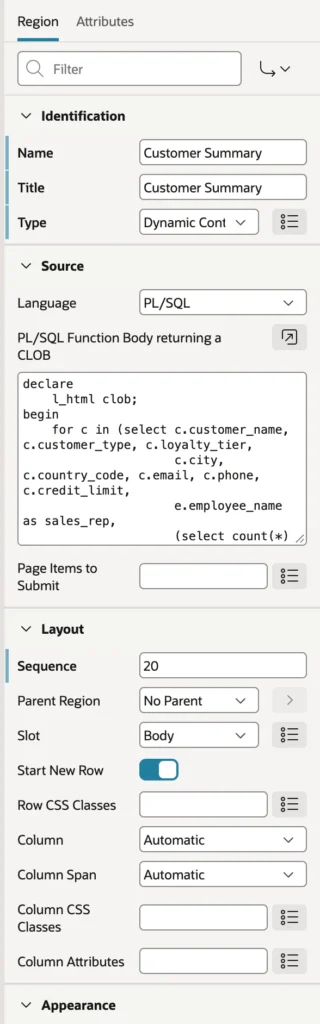
declare
l_html clob;
begin
for c in (select c.customer_name, c.customer_type, c.loyalty_tier,
c.city, c.country_code, c.email, c.phone, c.credit_limit,
e.employee_name as sales_rep,
(select count(*) from orb_orders o
where o.customer_id = c.customer_id
and o.status <> 'CANCELLED') as orders,
(select sum(order_total) from orb_orders o
where o.customer_id = c.customer_id
and o.status <> 'CANCELLED') as sales
from orb_customers c
left join orb_employees e on e.employee_id = c.sales_rep_id
where c.customer_id = :P19_CUSTOMER_ID)
loop
l_html := '<div class="customer-summary">'
|| '<h3>' || apex_escape.html(c.customer_name) || '</h3>'
|| '<p>' || apex_escape.html(initcap(c.customer_type)) || ' customer in '
|| apex_escape.html(c.city) || ', ' || apex_escape.html(c.country_code)
|| ' · ' || apex_escape.html(initcap(c.loyalty_tier)) || ' tier</p>'
|| '<ul>'
|| '<li><strong>' || c.orders || '</strong> orders, <strong>'
|| to_char(c.sales, 'FML999G999G990D00') || '</strong> in total</li>'
|| '<li>Credit limit ' || to_char(c.credit_limit, 'FML999G999G990') || '</li>'
|| '<li>Sales rep: ' || apex_escape.html(c.sales_rep) || '</li>'
|| '<li>' || apex_escape.html(c.email) || ' · ' || apex_escape.html(c.phone) || '</li>'
|| '</ul></div>';
end loop;
return l_html;
end;Look at what every database value passes through. Everything this region returns goes out as HTML, so any value from a table or a user must go through apex_escape.html, or another function from the APEX_ESCAPE package, before it is concatenated. Skip that and a customer whose name contains a script tag becomes a cross-site scripting hole. Numbers you format with to_char and literal HTML you typed yourself are safe, but anything else is not.
Dynamic content is the right tool for a one-off block built from several queries, like this summary. For repeated rows, a template component or a classic report with a custom template is easier to maintain and escapes values for you.
Tabs
A customer's orders and the products they buy both belong on this page, but not on screen at the same time. Tabs are a region template rather than a region type, which surprises people the first time.
- Create a region and set its Template to Tabs Container.
- Right-click it and choose Create Sub Region for each tab.
- Build each sub-region as you normally would, such as a classic report on a query.
- Add the driving page item to each report's Page Items to Submit, so the reports follow the selected customer.
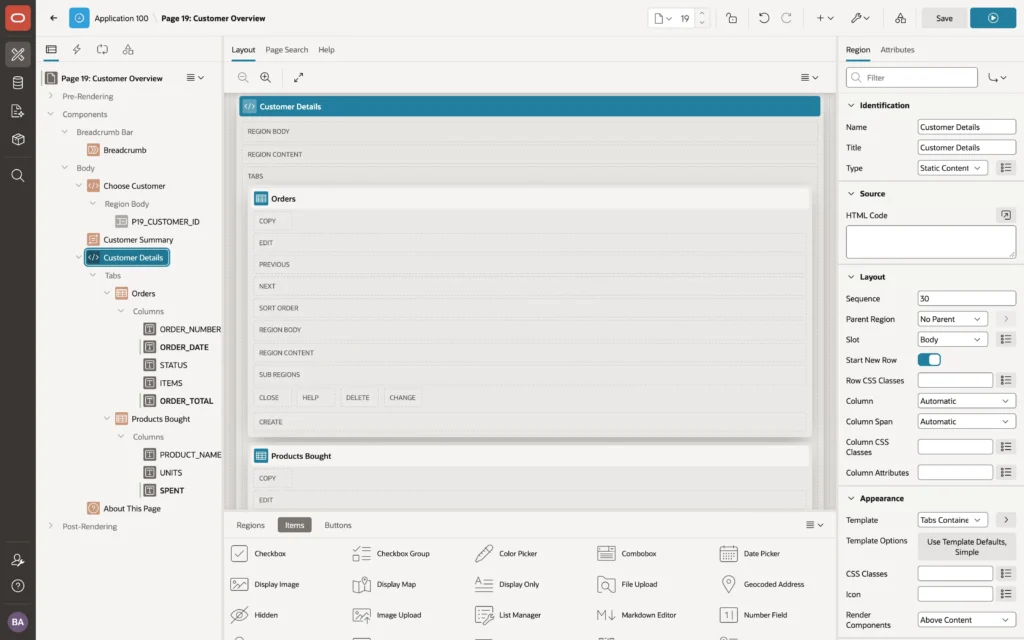
Each sub-region becomes a tab, labeled with its title and ordered by its sequence. The container's template options choose the tab style and whether the selected tab is remembered when a user comes back to the page.
Region Display Selector
There is an older way to do something similar. A Region Display Selector region shows a bar of links to every region on the page whose Region Display Selector property is switched on. In View Single Region mode those links behave like tabs. In Scroll Window mode every region stays visible and the links scroll to them.
The choice is straightforward: a tabs container for a set of related regions in one spot, and a region display selector in scroll mode for navigating a long page of sections. Its attributes add icons, a Show All link, and whether the choice is remembered by user, by session, or not at all.
Collapsible Regions
Set a region's template to Collapsible and its title becomes a toggle, which is the simplest way to keep occasionally useful information off the screen without deleting it. Template options decide whether it starts open or closed and whether that state is remembered.

Pair it with a Help Text region, whose content comes from the page's own Help Text property rather than from the region. Write the text once and it serves both this region and the application's help page, which means it cannot drift out of sync.
The Page at Work
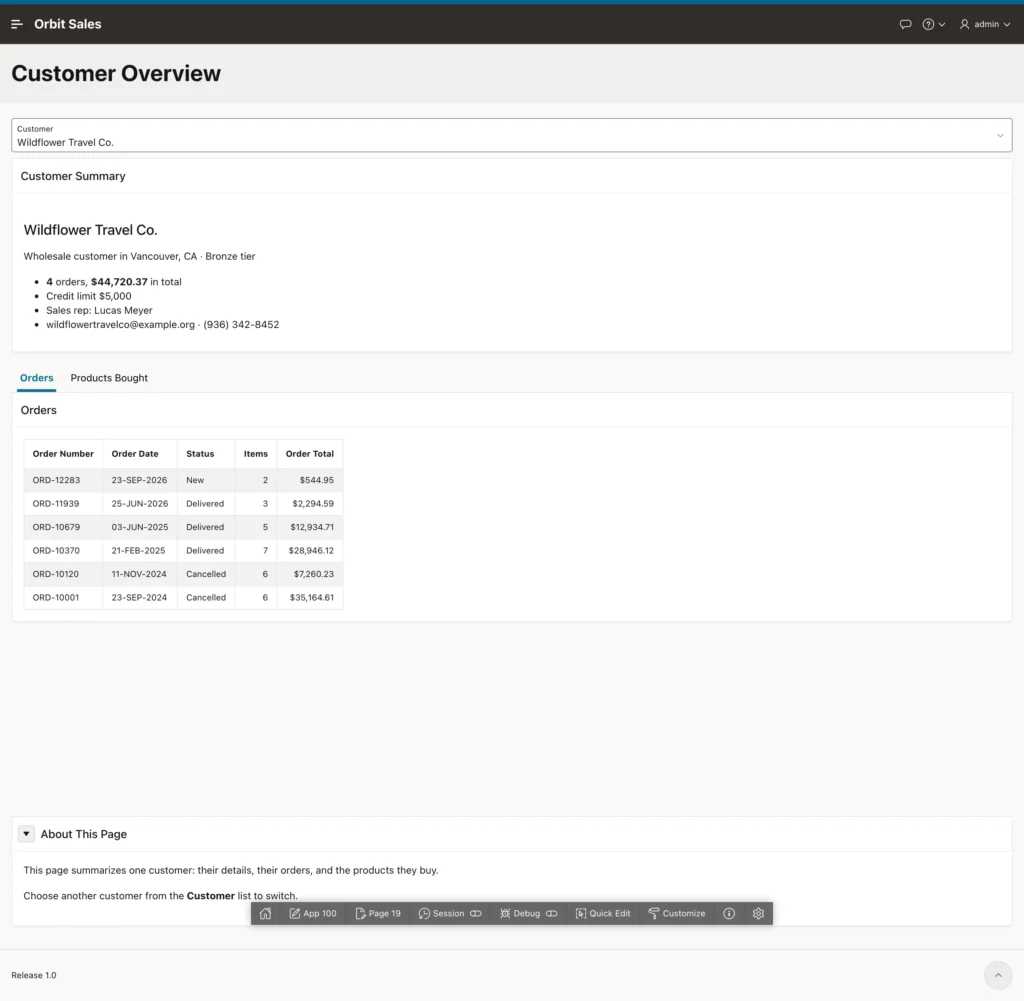
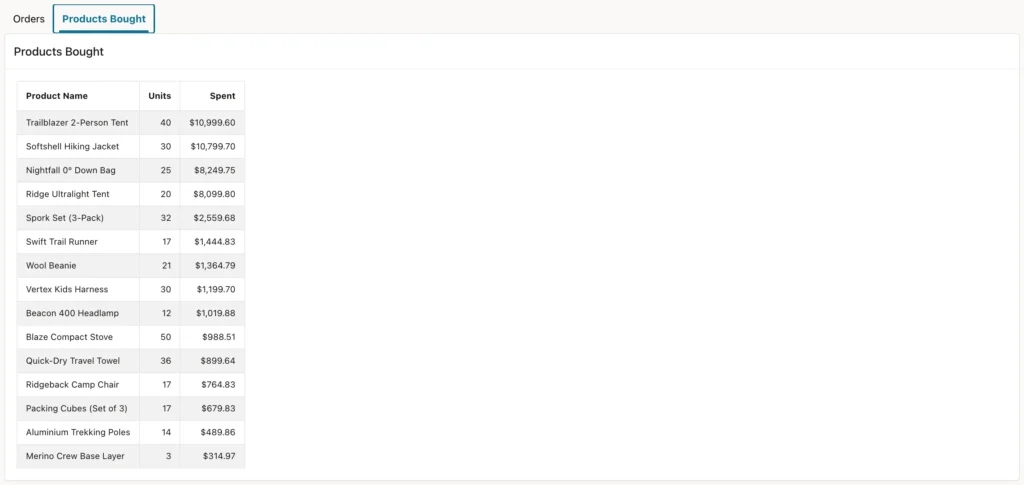
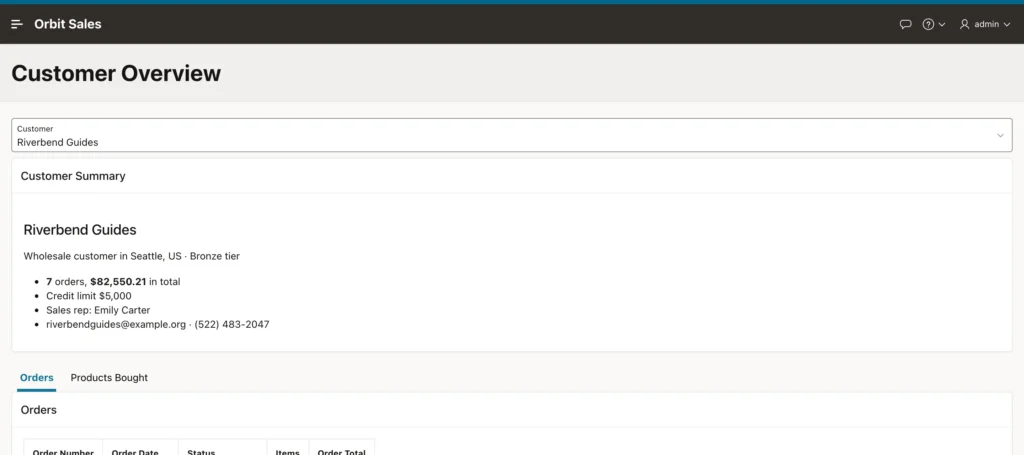
Four region types, no JavaScript, and a page that behaves the way users expect. It is worth switching the tabs container to the Standard template once just to see the difference: both reports appear one above the other inside a single region, and the page immediately feels twice as long.
Inline Dialogs, Drawers, and Popups
Three more templates turn a region into an overlay that stays hidden until something opens it.
| Template | Behaves as |
|---|---|
| Inline Dialog | A modal dialog that is part of the current page |
| Inline Drawer | A panel that slides in from the side of the page |
| Inline Popup | A small popup anchored to the element that opened it |
Put these regions in the page template's dialogs, drawers, and popups slot, and open or close them with the Open Region and Close Region dynamic actions or from JavaScript.
The difference from a modal dialog page is worth understanding, because it decides which one you should use. An inline region is part of the current page, so its items live in the same session state and it opens instantly with no round trip. That makes it ideal for small, quick tasks, such as a note, a confirmation that asks for a reason, or a filter panel. Anything with its own processing, validations, and branches still deserves a page of its own.
The Remaining Region Types
- URL displays a web page fetched by the server. It is rarely the right answer, because most sites refuse to be embedded, and for data a REST data source is better.
- Breadcrumb displays a breadcrumb shared component, normally in the breadcrumb bar slot. The Create Page wizard adds one to every page it builds.
- List displays a list shared component through a list template, which covers navigation menus, cards of links, tabs, and wizard progress bars. The navigation cards on a generated home page are a list shown with the Cards template.
- Help Text displays the page's help text, as described above.
- Flexbox Container arranges its sub-regions side by side and wraps them as the screen narrows.
If you inherit an older application, you will meet region types APEX now hides behind Show Legacy: Reflow Report and Column Toggle Report from the jQuery Mobile era, List View, PL/SQL Dynamic Content, and Data Upload Column Mapping. They still run, but new pages should use their modern replacements, which are classic reports, content rows, dynamic content, and the data loading process.
Conclusion
The regions in this article are the ones that turn a list of components into a page. Static Content displays HTML you wrote and, with a blank template, quietly serves as the container for items and buttons that would otherwise need a boxed region. Dynamic Content generates HTML from PL/SQL or in-database JavaScript for the cases a report cannot express, on the strict condition that every database value passes through APEX_ESCAPE on its way out. Region templates then do the structural work: a Tabs Container turns sub-regions into tabs, Collapsible folds a section away and remembers the choice, and Inline Dialog, Drawer, and Popup create overlays that share the page's session state and open without a round trip. Around them sit Help Text that reuses the page's own help, Breadcrumb and List regions that render shared components, and a Flexbox Container for side-by-side layout. None of it requires JavaScript, and used together they produce pages that feel designed rather than assembled.
