
Audit columns answer the first questions about any record: who created it, when, and who changed it last. Filling them in each form's processes is easy to forget and does not cover changes made outside APEX, so the database should fill them, whatever program writes the row.
For inserts, the columns need no code: a DEFAULT ON NULL clause fills them declaratively. Only updates need a small trigger.
The one APEX-specific detail is the user name: APEX applications connect to the database as one schema, so the database must read the APEX user from the session context. This guide adds four audit columns to a table, shows them on a form, and tests changes from APEX and from SQL.
Step 1: Add the Columns with Defaults and an Update Trigger
The table is PRODUCTS. Add CREATED_BY, CREATED_ON, UPDATED_BY, and UPDATED_ON with DEFAULT ON NULL, and a row-level trigger for updates:
Example:
alter table products add (
    created_by varchar2(255) default on null
               coalesce(sys_context('APEX$SESSION', 'APP_USER'),
                        sys_context('USERENV', 'SESSION_USER')),
    created_on date default on null sysdate,
    updated_by varchar2(255) default on null
               coalesce(sys_context('APEX$SESSION', 'APP_USER'),
                        sys_context('USERENV', 'SESSION_USER')),
    updated_on date default on null sysdate
);

create or replace trigger products_audit_trg
before update on products
for each row
begin
    :new.created_by := :old.created_by;
    :new.created_on := :old.created_on;
    :new.updated_by := coalesce(sys_context('APEX$SESSION', 'APP_USER'),
                                sys_context('USERENV', 'SESSION_USER'));
    :new.updated_on := sysdate;
end;
/
Output:
Table PRODUCTS altered.

Trigger PRODUCTS_AUDIT_TRG compiled
- DEFAULT ON NULL fills a column on insert when the INSERT leaves it out and also when the INSERT passes NULL, as generic code can. A plain DEFAULT leaves an explicit NULL as NULL. So inserts need no trigger code at all.
- sys_context('APEX$SESSION', 'APP_USER') returns the user signed in to the APEX application, such as SALES_USER. Outside an APEX request it returns NULL.
- sys_context('USERENV', 'SESSION_USER') is the database user. COALESCE uses it when there is no APEX user, so changes from SQL scripts, jobs, or other programs are recorded too.
- The trigger runs only on update. It sets the updated values and copies the old created values back, so CREATED_BY and CREATED_ON cannot be changed, even by an UPDATE statement that sets them.
- DEFAULT ON NULL also makes the columns NOT NULL. Rows that already exist get the current user and time when the columns are added.
Without the session context, the defaults and the trigger would see only a database user, the same one for every user of the application, so the audit columns could not tell users apart.
Why Updates Still Need the Trigger
Oracle Database 26ai has DEFAULT ON NULL FOR INSERT AND UPDATE, which sounds like it could replace the trigger for UPDATED_BY and UPDATED_ON too. It does not: on update, it applies only when the UPDATE statement sets the column to NULL. This test uses a scratch table, AUDIT_DEMO, and an APEX session for DEMO_DEV:
Example:
create table audit_demo (
    id         number generated by default as identity primary key,
    name       varchar2(30),
    updated_by varchar2(255) default on null for insert and update
               coalesce(sys_context('APEX$SESSION', 'APP_USER'),
                        sys_context('USERENV', 'SESSION_USER')),
    updated_on date default on null for insert and update sysdate
);

insert into audit_demo (name) values ('First');
commit;

select name, updated_by, to_char(updated_on, 'HH24:MI:SS') as updated
from   audit_demo;

exec dbms_session.sleep(3)
exec apex_session.create_session(p_app_id => 400, p_page_id => 1, p_username => 'DEMO_DEV')

update audit_demo set name = 'Changed';

select name, updated_by, to_char(updated_on, 'HH24:MI:SS') as updated
from   audit_demo;

update audit_demo set updated_by = null, updated_on = null;

select name, updated_by, to_char(updated_on, 'HH24:MI:SS') as updated
from   audit_demo;

exec apex_session.delete_session
drop table audit_demo purge;
Output:
Table AUDIT_DEMO created.

1 row inserted.

Commit complete.

NAME     UPDATED_BY    UPDATED
________ _____________ ___________
First    APXSOL        00:33:04

PL/SQL procedure successfully completed.

PL/SQL procedure successfully completed.

1 row updated.

NAME       UPDATED_BY    UPDATED
__________ _____________ ___________
Changed    APXSOL        00:33:04

1 row updated.

NAME       UPDATED_BY    UPDATED
__________ _____________ ___________
Changed    DEMO_DEV      00:33:07

PL/SQL procedure successfully completed.

Table AUDIT_DEMO dropped.
The ordinary update three seconds later, by DEMO_DEV, left UPDATED_BY as APXSOL and the time unchanged. Only the update that set both columns to NULL filled them with DEMO_DEV and the new time. Every update statement would have to do that, so a BEFORE UPDATE trigger is the dependable way to stamp updates.
Step 2: Show the Values on the Form
The form page on PRODUCTS gets four Display Only items for the audit columns, with the form region as their source. Set Query Only on for them, so the form reads the columns but never writes them; the defaults and the trigger are the only writers:
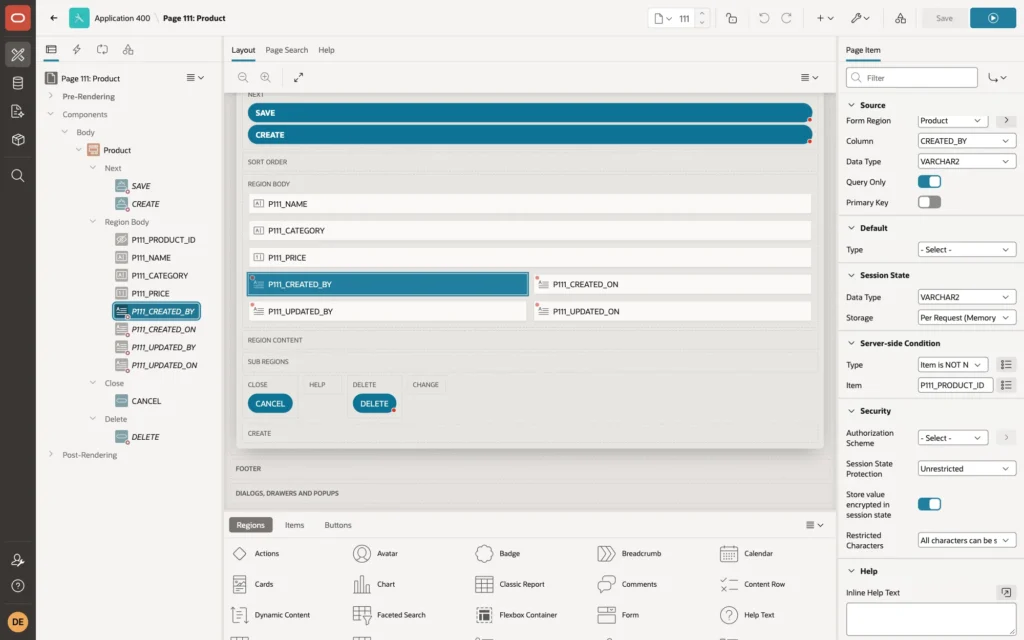
Give the four items a server-side condition, Item is NOT NULL on the primary key item P111_PRODUCT_ID, so they are hidden on the empty form for a new product.
Testing It
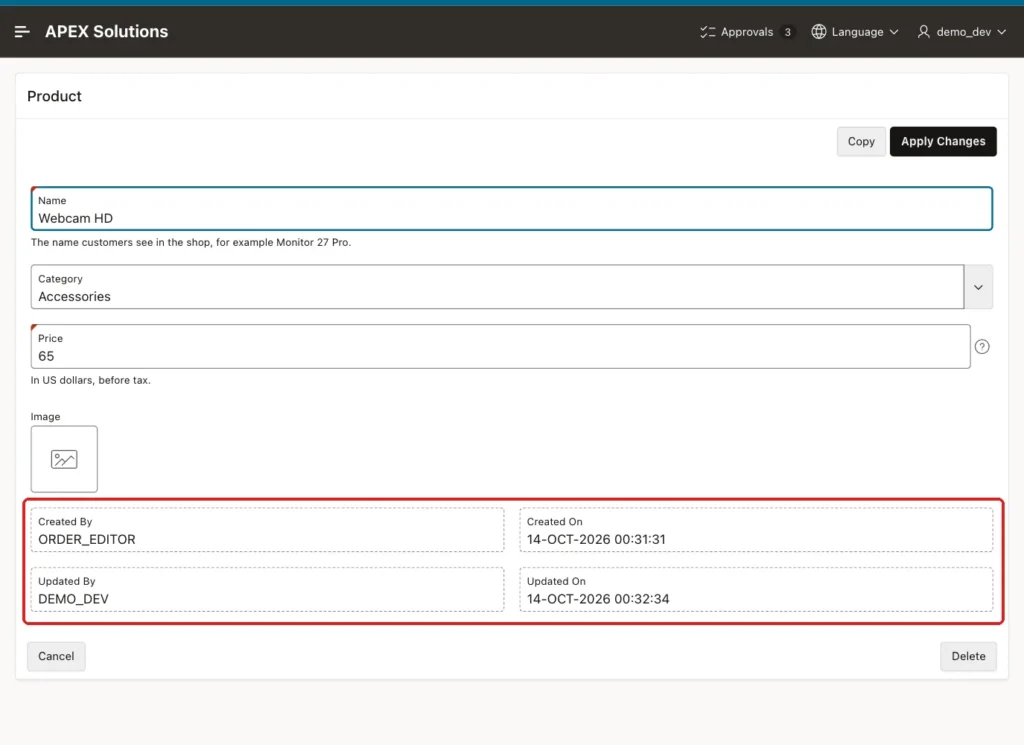
ORDER_EDITOR created a product, Webcam HD, in the form; the defaults filled the created and updated columns. Then DEMO_DEV opened it and changed the price from 70 to 65, and the trigger set the updated columns. The form shows both users:
An update from SQLcl, connected as the schema, that also tries to overwrite CREATED_BY:
Example:
update products
set    price      = 60,
       created_by = 'SOMEONE_ELSE'
where  name = 'Webcam HD';

select name, price, created_by, updated_by
from   products
where  name = 'Webcam HD';

commit;
Output:
1 row updated.

NAME            PRICE CREATED_BY      UPDATED_BY
____________ ________ _______________ _____________
Webcam HD          60 ORDER_EDITOR    APXSOL

Commit complete.
UPDATED_BY is the database user APXSOL, because there was no APEX session, and CREATED_BY is still ORDER_EDITOR: the trigger kept the original value.
An insert from SQL that passes NULL for the audit columns, which a plain DEFAULT would leave empty:
Example:
insert into products (name, category, price, created_by, created_on)
values ('Desk Lamp', 'Accessories', 25, null, null);

select name, created_by, updated_by
from   products
where  name = 'Desk Lamp';

rollback;
Output:
1 row inserted.

NAME         CREATED_BY    UPDATED_BY
____________ _____________ _____________
Desk Lamp    APXSOL        APXSOL

Rollback complete.
DEFAULT ON NULL filled both columns with the database user.
Things to Know
- Rows that existed before the columns were added get the user and time of the ALTER TABLE. Update them once with a value such as MIGRATION if reports should show that the real creator is unknown.
- A default does not stop an INSERT that supplies its own CREATED_BY. If that matters, also set the created values in a BEFORE INSERT trigger, or allow inserts only through the application.
- Use the same defaults and update trigger on every table that needs auditing, or generate them with a script from USER_TABLES.
- SYSDATE is the database server time. For applications used in several time zones, use TIMESTAMP WITH TIME ZONE columns and SYSTIMESTAMP, and show the values in the user's time zone.
- Audit columns record only the latest change. For a full history of every change, add a history table filled by a trigger, or use Flashback Data Archive.
Related Guides
Conclusion
To add audit columns in Oracle APEX, add CREATED_BY, CREATED_ON, UPDATED_BY, and UPDATED_ON with DEFAULT ON NULL, so inserts fill them declaratively, and set the updated values in a BEFORE UPDATE trigger that also protects the created values.
Read the APEX user with sys_context('APEX$SESSION', 'APP_USER') and fall back to the database user, and show the columns on forms as Query Only items.
