
A status progress tracker shows where a record is in its life cycle: the steps it has passed, the step it is on now, and the steps still ahead. Users see at a glance that a request is "Diagnosed" and that "Repaired" and "Returned" come next, without reading a status code.
Oracle APEX can draw such a tracker with the Wizard Progress list template of Universal Theme and a dynamic list built from a SQL query. This guide builds a tracker that follows the status of the selected record, shows a cancelled record in red, and adds buttons that move the record to the next step.
The guide uses repair tickets as the example; the same steps work for any table with a status column. It differs from How to Build a Multi-Step Wizard Form in Oracle APEX: there, a static list follows the pages of a form wizard. Here, the steps and the current step come from the data of one record.
Step 1: Create the Tables
The example needs three tables. REPAIR_STATUSES holds the steps in their order, REPAIR_TICKETS holds the records with their current status, and REPAIR_STATUS_LOG keeps every status change with its time and user:
Example:
create table repair_statuses (
    status_code varchar2(20) not null,
    status_name varchar2(50) not null,
    step_seq    number,
    constraint repair_statuses_pk primary key (status_code),
    constraint repair_statuses_seq_uk unique (step_seq),
    constraint repair_statuses_code_ck check (status_code = upper(status_code))
);

create table repair_tickets (
    ticket_id     number generated by default on null as identity,
    device        varchar2(100) not null,
    problem       varchar2(400) not null,
    customer_name varchar2(100) not null,
    status_code   varchar2(20)  default on null 'RECEIVED' not null,
    created_on    date          default on null sysdate not null,
    constraint repair_tickets_pk primary key (ticket_id),
    constraint repair_tickets_status_fk foreign key (status_code)
        references repair_statuses (status_code)
);

create index repair_tickets_status_ix on repair_tickets (status_code);

create table repair_status_log (
    log_id      number generated by default on null as identity,
    ticket_id   number       not null,
    status_code varchar2(20) not null,
    changed_on  timestamp    default on null systimestamp not null,
    changed_by  varchar2(255) default on null
                    coalesce(sys_context('APEX$SESSION', 'APP_USER'),
                             sys_context('USERENV', 'SESSION_USER')) not null,
    constraint repair_status_log_pk primary key (log_id),
    constraint repair_status_log_ticket_fk foreign key (ticket_id)
        references repair_tickets (ticket_id) on delete cascade,
    constraint repair_status_log_status_fk foreign key (status_code)
        references repair_statuses (status_code)
);

create index repair_status_log_ticket_ix on repair_status_log (ticket_id, changed_on);
create index repair_status_log_status_ix on repair_status_log (status_code);

insert into repair_statuses (status_code, status_name, step_seq) values ('RECEIVED', 'Received', 10);
insert into repair_statuses (status_code, status_name, step_seq) values ('DIAGNOSED', 'Diagnosed', 20);
insert into repair_statuses (status_code, status_name, step_seq) values ('REPAIRED', 'Repaired', 30);
insert into repair_statuses (status_code, status_name, step_seq) values ('RETURNED', 'Returned', 40);
insert into repair_statuses (status_code, status_name, step_seq) values ('CANCELLED', 'Cancelled', null);

insert into repair_tickets (device, problem, customer_name, status_code)
values ('Laptop', 'Screen flickers after a few minutes', 'Anita Rao', 'RECEIVED');

insert into repair_tickets (device, problem, customer_name, status_code)
values ('Phone', 'Battery drains in two hours', 'Mark Bell', 'DIAGNOSED');

insert into repair_tickets (device, problem, customer_name, status_code)
values ('Printer', 'Paper jams on every page', 'Lena Fischer', 'REPAIRED');

insert into repair_tickets (device, problem, customer_name, status_code)
values ('Tablet', 'Cracked glass', 'Omar Haddad', 'RETURNED');

insert into repair_tickets (device, problem, customer_name, status_code)
values ('Camera', 'Lens error on start', 'Sara Lind', 'CANCELLED');

insert into repair_status_log (ticket_id, status_code, changed_on)
select t.ticket_id, s.status_code,
       timestamp '2026-10-20 09:00:00' + numtodsinterval(s.step_seq / 10 - 1, 'DAY')
  from repair_tickets t
  join repair_statuses st on st.status_code = t.status_code
  join repair_statuses s  on s.step_seq <= nvl(st.step_seq, 20)
 order by t.ticket_id, s.step_seq;

insert into repair_status_log (ticket_id, status_code, changed_on)
values (5, 'CANCELLED', timestamp '2026-10-22 14:30:00');

commit;

select t.ticket_id, t.device, t.status_code,
       (select count(*) from repair_status_log l where l.ticket_id = t.ticket_id) as log_rows
  from repair_tickets t
 order by t.ticket_id;
Output:
Table REPAIR_STATUSES created.

Table REPAIR_TICKETS created.

Index REPAIR_TICKETS_STATUS_IX created.

Table REPAIR_STATUS_LOG created.

Index REPAIR_STATUS_LOG_TICKET_IX created.

Index REPAIR_STATUS_LOG_STATUS_IX created.

1 row inserted.

1 row inserted.

1 row inserted.

1 row inserted.

1 row inserted.

1 row inserted.

1 row inserted.

1 row inserted.

1 row inserted.

1 row inserted.

12 rows inserted.

1 row inserted.

Commit complete.

   TICKET_ID DEVICE     STATUS_CODE       LOG_ROWS
____________ __________ ______________ ___________
           1 Laptop     RECEIVED                 1
           2 Phone      DIAGNOSED                2
           3 Printer    REPAIRED                 3
           4 Tablet     RETURNED                 4
           5 Camera     CANCELLED                3
A few details in the tables:
- STEP_SEQ gives the order of the steps. The unique constraint REPAIR_STATUSES_SEQ_UK stops two steps from sharing a position.
- CANCELLED has no STEP_SEQ. It is not a step on the normal path; a ticket can be cancelled from any open step.
- STATUS_CODE in REPAIR_TICKETS has a foreign key to REPAIR_STATUSES, so a ticket can never get an unknown status. DEFAULT ON NULL 'RECEIVED' sets the first step for new tickets.
- CHANGED_ON and CHANGED_BY in the log use DEFAULT ON NULL, so the time and the APEX user are filled in without a trigger.
- The log rows of the sample data are inserted with fixed times, from 20 October 2026 on. Ticket 5 was cancelled after the Diagnosed step.
Step 2: Create the Procedure That Changes the Status
The status of a ticket and its log must change together. A procedure does both in one call and refuses to move a ticket that is already closed:
Example:
create or replace procedure move_repair_ticket (
    p_ticket_id in number,
    p_cancel    in boolean default false
) as
    l_step_seq repair_statuses.step_seq%type;
    l_next     repair_statuses.status_code%type;
begin
    select s.step_seq
      into l_step_seq
      from repair_tickets t
      join repair_statuses s on s.status_code = t.status_code
     where t.ticket_id = p_ticket_id
       for update of t.status_code;

    select min(status_code) keep (dense_rank first order by step_seq)
      into l_next
      from repair_statuses
     where step_seq > l_step_seq;

    if l_next is null then
        raise_application_error(-20002, 'This ticket is already closed.');
    end if;

    if p_cancel then
        l_next := 'CANCELLED';
    end if;

    update repair_tickets
       set status_code = l_next
     where ticket_id = p_ticket_id;

    insert into repair_status_log (ticket_id, status_code)
    values (p_ticket_id, l_next);
exception
    when no_data_found then
        raise_application_error(-20001, 'This ticket does not exist.');
end move_repair_ticket;
/

show errors
Output:
Procedure MOVE_REPAIR_TICKET compiled

No errors.
The first SELECT locks the ticket row with FOR UPDATE, so two users cannot move the same ticket at the same moment. It raises NO_DATA_FOUND for an unknown ticket, which the handler turns into "This ticket does not exist."
The second SELECT finds the next step: the status with the lowest STEP_SEQ above the current one. MIN with KEEP (DENSE_RANK FIRST) returns NULL when there is no next step. That happens for the last step, Returned, and for Cancelled, whose STEP_SEQ is NULL. In both cases the ticket is closed and the procedure raises an error.
In a first version, the "is it closed" check compared the step with a subquery inside an IF statement. That failed to compile with PLS-00405: subquery not allowed in this context. The version above avoids the problem, because the next-step query already tells whether the ticket is closed.
Step 3: Create the Repair Tracker Page
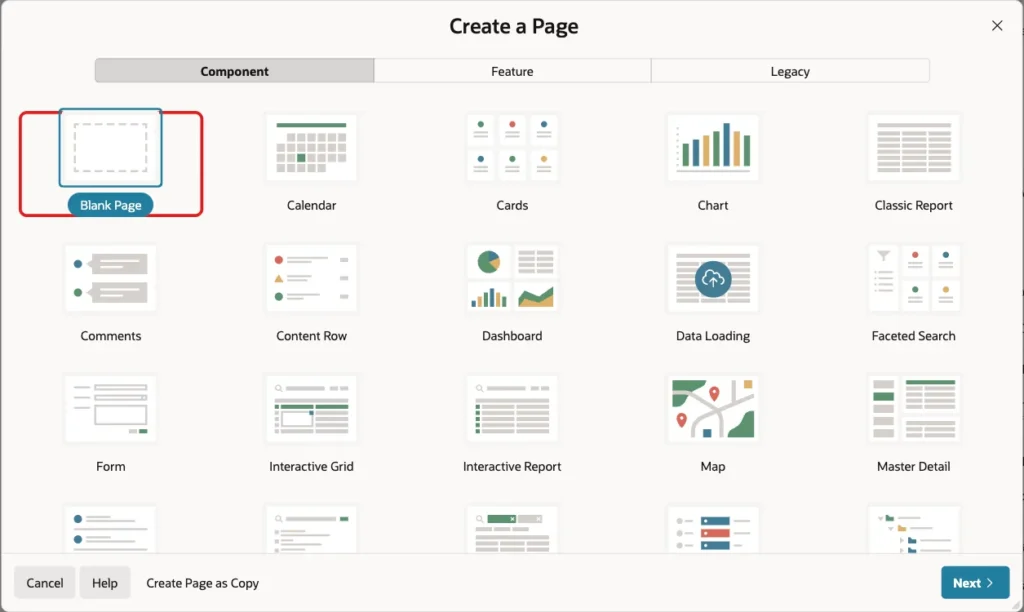
In App Builder, open the application and click Create Page. On the Component tab, select Blank Page:
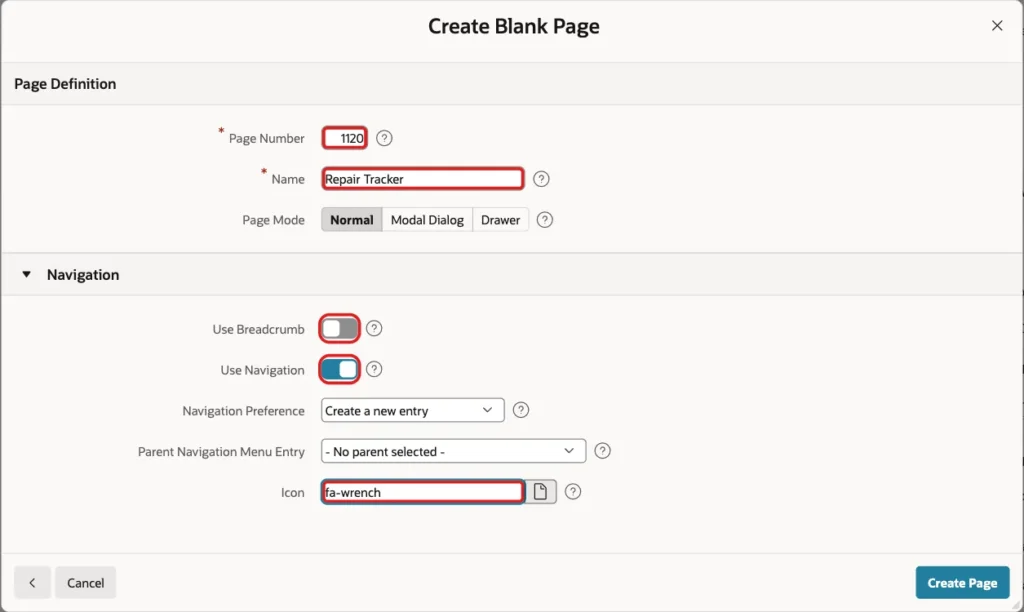
Set Page Number to 1120 and Name to Repair Tracker. Turn Use Breadcrumb off, keep Use Navigation on with Create a new entry, set Icon to fa-wrench and click Create Page:
Step 4: Create the Dynamic List
The tracker is a list. A static list has fixed entries, but here the entries depend on the ticket: a cancelled ticket shows the steps it reached and then Cancelled. So the list is dynamic and comes from this query:
Example:
select 1 as lvl,
       s.status_name as label,
       null as target,
       case when s.status_code = t.status_code then 'YES' else 'NO' end as is_current
  from repair_tickets t
  join repair_statuses c on c.status_code = t.status_code
  join repair_statuses s
    on (s.step_seq is not null
        and (c.step_seq is not null
             or s.status_code in (select l.status_code
                                    from repair_status_log l
                                   where l.ticket_id = t.ticket_id)))
       or s.status_code = t.status_code
 where t.ticket_id = :P1120_TICKET_ID
 order by nvl(s.step_seq, 1e6)
A dynamic list query returns these columns in this order: the level, the label, the target URL and the "is current" flag (YES or NO). The tracker needs no links, so TARGET is NULL.
The join decides which steps appear. For an open or returned ticket (C.STEP_SEQ is not NULL), all normal steps appear. For a cancelled ticket, only the steps found in its log appear, followed by the Cancelled status itself. IS_CURRENT is YES for the ticket's current status.
Running the query in SQL with :P1120_TICKET_ID set to 4 (returned) and then 5 (cancelled) returns:
Output:
PL/SQL procedure successfully completed.

   LVL LABEL        TARGET    IS_CURRENT
______ ____________ _________ _____________
     1 Received               NO
     1 Diagnosed              NO
     1 Repaired               NO
     1 Returned               YES

PL/SQL procedure successfully completed.

   LVL LABEL        TARGET    IS_CURRENT
______ ____________ _________ _____________
     1 Received               NO
     1 Diagnosed              NO
     1 Cancelled              YES
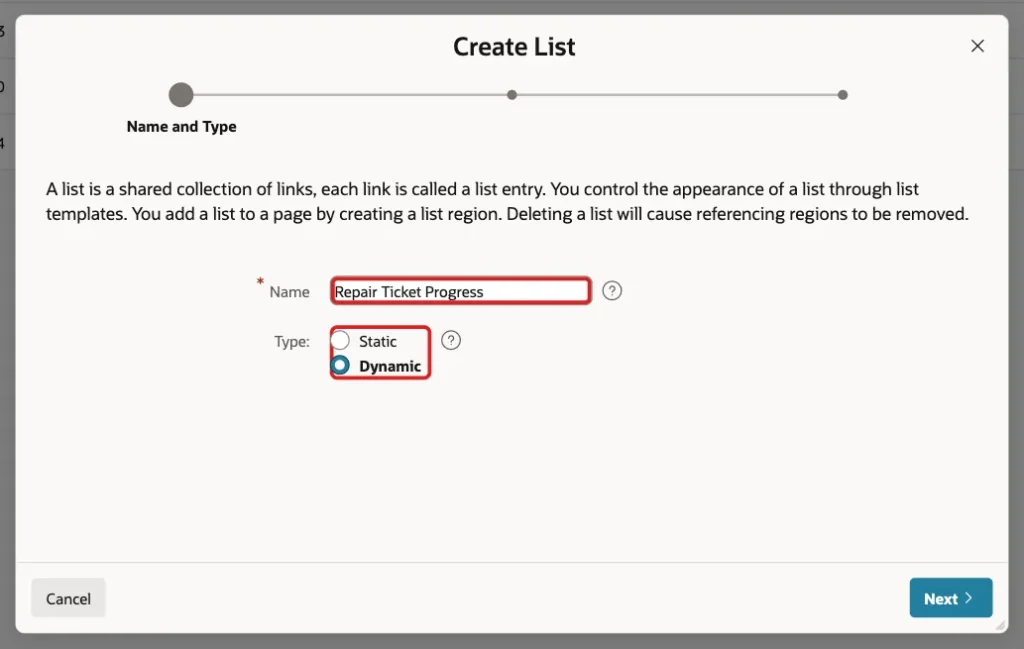
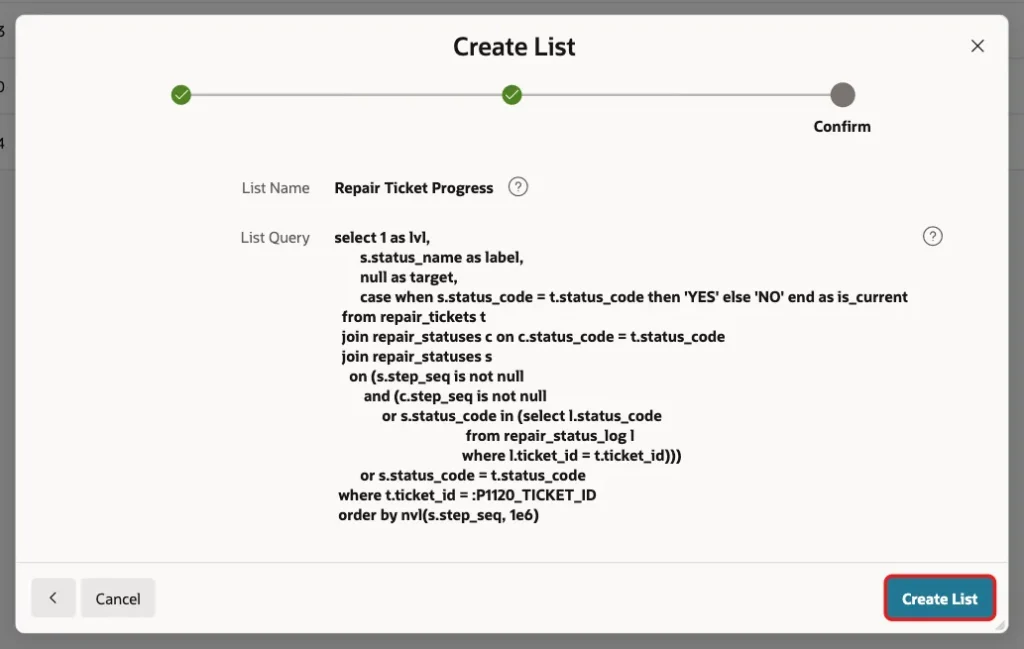
Now create the list. Go to Shared Components, Lists, and click Create. Enter the Name Repair Ticket Progress, select Type Dynamic and click Next:
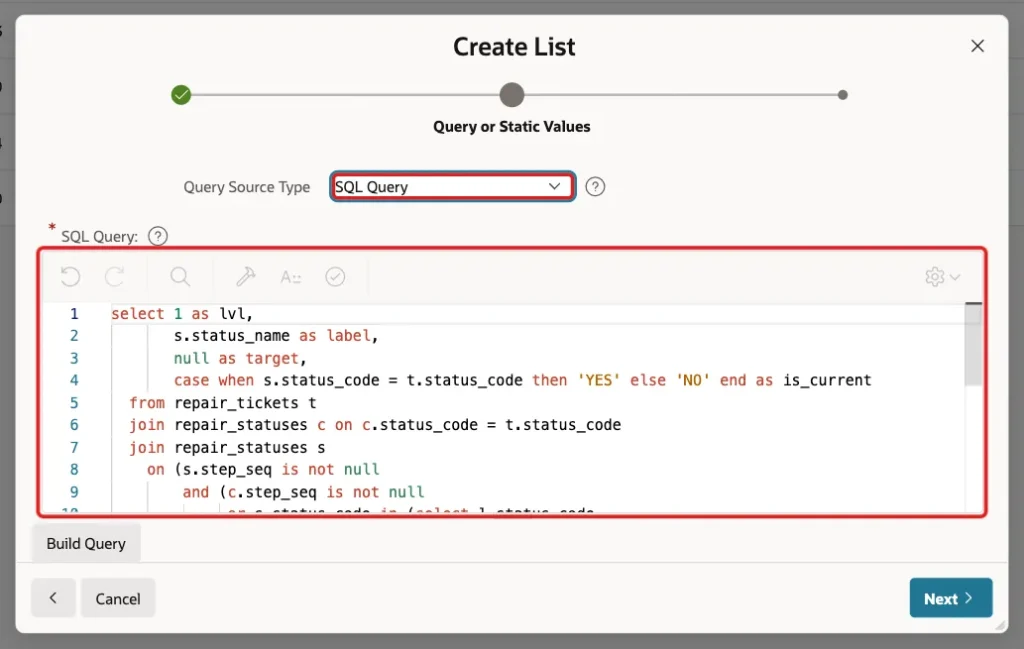
Keep Query Source Type SQL Query, paste the query above into SQL Query and click Next:
The last screen shows the name and query. Click Create List:
Step 5: Add the Ticket Region and Select List
Open page 1120 in Page Designer. Add a region named Ticket with Type Static Content:

Add a page item P1120_TICKET_ID to the Ticket region. Set Type to Select List, Label to Ticket and Page Action on Selection to Submit Page. Choosing a ticket then reloads the page for that ticket:
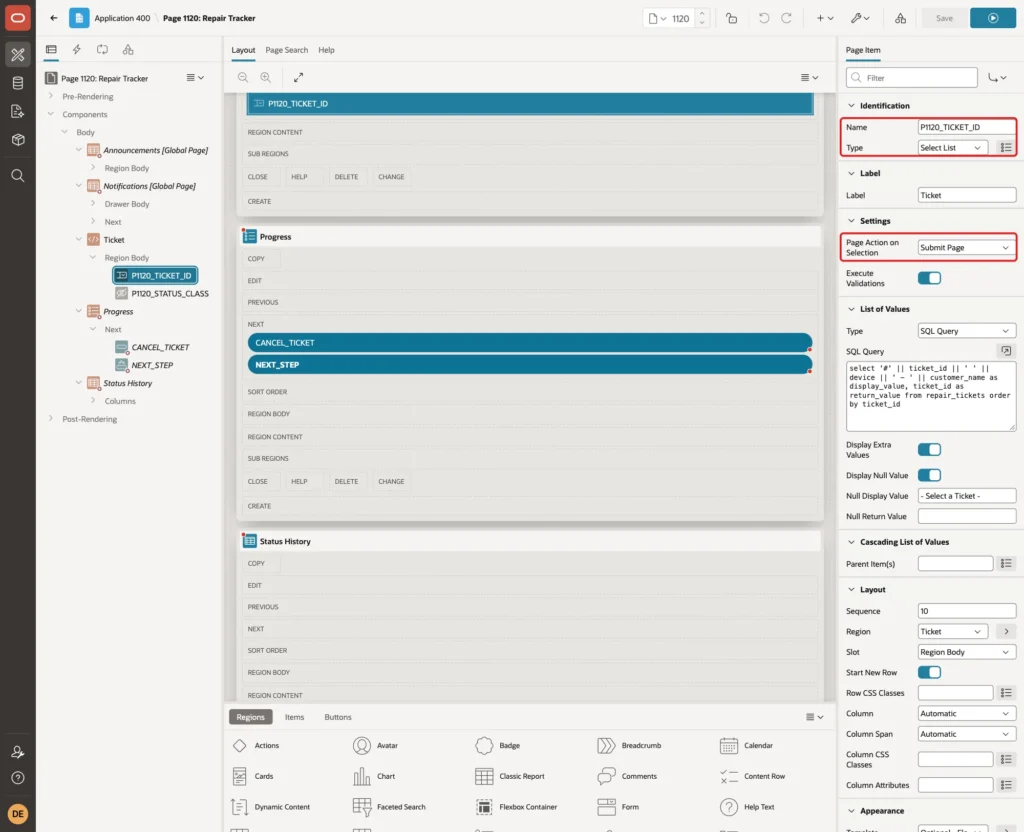
Under List of Values, set Type to SQL Query and enter this query. Keep Display Null Value on and set Null Display Value to - Select a Ticket -:
Example:
select '#' || ticket_id || ' ' || device || ' - ' || customer_name as display_value,
       ticket_id as return_value
  from repair_tickets
 order by ticket_id
Step 6: Add the Hidden Status Class Item
The cancelled step should look different. The tracker region gets a CSS class from the ticket status, and that class comes from a hidden item. Add a page item P1120_STATUS_CLASS to the Ticket region with Type Hidden.
Under Source, set Type to SQL Query (return single value), enter the query below and set Used to Always, replacing any existing value in session state. The item then gets a fresh value every time the page is shown:
Example:
select 'status-' || lower(status_code)
  from repair_tickets
 where ticket_id = :P1120_TICKET_ID

Step 7: Add the Progress Region
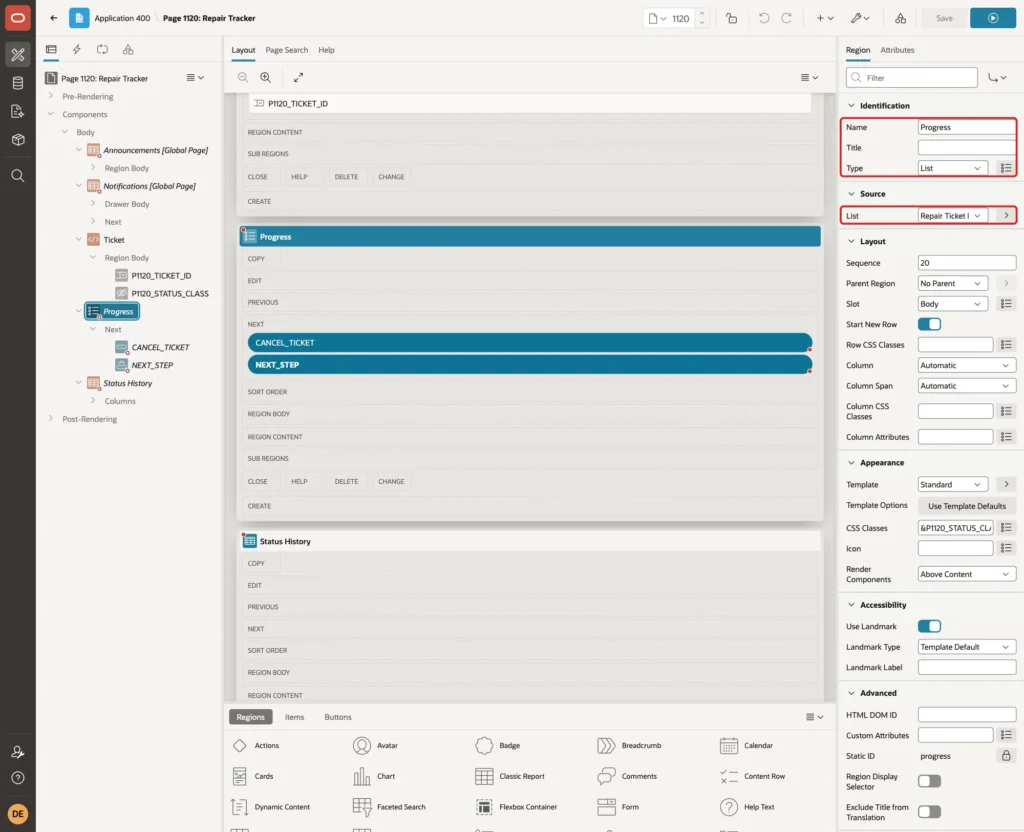
Add a region named Progress after the Ticket region. Set Type to List and Source List to Repair Ticket Progress:
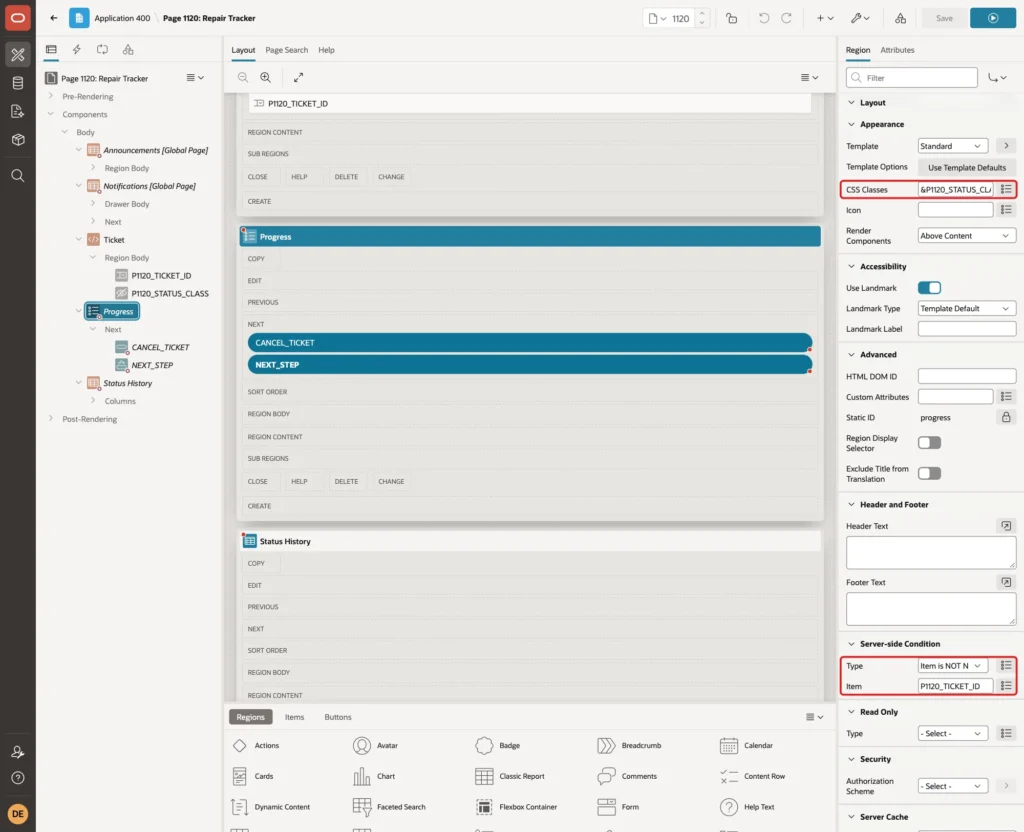
Under Appearance, set CSS Classes to &P1120_STATUS_CLASS. (with the trailing dot). APEX replaces the reference with the item value, so the region gets the class status-cancelled for a cancelled ticket.
Under Server-side Condition, set Type to Item is NOT NULL and Item to P1120_TICKET_ID. The region is then hidden until a ticket is chosen:
On the Attributes tab, set List Template to Wizard Progress. In Template Options, set Label Display to All Steps, so every step shows its name:
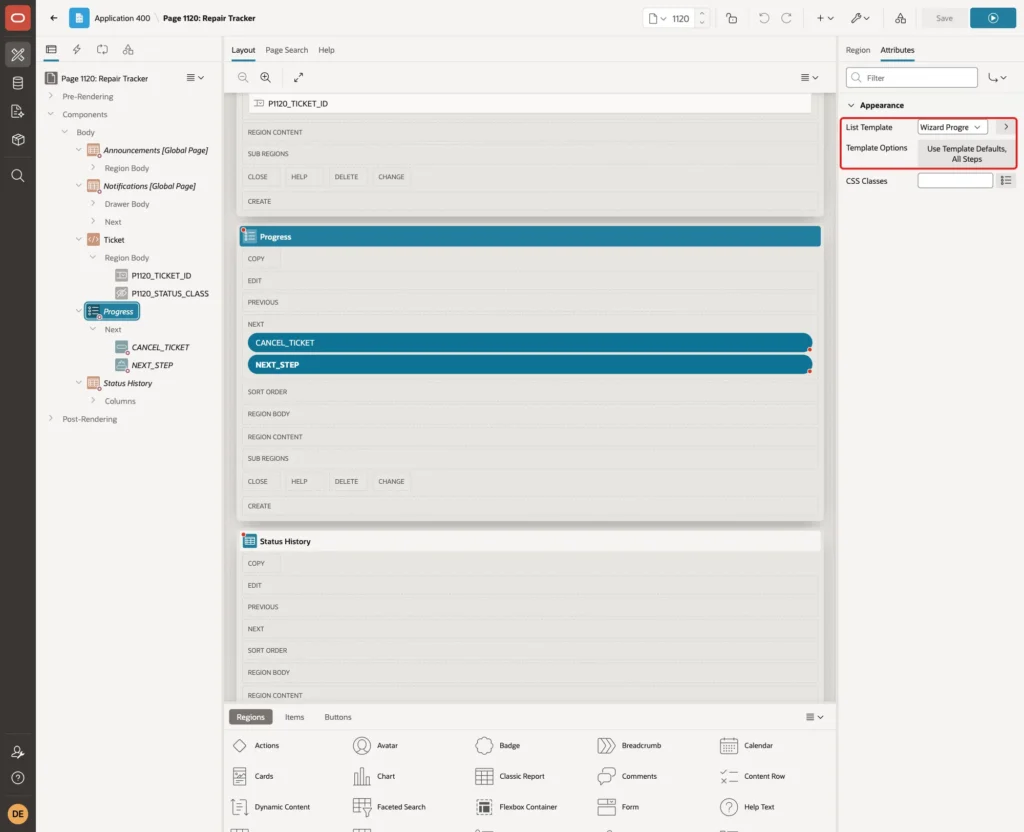
The template marks the entry with IS_CURRENT = YES as the active step. In the tests, Universal Theme also marked every step before it as complete with a green check mark. The query does not need to return a "complete" flag.
Step 8: Style the Cancelled Step
Select the page (Page 1120: Repair Tracker) and enter this CSS in CSS, Inline:
Example:
.status-cancelled .t-WizardSteps-step.is-active .t-WizardSteps-marker {
    background-color: var(--ut-palette-danger);
}
.status-cancelled .t-WizardSteps-step.is-active .t-WizardSteps-label {
    color: var(--ut-palette-danger);
    font-weight: 700;
}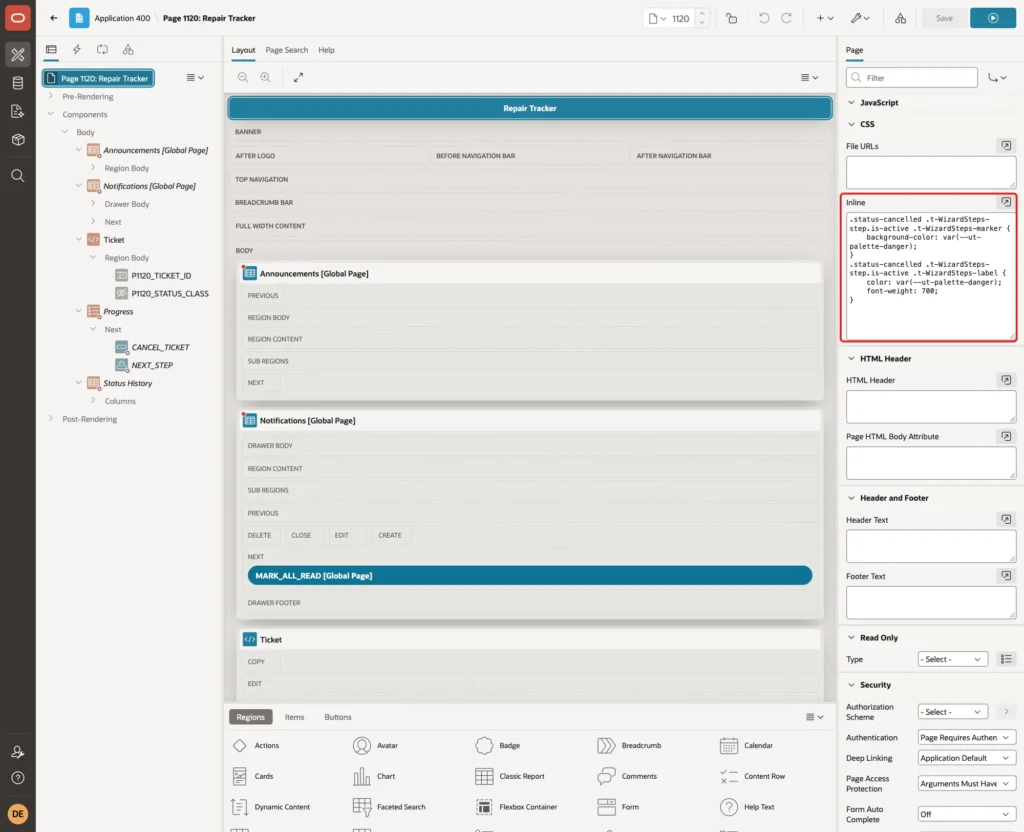
The rules apply only inside a region with the class status-cancelled, and only to the active step. Other tickets keep the normal blue active step. --ut-palette-danger is the Universal Theme danger color, so the red follows the theme style.
Step 9: Add the Status History Report
The tracker shows where the ticket is; a report shows when each step happened and who did it. Add a region named Status History with Type Classic Report, Source Type SQL Query and this query:
Example:
select s.status_name,
       l.changed_on,
       l.changed_by
  from repair_status_log l
  join repair_statuses s on s.status_code = l.status_code
 where l.ticket_id = :P1120_TICKET_ID
 order by l.changed_on, l.log_id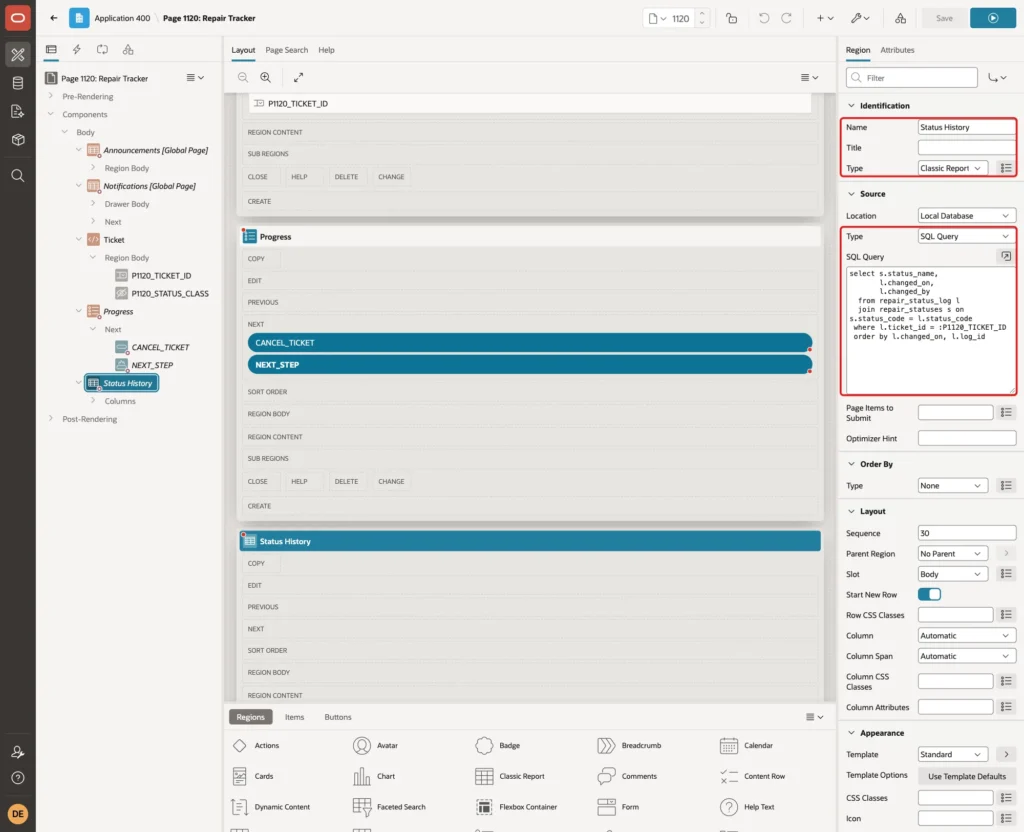
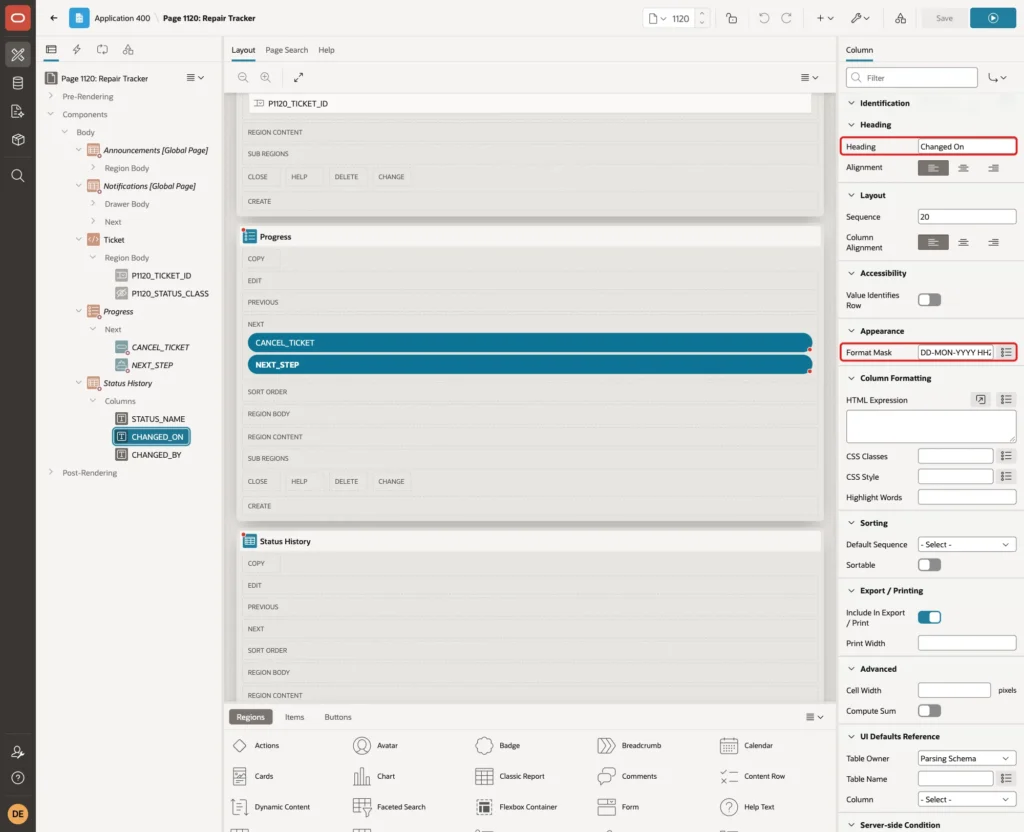
Give it the same Server-side Condition as the Progress region: Item is NOT NULL, P1120_TICKET_ID. Then set the column headings Status, Changed On and Changed By, and the Format Mask DD-MON-YYYY HH24:MI for CHANGED_ON:
Step 10: Add the Buttons
Add a button NEXT_STEP to the Progress region with Label Move to Next Step, Slot Next, Hot on and Action Submit Page:
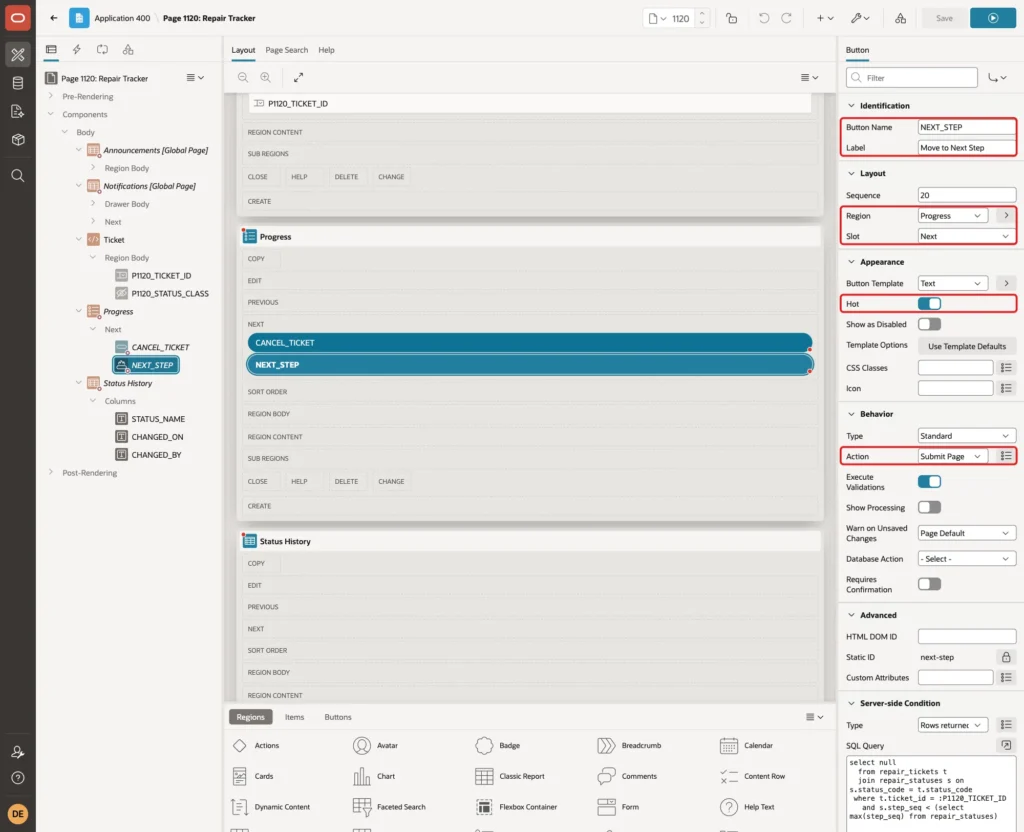
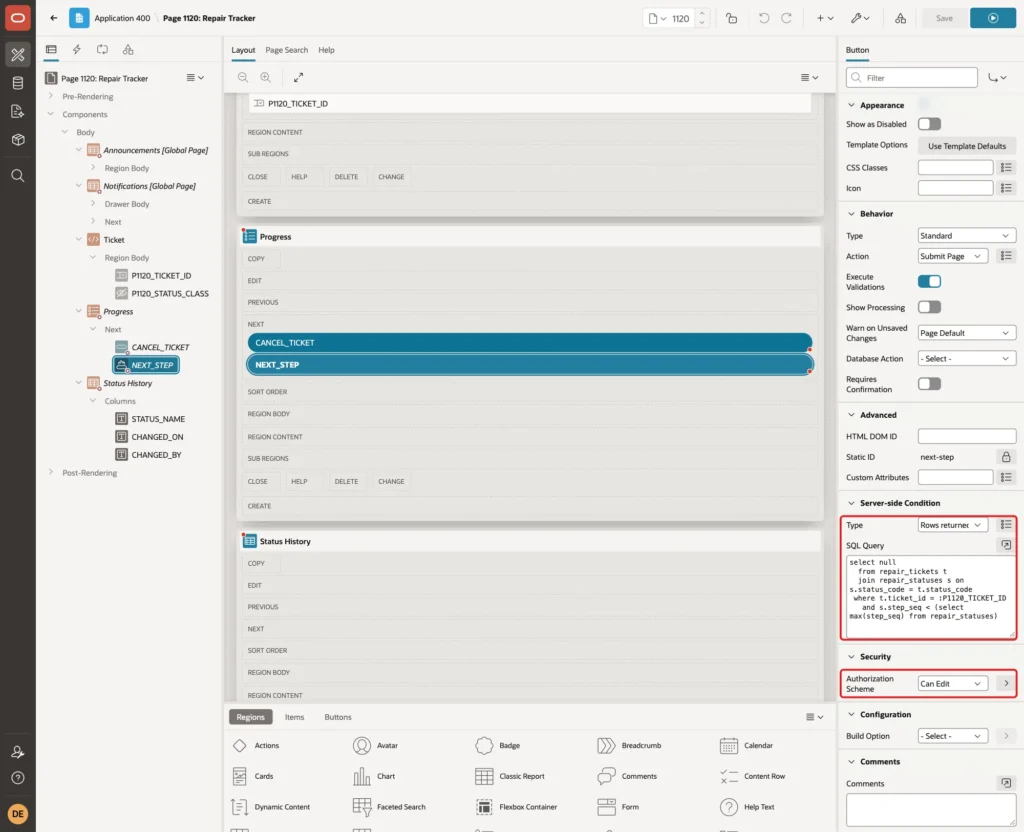
The button should only appear while the ticket is open. Set Server-side Condition Type to Rows returned with this query, which returns a row only when the ticket is on a step before the last one:
Example:
select null
  from repair_tickets t
  join repair_statuses s on s.status_code = t.status_code
 where t.ticket_id = :P1120_TICKET_ID
   and s.step_seq < (select max(step_seq) from repair_statuses)
Set Security, Authorization Scheme to Can Edit. In this application, Can Edit allows the Administrator and Editor roles, so Readers do not see the button:
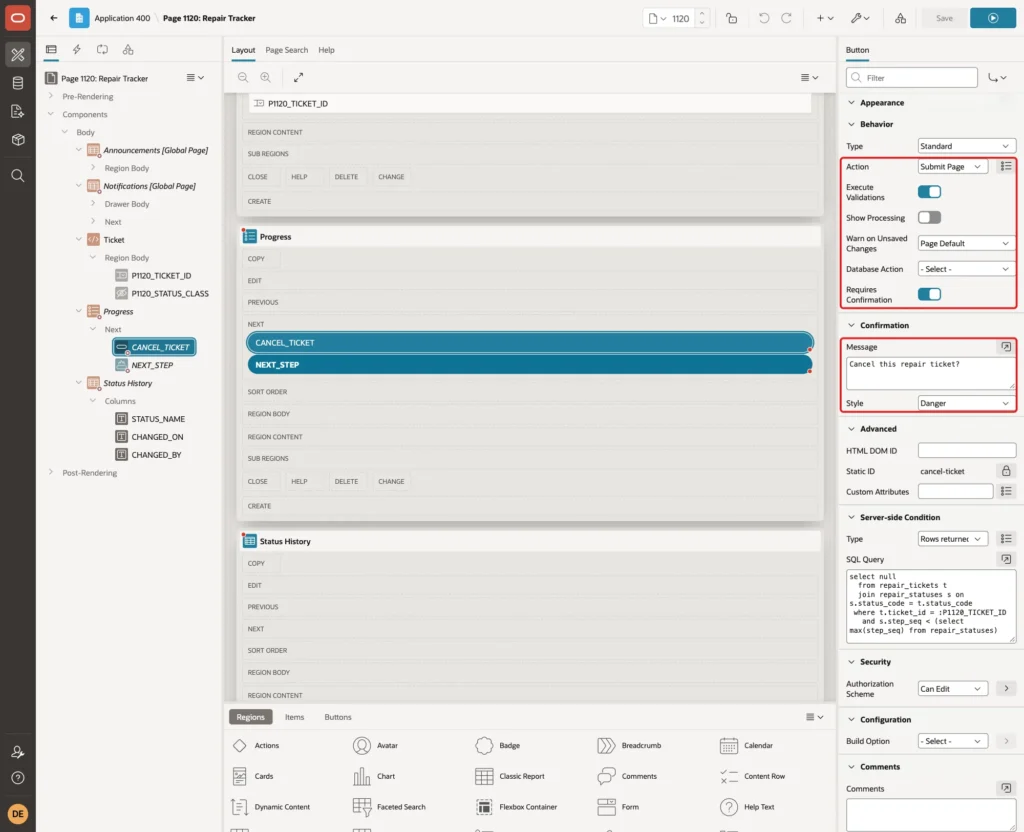
Add a second button CANCEL_TICKET with Label Cancel Ticket, Slot Next, Hot off and Action Submit Page. Give it the same Server-side Condition and Authorization Scheme. Turn Requires Confirmation on, set the Message to Cancel this repair ticket? and the Style to Danger:
Step 11: Add the Process and Branch
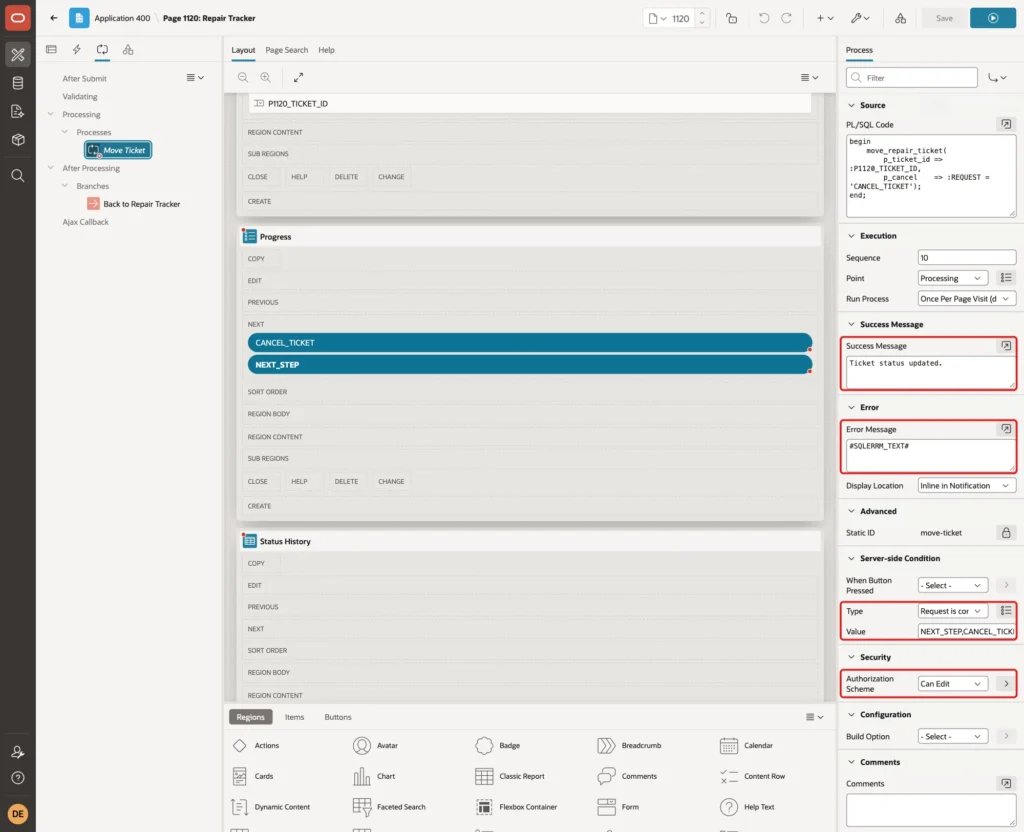
On the Processing tab, add a process named Move Ticket with Type Execute Code and this PL/SQL Code:
Example:
begin
    move_repair_ticket(
        p_ticket_id => :P1120_TICKET_ID,
        p_cancel    => :REQUEST = 'CANCEL_TICKET');
end;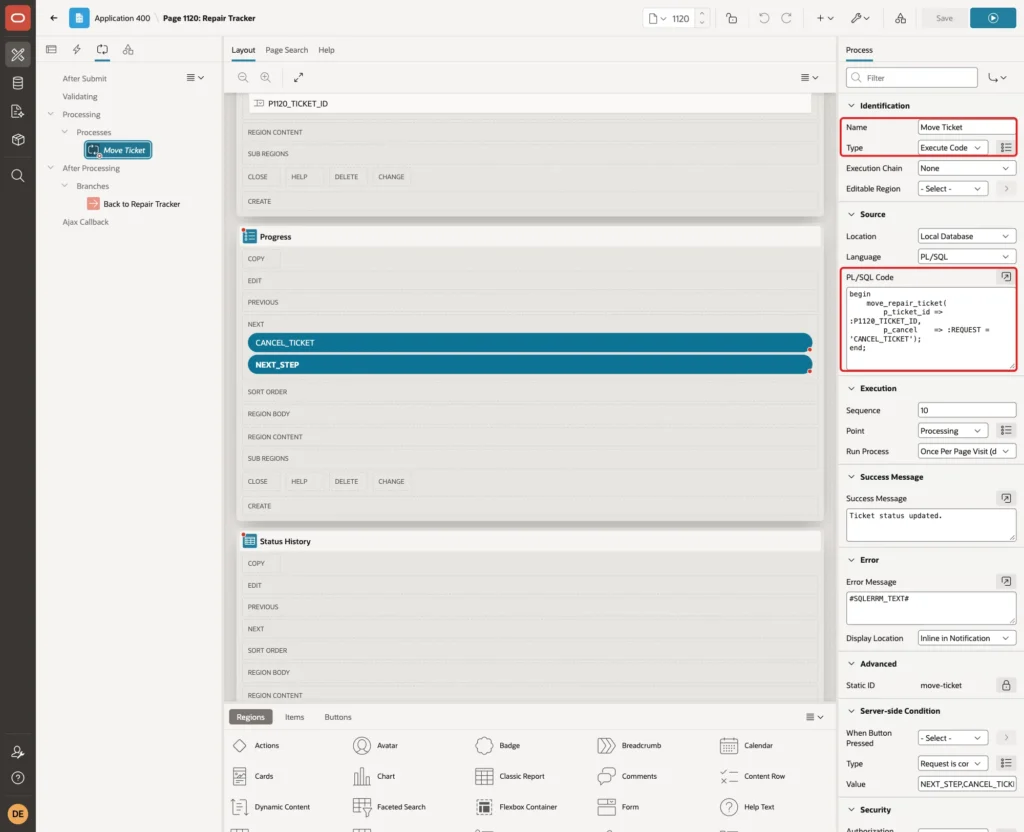
The button name becomes the request, so :REQUEST = 'CANCEL_TICKET' is TRUE for the Cancel Ticket button and FALSE for Move to Next Step. The procedure gets it as P_CANCEL.
Set Success Message to Ticket status updated. and Error Message to #SQLERRM_TEXT#, which shows the procedure's message without the ORA- number. Under Server-side Condition, set Type to Request is contained in Value and Value to NEXT_STEP,CANCEL_TICKET.
Set the Authorization Scheme to Can Edit here too. Hiding a button does not stop a request: the process check is what blocks a user who submits the request without the button:
Finally, add a branch named Back to Repair Tracker after processing, with Type Page or URL (Redirect) and Target page 1120. The ticket stays selected, because P1120_TICKET_ID keeps its value in session state:

Step 12: Test the Tracker
Run the page as ORDER_EDITOR, a user with the Editor role, and choose ticket #1. The ticket is on the first step, Received, and both buttons are shown. Click Move to Next Step:
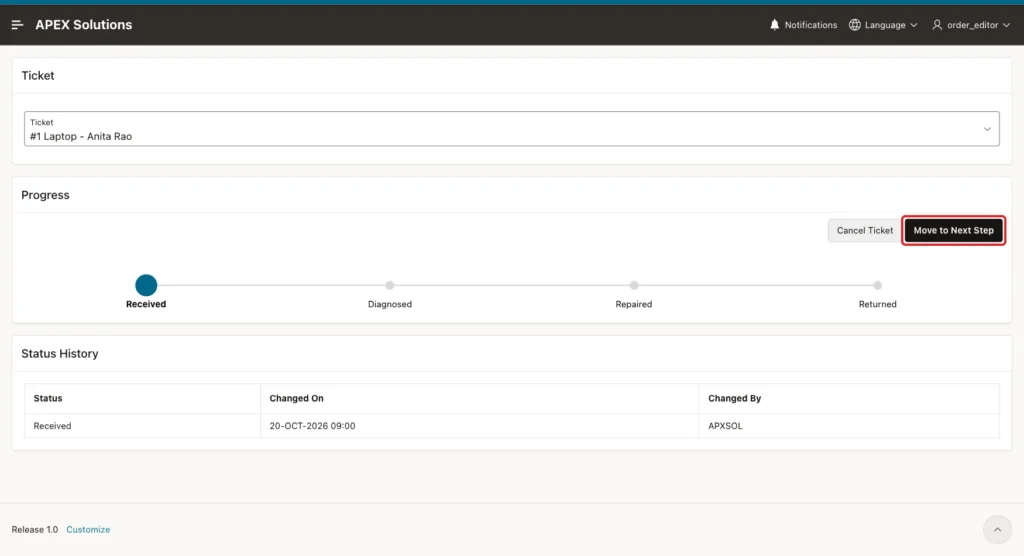
The page reloads with the success message. Received now has a check mark, Diagnosed is the active step, and the history shows the new row with ORDER_EDITOR as the user:

Choose ticket #3, which is on Repaired, and click Cancel Ticket. The confirmation dialog appears:
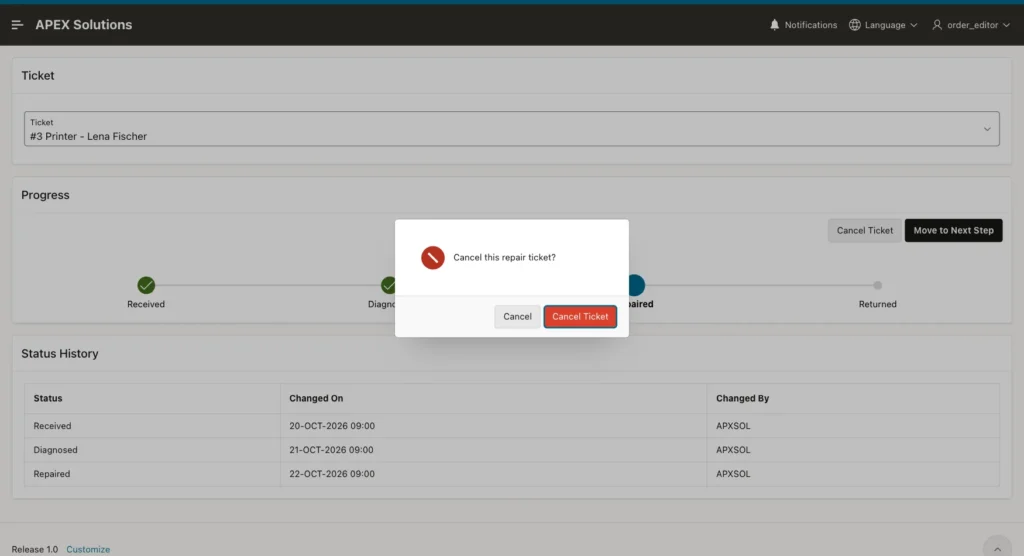
After confirming, the tracker shows the three steps the ticket reached and then Cancelled in red. Returned is no longer shown, and both buttons are gone because the ticket is closed:

Ticket #4 has finished all steps. Returned is the active step, all earlier steps are complete, and no buttons are shown:
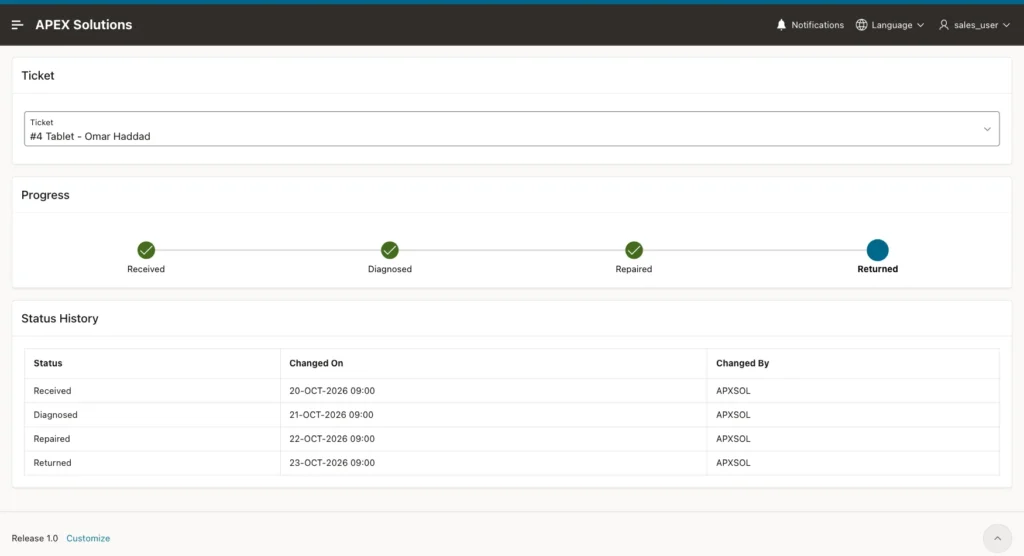
Run the page as SALES_USER, who has the Reader role. The tracker and history are shown, but the buttons are not:
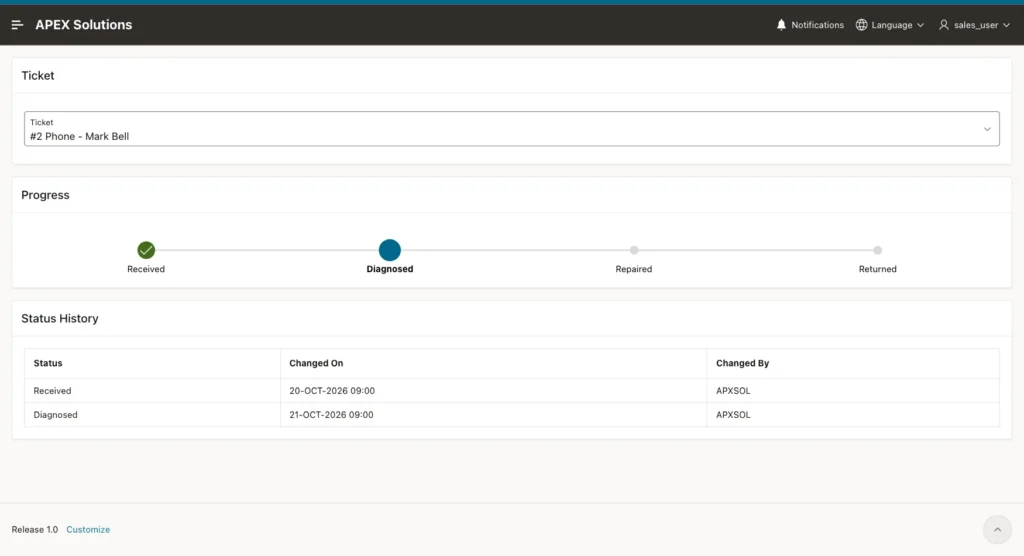
As the same Reader, apex.submit('NEXT_STEP') was then run in the browser console for ticket #2, which sends the button's request without the button. The page reloaded, ticket #2 stayed on Diagnosed, and no log row was added. The process authorization skipped the process.
Next, ORDER_EDITOR opened ticket #2 while a second session cancelled the same ticket in SQL. Clicking Move to Next Step on the open page then showed the procedure's error instead of changing a closed ticket:
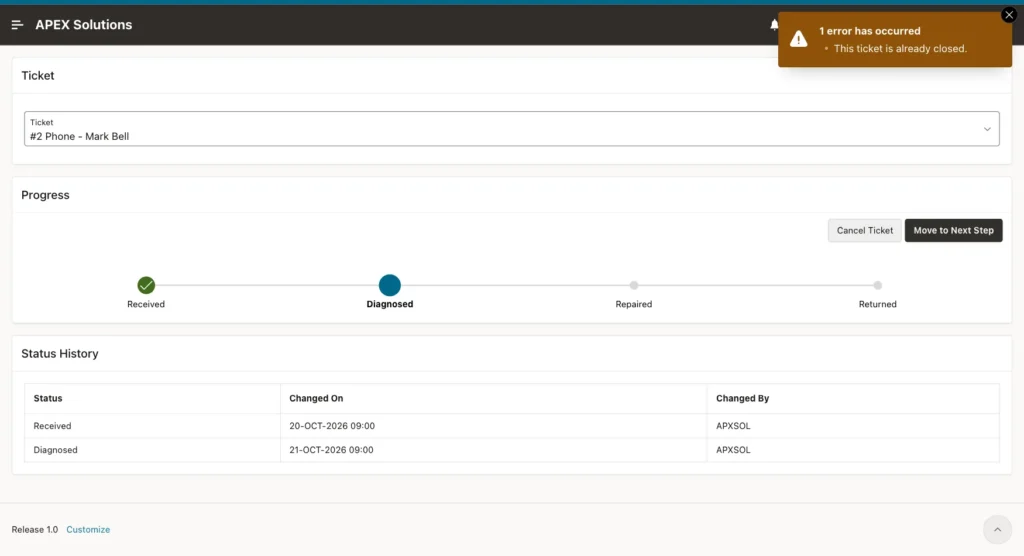
The error notification appears on the page as it was before the click, so the tracker still showed Diagnosed. A repeat of this test with a temporary ticket showed that reloading the page displays the real state: the Cancelled step and no buttons.
The tickets and their history after these tests:
Example:
select t.ticket_id, t.device, t.status_code,
       (select listagg(l.status_code || ' by ' || l.changed_by, ', ')
                 within group (order by l.changed_on, l.log_id)
          from repair_status_log l
         where l.ticket_id = t.ticket_id) as history
  from repair_tickets t
 order by t.ticket_id;
Output:
   TICKET_ID DEVICE     STATUS_CODE    HISTORY
____________ __________ ______________ _________________________________________________________________________________________
           1 Laptop     DIAGNOSED      RECEIVED by APXSOL, DIAGNOSED by ORDER_EDITOR
           2 Phone      CANCELLED      RECEIVED by APXSOL, DIAGNOSED by APXSOL, CANCELLED by APXSOL
           3 Printer    CANCELLED      RECEIVED by APXSOL, DIAGNOSED by APXSOL, REPAIRED by APXSOL, CANCELLED by ORDER_EDITOR
           4 Tablet     RETURNED       RECEIVED by APXSOL, DIAGNOSED by APXSOL, REPAIRED by APXSOL, RETURNED by APXSOL
           5 Camera     CANCELLED      RECEIVED by APXSOL, DIAGNOSED by APXSOL, CANCELLED by APXSOL
Finally, the database rules were tested directly in SQL: moving a returned ticket, moving a ticket that does not exist, and inserting a ticket with an unknown status:
Example:
exec move_repair_ticket(p_ticket_id => 4)

exec move_repair_ticket(p_ticket_id => 999)

insert into repair_tickets (device, problem, customer_name, status_code)
values ('Monitor', 'No signal', 'Ivan Petrov', 'SHIPPED');
Output:
BEGIN move_repair_ticket(p_ticket_id => 4); END;
*
ERROR at line 1:
ORA-20002: This ticket is already closed.
ORA-06512: at "APXSOL.MOVE_REPAIR_TICKET", line 21
ORA-06512: at line 1
Help: https://docs.oracle.com/error-help/db/ora-20002/

BEGIN move_repair_ticket(p_ticket_id => 999); END;
*
ERROR at line 1:
ORA-20001: This ticket does not exist.
ORA-06512: at "APXSOL.MOVE_REPAIR_TICKET", line 36
ORA-06512: at line 1
Help: https://docs.oracle.com/error-help/db/ora-20001/

Error starting at line : 5 File @ b115/05-negative.sql
In command -
insert into repair_tickets (device, problem, customer_name, status_code)
values ('Monitor', 'No signal', 'Ivan Petrov', 'SHIPPED')
Error report -
ORA-02291: integrity constraint (APXSOL.REPAIR_TICKETS_STATUS_FK) violated -
parent key not found
Help: https://docs.oracle.com/error-help/db/ora-02291/
Things to Know
- The order of the steps comes from REPAIR_STATUSES. In a test, a Quality Check row with STEP_SEQ 35 (rolled back afterwards) appeared in the tracker between Repaired and Returned, and the next-step query of the procedure returned it after Repaired.
- The Wizard Progress template has no attribute for an "error" step. The CSS class on the region, set from the hidden item, is the declarative way to change the look of one step.
- The list query uses :P1120_TICKET_ID, so the list belongs to this page. To use the tracker on another page, pass the ticket ID in an item with the same name or write a second list.
- P1120_TICKET_ID has Session State Protection Unrestricted, so any signed-in user can view any ticket. If tickets belong to customers or teams, filter the select list and the queries by the current user.
- CHANGED_ON is filled from the database clock. In this example the database runs in UTC, so a change made at 16:38 India time is shown as 11:08.
Related Guides
- How to Build a Multi-Step Wizard Form in Oracle APEX
- How to Show Progress Bars Inside Report Columns in Oracle APEX
Conclusion
A status progress tracker in Oracle APEX is a list region with the Wizard Progress template and a dynamic list query. The query returns the steps of the record and marks its current status. A class from a hidden item shows a cancelled record in red, and a status log adds the dates.
The tests showed a ticket moving forward, a cancelled ticket stopping at the step it reached, a finished ticket, a Reader without buttons, a blocked forged request and a ticket closed in another session. The same pattern fits any record that moves through fixed steps.
See my articles more often when you search Google.
