
In many applications, a lead hands out work: orders to pack, cases to answer, documents to review. Each record gets an owner, and each user needs one page that lists only their own work, with counts by status. The rules matter too: who may assign work to others, who may take free work, and who may only look.
This guide builds this in Oracle APEX. An administrator assigns many records at once with a shuttle and a select list. Each user sees a My Work page filtered by :APP_USER, with New, In Progress and Done counts. A PL/SQL package enforces the reassign rules for each role, and a log table keeps the history of every assignment.
The guide uses orders as the example; the same steps work for any table. The post How to Build a Work Queue with "Take Next" Using SKIP LOCKED in Oracle APEX lets agents pull the next ticket from a queue themselves.
Here a lead pushes chosen records to chosen users, and the post How to Show "My Pending Approvals" with the Unified Task List in Oracle APEX covers approval tasks, not plain assignment.
Step 1: Create the Tables
The example needs three tables:
- ASG_TEAM_MEMBERS holds the users who can receive work, with an IS_ACTIVE flag.
- ASG_ORDERS holds the records to assign, with STATUS, ASSIGNED_TO and ASSIGNED_ON.
- ASG_ASSIGNMENT_LOG keeps one row for every assignment, reassignment and release.
Create the tables and the sample data:
Example:
create table asg_team_members (
  user_name   varchar2(128)  not null,
  full_name   varchar2(100)  not null,
  is_active   varchar2(1)    default on null 'Y' not null,
  constraint asg_team_members_pk primary key (user_name),
  constraint asg_team_members_upper_ck check (user_name = upper(user_name)),
  constraint asg_team_members_active_ck check (is_active in ('Y', 'N'))
);

create table asg_orders (
  order_id       number generated by default on null as identity,
  order_no       varchar2(20)   not null,
  customer_name  varchar2(100)  not null,
  amount         number(10,2)   not null,
  status         varchar2(12)   default on null 'NEW' not null,
  assigned_to    varchar2(128),
  assigned_on    date,
  constraint asg_orders_pk primary key (order_id),
  constraint asg_orders_no_uk unique (order_no),
  constraint asg_orders_status_ck check (status in ('NEW', 'IN_PROGRESS', 'DONE')),
  constraint asg_orders_assigned_fk foreign key (assigned_to)
    references asg_team_members (user_name),
  constraint asg_orders_assign_ck check (
    (assigned_to is null and assigned_on is null and status = 'NEW')
    or (assigned_to is not null and assigned_on is not null))
);

create index asg_orders_assigned_ix on asg_orders (assigned_to, status);

create table asg_assignment_log (
  log_id      number generated by default on null as identity,
  order_id    number         not null,
  from_user   varchar2(128),
  to_user     varchar2(128),
  changed_by  varchar2(128)  not null,
  changed_on  date           default on null sysdate not null,
  constraint asg_assignment_log_pk primary key (log_id),
  constraint asg_assignment_log_order_fk foreign key (order_id)
    references asg_orders (order_id) on delete cascade
);

create index asg_assignment_log_order_ix on asg_assignment_log (order_id, changed_on);

insert into asg_team_members (user_name, full_name) values ('DEMO_DEV', 'Demo Developer');
insert into asg_team_members (user_name, full_name) values ('SALES_MANAGER', 'Sales Manager');
insert into asg_team_members (user_name, full_name) values ('ORDER_EDITOR', 'Order Editor');
insert into asg_team_members (user_name, full_name) values ('RAVI', 'Ravi Kumar');
insert into asg_team_members (user_name, full_name, is_active) values ('LINDA', 'Linda Brown', 'N');

insert into asg_orders (order_no, customer_name, amount) values ('SO-2001', 'Green Valley Market', 1250);
insert into asg_orders (order_no, customer_name, amount) values ('SO-2002', 'Blue Harbor Cafe', 480.50);
insert into asg_orders (order_no, customer_name, amount) values ('SO-2003', 'Northwind Books', 2310);
insert into asg_orders (order_no, customer_name, amount) values ('SO-2004', 'Sunrise Bakery', 96.40);
insert into asg_orders (order_no, customer_name, amount) values ('SO-2005', 'Metro Office Supply', 3875);
insert into asg_orders (order_no, customer_name, amount) values ('SO-2006', 'Lakeside Hotel', 1540);
insert into asg_orders (order_no, customer_name, amount, status, assigned_to, assigned_on)
  values ('SO-2007', 'Hilltop Garage', 720, 'IN_PROGRESS', 'RAVI', sysdate - 1);
insert into asg_orders (order_no, customer_name, amount, status, assigned_to, assigned_on)
  values ('SO-2008', 'City Flower Shop', 215, 'DONE', 'RAVI', sysdate - 2);
commit;

select order_id, order_no, customer_name, amount, status, assigned_to
from asg_orders
order by order_id;
Output:
Table ASG_TEAM_MEMBERS created.

Table ASG_ORDERS created.

Index ASG_ORDERS_ASSIGNED_IX created.

Table ASG_ASSIGNMENT_LOG created.

Index ASG_ASSIGNMENT_LOG_ORDER_IX created.

1 row inserted.

1 row inserted.

1 row inserted.

1 row inserted.

1 row inserted.

1 row inserted.

1 row inserted.

1 row inserted.

1 row inserted.

1 row inserted.

1 row inserted.

1 row inserted.

1 row inserted.

Commit complete.

   ORDER_ID ORDER_NO    CUSTOMER_NAME             AMOUNT STATUS         ASSIGNED_TO
___________ ___________ ______________________ _________ ______________ ______________
          1 SO-2001     Green Valley Market         1250 NEW
          2 SO-2002     Blue Harbor Cafe           480.5 NEW
          3 SO-2003     Northwind Books             2310 NEW
          4 SO-2004     Sunrise Bakery              96.4 NEW
          5 SO-2005     Metro Office Supply         3875 NEW
          6 SO-2006     Lakeside Hotel              1540 NEW
          7 SO-2007     Hilltop Garage               720 IN_PROGRESS    RAVI
          8 SO-2008     City Flower Shop             215 DONE           RAVI

8 rows selected.- ASG_ORDERS_ASSIGNED_FK allows only user names from ASG_TEAM_MEMBERS in ASSIGNED_TO.
- ASG_ORDERS_ASSIGN_CK keeps the columns consistent: an unassigned order has no date and status NEW, and an assigned order always has a date.
- ASG_TEAM_MEMBERS_UPPER_CK stores user names in upper case, the same way APEX returns :APP_USER.
- STATUS, IS_ACTIVE and CHANGED_ON use DEFAULT ON NULL, so no trigger is needed to fill them.
- The index ASG_ORDERS_ASSIGNED_IX on (ASSIGNED_TO, STATUS) serves the My Work page and its counts.
LINDA is an inactive team member. RAVI is a team member who is not an APEX user in this example. RAVI already has one order in progress and one done.
Step 2: Create the Assignment Package
The rules live in one package, so the pages cannot skip them. The roles come from the Access Control roles of the application in the view APEX_APPL_ACL_USER_ROLES:
- An administrator can assign or reassign any open order to any active team member.
- An editor can take an unassigned order for themselves and release their own orders.
- Any other user cannot assign work.
- Only the assigned user can move an order from New to In Progress and from In Progress to Done.
Create the package:
Example:
create or replace package asg_pkg as
  c_app_id constant number := 400;

  procedure assign_order (
    p_order_id  in number,
    p_to_user   in varchar2,
    p_actor     in varchar2);

  function assign_orders (
    p_order_ids in varchar2,
    p_to_user   in varchar2,
    p_actor     in varchar2) return number;

  procedure set_status (
    p_order_id  in number,
    p_status    in varchar2,
    p_actor     in varchar2);
end asg_pkg;
/

create or replace package body asg_pkg as

  function has_role (p_user in varchar2, p_role in varchar2) return boolean is
    l_count number;
  begin
    select count(*)
      into l_count
      from apex_appl_acl_user_roles
     where application_id = c_app_id
       and user_name = upper(p_user)
       and role_static_id = p_role;
    return l_count > 0;
  end has_role;

  procedure assign_order (
    p_order_id  in number,
    p_to_user   in varchar2,
    p_actor     in varchar2)
  is
    l_order     asg_orders%rowtype;
    l_to_user   asg_orders.assigned_to%type := upper(p_to_user);
    l_is_admin  boolean := has_role(p_actor, 'administrator');
    l_active    number;
  begin
    select *
      into l_order
      from asg_orders
     where order_id = p_order_id
       for update;

    if l_order.status = 'DONE' then
      raise_application_error(-20004, 'Order ' || l_order.order_no || ' is done and cannot be reassigned.');
    end if;

    if not l_is_admin then
      if not has_role(p_actor, 'editor') then
        raise_application_error(-20002, 'You are not allowed to assign work.');
      elsif l_to_user is not null and l_to_user <> upper(p_actor) then
        raise_application_error(-20002, 'Only an administrator can assign work to other users.');
      elsif l_to_user is not null and l_order.assigned_to is not null then
        raise_application_error(-20003, 'Order ' || l_order.order_no || ' is already assigned to ' || l_order.assigned_to || '.');
      elsif l_to_user is null and nvl(l_order.assigned_to, '-') <> upper(p_actor) then
        raise_application_error(-20002, 'You can only release your own work.');
      end if;
    end if;

    if l_to_user is not null then
      select count(*)
        into l_active
        from asg_team_members
       where user_name = l_to_user
         and is_active = 'Y';
      if l_active = 0 then
        raise_application_error(-20001, l_to_user || ' is not an active team member.');
      end if;
    end if;

    if l_order.assigned_to = l_to_user
       or (l_order.assigned_to is null and l_to_user is null) then
      return;
    end if;

    update asg_orders
       set assigned_to = l_to_user,
           assigned_on = case when l_to_user is not null then sysdate end,
           status      = case when l_to_user is null then 'NEW' else status end
     where order_id = p_order_id;

    insert into asg_assignment_log (order_id, from_user, to_user, changed_by)
    values (p_order_id, l_order.assigned_to, l_to_user, upper(p_actor));
  exception
    when no_data_found then
      raise_application_error(-20005, 'Order ' || p_order_id || ' does not exist.');
  end assign_order;

  function assign_orders (
    p_order_ids in varchar2,
    p_to_user   in varchar2,
    p_actor     in varchar2) return number
  is
    l_ids apex_t_number := apex_string.split_numbers(p_order_ids, ':');
  begin
    if not has_role(p_actor, 'administrator') then
      raise_application_error(-20002, 'Only an administrator can assign work in bulk.');
    end if;
    savepoint before_bulk_assign;
    for i in 1 .. l_ids.count loop
      assign_order(l_ids(i), p_to_user, p_actor);
    end loop;
    return l_ids.count;
  exception
    when others then
      rollback to before_bulk_assign;
      raise;
  end assign_orders;

  procedure set_status (
    p_order_id  in number,
    p_status    in varchar2,
    p_actor     in varchar2)
  is
  begin
    update asg_orders
       set status = p_status
     where order_id = p_order_id
       and assigned_to = upper(p_actor)
       and (   (status = 'NEW' and p_status = 'IN_PROGRESS')
            or (status = 'IN_PROGRESS' and p_status = 'DONE'));
    if sql%rowcount = 0 then
      raise_application_error(-20006, 'This order is not in your work list or cannot change to ' || p_status || '.');
    end if;
  end set_status;

end asg_pkg;
/
select object_name, object_type, status from user_objects where object_name = 'ASG_PKG' order by object_type;
Output:
Package ASG_PKG compiled

Package Body ASG_PKG compiled

OBJECT_NAME    OBJECT_TYPE     STATUS
______________ _______________ _________
ASG_PKG        PACKAGE         VALID
ASG_PKG        PACKAGE BODY    VALID
C_APP_ID holds the application ID, 400 in this example. Change it to your application ID. The role static IDs are lower case, as APEX stores them.
ASSIGN_ORDER reads the order with FOR UPDATE. A second session that wants the same order waits until the first one commits, and then it sees the new owner. Step 4 tests this.
ASSIGN_ORDERS takes the colon-separated list of a shuttle item and calls ASSIGN_ORDER for each ID. On any error it rolls back to its savepoint, so a bulk assignment is all or nothing. SET_STATUS updates only an order of the given user and only along the allowed status steps.
A trigger could not do this work, because the rules depend on who acts, and the actor is not a column of the table. Neither procedure commits; APEX commits at the end of the request.
Step 3: Test the Rules in SQL
Call ASSIGN_ORDER as different users and print the result of each call. The test is rolled back at the end:
Example:
set serveroutput on
declare
  procedure try (p_label in varchar2, p_order_id in number, p_to_user in varchar2, p_actor in varchar2) is
  begin
    asg_pkg.assign_order(p_order_id, p_to_user, p_actor);
    dbms_output.put_line(rpad(p_label, 34) || 'OK');
  exception
    when others then
      dbms_output.put_line(rpad(p_label, 34) || sqlerrm);
  end try;
begin
  try('Admin assigns 1 to ORDER_EDITOR', 1, 'ORDER_EDITOR', 'DEMO_DEV');
  try('Editor takes 2 for self', 2, 'ORDER_EDITOR', 'ORDER_EDITOR');
  try('Editor gives 3 to RAVI', 3, 'RAVI', 'ORDER_EDITOR');
  try('Editor takes 7 (RAVI''s)', 7, 'ORDER_EDITOR', 'ORDER_EDITOR');
  try('Editor releases 7 (RAVI''s)', 7, null, 'ORDER_EDITOR');
  try('Reader takes 3', 3, 'SALES_USER', 'SALES_USER');
  try('Admin assigns 3 to LINDA', 3, 'LINDA', 'DEMO_DEV');
  try('Admin reassigns 8 (done)', 8, 'ORDER_EDITOR', 'DEMO_DEV');
  try('Admin reassigns 1 to RAVI', 1, 'RAVI', 'DEMO_DEV');
  try('Editor releases 2', 2, null, 'ORDER_EDITOR');
end;
/

select order_id, order_no, status, assigned_to
from asg_orders
where order_id in (1, 2, 3, 7, 8)
order by order_id;

select order_id, from_user, to_user, changed_by
from asg_assignment_log
order by log_id;

rollback;
Output:
Admin assigns 1 to ORDER_EDITOR   OK
Editor takes 2 for self           OK
Editor gives 3 to RAVI            ORA-20002: Only an administrator can assign work to other users.
Editor takes 7 (RAVI's)           ORA-20003: Order SO-2007 is already assigned to RAVI.
Editor releases 7 (RAVI's)        ORA-20002: You can only release your own work.
Reader takes 3                    ORA-20002: You are not allowed to assign work.
Admin assigns 3 to LINDA          ORA-20001: LINDA is not an active team member.
Admin reassigns 8 (done)          ORA-20004: Order SO-2008 is done and cannot be reassigned.
Admin reassigns 1 to RAVI         OK
Editor releases 2                 OK

PL/SQL procedure successfully completed.

   ORDER_ID ORDER_NO    STATUS         ASSIGNED_TO
___________ ___________ ______________ ______________
          1 SO-2001     NEW            RAVI
          2 SO-2002     NEW
          3 SO-2003     NEW
          7 SO-2007     IN_PROGRESS    RAVI
          8 SO-2008     DONE           RAVI

   ORDER_ID FROM_USER       TO_USER         CHANGED_BY
___________ _______________ _______________ _______________
          1                 ORDER_EDITOR    DEMO_DEV
          2                 ORDER_EDITOR    ORDER_EDITOR
          1 ORDER_EDITOR    RAVI            DEMO_DEV
          2 ORDER_EDITOR                    ORDER_EDITOR

Rollback complete.
The administrator DEMO_DEV assigned and reassigned orders. The editor could take a free order and release it, but not give work to RAVI or take RAVI's order. The reader SALES_USER, the inactive LINDA and the done order SO-2008 were all refused. The log shows four rows, one for each change.
Now test the status steps and a direct update that skips the package:
Example:
set serveroutput on
declare
  procedure try (p_label in varchar2, p_order_id in number, p_status in varchar2, p_actor in varchar2) is
  begin
    asg_pkg.set_status(p_order_id, p_status, p_actor);
    dbms_output.put_line(rpad(p_label, 34) || 'OK');
  exception
    when others then
      dbms_output.put_line(rpad(p_label, 34) || sqlerrm);
  end try;
begin
  asg_pkg.assign_order(2, 'ORDER_EDITOR', 'ORDER_EDITOR');
  try('Editor starts 2', 2, 'IN_PROGRESS', 'ORDER_EDITOR');
  try('Editor finishes 2', 2, 'DONE', 'ORDER_EDITOR');
  try('Editor starts 2 again', 2, 'IN_PROGRESS', 'ORDER_EDITOR');
  try('Editor finishes 7 (RAVI''s)', 7, 'DONE', 'ORDER_EDITOR');
end;
/

update asg_orders set assigned_to = null where order_id = 7;

select order_id, order_no, status, assigned_to
from asg_orders
where order_id in (2, 7)
order by order_id;

rollback;
Output:
Editor starts 2                   OK
Editor finishes 2                 OK
Editor starts 2 again             ORA-20006: This order is not in your work list or cannot change to IN_PROGRESS.
Editor finishes 7 (RAVI's)        ORA-20006: This order is not in your work list or cannot change to DONE.

PL/SQL procedure successfully completed.

Error starting at line : 20 File @ b74/31-status.sql
In command -
update asg_orders set assigned_to = null where order_id = 7
Error report -
ORA-02290: check constraint (APXSOL.ASG_ORDERS_ASSIGN_CK) violated
Help: https://docs.oracle.com/error-help/db/ora-02290/

   ORDER_ID ORDER_NO    STATUS         ASSIGNED_TO
___________ ___________ ______________ _______________
          2 SO-2002     DONE           ORDER_EDITOR
          7 SO-2007     IN_PROGRESS    RAVI

Rollback complete.
The editor could start and finish their own order once, but not finish RAVI's order. The direct UPDATE failed on ASG_ORDERS_ASSIGN_CK, because an order in progress must have an owner.
Step 4: Test Two Users Assigning the Same Order
Run two sessions at the same time. Session A is the administrator, who assigns SO-2003 to RAVI and commits six seconds later:
Example:
set serveroutput on
exec asg_pkg.assign_order(3, 'RAVI', 'DEMO_DEV');
select to_char(systimestamp, 'HH24:MI:SS') as assigned_at from dual;
exec dbms_session.sleep(6);
commit;
select to_char(systimestamp, 'HH24:MI:SS') as committed_at from dual;
Output:
PL/SQL procedure successfully completed.

ASSIGNED_AT
______________
18:58:19

PL/SQL procedure successfully completed.

Commit complete.

COMMITTED_AT
_______________
18:58:25
Session B is the editor, who tries to take the same order two seconds after A started:
Example:
set serveroutput on
select to_char(systimestamp, 'HH24:MI:SS') as started_at from dual;
begin
  asg_pkg.assign_order(3, 'ORDER_EDITOR', 'ORDER_EDITOR');
  dbms_output.put_line('Taken');
exception
  when others then
    dbms_output.put_line(sqlerrm);
end;
/
select to_char(systimestamp, 'HH24:MI:SS') as finished_at from dual;
rollback;
Output:
STARTED_AT
_____________
18:58:23

ORA-20003: Order SO-2003 is already assigned to RAVI.

PL/SQL procedure successfully completed.

FINISHED_AT
______________
18:58:25

Rollback complete.
Session B waited on the FOR UPDATE lock until A committed at the same second. It then read the committed row and got ORA-20003, so the editor did not overwrite RAVI. After this test, SO-2003 was set back to unassigned.
Step 5: Create the Assign Work Page
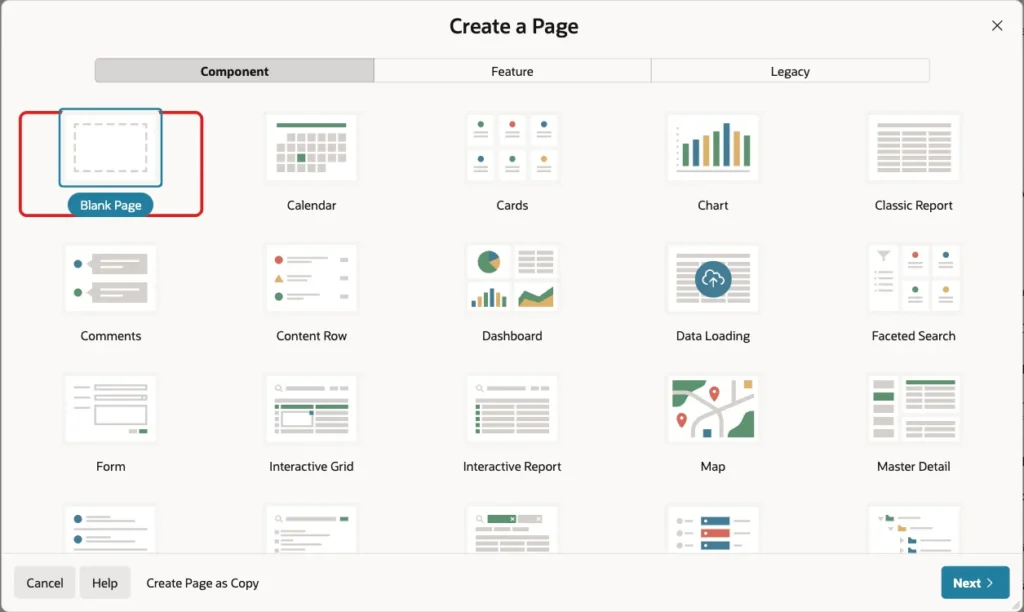
In App Builder, open the application, click Create Page and select Blank Page:
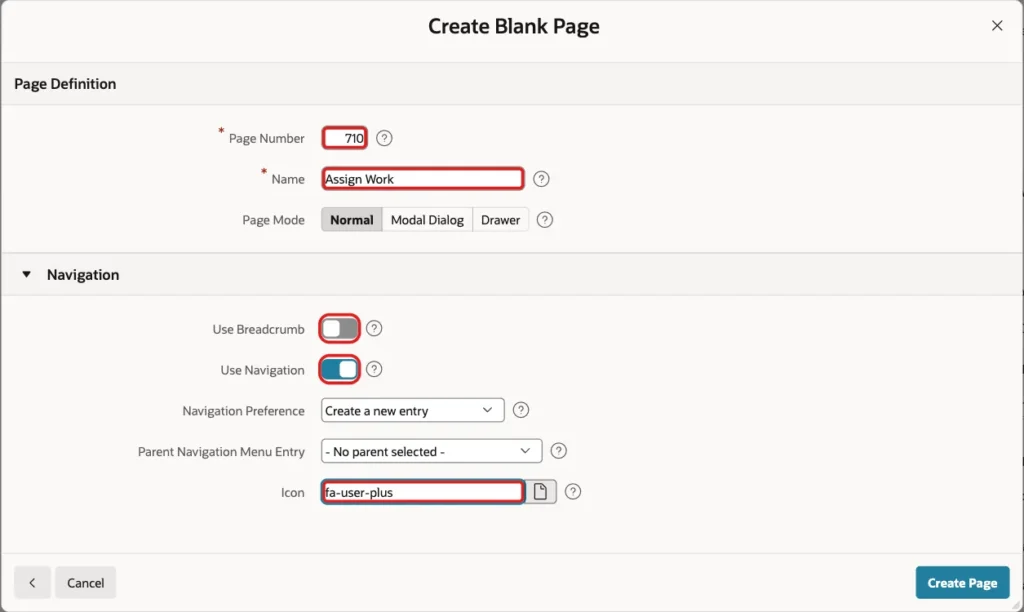
Enter page number 710 and the name Assign Work. Turn Use Breadcrumb off, keep Use Navigation on and enter the icon fa-user-plus. Click Create Page:
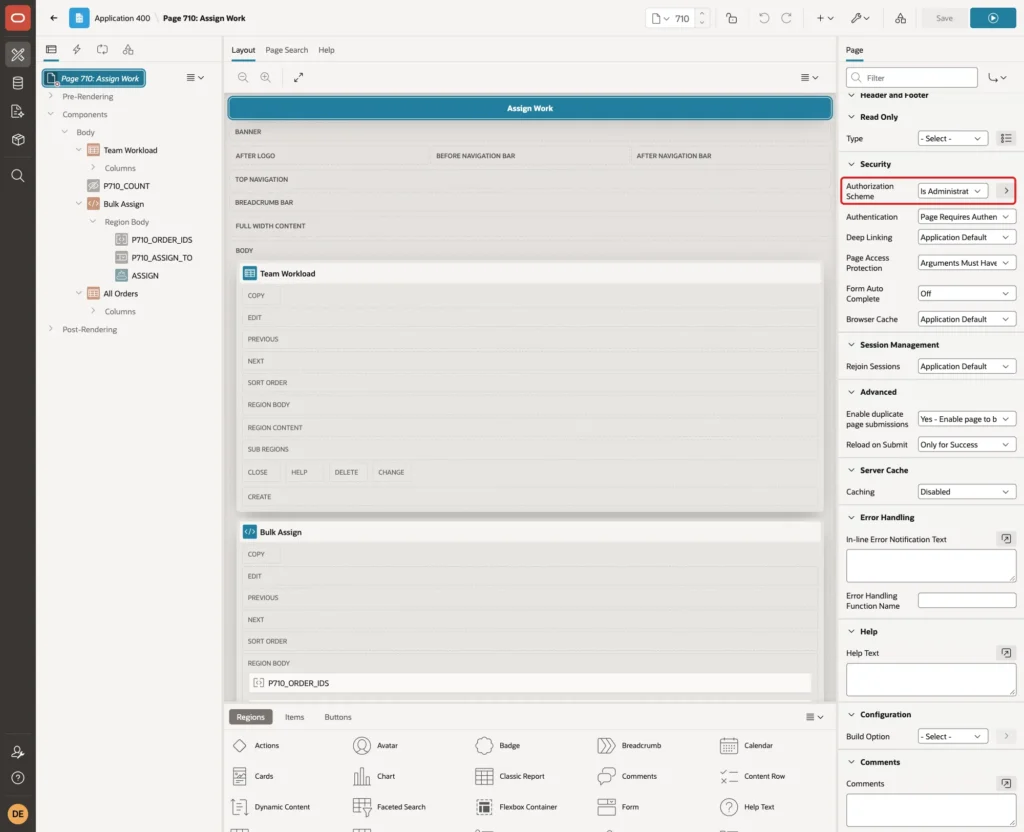
Only administrators assign work to others. In Page Designer, select the page node and set Security, Authorization Scheme to Is Administrator:
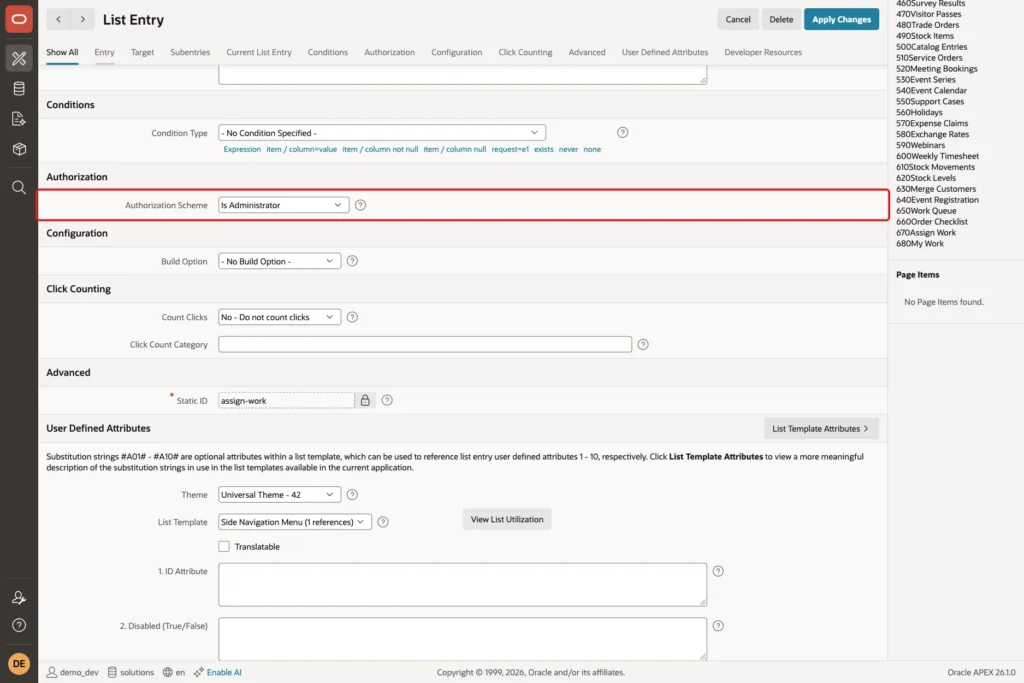
The wizard also created an Assign Work entry in the navigation menu. In Shared Components, open Navigation Menu, edit the Assign Work entry, set Authorization Scheme to Is Administrator and click Apply Changes:
Step 6: Add the Team Workload Report
Right-click Body and select Create Region. Set Name to Team Workload, Type to Classic Report and enter this SQL Query:
Example:
select m.full_name,
       count(case when o.status = 'NEW' then 1 end)         as new_count,
       count(case when o.status = 'IN_PROGRESS' then 1 end) as in_progress_count,
       count(case when o.status = 'DONE' then 1 end)        as done_count
from   asg_team_members m
       left join asg_orders o on o.assigned_to = m.user_name
where  m.is_active = 'Y'
group  by m.full_name
order  by m.full_name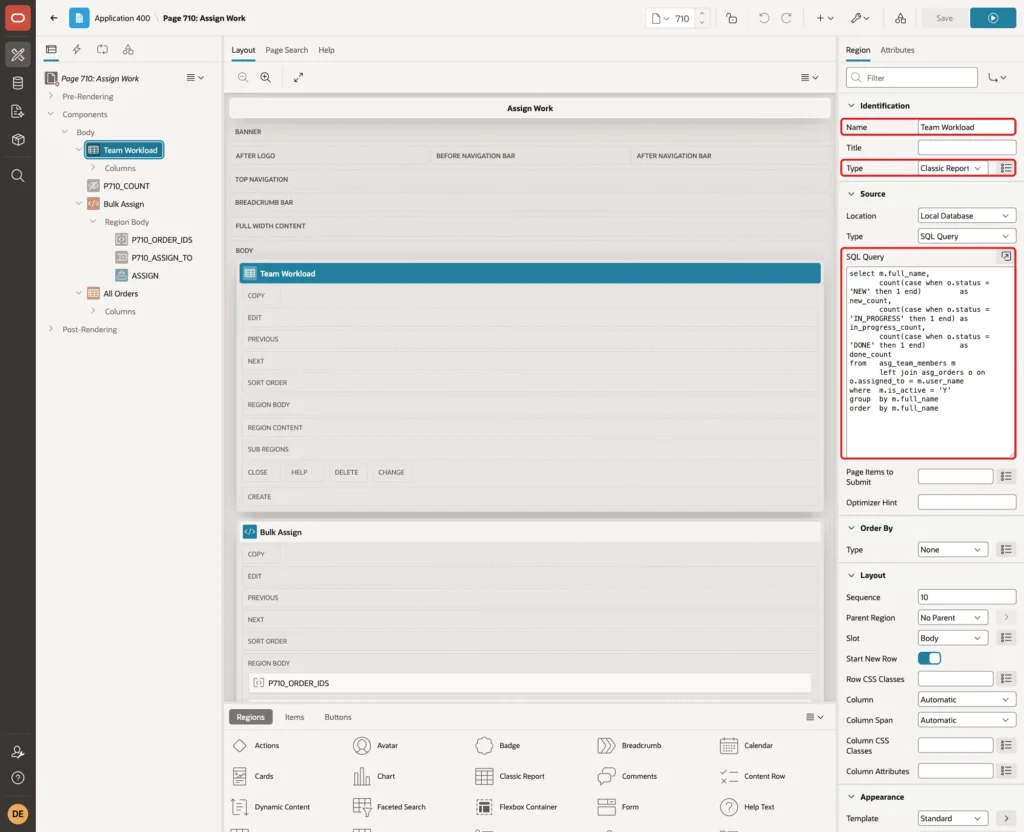
The LEFT JOIN keeps team members without work in the list with zeros. Set the column headings to Team Member, New, In Progress and Done.
Step 7: Add the Bulk Assign Region
Create a second region. Set Name to Bulk Assign and Type to Static Content:
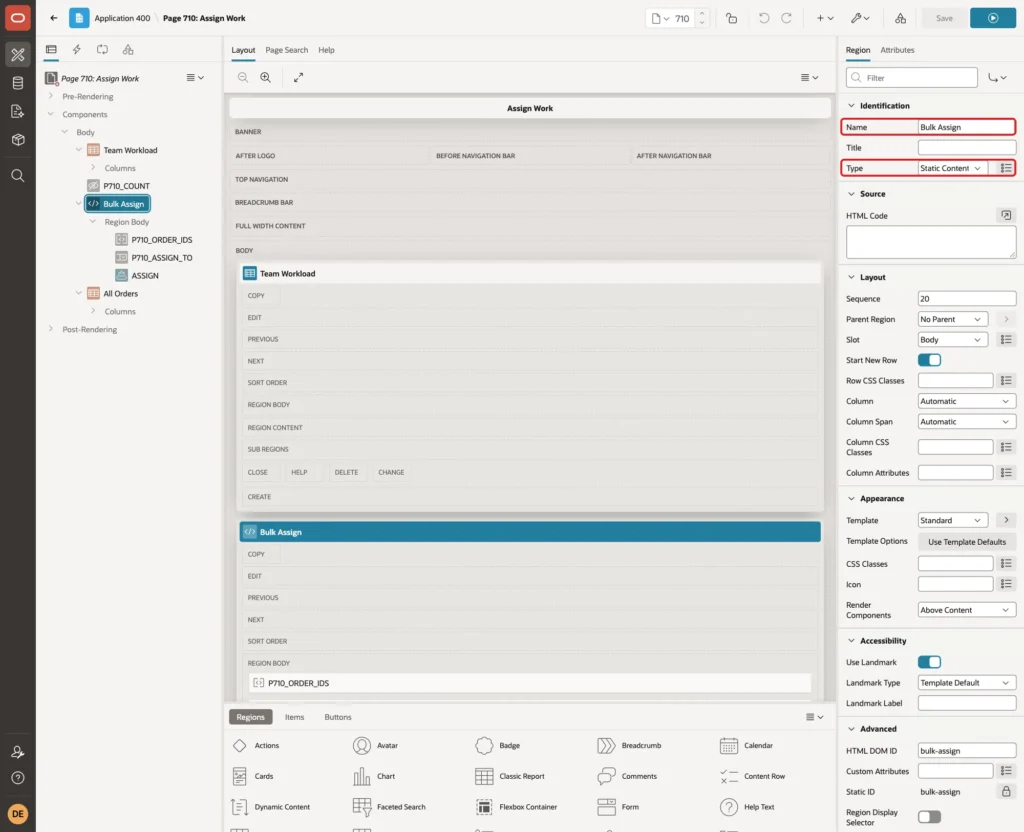
Right-click Bulk Assign and select Create Page Item. Set Name to P710_ORDER_IDS, Type to Shuttle and Label to Orders. Set List of Values, Type to SQL Query and enter this query:
Example:
select order_no || ' - ' || customer_name || ' (' || nvl(assigned_to, 'unassigned') || ')' as display_value,
       order_id as return_value
from   asg_orders
where  status <> 'DONE'
order  by order_no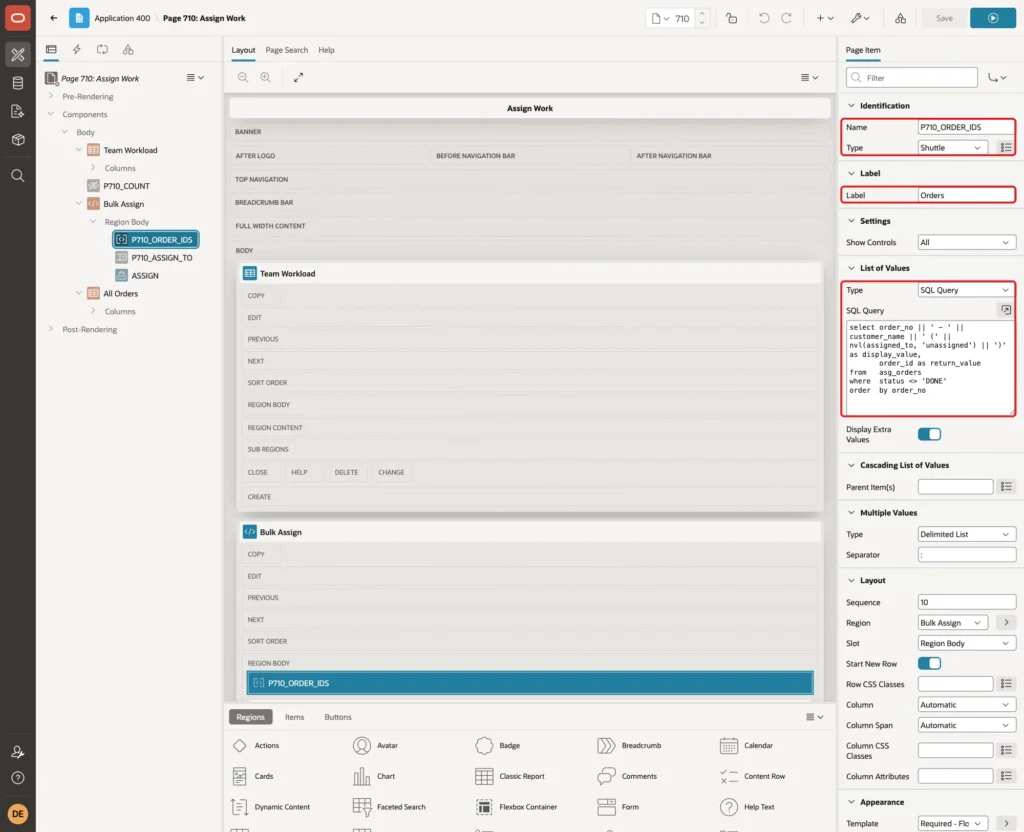
The list shows assigned orders too, so the same shuttle also reassigns work. Done orders are left out. A shuttle returns the selected values as one string separated by colons, such as 1:3:5, which ASSIGN_ORDERS splits.
Turn Validation, Value Required on and set Session State, Storage to Per Request (Memory Only). The shuttle starts empty after each submit:
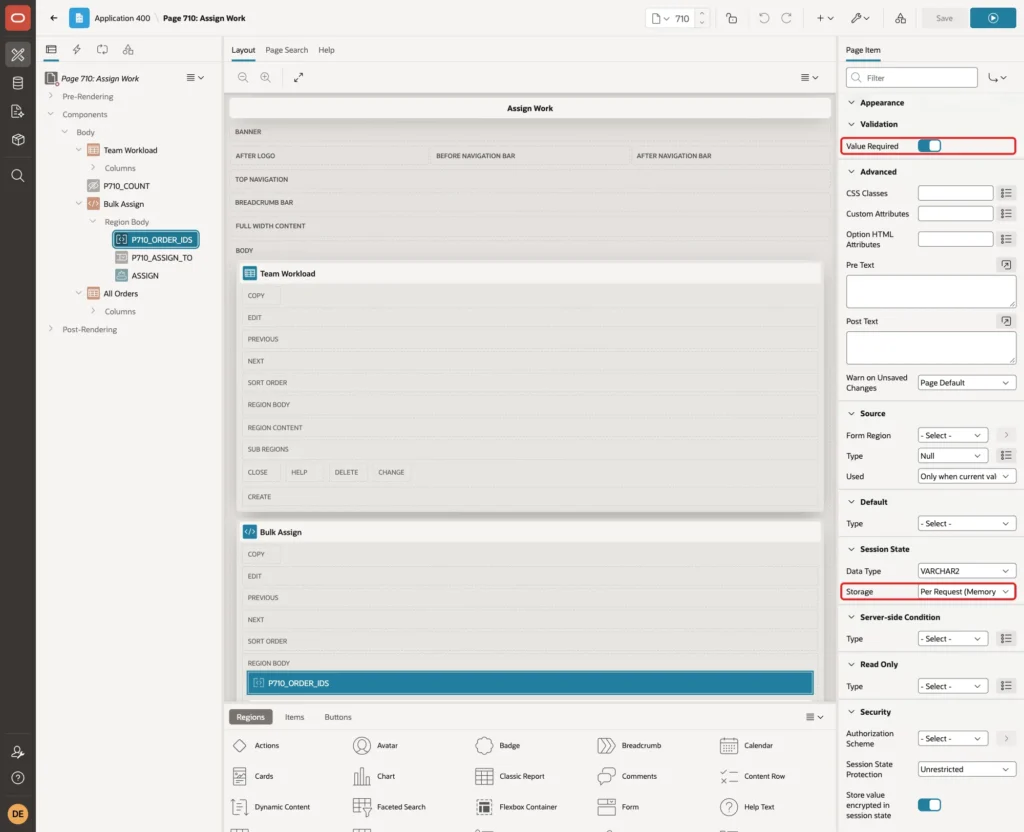
Create a second item P710_ASSIGN_TO with Type Select List and Label Assign To. Set List of Values, Type to SQL Query and enter this query:
Example:
select m.full_name || ' (' ||
       (select count(*)
        from   asg_orders o
        where  o.assigned_to = m.user_name
        and    o.status <> 'DONE') || ' open)' as display_value,
       m.user_name as return_value
from   asg_team_members m
where  m.is_active = 'Y'
order  by m.full_name
Keep Display Null Value on and set Null Display Value to "- Select a team member -":
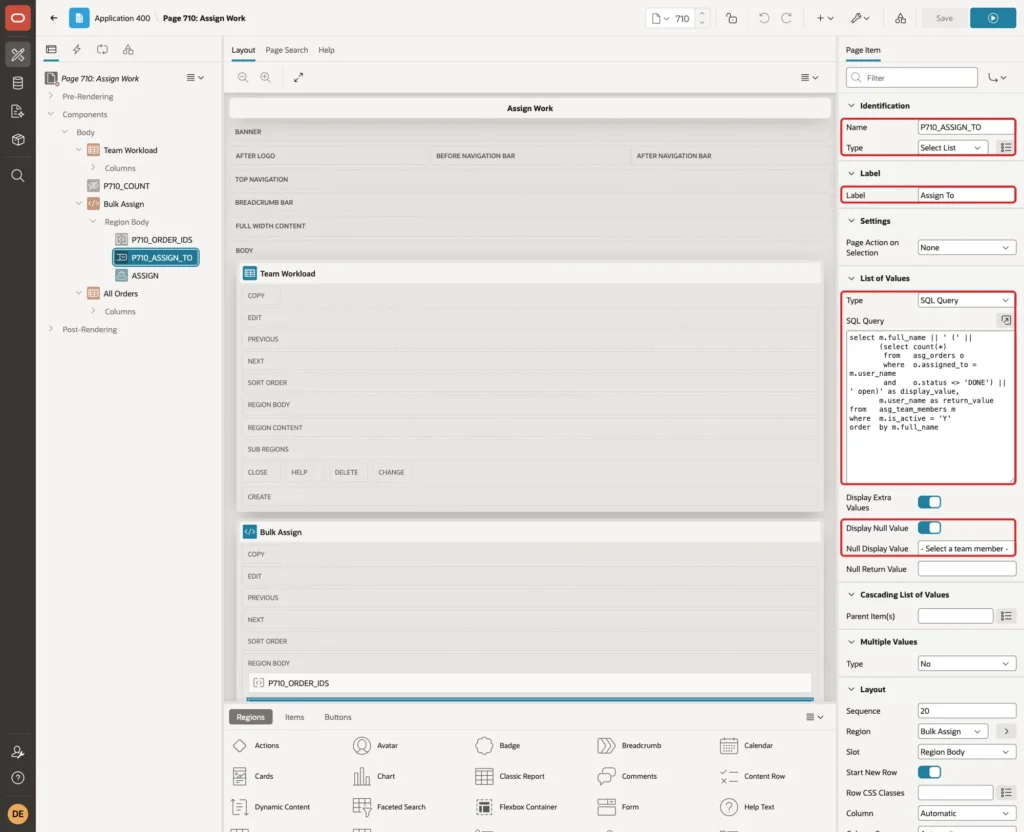
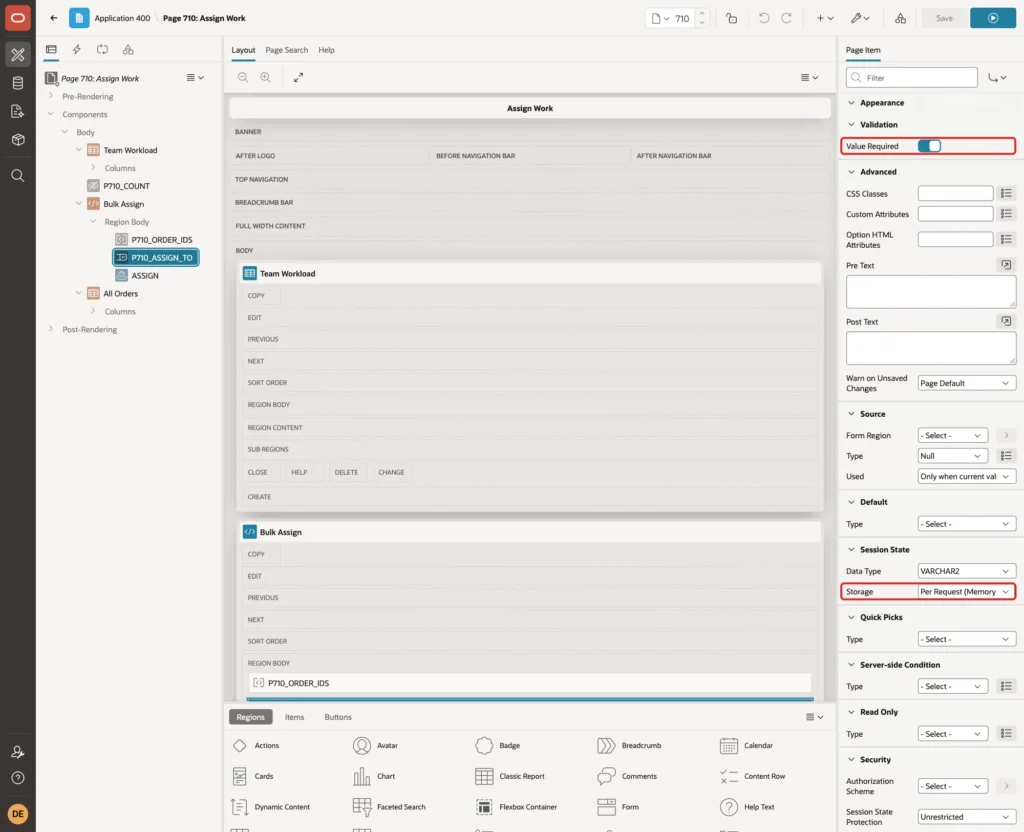
The number of open orders next to each name helps the administrator spread the work. Turn Value Required on and set Storage to Per Request (Memory Only):
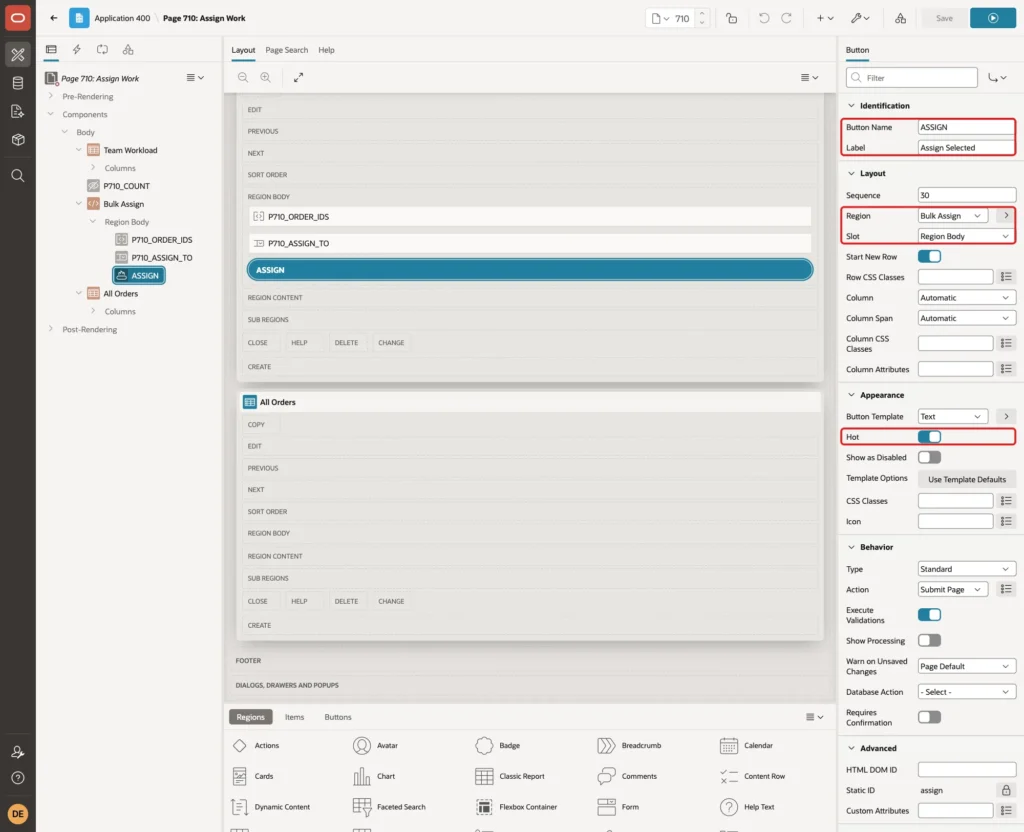
Right-click Bulk Assign and select Create Button. Set Button Name to ASSIGN, Label to Assign Selected, Slot to Region Body and Hot on. Give it a sequence after the two items, so it shows below them:
Step 8: Add the All Orders Report
Create a third region. Set Name to All Orders, Type to Classic Report and enter this SQL Query:
Example:
select o.order_no,
       o.customer_name,
       o.amount,
       initcap(replace(o.status, '_', ' ')) as status_label,
       m.full_name as assigned_to,
       o.assigned_on
from   asg_orders o
       left join asg_team_members m on m.user_name = o.assigned_to
order  by o.order_no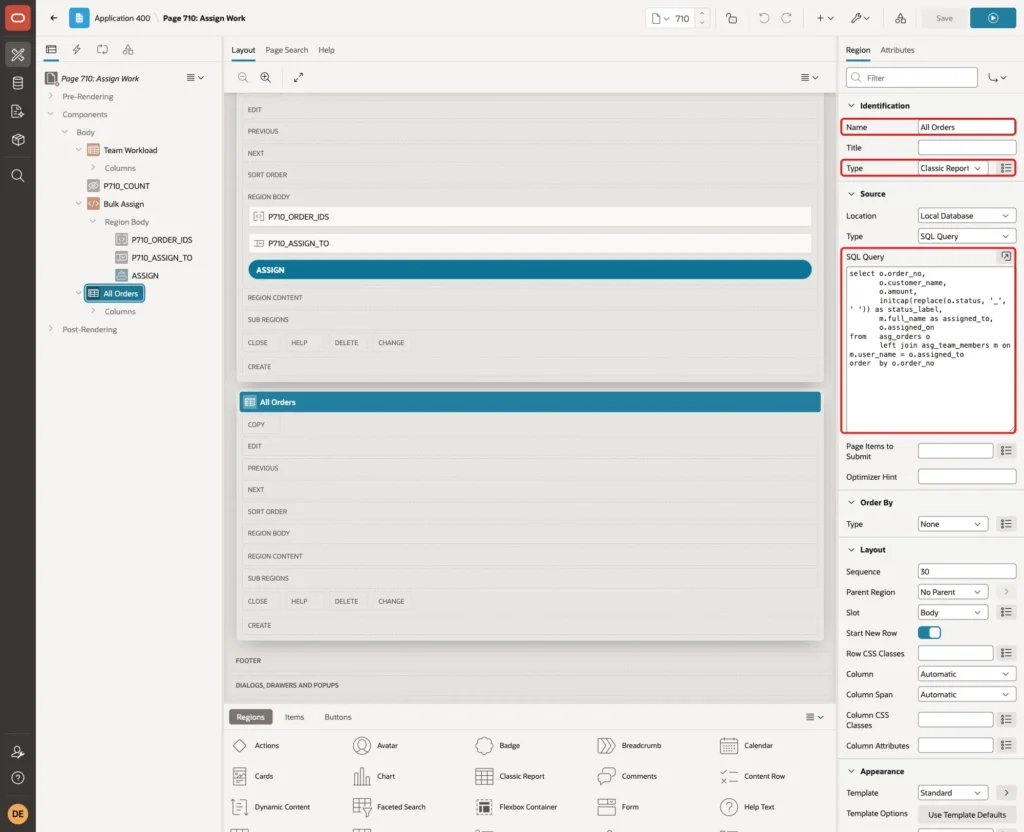
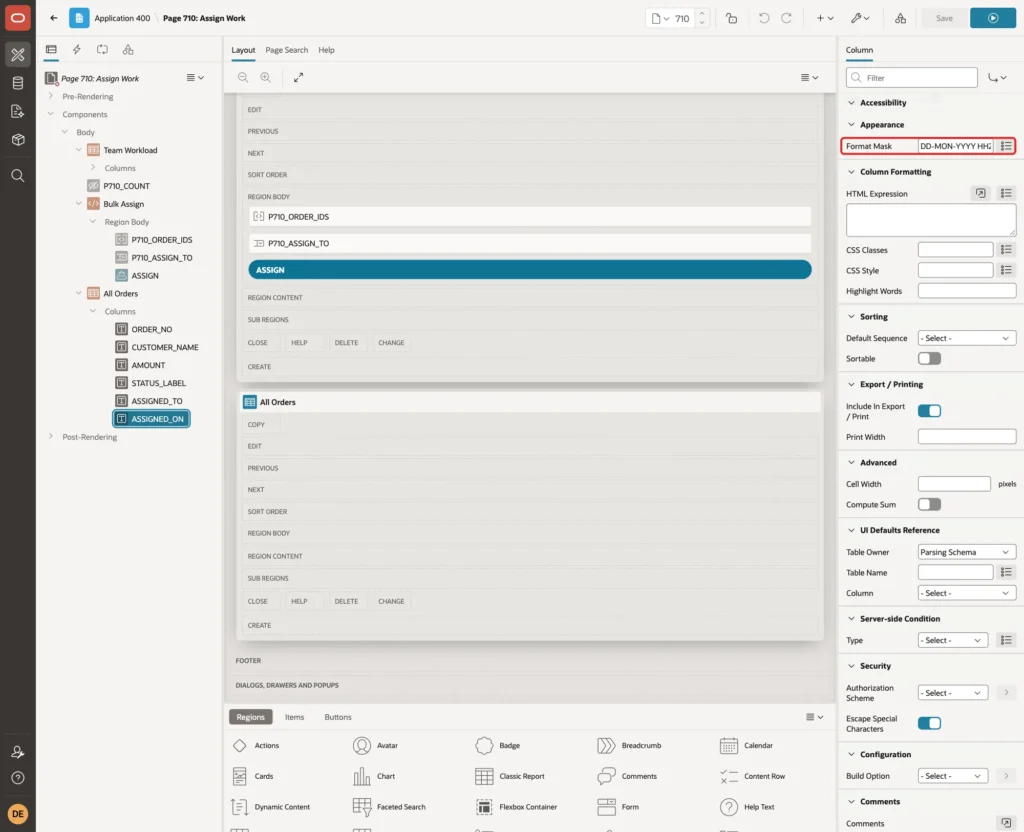
Expand Columns, select ASSIGNED_ON and set Format Mask to DD-MON-YYYY HH24:MI. Set AMOUNT's Format Mask to 999G999G990D00 and the headings to Order, Customer, Amount, Status, Assigned To and Assigned On:
Step 9: Add the Assign Process
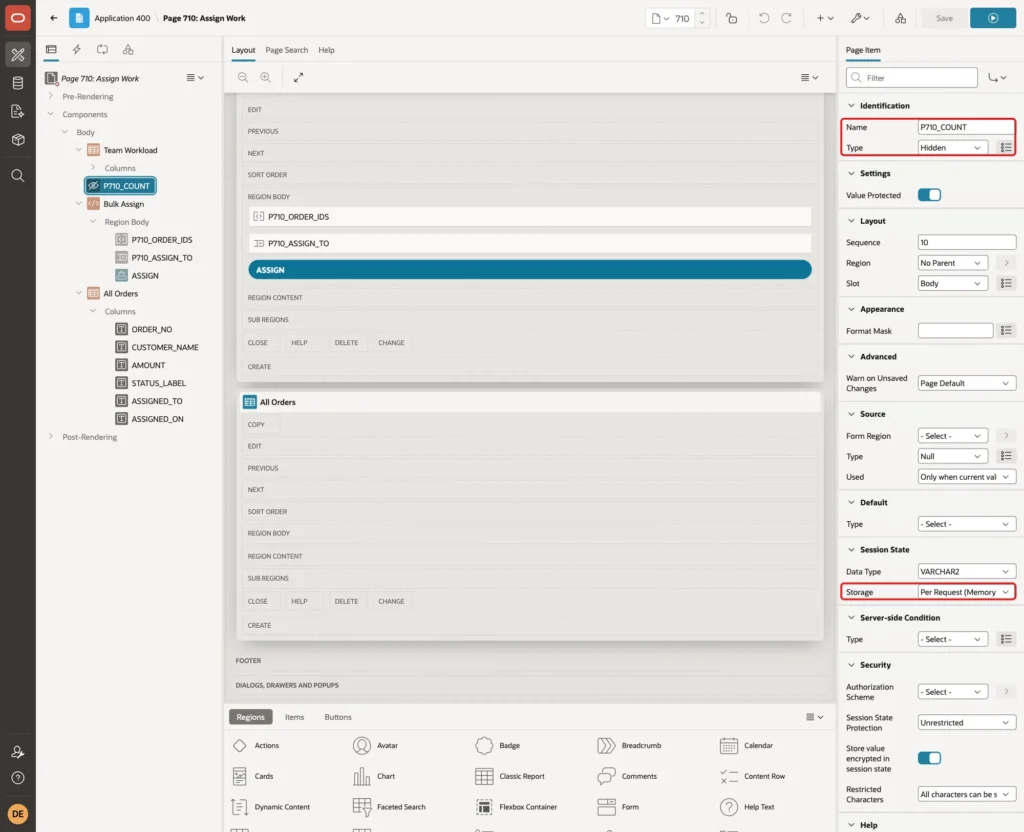
Create a page item P710_COUNT in Body with Type Hidden and Storage Per Request (Memory Only). The process puts the number of assigned orders into it for the success message:
Open the Processing tab, right-click Processing and select Create Process. Set Name to Assign Selected Orders, Type to Execute Code and enter this PL/SQL Code:
Example:
begin
    :P710_COUNT := asg_pkg.assign_orders(
                       p_order_ids => :P710_ORDER_IDS,
                       p_to_user   => :P710_ASSIGN_TO,
                       p_actor     => :APP_USER);
end;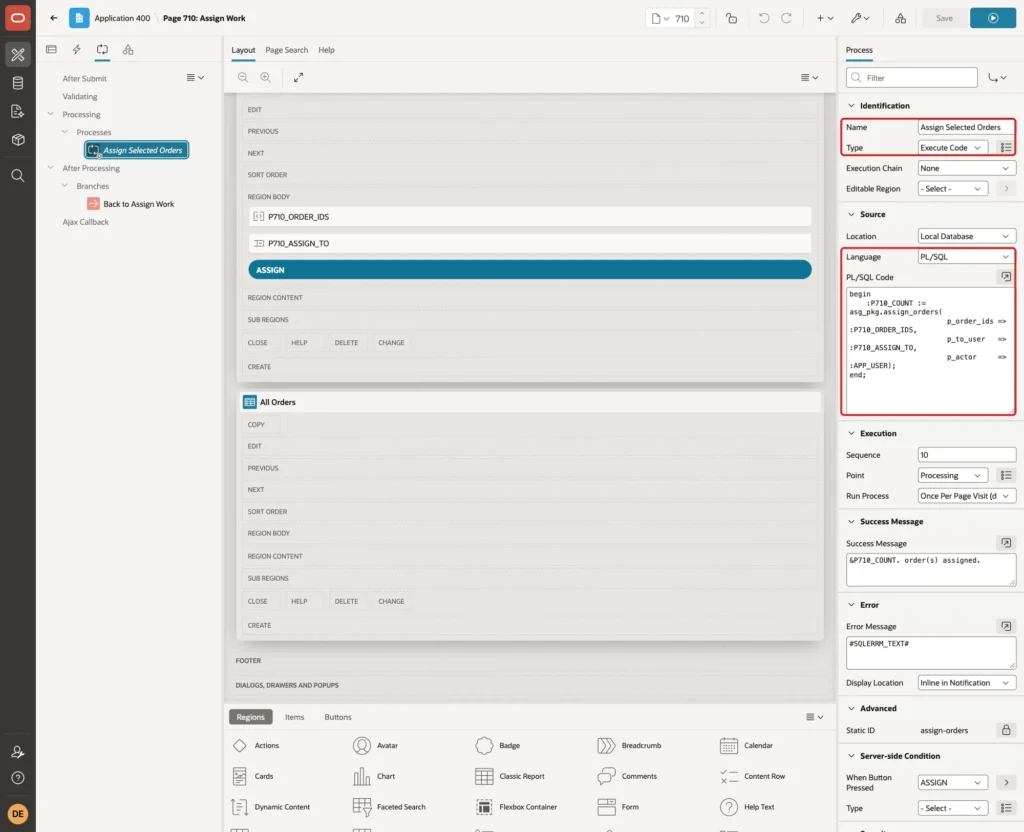
Set Success Message to "&P710_COUNT. order(s) assigned.", Error Message to #SQLERRM_TEXT#, and When Button Pressed to ASSIGN:
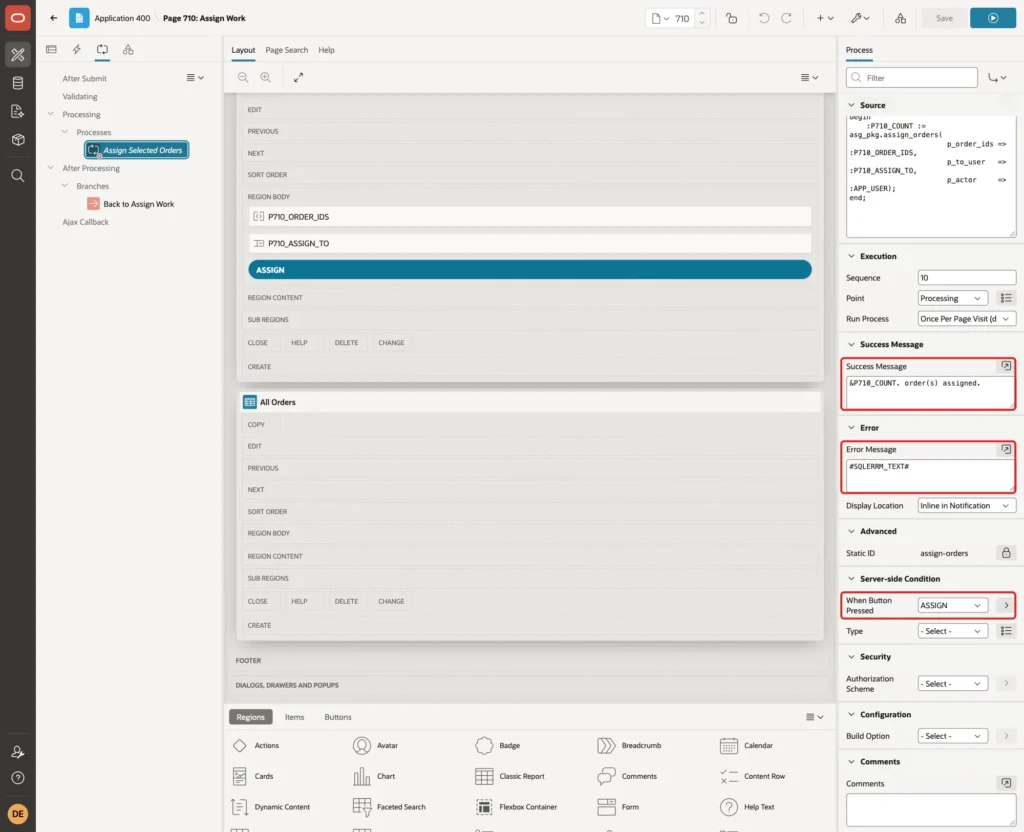
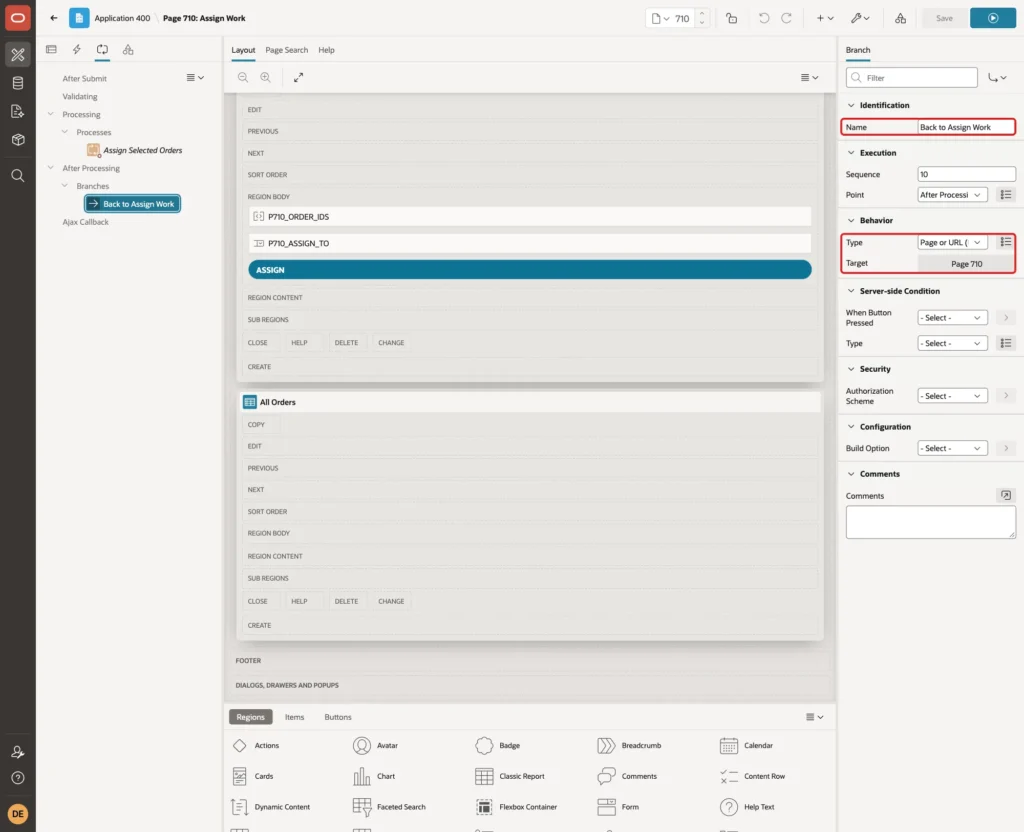
#SQLERRM_TEXT# shows the package message without the ORA- number. Right-click After Processing and select Create Branch. Set Name to Back to Assign Work, Type to Page or URL (Redirect) and Target to page 710:
Step 10: Create the My Work Page
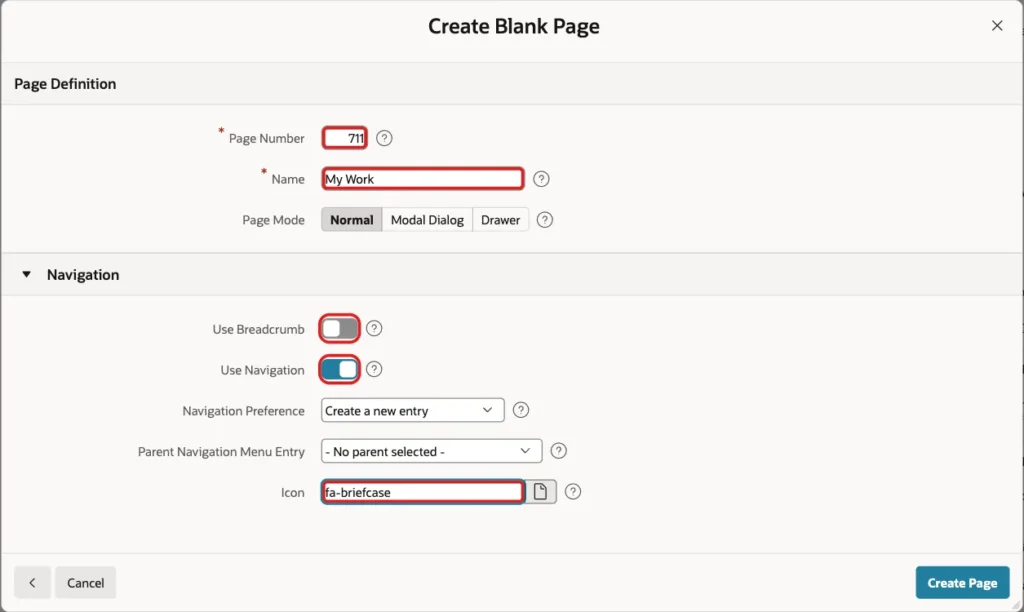
Create another Blank Page with page number 711 and the name My Work. Turn Use Breadcrumb off, keep Use Navigation on and enter the icon fa-briefcase:
This page needs no authorization scheme. Every user can open it, and each user sees only their own work.
Step 11: Add the Counts by Status
Create a region. Set Name to My Counts, Type to Classic Report and enter this SQL Query:
Example:
select count(case when status = 'NEW' then 1 end)         as new_count,
       count(case when status = 'IN_PROGRESS' then 1 end) as in_progress_count,
       count(case when status = 'DONE' then 1 end)        as done_count
from   asg_orders
where  assigned_to = :APP_USER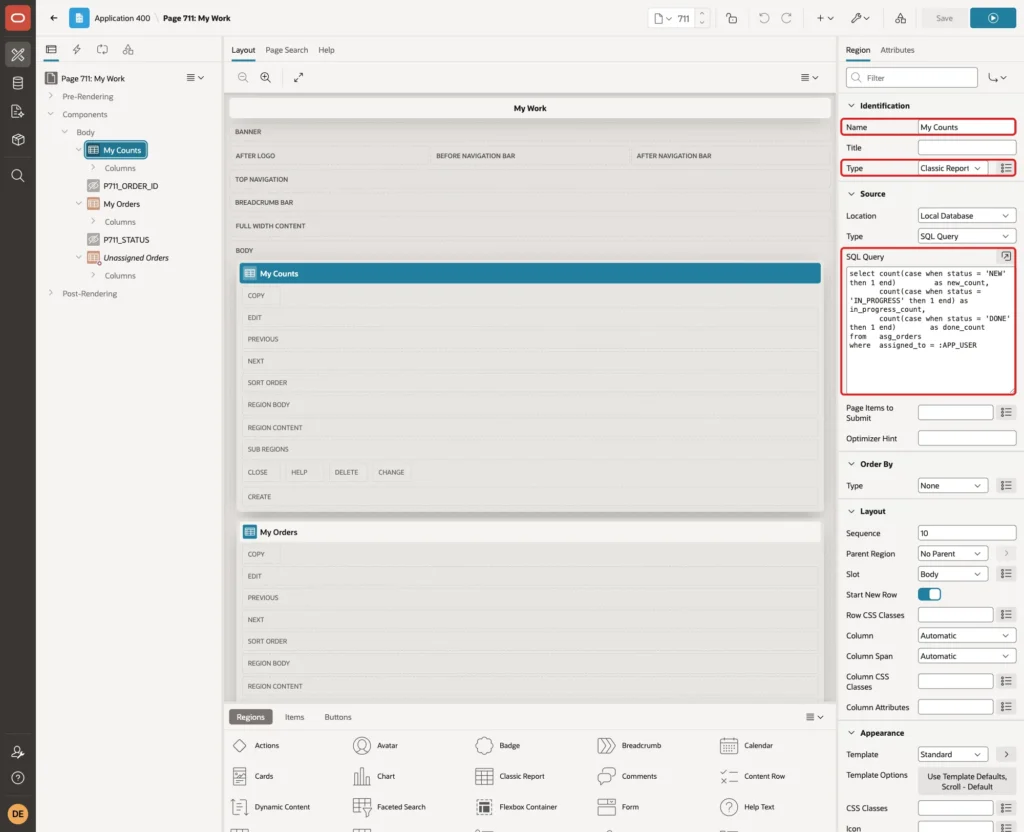
The query always returns one row, with zeros for a user without work. Open the Attributes tab and set Appearance, Template to Badge List. In Template Options, choose the 64px size, the Span Horizontally layout and the Circular style:
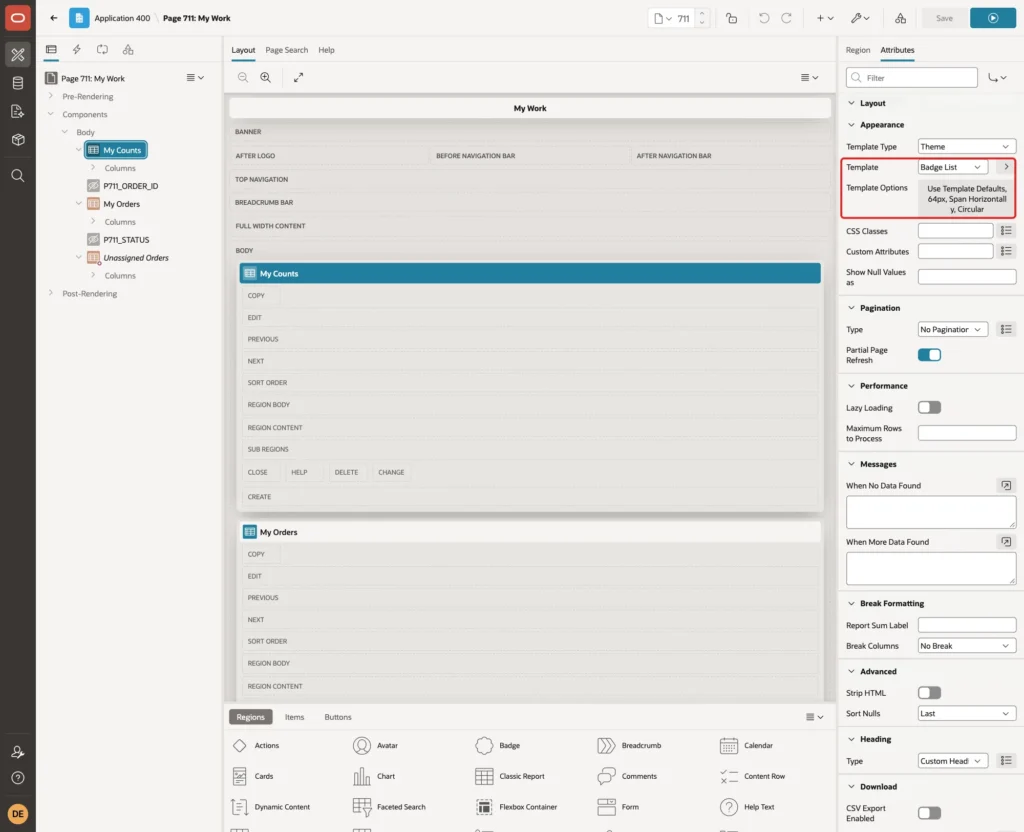
Set the column headings to New, In Progress and Done. The Badge List shows the heading below each number.
Step 12: Add the My Orders Report
Create a second region. Set Name to My Orders, Type to Classic Report and enter this SQL Query:
Example:
select order_id,
       order_no,
       customer_name,
       amount,
       initcap(replace(status, '_', ' ')) as status_label,
       assigned_on,
       case status when 'NEW' then 'IN_PROGRESS' when 'IN_PROGRESS' then 'DONE' end as next_status,
       case status when 'NEW' then 'Start' when 'IN_PROGRESS' then 'Mark Done' end as action_label,
       case when status <> 'DONE' then 'Release' end as release_label
from   asg_orders
where  assigned_to = :APP_USER
order  by case status when 'IN_PROGRESS' then 1 when 'NEW' then 2 else 3 end,
          order_no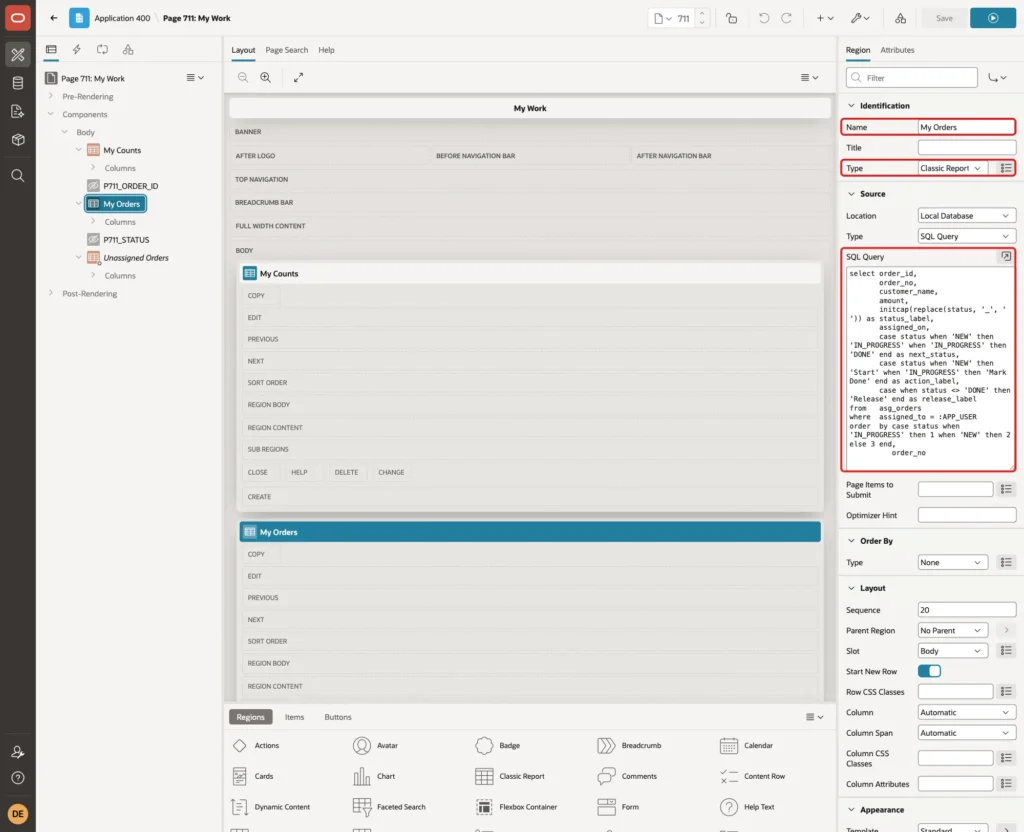
The WHERE clause with :APP_USER is the whole "My Work" filter. NEXT_STATUS and ACTION_LABEL give the next step of each order: Start for a new order and Mark Done for one in progress. A done order gets no links.
Under Messages, set When No Data Found to "No work is assigned to you.". Expand Columns and set Type to Hidden for ORDER_ID and NEXT_STATUS.
Select ACTION_LABEL. Set Type to Link, Heading to Action and Link Text to #ACTION_LABEL#:
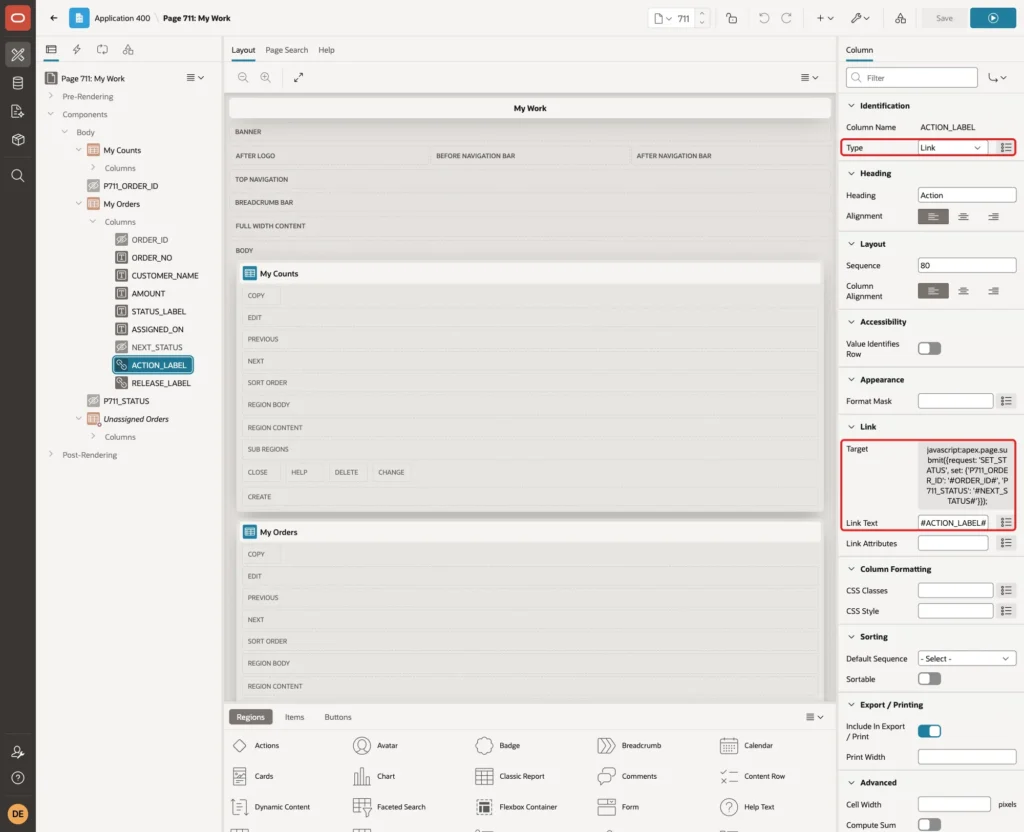
Click Target, set Type to URL and enter this URL:
Example:
javascript:apex.page.submit({request: 'SET_STATUS', set: {'P711_ORDER_ID': '#ORDER_ID#', 'P711_STATUS': '#NEXT_STATUS#'}});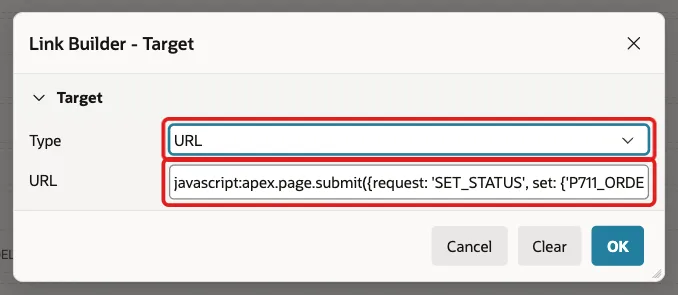
Select RELEASE_LABEL, set Type to Link, Heading to Release and Link Text to #RELEASE_LABEL#. Set its Target to Type URL with this URL:
Example:
javascript:apex.page.submit({request: 'RELEASE', set: {'P711_ORDER_ID': '#ORDER_ID#'}});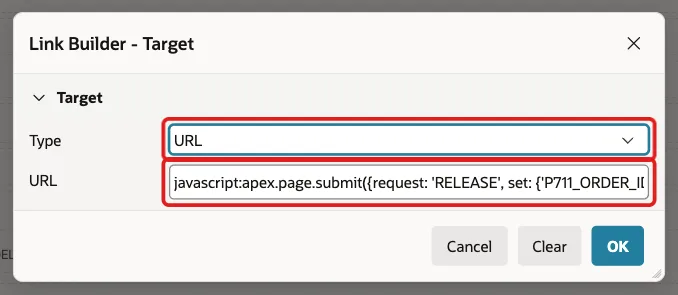
Set the other headings to Order, Customer, Amount, Status and Assigned On, and turn Sortable off for the columns so the report keeps the order of the query.
Step 13: Add the Unassigned Orders Region
Create a third region. Set Name to Unassigned Orders, Type to Classic Report and enter this SQL Query:
Example:
select order_id,
       order_no,
       customer_name,
       amount,
       'Assign to Me' as take_label
from   asg_orders
where  assigned_to is null
order  by order_no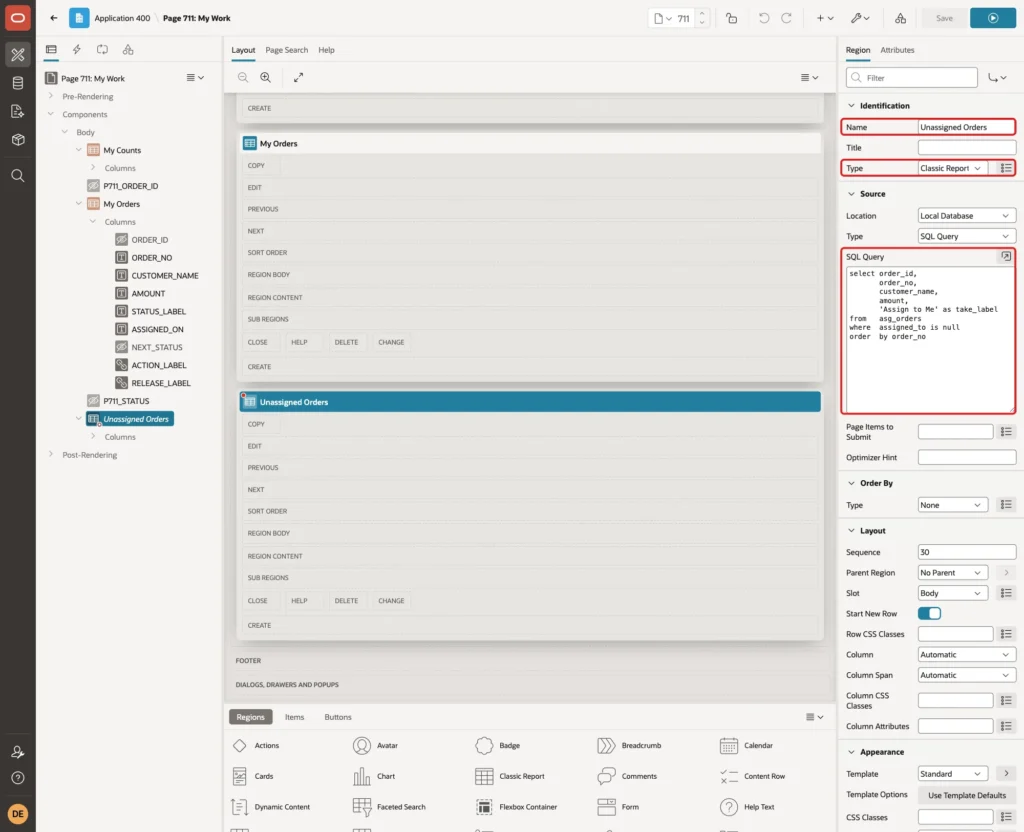
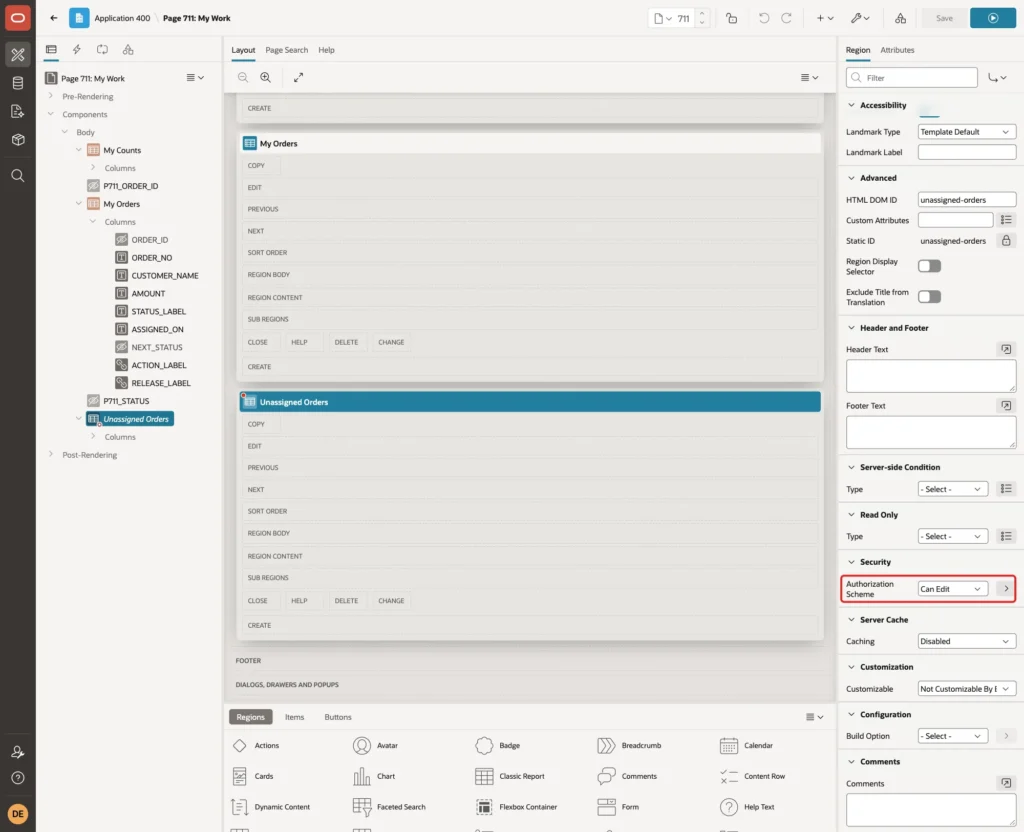
Set Security, Authorization Scheme to Can Edit. In this example, Can Edit passes for editors and administrators, so readers do not see the region:
Set ORDER_ID to Hidden. Select TAKE_LABEL, set Type to Link, Heading to Action and Link Text to #TAKE_LABEL#, with a Target of Type URL:
Example:
javascript:apex.page.submit({request: 'TAKE', set: {'P711_ORDER_ID': '#ORDER_ID#'}});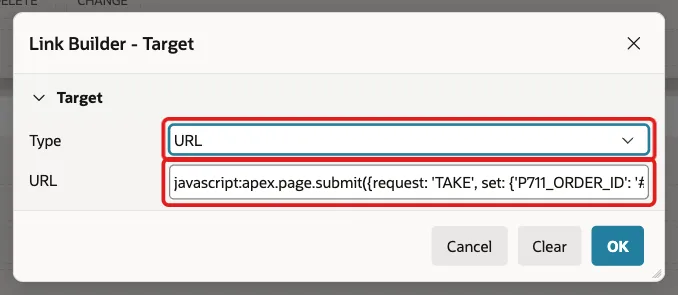
Step 14: Add the Hidden Items and the Processes
Create the page item P711_ORDER_ID in Body with these properties:
- Type: Hidden
- Value Protected: off
- Session State, Storage: Per Request (Memory Only)
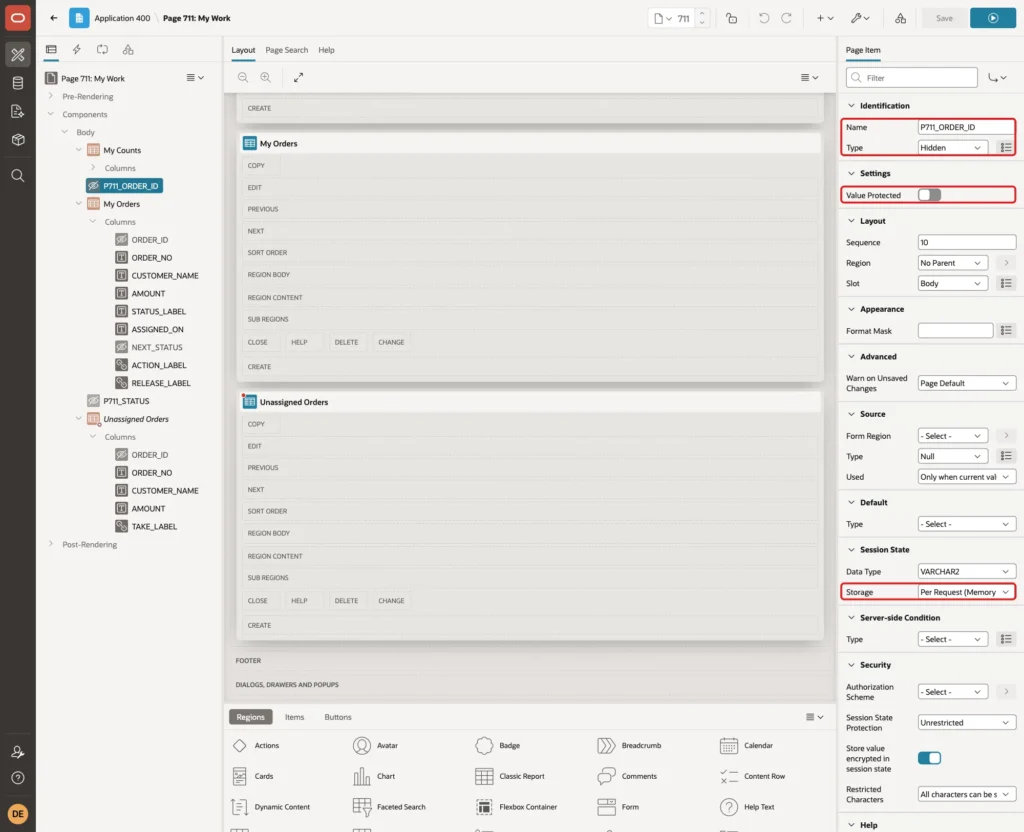
Create P711_STATUS with the same properties. Value Protected must be off, because the links set both items in the browser. That is safe here, because the package checks every request against the logged-in user.
Open the Processing tab and create the process Change Order Status with Type Execute Code and this PL/SQL Code:
Example:
begin
    asg_pkg.set_status(
        p_order_id => :P711_ORDER_ID,
        p_status   => :P711_STATUS,
        p_actor    => :APP_USER);
end;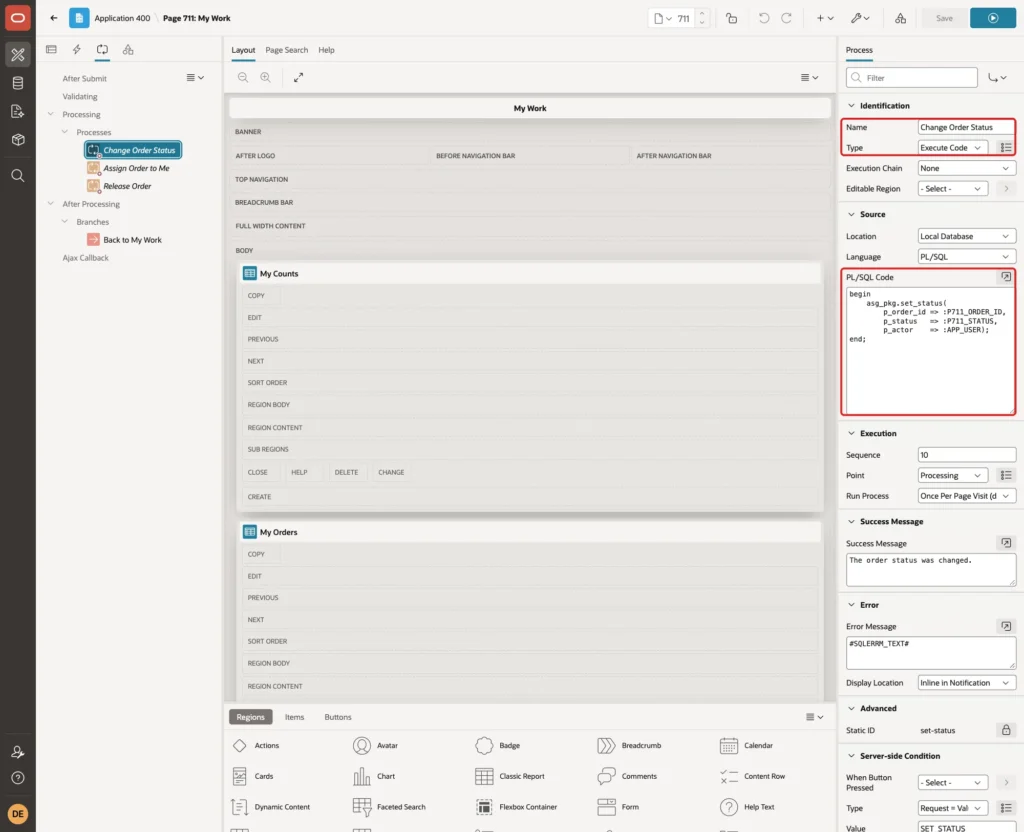
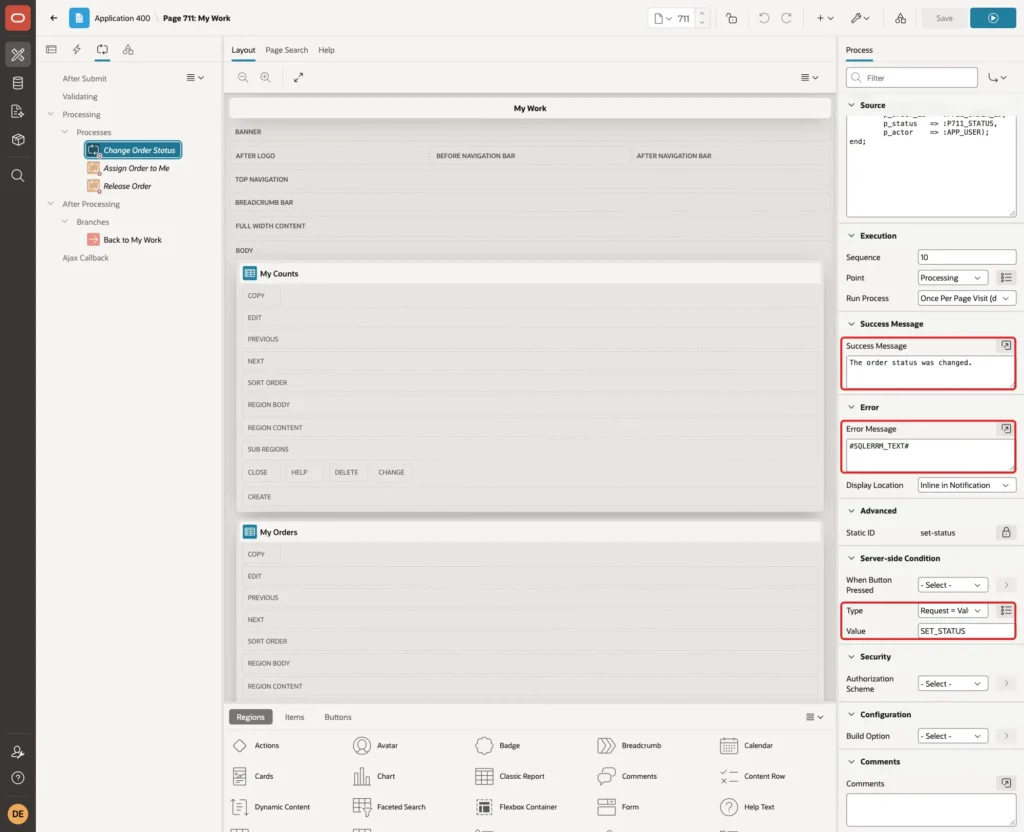
Set Success Message to "The order status was changed.", Error Message to #SQLERRM_TEXT#, and Server-side Condition Type to Request = Value with Value SET_STATUS:
Create the process Assign Order to Me with this code:
Example:
begin
    asg_pkg.assign_order(
        p_order_id => :P711_ORDER_ID,
        p_to_user  => :APP_USER,
        p_actor    => :APP_USER);
end;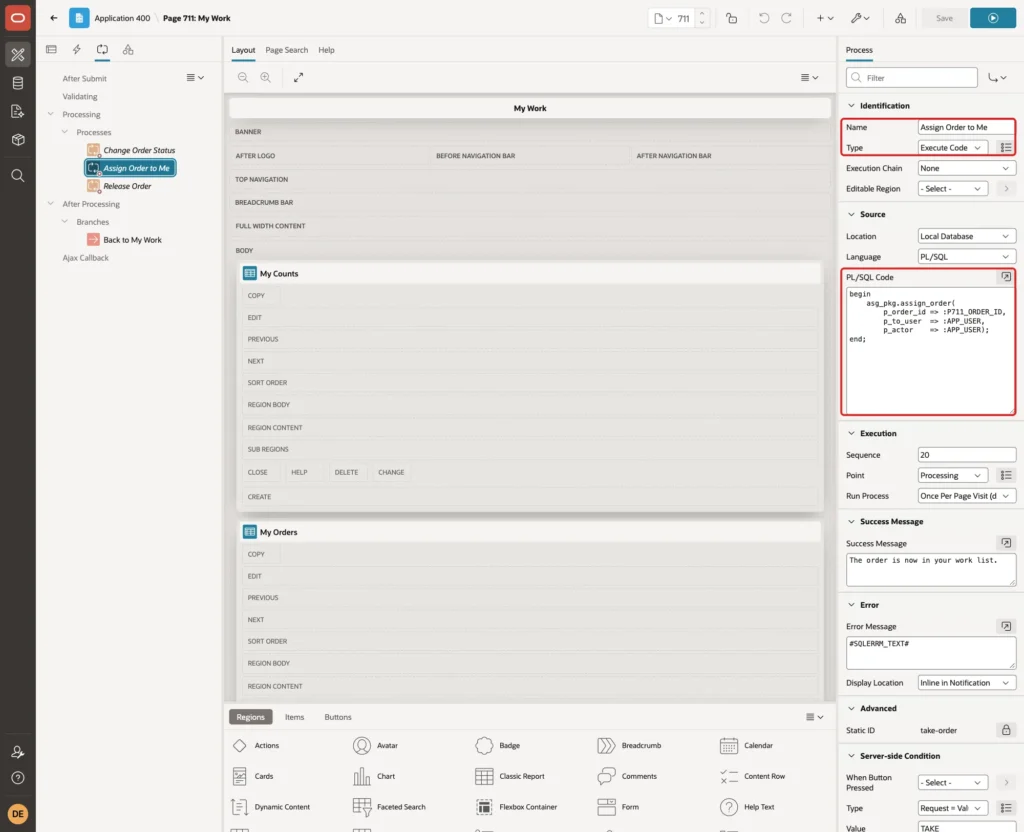
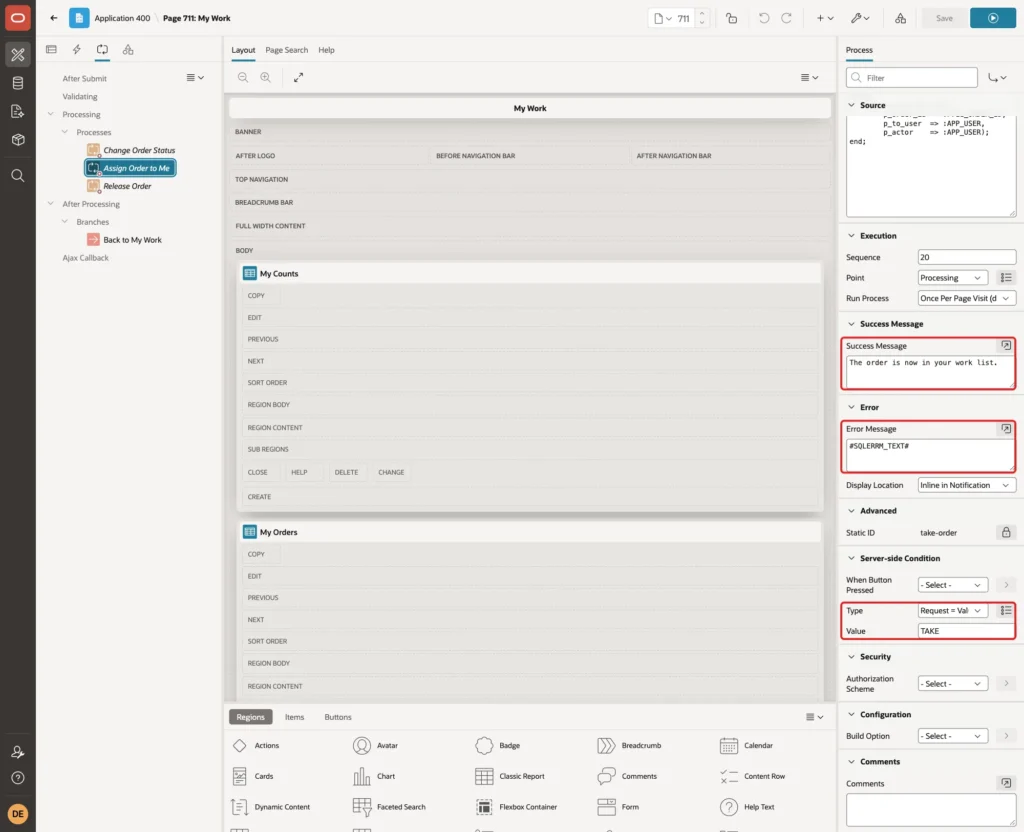
Set Success Message to "The order is now in your work list.", Error Message to #SQLERRM_TEXT#, and the condition Request = Value TAKE:
Create the process Release Order with this code:
Example:
begin
    asg_pkg.assign_order(
        p_order_id => :P711_ORDER_ID,
        p_to_user  => null,
        p_actor    => :APP_USER);
end;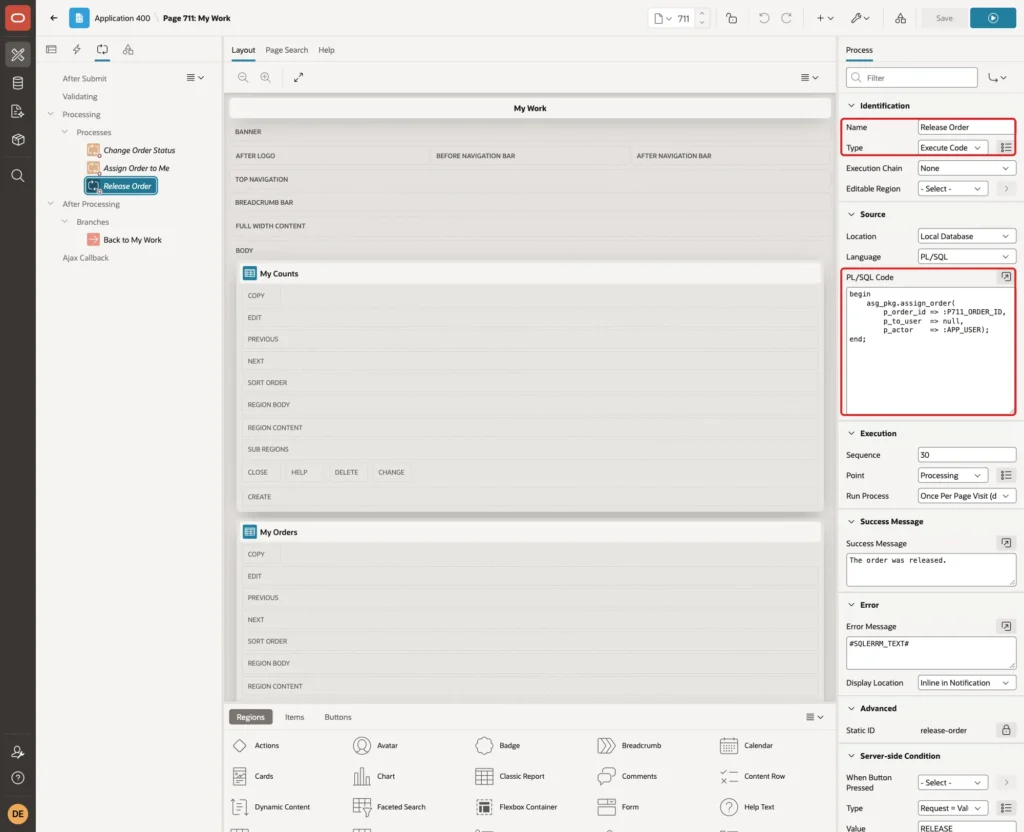
Set Success Message to "The order was released.", Error Message to #SQLERRM_TEXT#, and the condition Request = Value RELEASE:
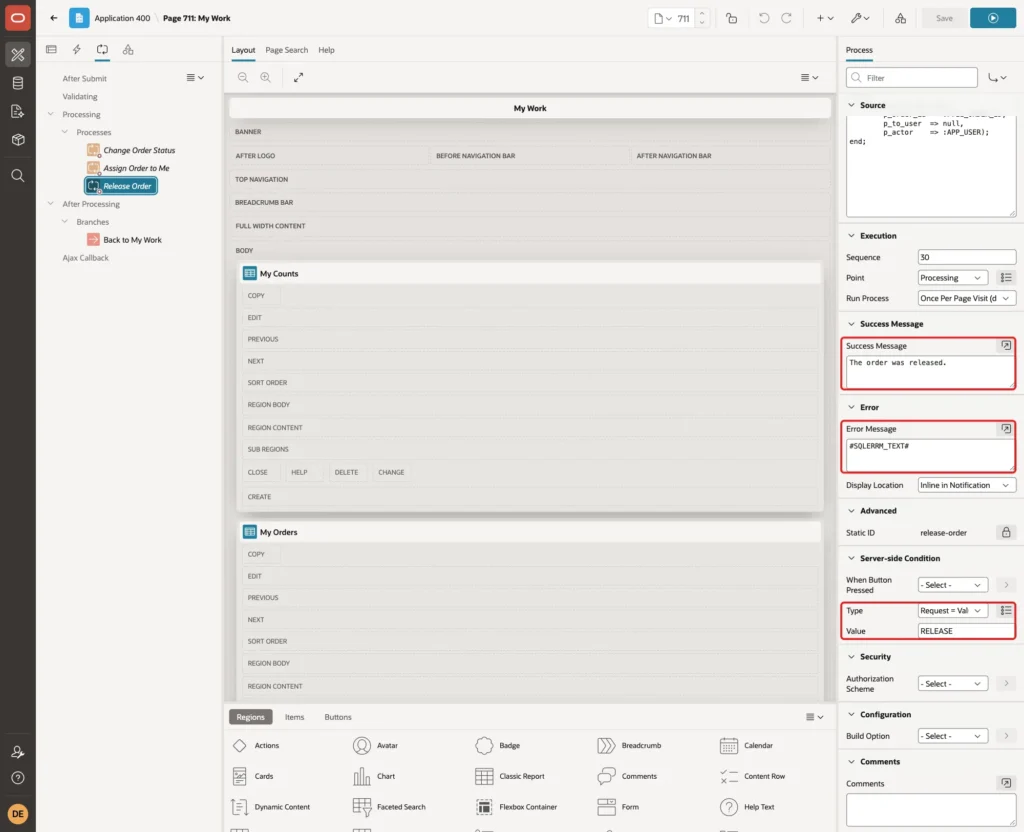
Finally, create a branch Back to My Work after processing, with Type Page or URL (Redirect) and Target page 711, and save the page.
Step 15: Test the Bulk Assignment
Run page 710 as DEMO_DEV, an administrator. Move SO-2001, SO-2003 and SO-2005 to the right side of the shuttle and select Order Editor (0 open):
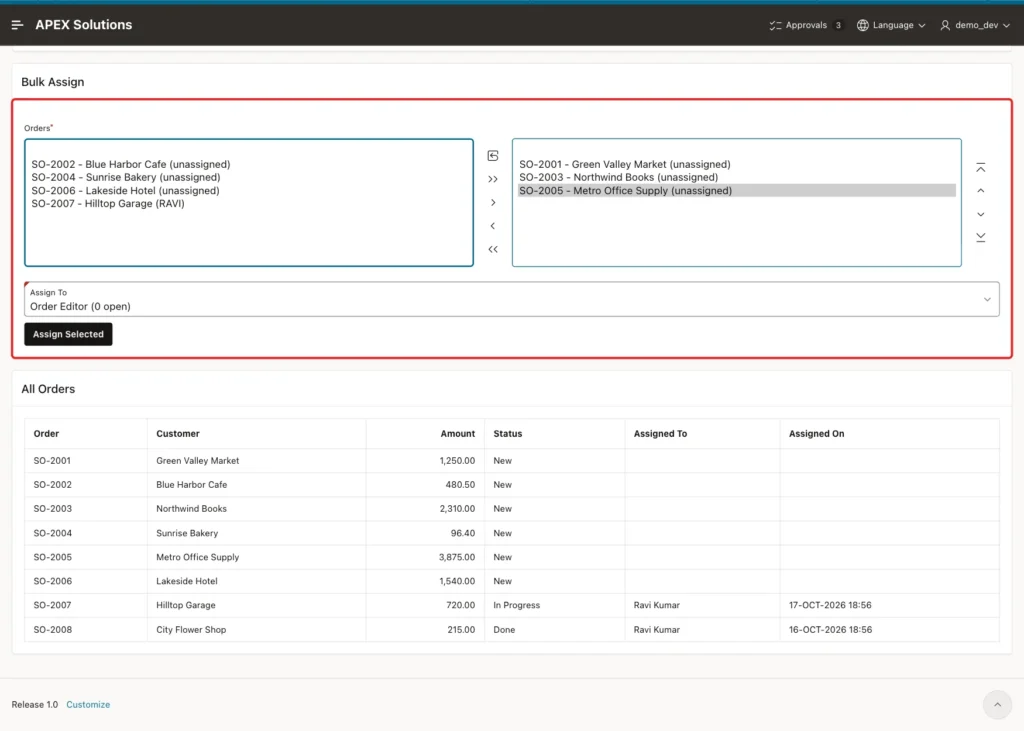
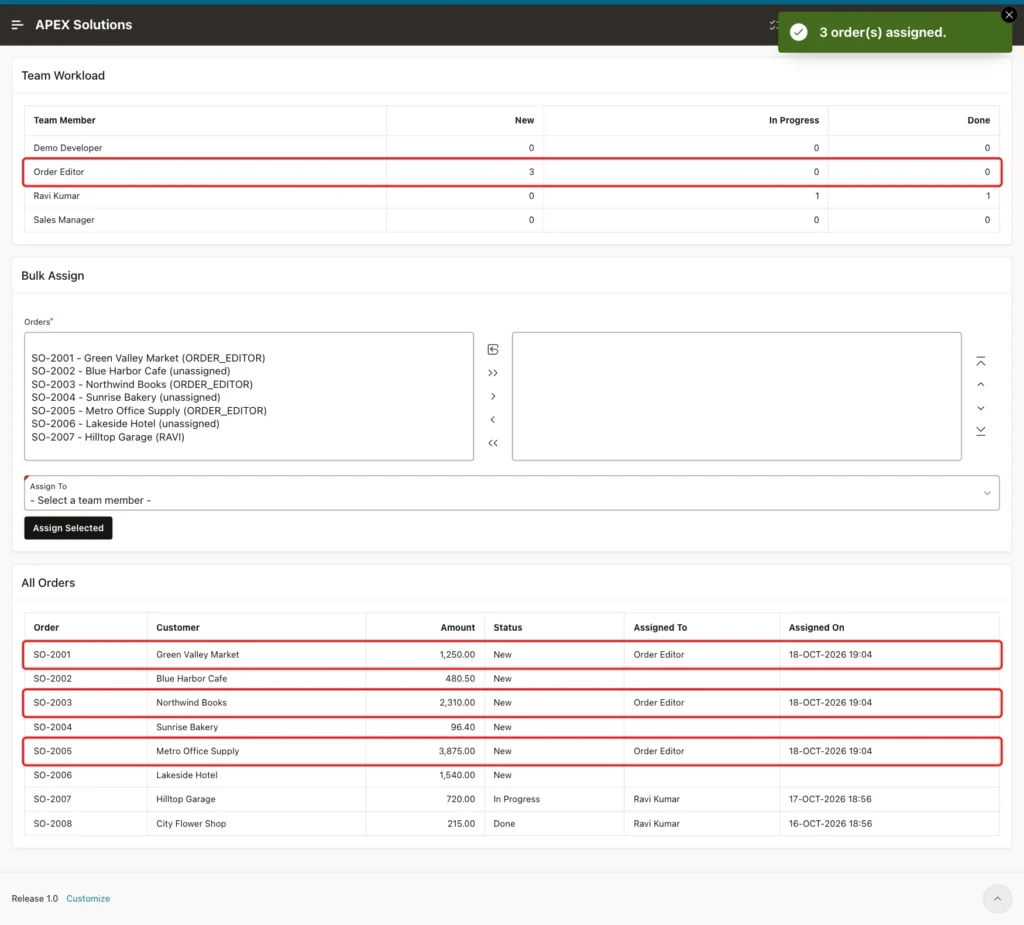
Click Assign Selected. The message says 3 order(s) assigned. Team Workload shows 3 new orders for Order Editor, and All Orders shows the owner and the time:
Step 16: Test the My Work Page
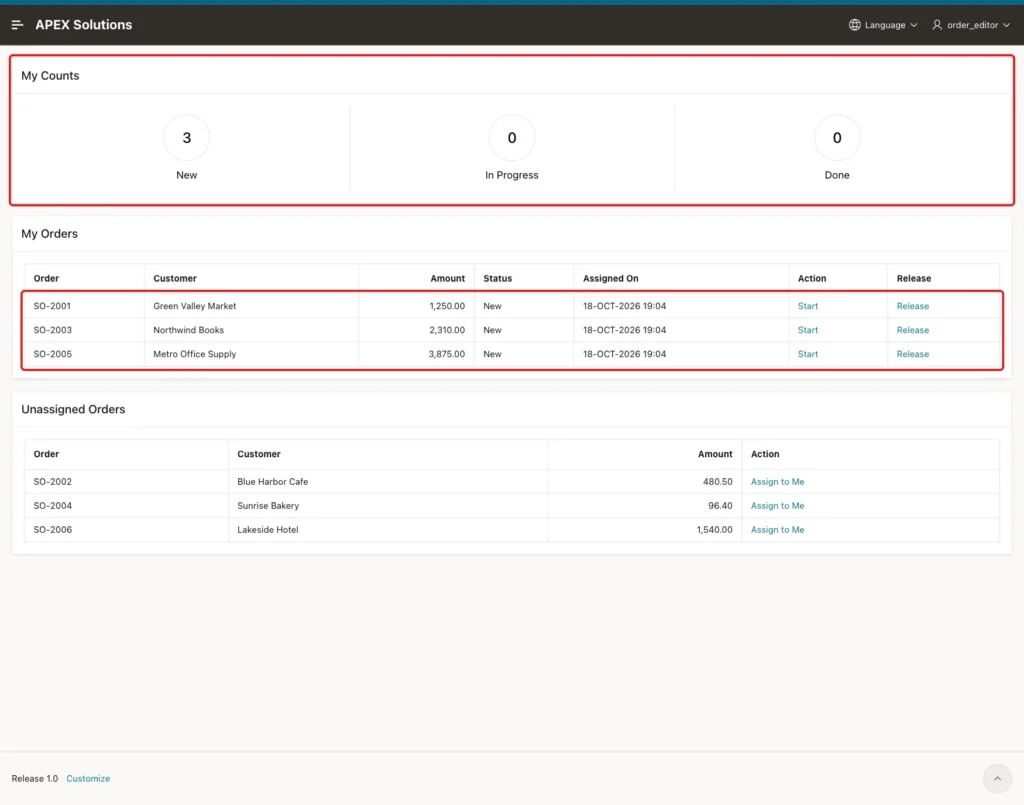
Log in as ORDER_EDITOR, who has the Editor role, and open My Work. The counts show 3 New, and My Orders lists exactly the three orders from Step 15. The menu shows My Work but not Assign Work:
Then these steps were done on the page:
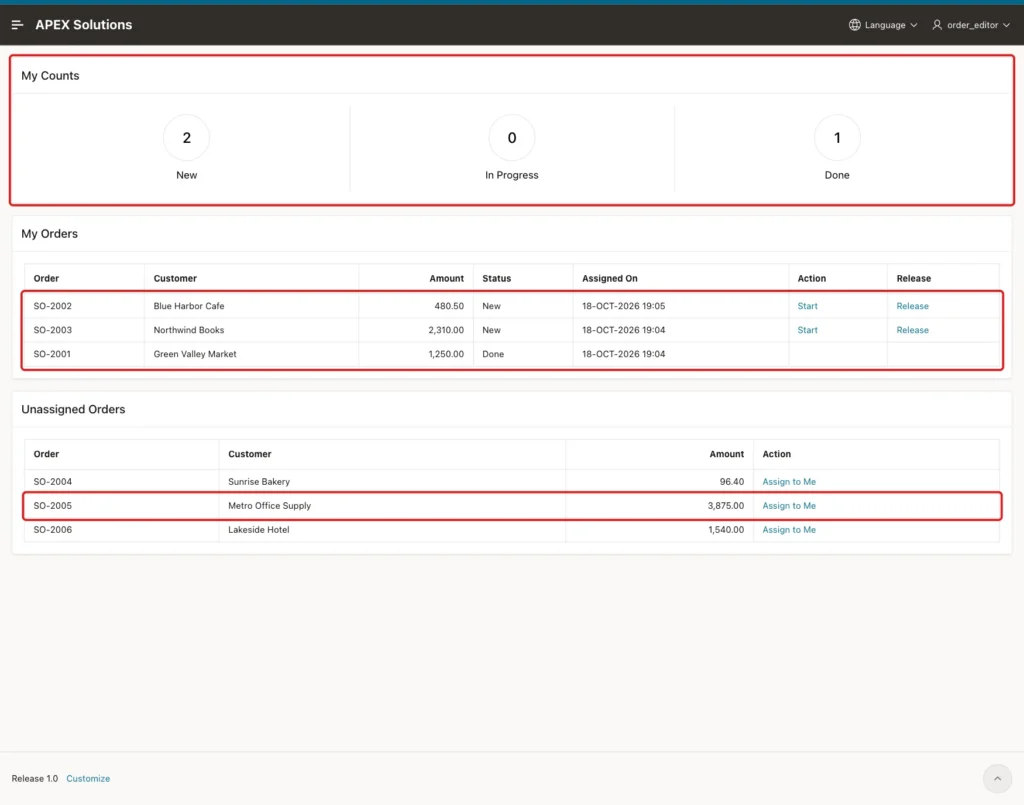
- Start on SO-2001 moved it to In Progress, and the link changed to Mark Done.
- Mark Done moved SO-2001 to Done, and its links disappeared.
- Assign to Me on SO-2002 moved it from Unassigned Orders to My Orders.
- Release on SO-2005 moved it back to Unassigned Orders.
Now log in as SALES_USER, who has only the Reader role. My Work shows 0, 0 and 0 and "No work is assigned to you.". The three orders of ORDER_EDITOR do not appear, and the Unassigned Orders region and the Assign Work menu entry are hidden.
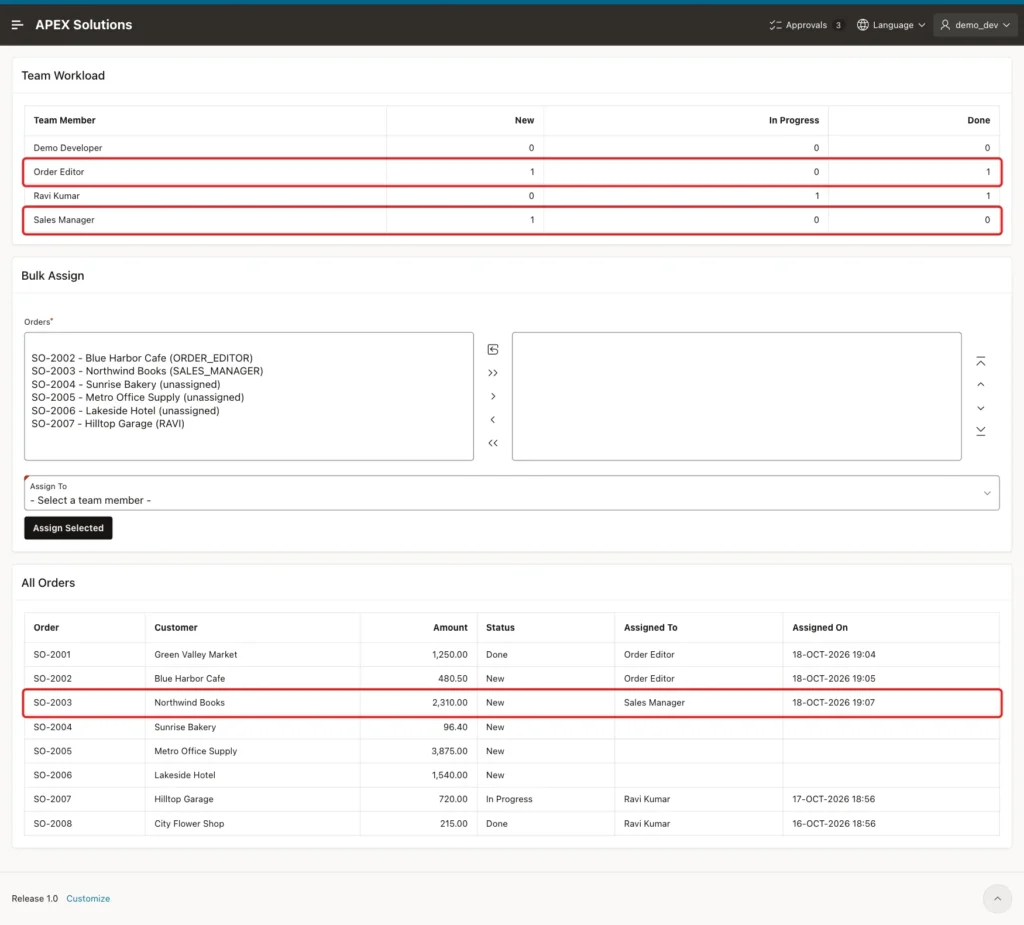
Back as DEMO_DEV, SO-2003 was moved in the shuttle and assigned to Sales Manager. This reassigned it from Order Editor, and the workload counts changed for both users:
The final state in SQL:
Example:
select u.app_user,
       count(o.order_id) as assigned,
       count(case when o.status = 'NEW' then 1 end)         as new_count,
       count(case when o.status = 'IN_PROGRESS' then 1 end) as in_progress_count,
       count(case when o.status = 'DONE' then 1 end)        as done_count
from   (select 'ORDER_EDITOR' as app_user from dual
        union all
        select 'SALES_USER' from dual) u
       left join asg_orders o on o.assigned_to = u.app_user
group  by u.app_user
order  by u.app_user;
Output:
APP_USER           ASSIGNED    NEW_COUNT    IN_PROGRESS_COUNT    DONE_COUNT
_______________ ___________ ____________ ____________________ _____________
ORDER_EDITOR              2            1                    0             1
SALES_USER                0            0                    0             0
The assignment log shows each change with the user who made it:
Example:
select o.order_no,
       l.from_user,
       l.to_user,
       l.changed_by,
       to_char(l.changed_on, 'HH24:MI') as changed_at
from   asg_assignment_log l
       join asg_orders o on o.order_id = l.order_id
order  by l.log_id;
Output:
ORDER_NO    FROM_USER       TO_USER          CHANGED_BY      CHANGED_AT
___________ _______________ ________________ _______________ _____________
SO-2001                     ORDER_EDITOR     DEMO_DEV        19:04
SO-2003                     ORDER_EDITOR     DEMO_DEV        19:04
SO-2005                     ORDER_EDITOR     DEMO_DEV        19:04
SO-2002                     ORDER_EDITOR     ORDER_EDITOR    19:05
SO-2005     ORDER_EDITOR                     ORDER_EDITOR    19:05
SO-2003     ORDER_EDITOR    SALES_MANAGER    DEMO_DEV        19:07

6 rows selected.
Step 17: Test the Error Cases
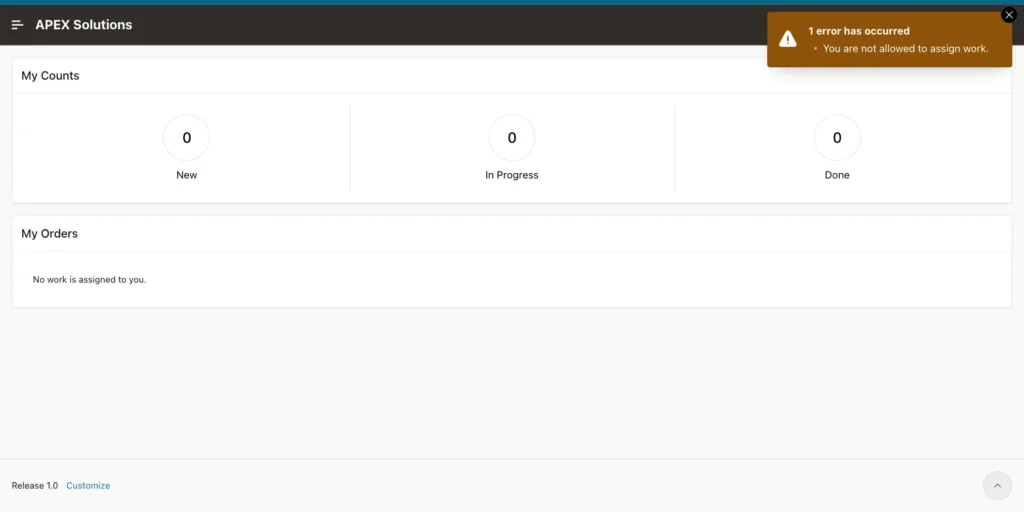
The pages hide the links a user should not use, but a request can still be forced from the browser console. As SALES_USER, this call was run on My Work:
Example:
apex.page.submit({request: 'TAKE', set: {'P711_ORDER_ID': '4'}});The Assign Order to Me process ran, and the package refused it:
As ORDER_EDITOR, a forced RELEASE request for order 7 of RAVI returned "You can only release your own work.":
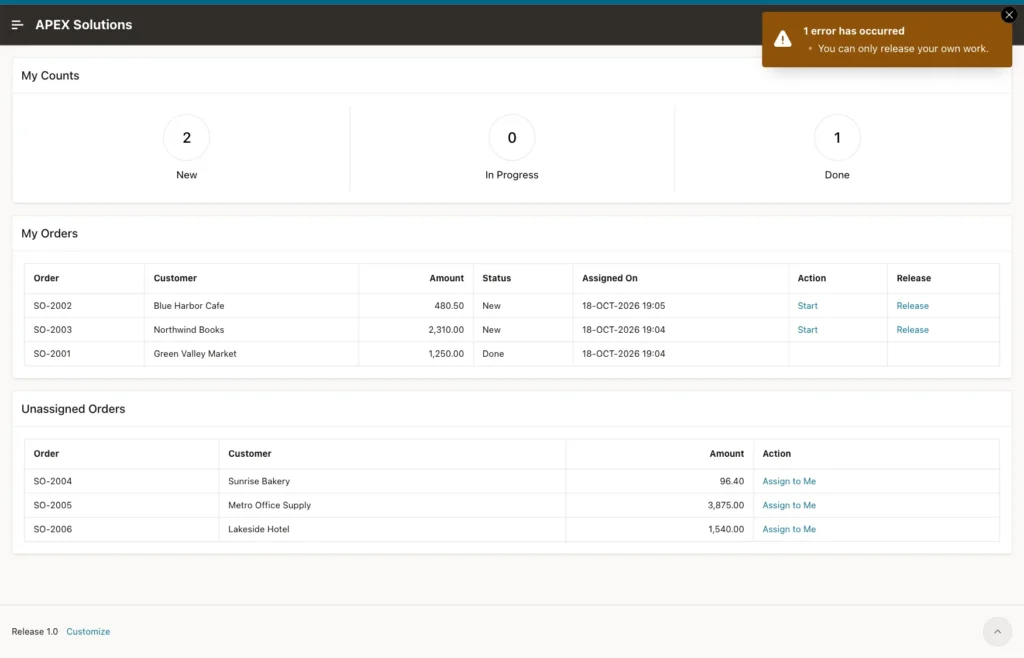
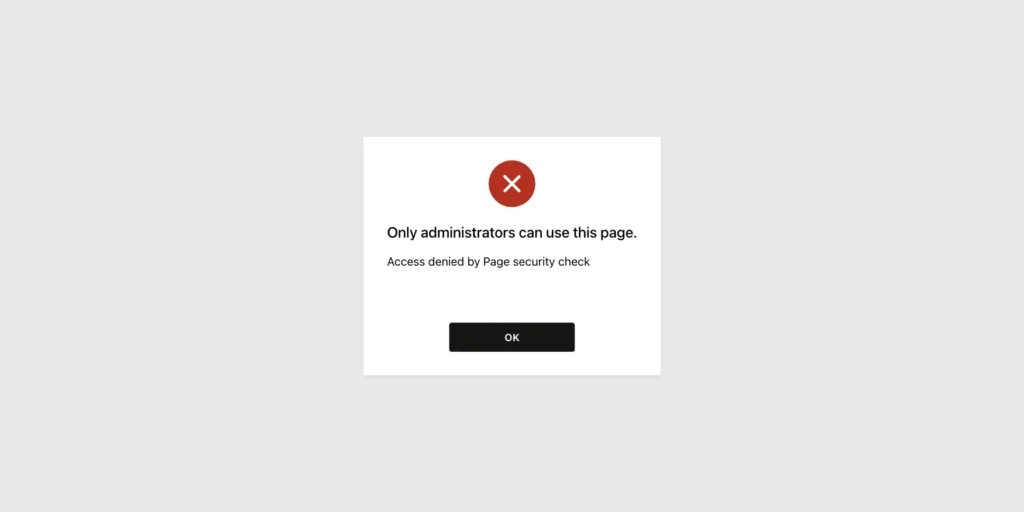
A forced SET_STATUS request for the same order returned "This order is not in your work list or cannot change to DONE.". When SALES_USER opened the URL of page 710, APEX blocked the page:
As DEMO_DEV, the browser console added LINDA as an option to the Assign To select list. APEX accepted the forced value and ran the process, and the package returned "LINDA is not an active team member.". The check in the package is what stops this, not the list of values.
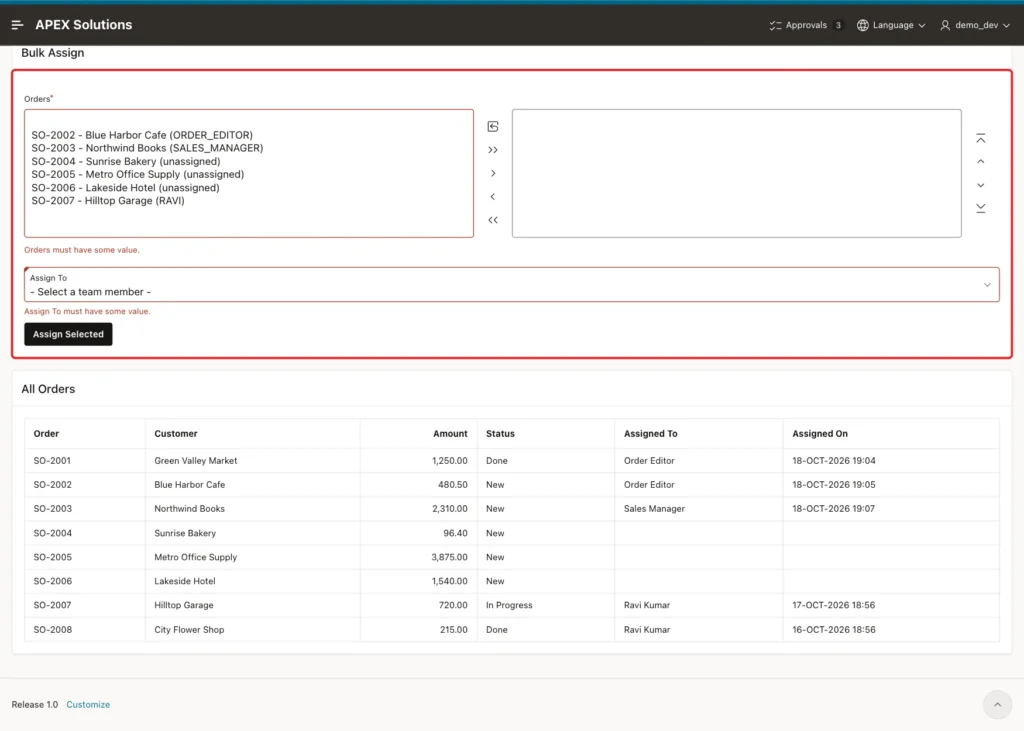
As DEMO_DEV, clicking Assign Selected with no orders and no user selected showed the Value Required error on both items, and nothing was assigned:
Last, a bulk assignment where one order fails. In a first SQL test, ASSIGN_ORDERS had no savepoint, and the call for orders 4 and 8 was run in a block with an exception handler. SO-2008 is done and raised ORA-20004, but SO-2004 stayed assigned to RAVI: the handler stopped Oracle from rolling back the whole call.
With the savepoint from Step 2, the same test leaves SO-2004 unassigned:
Example:
set serveroutput on
declare
  l_count number;
begin
  l_count := asg_pkg.assign_orders('4:8', 'RAVI', 'DEMO_DEV');
exception
  when others then
    dbms_output.put_line(sqlerrm);
end;
/

select order_no, status, assigned_to
from asg_orders
where order_id in (4, 8)
order by order_id;
Output:
ORA-20004: Order SO-2008 is done and cannot be reassigned.

PL/SQL procedure successfully completed.

ORDER_NO    STATUS    ASSIGNED_TO
___________ _________ ______________
SO-2004     NEW
SO-2008     DONE      RAVI
On page 710, SO-2006 plus a forced option for SO-2008 gave the same error, and SO-2006 stayed unassigned with no log row.
Things to Know
- Filter the My Work queries with :APP_USER on the server. Never pass the user name from the browser.
- Hiding a region or a link is not security. Check the role and the owner in the code that changes the data, as ASG_PKG does.
- APEX accepted a select list value that was not in its list of values. Validate the value on the server.
- Lock the row with FOR UPDATE before you check the current owner, or two users can assign the same record at once.
- Use a savepoint in a bulk procedure, so a caller that catches the error does not keep half of the changes.
- A shuttle returns its values as one colon-separated string; APEX_STRING.SPLIT_NUMBERS turns it into a list of numbers.
Related Guides
- How to Build a Work Queue with "Take Next" Using SKIP LOCKED in Oracle APEX
- How to Show "My Pending Approvals" with the Unified Task List in Oracle APEX
Conclusion
Assigning records to users in Oracle APEX needs an owner column with a foreign key to the team, a check constraint that keeps owner, date and status consistent, and a log table. A package holds the rules for each Access Control role and locks the record before it changes the owner.
On the pages, a shuttle and a select list assign many records at once, and the My Work page filters by :APP_USER with Badge List counts by status. Readers, other users' records, inactive users, done records and forced requests were all tested and refused.
